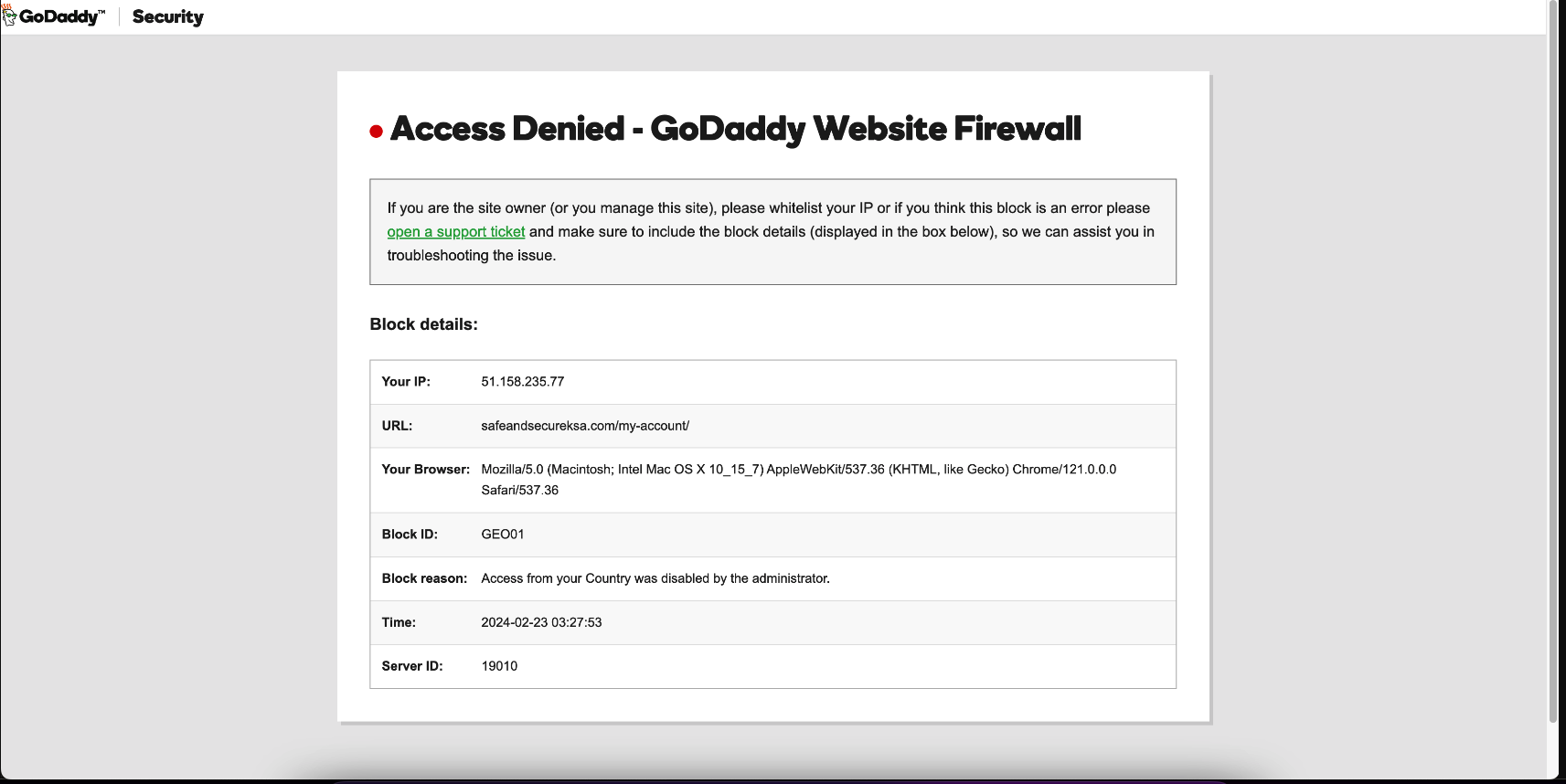
Hi @khurram virk,
How about now: https://userimg.8theme.com/storage/2024/02/23/32724-Screenshot%20at%20Feb%2023%2022-26-05.png?
Best regards,
8Theme’s Team

Hi @khurram virk,
How about now: https://userimg.8theme.com/storage/2024/02/23/32724-Screenshot%20at%20Feb%2023%2022-26-05.png?
Best regards,
8Theme’s Team
Hello @HDTeam,
Thank you for reaching out to us with your concerns regarding the page loading speed issues you’ve been experiencing. We understand how important it is to maintain a swift and responsive website, and we appreciate the efforts you’ve already made to optimize your site’s performance.
Based on the information you’ve provided, it appears that the server is indeed reaching its max_children limit, which is a common issue when dealing with PHP-FPM (FastCGI Process Manager). This can occur when there is a high demand on your server’s resources, often due to a surge in traffic or resource-intensive operations, such as the product filtering feature on your website.
To address this, we recommend the following steps:
1. Review the PHP-FPM configuration, specifically the max_children setting, to ensure it is optimized for your server’s resources and the traffic your website receives. It may be necessary to increase this limit(maybe 500 or 1000), but this should be done cautiously to avoid overloading the server. For more information, please take a look at this: https://serverfault.com/questions/479443/php5-fpm-server-reached-pm-max-children.
2. Analyze the product filtering functionality to determine if it can be optimized further. This could involve caching the results of common filter queries or optimizing the underlying database queries to reduce the load on the server.
3. Consider implementing a more aggressive caching strategy for your website’s content, especially for pages that do not change frequently. This can reduce the number of requests that reach the server, thereby decreasing the likelihood of hitting the max_children limit.
4. Monitor your server’s resource usage regularly to identify any patterns or spikes in traffic that could be contributing to the problem. This can help you make informed decisions about resource allocation and scaling.
5. If the issue persists, it may be worth exploring other hosting solutions that can offer more resources or better scalability options to accommodate your website’s needs.
6. Since you’re using the WPML plugin, please also take a look at this article: https://wpml.org/tutorials/2022/03/boosting-the-performance-of-your-multilingual-wordpress-site/
We understand that these technical aspects can be challenging, and we are here to assist you further. If you require more in-depth support or would like us to take a closer look at your configuration, please do not hesitate to get in touch with our technical support team.
We are committed to helping you resolve these issues and ensuring that your website operates smoothly. Thank you for your patience and understanding as we work together to find a solution.
Best Regards,
8Theme’s Team
Dear @gewoonbovenaan,
Greetings from the 8Theme team.
We are writing to inform you that upon thorough review by our technical staff, we can confirm that the homepage is functioning correctly in both LIVE and Editor Modes. We kindly request that you review the File Uploading section to ensure everything is in order.
Should you require any further assistance, please do not hesitate to reach out.
Best Regards,
The 8Theme Team
Hi @khurram virk,
We’ve uploaded the File Uploading Area.
Can you check again?
Thank you!
Dear Jay,
We hope this message finds you well.
We would like to draw your attention to the following article which we believe may be of assistance to you: https://stackoverflow.com/a/47878455
Should you have any further inquiries or require additional support, please do not hesitate to reach out.
Best regards,
The 8Theme Team
Dear Jay,
We hope this message finds you well.
Please be advised that you can update your custom CSS with the following code:
.fix-btn {
    position: fixed !important;
    width: 100% !important;
    z-index: 9999;
    bottom: 0;
    left: 0 !important;
    background: transparent !important;
}
Applying this code will ensure that your button remains fixed at the bottom of the page.
Furthermore, we must inform you that replicating the exact functionality of the example you provided may necessitate additional customization. Should you require further personalization, we invite you to consider our premium service. You can request this service through the following link: https://www.8theme.com/account/#etheme_customization_panel
Should you have any further inquiries or require assistance, please feel free to contact our support team. We are always at your service.
Warm regards,
The 8Theme Team
Dear Luiza,
We kindly request that you insert the following snippet of code into the functions.php file located within your child theme directory:
add_filter('woocommerce_account_menu_items', 'wptips_customize_account_menu_items');
function wptips_customize_account_menu_items($menu_items) {
    $menu_items['edit-address'] = 'Text Replace';
    return $menu_items;
}
Change the Text Replace text with your text.
Should you require any further assistance, please do not hesitate to reach out.
Best regards,
The 8Theme Team
Dear Mr. Khurram Virk,
We are currently experiencing difficulty accessing your website, as it appears to be blocked by a firewall. This issue is significantly impacting our ability to proceed with our work. For your reference, please find a screenshot of the error we are encountering: https://prnt.sc/GYM8biyAAQBR.
We kindly request that you investigate this matter at your earliest convenience to resolve the access issue. Your prompt attention to this problem would be greatly appreciated.
Thank you for your cooperation.
Best regards,
8Theme’s Team
Dear Khurram Virk,
We would like to bring to your attention that decreasing the number of components on a webpage can significantly reduce the number of HTTP requests necessary for the page to load, thereby enhancing the page’s loading speed. To achieve this, you may consider the following strategies: merging files, consolidating multiple scripts into a single script, combining various CSS files into one stylesheet, and employing CSS Sprites and image maps.
In light of this, we recommend utilizing the WP-Rocket plugin, which is designed to efficiently manage these optimizations. For further guidance on how to improve your WP-Rocket settings with XStore, please visit the following link: https://www.8theme.com/documentation/xstore/troubleshooting/how-to-improve-wp-rocket-settings-with-xstore/
Should you require any additional assistance, please do not hesitate to reach out to us.
Warm regards,
The 8Theme Team
Dear Antonis,
We hope this message finds you well.
We would like to bring to your attention that integrating the Revolution Slider on the homepage may impact the page’s loading speed. To enhance the performance of your slider, we kindly suggest reviewing the following tutorial on optimizing load speed: https://www.sliderrevolution.com/tutorials/optimizing-load-speed-and-performance/.
As an alternative, you may consider utilizing the Elementor Slider, which can be found here: https://elementor.com/widgets/pro/slides-widget/.
Furthermore, for cache optimization, we recommend exploring the WP-Rocket plugin. Detailed guidance on how to fine-tune its settings in conjunction with our XStore theme is available at: https://www.8theme.com/documentation/xstore/troubleshooting/how-to-improve-wp-rocket-settings-with-xstore/.
Should you require any further assistance, please do not hesitate to reach out.
Warm regards,
The 8Theme Team
Dear Mr. Khurram Virk,
We hope this message finds you well.
We have conducted a review of your website and observed that certain product images are being loaded via AJAX requests. During our assessment, we identified that some of these AJAX requests are encountering a 403 error(https://prnt.sc/3_trXDPklZt2). It has come to our attention that your website is protected by the Sucuri security system.
To ensure seamless functionality and user experience, we kindly request your assistance in whitelisting the following AJAX request URL on your security system:
https://safeandsecureksa.com/wp-admin/admin-ajax.php
Your prompt attention to this matter would be greatly appreciated. Should you require any additional information or assistance from our end, please do not hesitate to reach out.
Thank you for your cooperation.
Best regards,
8Theme’s Team
Dear Jay,
We hope this message finds you well.
We’re writing to inform you that several pages on our website have been configured to utilize the custom footer. In an effort to enhance the user experience, we have recently edited this custom footer to include a static block positioned above it. As a result of this update, you will now observe that all the relevant pages are consistently displaying two buttons, as illustrated in the screenshot provided below:
[https://prnt.sc/wdqwb3IcJkhZ](https://prnt.sc/wdqwb3IcJkhZ)
Should you require any further assistance or have any questions regarding this modification, please do not hesitate to reach out.
Best regards,
The 8Theme Team
Dear Glam.eu Team,
We hope this message finds you well.
We’re writing to inform you that we have identified an issue with the ‘woocommerce_checkout’ shortcode on your website. It was observed that the inclusion of a table within the shortcode was interfering with the responsive design settings, as evidenced by the following screenshot: https://prnt.sc/F3R7JhSr7M6m.
Our team has taken the necessary steps to address this matter by removing the table from the shortcode. I am pleased to report that this action has successfully resolved the issue, and the checkout functionality is now operating as intended across all devices.
Should you have any further questions or require additional assistance, please do not hesitate to reach out to us.
Best regards,
The 8Theme Team
Dear Luiza,
We would like to inform you that the text you wish to alter can be found and edited within the Sale Booster plugin, specifically under the “Account Login/Register Tabs” settings. For your convenience, I have provided a screenshot that illustrates the location of these settings:
[https://prnt.sc/DYPqYO2KPJfS](https://prnt.sc/DYPqYO2KPJfS)
Should you require any further assistance, please do not hesitate to reach out.
Warm regards,
The 8Theme Team
Dear Glam.eu,
We regret to inform you that the current thumbnail placement option on the left is not functioning properly. We kindly suggest utilizing the thumbnail placement at the bottom or the inside-bottom as an alternative.
Please be assured that we are actively working on resolving this issue and will include the necessary fixes in our forthcoming update.
We apologize for any inconvenience this may have caused and appreciate your understanding.
Warm regards,
The 8Theme Team
Hi @Taalaki Abaya,
1. To remove the Buy Now button, please navigate to Theme Options > WooCommerce(Shop) > Single Product Page > Layout > disable the Buy Now button: https://prnt.sc/RSEc-LPtc_BS. After that add the following codes under functions.php file locates in your child theme to add Messenger button:
add_action('woocommerce_after_add_to_cart_form', 'n2t_woocommerce_after_add_to_cart_form');
function n2t_woocommerce_after_add_to_cart_form(){
	?>
	<button>Messenger</button>
	<?php
}
2.
a. Those texts can be editted via Elementor Editor:
– https://prnt.sc/GfK3JzKMgLb9
– https://***lakiabaya.com/wp-admin/post.php?post=103&action=elementor
b. The texts above image product can be translated there: https://***lakiabaya.com/wp-admin/admin.php?path=languages%2Fthemes%2Fxstore-ar.po&bundle=xstore&domain=xstore&page=loco-theme&action=file-edit
3. Please add the following CSS:
.header-main .et_column.et_col-xs-3.et_col-xs-offset-0.pos-static span.et_connect-block-sep {
    display: none;
}
Warm regards,
The 8Theme Team
Dear Jay,
We kindly request that you insert the following CSS code snippet into your website’s theme. You can do this by navigating to Theme Options, then selecting Theme Custom CSS, and finally placing the code under the Global CSS section:
footer.prefooter {
    position: fixed;
    width: 100%;
    z-index: 9999;
    bottom: 0;
}
Should you require any further assistance, please do not hesitate to reach out.
Best Regards,
The 8Theme Team
Dear Glam.eu Team,
We hope this message finds you well.
We are writing to inform you that we have successfully applied the hotfix to your website as part of our ongoing commitment to maintain and improve your online presence.
At your earliest convenience, could you kindly review the changes to ensure that everything is functioning as expected? Your confirmation on the successful application of the hotfix would be greatly appreciated.
Thank you for your attention to this matter.
Best Regards,
The 8Theme Team
Hi @jimmy-17,
We hope this message finds you well.
To address this issue, we kindly request that you temporarily disable all third-party plugins on your website, with the exception of those that are Theme Required/Recommended, as detailed here: [https://www.8theme.com/documentation/xstore/plugins/included-plugins/](https://www.8theme.com/documentation/xstore/plugins/included-plugins/). After doing so, please clear your browser cache and check your site again. This step is to determine if there is a conflict caused by any additional third-party plugins.
Should this resolve the issue, you will then need to reactivate each third-party plugin individually to identify which one is causing the conflict. Once identified, we recommend contacting the Plugin Author for further assistance.
If the problem persists, please keep all third-party plugins deactivated and grant us permission to conduct a thorough investigation on your site. This may include deactivating all third-party plugins and any on-site customizations.
Please note: It is imperative that you create a complete backup of your website before proceeding with the aforementioned steps, as they may impact your site’s functionality.
We appreciate your cooperation and look forward to resolving this matter promptly.
Yours sincerely,
The 8Themes Team.
Subject: Instructions for Adjusting Font Size on Product Elements
Dear TronShop,
We hope this message finds you well.
We would like to provide you with the necessary CSS code to adjust the font size of certain elements within your product screenshots. Kindly insert the following custom CSS snippet into your website’s stylesheet:
.single-product .et_product-block .woocommerce-product-details__short-description p,
.single-product .et_product-block .woocommerce-product-rating a,
.single-product .et_product-block div.sales-booster-estimated-delivery {
    font-size: var(--p-font-size, 1.14rem);
}
This code will ensure that the font size for the product details description, product rating links, and estimated delivery information is set to 1.14rem, or to the value of the --p-font-size variable if it is defined.
Should you require any further assistance or have any questions regarding this process, please do not hesitate to reach out to us.
Best regards,
The 8Theme Team
Dear Moshe,
We hope this message finds you well.
In order to resolve the issue you are experiencing, we kindly request that you insert the custom CSS code provided below. Please navigate to the Theme Options, then proceed to Theme Custom CSS, and finally to Global CSS, where you can add the following lines:
body .et_b-icon svg,
body .et_b_header-socials svg {
    fill: #000;
}
We trust this will address your needs effectively. Should you require any further assistance, please do not hesitate to reach out.
Warm regards,
The 8Theme Team
Dear @coffeedog,
We kindly request that you proceed to the specified file located at:
/wp-content/plugins/et-core-plugin/app/controllers/elementor/general/posts.php
Upon reaching line 3792, please locate the following code:
<a>
We ask that you replace it with the following code:
<a href="<?php echo get_the_permalink(); ?>">
Your attention to this matter is greatly appreciated.
Best Regards,
The 8Theme Team
Dear @coffeedog,
We hope this message finds you well.
We would like to inform you that the links in question are integral to the JavaScript functionality. As such, the ‘href’ attribute should be set to javascript:void(0); to ensure that the page does not scroll up or down when users interact with the ‘Clear’ button.
Regrettably, our current system does not provide any options or hooks to facilitate the removal of these links.
Should you wish to proceed with their deletion, you may do so by accessing the following file: /wp-content/plugins/et-core-plugin/packages/st-woo-swatches/public/partials/class-st-woo-shop.php. Once there, please locate line 156 and remove the subsequent code:
$html .= sprintf( '<a href="javascript:void(0);" class="sten-reset-loop-variation" style="display:none;"> %1$s </a>', esc_html__( 'Clear', 'xstore-core' ) );
We trust this will assist you in achieving the desired outcome.
Warm regards,
The 8Theme Team
Dear Alberto P.,
We hope this message finds you well.
We have noticed that you are utilizing the WPBakery Builder. Should you wish to modify the mobile responsive breakpoint, we kindly suggest reviewing the guidance provided in the following article: https://wpbakery.com/video-academy/control-elements-different-devices-responsive-column-controls/.
Additionally, if you are considering a transition to Elementor, we recommend consulting the information available at this link: https://elementor.com/help/mobile-editing/.
Should you require any further assistance, please do not hesitate to reach out.
Best regards,
The 8Theme Team
Thanks @Nancy.
Let’s see how the vote goes!
Dear Nancy,
We hope this message finds you well.
We are pleased to inform you that we have made some updates to your custom code. Your contribution is greatly appreciated, and we would like to invite you to upload the revised code to Pastebin (https://pastebin.com/). Following this, please proceed to create a new feature request on our taskboard (https://www.8theme.com/taskboard/) for further consideration.
Below is the updated code snippet for your reference:
add_filter('woocommerce_get_breadcrumb', 'custom_woocommerce_breadcrumbs', 10, 2);
function custom_woocommerce_breadcrumbs($crumbs, $breadcrumb) {
    if (is_singular('product')) {
        $referer = wp_get_referer();
        if (!empty($referer)) {
            // Parse the referer URL to get the path
            $parsed_url = parse_url($referer);
            $path_segments = explode('/', trim($parsed_url['path'], '/'));
            $custom_crumbs = [$crumbs[0]]; // Home link

            // Build custom breadcrumb from referer
            if (!empty($path_segments)) {
                foreach ($path_segments as $segment) {
                    $term = get_term_by('slug', $segment, 'product_cat');
                    if ($term) {
                        $custom_crumbs[] = [$term->name, get_term_link($term)];
                    }
                }
            }

            // Add the current product to the custom breadcrumb
            $custom_crumbs[] = end($crumbs);
            return $custom_crumbs;
        }
    }
    // Return default breadcrumbs for other cases
    return $crumbs;
}
We thank you once again for your valuable input and look forward to your continued collaboration.
Warm regards,
The 8Theme Team
Dear Glam.eu Team,
We wish to inform you that the variation gallery feature was temporarily deactivated for the purpose of conducting tests.
We are pleased to announce that the feature has now been reactivated. We have confirmed that the variation gallery is functioning correctly in conjunction with the new builder.
Best regards,
The 8Theme Team
Hi @Mihalis,
We will suggest you a faster way, please add the following code under functions.php file locates in your child theme:
– Code Before Closing Head Tag:
add_action('wp_head', 'n2t_wp_head', 99);
function n2t_wp_head() {
	?>
	<script>
	</script>
	<?php
}
– Code After Opening Body Tag:
add_action('wp_body_open', 'n2t_wp_body_open', 99);
function n2t_wp_body_open() {
	?>
	<script>
	</script>
	<?php
}
– Code Before Closing Body Tag:
add_action('wp_footer', 'n2t_wp_footer', 99);
function n2t_wp_footer() {
	?>
	<script>
	</script>
	<?php
}
Hope it helps!
Hi @Mihalis,
Can you please have a look at this plugin: WPCode – Insert Headers and Footers + Custom Code Snippets – WordPress Code Manager?
https://wordpress.org/plugins/insert-headers-and-footers/
Warm regards,
The 8Theme Team
Dear Glam.eu,
We hope this message finds you well.
We have noticed that you are currently utilizing both the Single Product and Single Product (Old) Builders on your platform. To ensure optimal performance and prevent any potential template conflicts, we kindly recommend selecting a single builder for your product pages.
For further guidance on how to effectively use the Single Product Builder with Elementor, please refer to the following documentation: https://www.8theme.com/documentation/xstore/xstore-builders/xstore-single-product-builder-with-elementor/.
Should you require any assistance or have any questions, please do not hesitate to reach out to us.
Warm regards,
The 8Theme Team