Hello,
You can change images sizes on blog page using this code in custom.css file:
.post-default .post-images {
    width: 600px;
}
Thank you.
Regards,
Eva Kemp.

Hello,
You can change images sizes on blog page using this code in custom.css file:
.post-default .post-images {
width: 600px;
}Thank you.
Regards,
Eva Kemp.
Hello,
In .htaccess file you have written this redirect:
RewriteRule ^(.*)$ http://6.moby24.com [L,R=302]
You need remove it and your site won’t be redirected to other url on mobiles.
Please try it.
Regards,
Eva Kemp.
Hello,
Sorry, but WooCommerce has removed that feature in the recent update and replaced it with the number input type. In our demo old theme and Woocommerce plugin versions are used. Soon we’ll update our demo site too.
Please take our apologies for inconveniences.
Regards,
Eva Kemp.
Hello,
Please read our documentation what shortcodes you can use:
https://www.8theme.com/demo/docs/xmarket/index.html#!/xmarket_shortcodes
Also here you can see how featured images are added on the home page:
https://www.8theme.com/demo/docs/xmarket/index.html#!/demo_data_installation > Home page.
Now we can’t log in to wp-admin panel getting an error:
“Bandwidth Limit Exceeded”
Please check it.
Regards,
Eva Kemp.
Hello,
As I see “Add to Cart” button is displayed fine:
https://s3.amazonaws.com/fvd-data/notes/168674/1426925185-sBBlxe/screen.png
Sorry, but your question is a bit unclear. Could you please specify what you’re trying to achieve?
Thank you.
Regards,
Eva Kemp.
Hello,
You’re welcome.
Regards,
Eva Kemp.
Hello,
This is Woocommerce configuration. You can try to add the code to functions.php file in wp-content/themes/woopress directory that is described in this article:
https://support.woothemes.com/hc/communities/public/questions/202794676-Showing-only-1-price-for-variable-product or you should contact Woocommerce support to get the correct code.
Regards,
Eva Kemp.
Hello,
You’re welcome.
Regards,
Eva Kemp.
Hello,
Please provide us with a page link where you want to make changes and show screenshots for better understanding.
Thank you.
Regards,
Eva Kemp.
Hello @alemdag,
You’re welcome.
Regards,
Eva Kemp.
Hello,
Go to Theme Options > Shop > Product Page Banner and remove the banner.
I’ve added this code in custom.css file:
.variations td {
  display: inline-block;
  vertical-align: initial;
}
Please check “Reservation” field.
Regards,
Eva Kemp.
Hello,
As I see the price is shown:
https://s3.amazonaws.com/fvd-data/notes/168674/1426876361-WUVzzc/screen.png
The exact price is shown only when variables are selected. This is Woocommerce configuration. If you want to change it you should contact their support.
Thank you.
Regards,
Eva Kemp.
Hello,
Please use this code in custom.css:
del {
    font-size: 12px;
    color: red;
}
Regards,
Eva Kemp.
Hello,
You’re welcome.
Regards,
Eva Kemp.
Hello,
I’ve created 2 layers for the 1st slide for test.
Please check it.
Thank you.
Regards,
Eva Kemp.
Hello,
Please provide us with wp-admin panel and FTP credentials in Private Content.
Thank you.
Regards,
Eva Kemp.
Hello,
You’re using very old theme version.
Please update it to 2.6.3 version as well as all plugins https://www.8theme.com/download-plugins/ . Updating theme may cause some mess on the pages with sections and parallax effect! This is due to changes made in the code and visual composer was separated, now it’s a separate plugin which you can activate/deactivate. Therefore, after the upgrade to Legenda version 2.6.3 be ready that you will need to recreate those pages! Please take our apologies for the inconveniences and we’ll be grateful if you treat it with understanding .
Always create a backup of all your files and databases before upgrading, and read instructions carefully on how to update your template properly https://www.8theme.com/demo/docs/legenda/index.html#!/installation_upgrade (Theme Upgrade). Also update WordPress as well.
Thank you.
Regards,
Eva Kemp.
Hello,
If you created a back up you can restore it in control panel of your host and old version will be reverted back.
Regards,
Eva Kemp.
Hello,
As I see both MailChimp and Visual Composer plugins are activated. I don’t see the issue you described:
https://s3.amazonaws.com/fvd-data/notes/168674/1426871547-Plbiet/screen.png
Have you resolved it?
Regards,
Eva Kemp.
Hello,
Did you read Woocommerce documentation http://docs.woothemes.com/document/woocommerce-localization/ (6. Translating with PoEdit)? Please follow the instruction.
Thank you.
Regards,
Eva Kemp.
Hello,
Did you enable lightbox in Theme Options > Single Product Page?
Please give us access to your site as now we’re getting “Forbidden” error.
Thank you.
Regards,
Eva Kemp.
Hello,
I’ve installed Ultimate VC Addons plugin and dashboard is loading fine.
Please clear browser cache and check.
Thank you.
Regards,
Eva Kemp.
Hello,
There – Theme Options > Product Page Layout > Product Images Width and Product Images Height – you can change sizes for the products on Shop page, but not on a single product page.
It can be done only editing the file legenda/woocommerce/single-product/product-image.php and custom.css.
Sorry for inconveniences.
Regards,
Eva Kemp.
Hello @gaz,
Please provide us with FTP and wp-admin panel credentials in Private Content.
May we reupdate the theme?
Regards,
Eva Kemp.
Hello,
Please provide us with wp-admin panel credentials to check the issue.
Thank you.
Regards,
Eva Kemp.
Hello,
1. To add border for products images on Home page you need add this code in custom.css file:
.carousel-area .product-image-wrapper {
    border: 1px solid black;
}
.carousel-area .product-image-wrapper: hover {
border: 1px solid red;
}Change color values to yours.
How to create custom.css you can watch in this tutorial (it’s for Legenda theme but the process is the same).
2. You can translate “Quick View” text in .po file in wp-content/themes/royal/languages directory.
3. I’ve reuploaded “woocommerce” folder in wp-content/themes/royal/ directory. Please check Wishlist page and clear browser cache before.
Also please update the required plugins to the latest versions https://www.8theme.com/download-plugins/ .
Thank you.
Regards,
Eva Kemp.
Hello,
Please try to add this code in custom.css file:
.address-company .sfsi_wicons {
  margin-left: 14px !important;
}
How to create custom.css you can watch in this tutorial (it’s for Legenda theme but the process is the same).
Thank you.
Regards,
Eva Kemp.
Hello,
I’ve activated Cache plugin and as I see captcha is working fine:
http://storage2.static.itmages.com/i/15/0320/h_1426868117_6834713_44d4b7c209.png
I’ve registered a new account successfully.
Could you please describe the issue with more details and provide us with screenshots?
Thank you.
Regards,
Eva Kemp.
Hello,
I’ve added this code in custom.css file:
.menu-social-icons i {
   width: 28px;
   height: 28px;
}

.header-vertical-enable .page-wrapper .header-type-vertical .header-custom-block .menu-social-icons {
   margin-right: 70px;
}
Please check social media icons now.
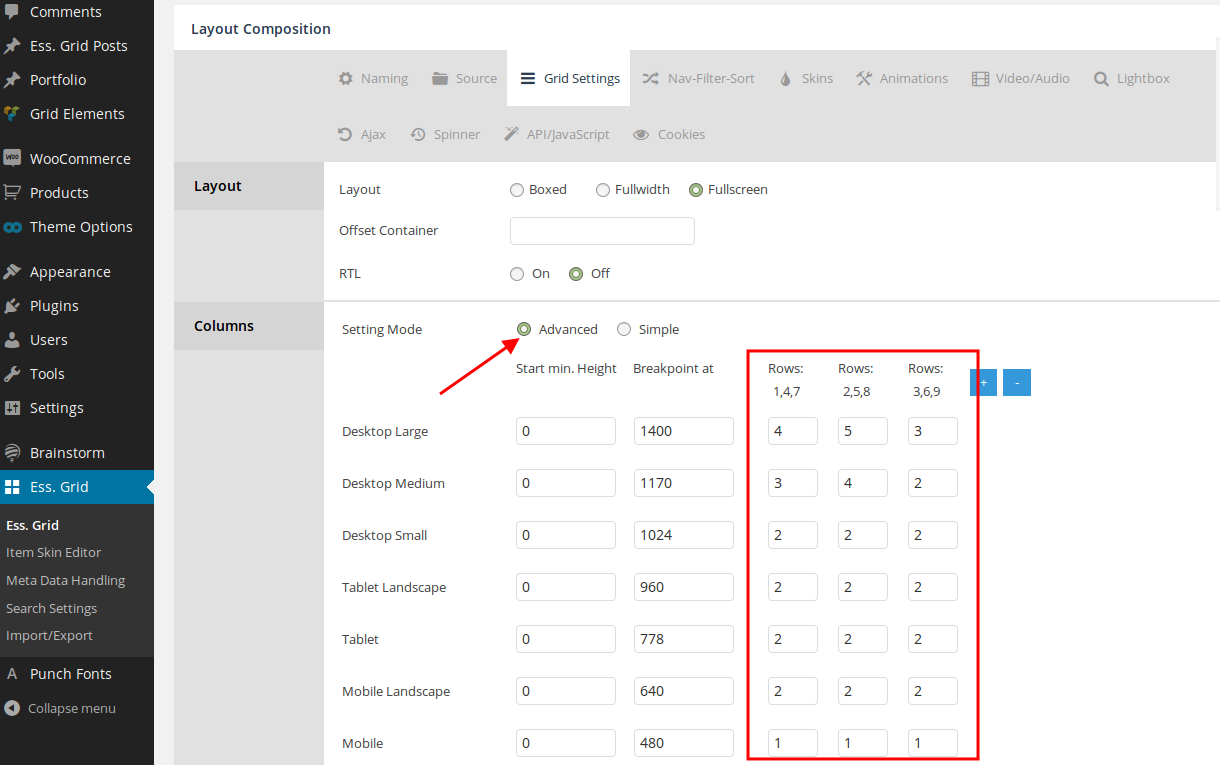
Also I’ve changed ess. grid settings and set how many items to show per row:
https://s3.amazonaws.com/fvd-data/notes/168674/1426867641-nlsPhD/screen.png
Regards,
Eva Kemp.
Hello,
We’ve forwarded your query to our developers and once there is any news from them we’ll inform you.
Thank you for your understanding and patience.
Regards,
Eva Kemp.