
Hello,
Seems some plugin creates the problem. Please try to disable the plugins one by one to find which one causes the issue.
Regards,
Eva Kemp.

Hello,
Seems some plugin creates the problem. Please try to disable the plugins one by one to find which one causes the issue.
Regards,
Eva Kemp.
Hello,
You need to add the following code to custom.css file:
@media(min-width:980px) and (max-width:1199px){
 .header5 .logo, .header6 .logo, .header1 .logo, .header7 .logo {
  position: relative;
  left: 325px;
 }
}

@media(min-width:1200px){
 .header5 .logo, .header6 .logo, .header1 .logo, .header7 .logo {
   position: relative;
   left: 330px;
   float:left !important;
 }
}
Please try this and reply back if the problem persists.
Regards,
Eva Kemp.
Also please provide us with the credentials to wp-admin panel.
Thank you.
Hello,
You’ve been already replied on this issue in other topic https://www.8theme.com/forums/topic/problems-with-categories-and-permalink-settings/
Please check.
Regards,
Eva Kemp.
Hello,
1. When you create a new category and want it to be displayed as a separate one, you should choose “None” in Parent tab. So you need edit the subcategories and select “None” next to the Parent tab and not the category name.
Also some categories may not be shown because products aren’t added there.
2. To fix the issue with permalinks you should make the following changes in wp-admin panel > Settings > Permalinks:
– Under common settings select “Post Name”;
– Within the Option Menu put this in the box Product category base – /shop (or the name of your products page, e.g. /productos);
And save the changes.
Regards,
Eva Kemp.
Hello,
There may be a bug in the theme after update to WP 3.9. You may try to fix it editing the file blanco/code/functions.php , find wp_enqueue_script('masonry', get_template_directory_uri().'/js/jquery.masonry.min.js'); (line 47) and replace by
wp_enqueue_script('et_masonry', get_template_directory_uri().'/js/jquery.masonry.min.js');
If the issue still persists, provide us with the admin panel and FTP access in Private Content.
Regards,
Eva Kemp.
Hello,
We’ve fixed the bug on the checkout page.
Please check if everything is fine now. Let us know if more help is needed.
Regards,
Eva Kemp.
Hello,
Please provide us with the site and login details to admin panel to check the issue. You can write the information in Private Content.
Regards,
Eva Kemp.
Thank you for the feedback.
Don’t hesitate to contact us if you need any further assistance.
Regards,
Eva Kemp.
Hello,
You can send it in Private Content.
Regards,
Eva Kemp
Hello,
Could you please provide us with the site and admin panel credentials to check the issue on our side?
Regards,
Eva Kemp.
You are always welcome.
Regards,
Eva Kemp.
Hello,
I’ve made some changes to Permalinks in admin panel > Settings. Please check if the categories are displayed correctly.
Let us know if there is something else we can help you with.
Regards,
Eva Kemp.
Hello,
If you want to change the title “Shopping Cart” at the top right corner, you have to edit woo.php file, which you can find in admin panel > Appearance > Editor and replace Shopping Cart with Basket.

Regards,
Eva Kemp.
Hello,
Please provide us with the site and login details to admin panel to investigate the issue, and the information you filled in.
Regards,
Eva Kemp.
You are welcome.
Hello,
You can remove the image by adding the following code into custom.css file:
.cat-banner { display: none; }
Make sure you’ve created custom.css or renamed default.custom.css to custom.css in the directory wp-content/themes/idstore and turned it on in admin panel > Theme Options > Custom CSS > On.
Regards,
Eva Kemp
Hello,
Unfortunately we can’t reproduce the issue with logo on our side. Could you please provide us with the site and admin panel credentials? Also please attach a screenshot of how the logo is displayed on your device.
To make the menu sidebar the full width you need to change styles for media inquiry in custom.css.
Here is the example of the code:
@media (max-width: 479px) {.mobile-nav {width: 100%;}}
How to create custom.css file you can find here .
Regards,
Eva Kemp
Hello,
You can create the same blocks using Visual Composer. On this picture you can see how this should be done:
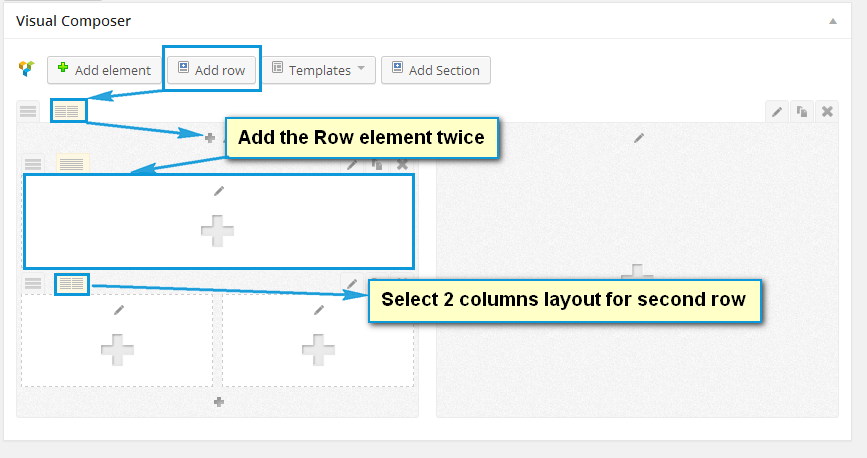
If you have difficulties with it, provide us with the login details to admin panel and we’ll assist you further.
Regards,
Eva Kemp.
Hello,
Please provide us with FTP access, purchase code and we’ll try to update the theme. Don’t forget to create a backup before.
Have you made any changes directly in the theme files? If yes, they will be lost after update.
Regards,
Eva Kemp.
Hello,
We are sorry that you are experiencing such problems after WP update. Our developers are working on this issue and it will be fixed in the soonest updates. Now I can advise you to restore your sites from the backup if you have made it before the WP update.
Regards,
Eva Kemp
Hello,
Could you please provide us with the site and login details to admin panel and FTP?
Also please watch this video how to create footer.
Regards
Thank you for your reply.
Unfortunately we can’t reproduce the issue with logo on our side. Could you please provide us with the site and admin panel credentials?
You can change border color in custom.css, just add the following code and write the color you need:
.main-nav .double-border, .main-nav {
border-top: red;
border-bottom: red;
}
How to create custom.css file you can watch here
Regards
Hello,
1. You might have put wrong url for facebook and twitter boxes. You should insert https://twitter.com/8theme, for example, not #https://twitter.com/8theme.
2. Unfortunately there is no such feature to make different colors for different categories. You just can change the color of active button hover. To do this go to admin panel > Blanco Theme Settings > Color Scheme.
3. A down arrow will appear by default when there is submenu, but this is possible only for the second and further levels, not for the 1st one.
Regards
Hello,
You should add the following code into custom.css:
.product-slider .carousel { height: 251px; }
Change the height value to desired one.
Regards
Thank you for the screenshot.
Could you please provide us with FTP and admin panel credentials to check if we are able to resolve this issue?
Regards
Hello,
Please read the Legenda documentaion https://www.8theme.com/demo/docs/legenda/index.html#!/legenda_theme_options > Legenda Theme Options > Responsive
Regards
You are welcome.
You can remove the image adding the following code to custom.css:
.grid_content.no-sidebar .cat-banner { display: none; }
Let us know if this doesn’t help and we’ll check ourselves.
Regards
Have you tried to upload wider image for a single product page?
I’ve made some changes to Permalinks settings in admin panel and now categories are displaying correctly. Please check.
Regards
You are welcome.
Regards









