Hello,
You can create your own footer as described in our documentation:
https://www.8theme.com/demo/docs/blanco/index.html#!/widgets
Concerning social icons you need use some plugin to add more icons.
Regards,
Eva Kemp.

Hello,
You can create your own footer as described in our documentation:
https://www.8theme.com/demo/docs/blanco/index.html#!/widgets
Concerning social icons you need use some plugin to add more icons.
Regards,
Eva Kemp.
Hello,
I’ve added “/categoria-prodotto” in Settings > Permalinks > Base categoria prodotto.
Please clear browser cache and check categories again.
Thank you.
Regards,
Eva Kemp.
Hello,
You can increase the width of the thumbnails slider to show more than 3 images. Add this code in custom.css file:
#product-pager {
    width: 515px !important;
}
Regards,
Eva Kemp.
Hello @ballyhoopro,
Please provide us with wp-admin panel credentials in private content.
Thank you.
Regards,
Eva Kemp.
Hello,
We’re glad the problem is resolved.
If there are any questions feel free to contact us.
Regards,
Eva Kemp.
Hello,
The problem with importing is that you have allow_url_fopen function disabled.
Please contact your host and ask them to enable it. Also ask them to increase post_max_size and upload_max_filesize values.
After that try to import the template variant.
Thank you.
Regards,
Eva Kemp.
Hello @bharatk,
You activated WP eCommerce plugin as well as Woocommerce plugin. It can’t be done because there may be conflict between these 2 plugins. I’ve deactivated WP eCommerce, but recommend you to delete the folder in wp-content/plugins.
You should use only one plugin for Shop site.
Please do this and check the site after that.
Thank you.
Regards,
Eva Kemp.
Hello,
Currently the developers are working on a new update.
You can monitor our site http://themeforest.net/item/idstore-responsive-multipurpose-ecommerce-theme/4792186 for new releases.
Thank you.
Regards,
Eva Kemp.
Hello,
Could you please describe with more details what you’re trying to achieve?
Maybe show us screenshots.
Thank you.
Regards,
Eva Kemp.
Hello,
Sorry, but concerning this query you should contact Woocommerce support as Checkout page is configured by them.
Regards,
Eva Kemp.
Hello,
Please provide us with FTP and wp-admin panel credentials in Private Content.
Thank you.
Regards,
Eva Kemp.
Hello,
This requires a lot of additional customization.
We’ll try to implement this feature in future updates.
Please take our apologies for inconveniences.
Thank you.
Regards,
Eva Kemp.
Hello,
We’ve taken your query into account and will try to implement that feature in future updates.
Sorry for inconveniences.
Regards,
Eva Kemp.
Hello @kinhacura,
Please provide us with the path where site files are located.
Thank you.
Regards,
Eva Kemp.
Hello,
The content has been imported. Please check your site.
The problem is with products images only. They couldn’t be imported.
Please try to change permissions for all .jpg files in the directory /public_html/wp-content/uploads/.
Thank you.
Regards,
Eva Kemp.
Hello,
The error states there is an issue with the plugin “wordpress-seo”. You can contact the plugin author to investigate it.
Thank you.
Regards,
Eva Kemp.
Hello,
As I see Facebook code is shown now:
http://storage3.static.itmages.com/i/15/0317/h_1426608797_8458394_e3d967b2a6.png
Please clear browser cache and check.
Thank you.
Regards,
Eva Kemp.
Hello,
Please add this code in custom.css file:
a.btn.border-grey.product_type_variable {
    background-color: #fff;
    border: 1px solid black;
}
Thank you.
Regards,
Eva Kemp.
Hello,
You can check this link with the test result:
http://www.webpagetest.org/result/150317_Z4_109S/1/breakdown/
You’ll see that slow loading is caused by images.
Please refer to these articles how to optimize your site:
http://codex.wordpress.org/WordPress_Optimization
http://www.sparringmind.com/speed-up-wordpress/
http://techtage.com/speeding-up-wordpress-sites/
Thank you.
Regards,
Eva Kemp.
Hello,
In this case use this code instead of the previous one:
.boxed .st-container {
   box-shadow: 0px 0px 0px !important;
}
Thank you.
Regards,
Eva Kemp.
Hello,
Sorry for a delay.
I’ve enabled “Close” button in the Essential Grid settings > edited “Home” grid > “Ajax” tab > Ajax Navigation.
Please clear browser cache and check the page.
Thank you.
Regards,
Eva Kemp.
Hello,
You’ve been emailed an IP address to unlock it for FTP access.
Please check your mail.
Thank you.
Regards,
Eva Kemp.
Hello,
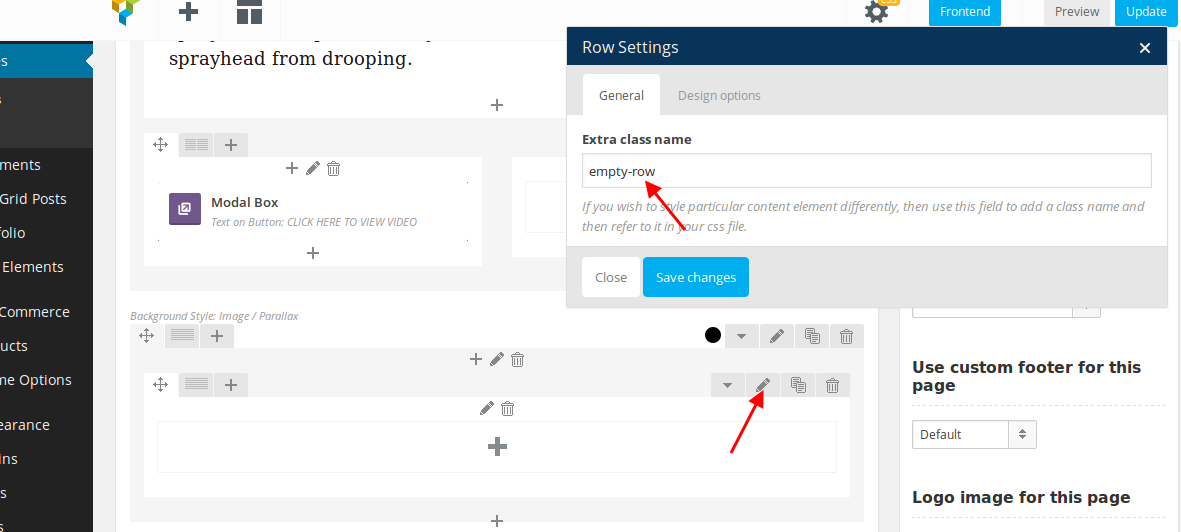
I’ve created extra class for an empty row where video background is added:
https://s3.amazonaws.com/fvd-data/notes/168674/1426604955-35gpQR/screen.png
and added this code in CSS block of Visual Composer editor in “KOHLER” page:
.empty-row {height: 500px;}
Please check the video now.
Thank you.
Regards,
Eva Kemp.
Hello,
Please provide us with FTP credentials.
Thank you.
Regards,
Eva Kemp.
Hello,
You’re using old theme version and old versions for plugins.
Please update them https://www.8theme.com/download-plugins/ .
https://www.8theme.com/demo/docs/royal/#!/installation_upgrade (1.5 Theme Upgrade)
Don’t forget to create a back up of your files and database before update!
Thank you.
Regards,
Eva Kemp.
Hello,
You can change portfolio projects display using Essential Grid plugin and Essential Grid element in Visual Composer. You can find more information in the documentation:
http://essential.themepunch.com/documentation/
To remove “More details” button you need edit the file wp-content/themes/royal/content-portfolio.php and comment the line 47.
Thank you.
Regards,
Eva Kemp.
Hello,
Sorry but we can’t log in with the provided credentials.
Please check them.
Thank you.
Regards,
Eva Kemp.
Hello,
As I see front page is shown.
Please clear browser cache and check again.
Thank you.
Regards,
Eva Kemp.
Hello,
Please add this code as well:
@media (max-width: 768px) { .banner-block.banner-block-custom-height img {
    width: auto !important;
}
.banner-block.banner-block-custom-height h3.bb-top-title {
   height: 40px;
}
}
Thank you.
Regards,
Eva Kemp.
Hello,
We’ve passed your query to the second support level and you’ll be informed with the result as soon as possible.
Thank you for understanding and patience.
Regards,
Eva Kemp.