Hello,
Sorry for a long delay.
Please try to translate the text in this file: wp-includes/user.php (line 137).
Thank you.
Regards,
Eva Kemp.

Hello,
Sorry for a long delay.
Please try to translate the text in this file: wp-includes/user.php (line 137).
Thank you.
Regards,
Eva Kemp.
Hello,
You can try to translate the text in .po file. Edit your .po file in wp-content/themes/royal/languages and select fuzzy string, press Fuzzy button. String will change color from gold to black. Save .po file and replace .po, .mo files.
Thank you.
Regards,
Eva Kemp.
Hello,
You’re welcome.
Regards,
Eva Kemp.
Hello,
I’ve added an image to the Products Gallery section for the product “Fleshlight Girls Angela White”. Please check. Try to clear browser cache and check gallery again.
Also the notes are added successfully for orders.
So please clear the cache and test your site after that or check it in another browser.
Thank you.
Regards,
Eva Kemp.
Hello,
When trying to connect to FTP we’re getting the error:
Response: 530 Login authentication failed
Are the credentials correct?
Also your site isn’t loading. Did your host set any restrictions?
Thank you.
Regards,
Eva Kemp.
Hello,
Please try to use this code in custom.css file:
@media (max-width: 480px) {.products-grid.product-count-3 .product:nth-child(n) {
    width: 50%;
}}
How to create custom.css you can watch in this tutorial.
If there are still problems please provide us with wp-admin panel credentials in Private Content.
Thank you.
Regards,
Eva Kemp.
Hello,
You can create a new menu and mark it for “Account menu”:
https://s3.amazonaws.com/fvd-data/notes/168674/1426598005-QBPoTJ/screen.png
Or use already created menu for it.
If you don’t want to display that pop up under My Account link on your site you can use this code in custom.css file:
.links li.my-account-link .submenu-dropdown {display: none !important;}
How to create custom.css you can watch in this tutorial.
Thank you.
Regards,
Eva Kemp.
Hello,
If you’re going to import any pages or products we recommend you to keep that function enabled. If not, then you can disable it.
Regards,
Eva Kemp.
Hello,
You need import base demo content as described in our documentation https://www.8theme.com/demo/docs/legenda/index.html#!/demo_data_installation . Haven’t you installed it yet?
If there are any difficulties please provide us with wp-admin panel credentials in Private Content.
Thank you.
Regards,
Eva Kemp.
Hello,
To change color of the price and links you need go to Theme Options > Color Scheme and select Main Color and Price Color.
To have portfolio images opened in lightbox you need remove the previously added code:
.portfolio-item .portfolio-image .portfolio-mask {
  display: none;
}
and buttons will be shown to enlarge an image.
Thank you.
Regards,
Eva Kemp.
Hello,
You can delete the file legenda/woocommerce/cart/cart-totals.php.
Other files has been fixed.
Please check.
Regards,
Eva Kemp.
Hello,
You’ve been replied in the other topic concerning your issue.
Please don’t duplicate queries to avoid confusion.
Thank you.
Regards,
Eva Kemp.
Hello,
Sorry for a delay, but we can’t connect to FTP account with the credentials you provided.
Please check them.
Thank you.
Regards,
Eva Kemp.
Hello,
We’re sorry for a delay.
This is caused by large amount of work.
We’ve checked your site and the same issue persists will default WordPress theme too.
We recommend you to contact WP-eCommerce plugin support to investigate the problem.
Thank you.
Regards,
Eva Kemp.
Hello,
Sorry, but we don’t provide support for all 3rd-party plugins and we can’t test all plugins with the theme. If you have some compatibility problems you can ask Woocommerce support for hooks need to be imported in the theme and we’ll try to fix it.
Thank you for your understanding.
Regards,
Eva Kemp.
Hello,
There is a problem with importing demo data. You don’t have PHP ZipArchive extension enabled and layer slider archive can’t be imported. Please contact your host and ask them to enable this extension. Also ask them to check if allow_url_fopen function is enabled and increase post_max_size and upload_max_filesize values.
Thank you.
Regards,
Eva Kemp.
Hello @mercom,
You’re welcome.
Regards,
Eva Kemp.
Hello,
We’re currently working on your site.
Please wait. We’ll let you know as soon as possible.
Thank you.
Regards,
Eva Kemp.
Hello,
Please take our apologies.
The delay is caused by large amount of work.
I’m starting to work on your site.
You’ll be notified when there is a result.
Thank you for your understanding.
Regards,
Eva Kemp.
Hello,
1./2. As I see quantity button is shown fine. Please describe the issue with more details or show a screenshot.
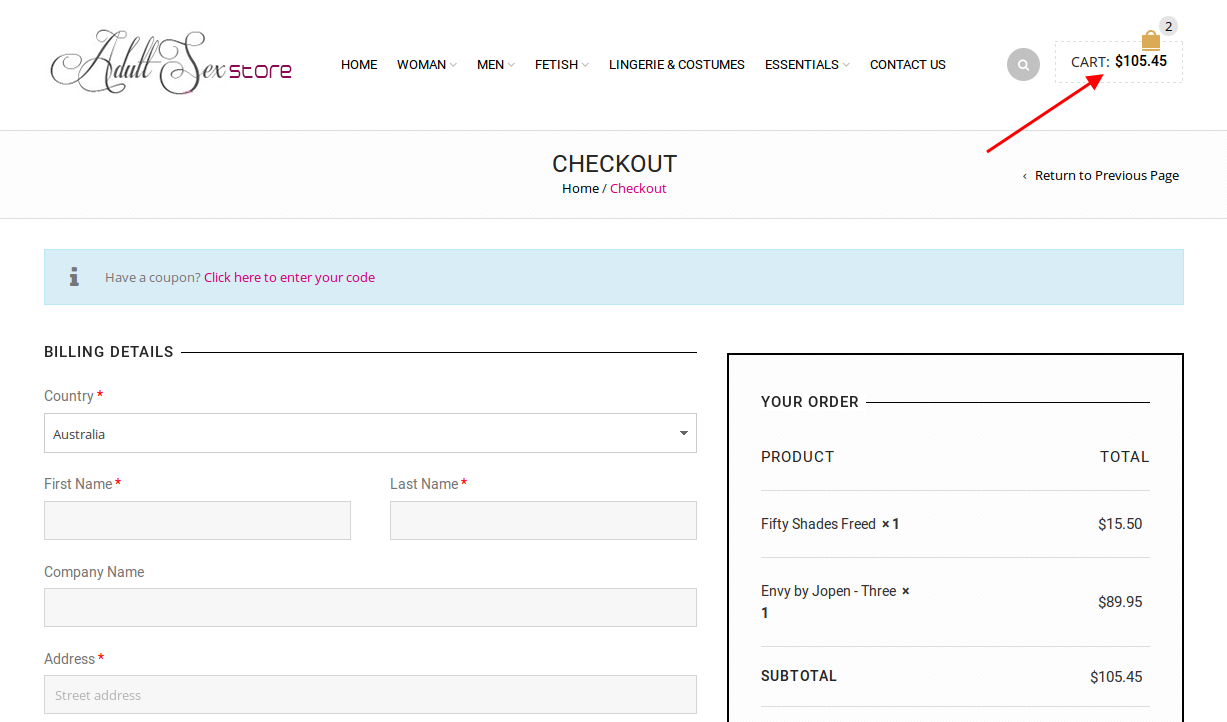
3. When I’m on Checkout page the cart isn’t empty. Please look at the screenshot:
https://s3.amazonaws.com/fvd-data/notes/168674/1426584955-g4iksf/screen.png
4. Please add this code in custom.css file:
fieldset#anz_egate-cc-form {
   margin-right: 50px;
 }
fieldset#anz_egate-cc-form .form-row-last {
  float: left !important;
}
How to create custom.css you can watch in this tutorial (it’s for Legenda theme but the process is the same).
5. There is an error:
Allowed memory size of 268435456 bytes exhausted (tried to allocate 32768 bytes).
You need contact your host and ask them to increase memory_limit value.
Thank you.
Regards,
Eva Kemp.
Hello,
Please provide us with FTP credentials.
Thank you.
Regards,
Eva Kemp.
Hello,
1. As I see quantity box is already next to “Add to Cart” button.
2. Sorry, but concerning this issue you should contact Woocommerce support.
3. WooCommerce has removed that feature in the recent update and now there is no overrides in Woopress for this. You may try https://wordpress.org/plugins/woocommerce-quantity-increment/ plugin.
Thank you.
Regards,
Eva Kemp.
Hello,
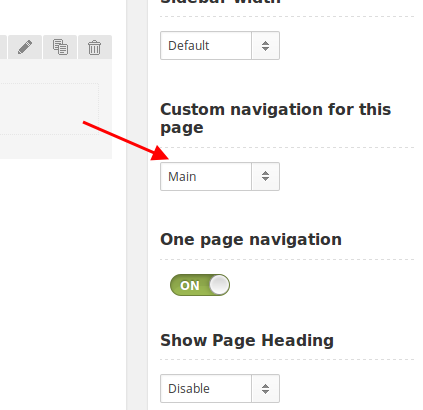
I’ve selected the menu in the page settings
https://s3.amazonaws.com/fvd-data/notes/168674/1426581291-W76DqA/screen.png
and now Contact anchor is working. Please clear browser cache and check.
Please update Woocommerce plugin to the latest 2.3.6 version and check Reviews tab after that.
Thank you.
Regards,
Eva Kemp.
Hello,
If you’re using child theme you need make style changes in style.css of the child theme. So I’ve added the code in this file. Please check single product page now and clear browser cache before.
Thank you.
Regards,
Eva Kemp.
Hello,
I’ve added the form in the center in a new row.
Please check it. You can remove the form on the right.
Concerning the translation, you didn’t create any .po files with your translation in the directory wp-content/themes/woopress/languages. Please read our documentation carefully
https://www.8theme.com/demo/docs/woopress/#!/1_how_to_translate
Thank you.
Regards,
Eva Kemp.
Hello,
Please take our apologies for such experience with the theme.
We have already created and included child theme in the theme package. You just need to find woopress-child folder in the package and upload it to /wp-content/themes/ folder of your server.
We can help you with the theme set up if you describe your queries with details.
Thank you.
Regards,
Eva Kemp.
Hello,
Is your issue resolved now?
Thank you.
Regards,
Eva Kemp.
Hello,
Could you please clear a database of your site in hosting control panel to be able to install the theme from scratch? Or create a new database and write new settings in wp-config.php file.
Thank you.
Regards,
Eva Kemp.
Hello,
Please update all required plugins to the latest versions:
https://www.8theme.com/download-plugins/
Also write your email address in Chat Console > Options > General Settings > “Where should offline messages go?” to receive messages.
Thank you.
Regards,
Eva Kemp.
Hello,
Did you check spam folder in your email account?
Thank you.
Regards,
Eva Kemp.