Hello,
You’ve already had “Contact us” and “Contact Page 2” pages.
We don’t have About Us page on our demo site. Other pages you can create using Visual Composer editor.
Regards,
Eva Kemp.

Hello,
You’ve already had “Contact us” and “Contact Page 2” pages.
We don’t have About Us page on our demo site. Other pages you can create using Visual Composer editor.
Regards,
Eva Kemp.
Hello,
1. I’ve added this code in style.css of the child theme:
.rev_slider_wrapper .tparrows::before {
margin-top: -3px !important;
}
Please check slider arrows now.
2. Provide us with a link where you’re using button in Visual Composer.
3. Your WordPress is up to date. Please clarify what button you’re talking about.
Thank you.
Regards,
Eva Kemp.
Hello,
We’ve edited the file theme-functions.php.
Please don’t worry, that bug will be fixed in the next theme update.
Thank you.
Regards,
Eva Kemp.
Hello,
I’ve increased memory_limit value. Adding define('WP_MEMORY_LIMIT', '240M'); to wp-config has fixed it. Please check Revolution Slider settings now and clear browser cache before.
As I see Ultimate VC Addons plugin is installed and your site is working fine.
Regards,
Eva Kemp.
Hello @mercy20,
Could you please provide us with wp-admin panel credentials?
Thank you.
Regards,
Eva Kemp.
Hello,
Please add this code in custom.css file:
@media (min-width: 768px) {.single-product-sidebar {
  width: 25% !important;
}}
Regards,
Eva Kemp.
Hello,
Please add this code in custom.css file:
img.hide-image {
height: 300px;
}
How to create custom.css you can watch in this tutorial.
Regards,
Eva Kemp.
Hello,
As I see the images are shown fine:
http://storage3.static.itmages.com/i/15/0326/h_1427377447_2535722_cbb54503d0.png
Could you please show a screenshot where you see the issue?
Thank you.
Regards,
Eva Kemp.
Hello @mercy20,
We’re glad you’ve found the solution.
If there are any questions feel free to contact us.
Thank you.
Regards,
Eva Kemp.
Hello,
I’ve added this code in custom.css block:
@media (max-width: 979px) {.product-loop.products-grid.product-count-3 {
width: 100% !important;
} }
Please check products page on mobile devices.
Thank you.
Regards,
Eva Kemp.
Hello,
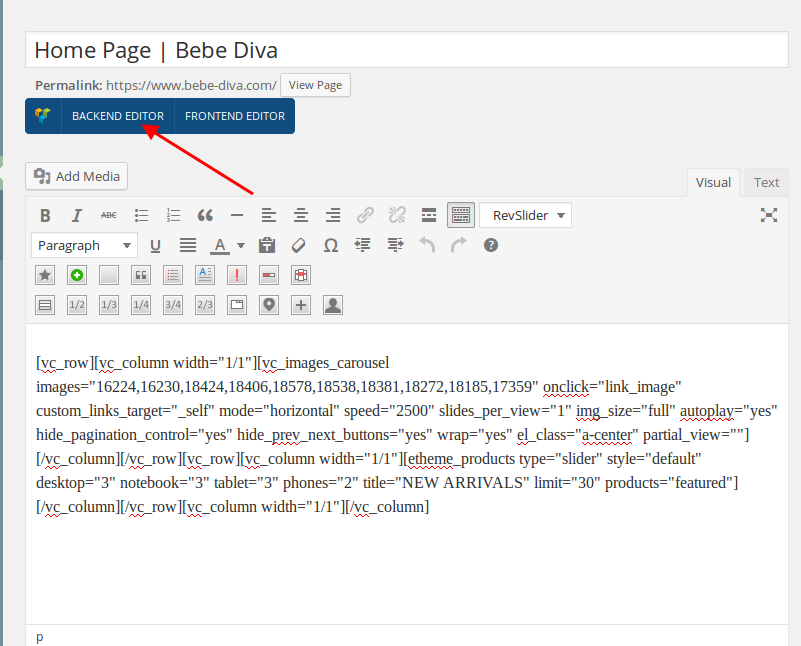
You need click “Backend editor” button in the page editor and Visual Composer editor will be available:
https://s3.amazonaws.com/fvd-data/notes/168674/1427374638-yHhTqX/screen.png
Thank you.
Regards,
Eva Kemp.
Hello,
Now we’re getting 502 error when trying to access wp-admin panel.
Please contact your host concerning this issue.
Regards,
Eva Kemp.
Hello,
The same issue persists with default WordPress theme.
You can check it yourself, switch the theme to Twenty Fifteen or other one in Appearance > Themes.
You need contact Woocommerce support concerning this problem.
Regards,
Eva Kemp.
Hello,
I’ve removed the code
.menu-item-100{margin-left:-12px ; margin-right:-14px}
and added this one:
.menu-item-100 a{
  padding: 9px 8px !important;
}
Please check menu now.
Regards,
Eva Kemp.
Hello,
You’re welcome.
We’ll include these fixes in the next update.
Regards,
Eva Kemp.
Hello,
To change breadcrumbs background go to Theme Options > Header > Breadcrumbs background and upload your picture.
To add media social icons on the top bar you need add shortcode [share] in Text widget and drag it into “Place in header top bar” area in Appearance > Widgets.
Thank you.
Regards,
Eva Kemp.
Hello,
Not all files were uploaded to a server. I’ve reuploaded theme files and activated the theme.
Please check it now.
Thank you.
Regards,
Eva Kemp.
Hello,
You need translate this text in wp-content/plugins/js_composer/include/templates/shortcodes/vc_teaser_grid.php (line 181).
Regards,
Eva Kemp.
Hello,
You wrote information about royal theme in style.css file of the child theme, but you’re using Legenda theme and not Royal theme. I’ve recreated style.css and edited functions.php file.
Please check your site now.
Thank you.
Regards,
Eva Kemp.
Hello,
You need translate theme files as described in the documentation:
https://www.8theme.com/demo/docs/idstore/index.html#!/how_to_translate
Thank you.
Regards,
Eva Kemp.
Hello,
Could you please show a screenshot of a problem for better understanding?
As I see there are only demo currency symbols on the top bar, but I don’t see any Arabic symbols.
Thank you.
Regards,
Eva Kemp.
Hello,
1. Please add this code in custom.css block to change height and color of progress button:
.progress-button .progress, .progress-button .progress-inner {
	background-color: blue !important;
	height: 10px !important;
	margin-top: 10px;
}
2. You need edit the file wp-content/themes/royal/framework/woo.php (section “! Top Cart Widget”, lines 1224 and 1327).
Regards,
Eva Kemp.
Hello,
I’ve installed Creative template via Theme Options > Import/Export, selected template and clicked “Install” button. To have it the same as on our demo you need use 2nd or 3rd header type. I’ve selected the second header type in Theme Options > Headers.
Also I’ve set “Creative” page as your home page in Settings > Reading > “Front page:” and changed it in Appearance > Menus.
Please clear browser cache and check the site.
Thank you.
Regards,
Eva Kemp.
Hello,
I’ve set permalinks settings to default and now products information is loading on single product pages.
Please clear browser cache and check.
Thank you.
Regards,
Eva Kemp.
Hello,
You need go to WPML > String translation > scroll down to the bottom of the page and click the link “Translate texts in admin screens”, find custom tab title, tick it and click “Apply” button at the bottom, for example:
http://imgur.com/Sysfujm
This way it will be available for translation.
Thank you.
Regards,
Eva Kemp.
Hello,
This has been fixed as well.
Please check.
Regards,
Eva Kemp.
Hello,
Please specify what folder your site files are located in.
Thank you.
Regards,
Eva Kemp.
Hello,
May we update Woocommerce plugin to check the issue?
Thank you.
Regards,
Eva Kemp.
Hello,
You’re welcome.
Regards,
Eva Kemp.
Hello,
1. Your changes will remain after switching the themes.
2. I’ve selected “My account” page in Woocommerce > Settings > Accounts tab > My Account Page.
Now My Account page is working fine. Also I’ve selected Wishlist page in YIT Plugins > Wishlist > General Settings > Wishlist Page. Set price for your products and check “Add to basket” button and Cart page.
Please clear browser cache and check the pages now.
4. Those pages don’t need to be added to the menu if you don’t want it.
Thank you.
Regards,
Eva Kemp.