
Hello @Ian Welham,
Please provide us with FTP and wp-admin panel credentials in Private Content.
Thank you.
Regards,
Eva Kemp.

Hello @Ian Welham,
Please provide us with FTP and wp-admin panel credentials in Private Content.
Thank you.
Regards,
Eva Kemp.
Hello,
Do you mean these arrows when talking about accordion?
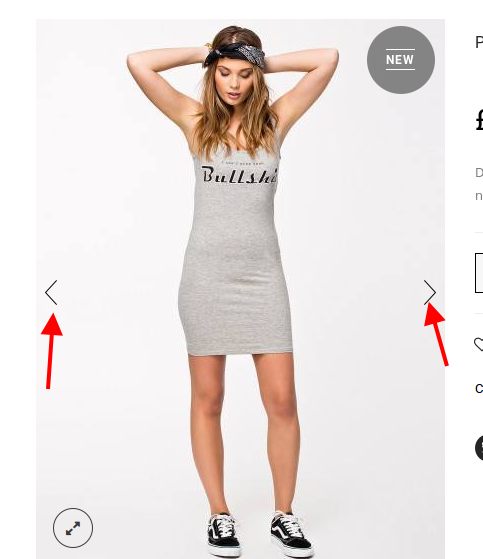
If so you need either change background of your image or edit arrows picture with some image editor because those arrows are loaded from this picture wp-content/themes/royal/images/sprite/icons.png.
I’ve imported Delivery page for you. It’s located in wp-admin panel > Pages > Delivery.
Please check it.
Thank you.
Regards,
Eva Kemp.
Hello,
That error may be caused by your server configuration. Please refer to these articles
https://wordpress.org/support/topic/http-error-in-media-upload-tool
http://wordpress.stackexchange.com/questions/59763/how-to-fix-http-error-when-uploading-images
Thank you.
Regards,
Eva Kemp.
Hello,
Please try to use this code for icons:
.aio-icon i {
    vertical-align: -moz-middle-with-baseline;
}
Thank you.
Regards,
Eva Kemp.
Hello,
You’re welcome.
Regards,
Eva Kemp.
Hello,
You’re welcome.
Regards,
Eva Kemp.
Hello,
You’re welcome.
Regards,
Eva Kemp.
Hello,
Sorry, but that is related to Visual Composer configuration. Also Ultimate VC Addons plugin may slow it.
Regards,
Eva Kemp.
Hello,
Please provide us with wp-admin panel credentials in Private Content.
Thank you.
Regards,
Eva Kemp.
Hello @corinneo,
We’re glad you managed to find the solution.
Regards,
Eva Kemp.
Hello,
1. Please add this code in custom.css file:
.empty-category-block p {
    display: inline-block;
    margin-right: -120px;
    margin-left: 200px;
}
2. Add this code in custom.css:
.uavc-list-content {
    display: inline-flex !important;
}
Please show a screenshot concerning search image issue.
Thank you.
Regards,
Eva Kemp.
Hello,
You’re welcome.
Regards,
Eva Kemp.
Hello,
You didn’t provide site url.
The “taxi cab” picture is added with help of Visual Composer editor. It’s also described in our documentation:
https://www.8theme.com/demo/docs/leader/#!/visual_composer > Parallax effect.
Thank you.
Regards,
Eva Kemp.
Hello,
Please provide us with wp-admin panel credentials in Private Content.
Thank you.
Regards,
Eva Kemp.
Hello,
I’ve edited the previous code and added this one:
.product_list_widget .star-rating {
   float: left;
}
Please check the widget now.
Sorry, but if to move star rating icons they will be also moved “Top Rated Products” widget.
I’ve just added products to cart and then removed them but they are still shown in “Recently Viewed” section. Please clear your browser cache and check again.
Thank you.
Regards,
Eva Kemp.
Hello,
I’ve activated the plugin.
Please check.
Regards,
Eva Kemp.
Hello,
In this case you need buy the plugins yourself.
All plugins are external extensions which are included into theme because for each product we purchase “Extended license” and that’s why we are able to include it into them. The plugins work fine without activation and you can always get actual version if you want directly from us https://www.8theme.com/download-plugins/ . We update plugins with theme updates from time to time so plugins will be also updated with each next theme update. The option with registering of the plugins has been already added to plugin and this only allows you to get automatic updates and support for the plugins directly from authors if you need. You don’t need to register these products because it is not required but if you want to get those features, then you need to purchase them directly from the author. This is how it works for all themes on Themeforest and not only in our case.
Thank you.
Regards,
Eva Kemp.
Hello,
If you want to create your own footer you can add appropriate widgets into Footer areas in Appearance > Widgets:
https://www.8theme.com/demo/docs/idstore/index.html#!/widgets
Thank you.
Regards,
Eva Kemp.
Hello,
Please update the theme to the latest version http://themeforest.net/item/blanco-responsive-wordpress-wooecommerce-theme/2755246 and check products categories again.
https://www.8theme.com/demo/docs/blanco/index.html#!/upgrade
Thank you.
Regards,
Eva Kemp.
Hello,
Please provide us with the correct login details to wp-admin panel and FTP.
Thank you.
Regards,
Eva Kemp.
Hello,
The credentials to FTP are incorrect. Please check them.
Also please open access to wp-admin panel as it’s not allowed.
Thank you.
Regards,
Eva Kemp.
Hello,
You’re welcome.
Regards,
Eva Kemp.
Hello,
1. Please read in the documentation how to style Wishlist button:
https://www.8theme.com/demo/docs/legenda/index.html#!/wishlist
2. This is Woocommerce update, not of our theme.
3. Your original image is too small – 350px × 145px.
It should be 2 160px × 2 349px approximately or a bit less. Try to reupload the original image in higher resolution and check it again.
Thank you.
Regards,
Eva Kemp.
Hello,
Some plugin is causing the issue.
Please deactivate all 3rd-party plugins and check the site.
Thank you.
Regards,
Eva Kemp.
Hello,
Some plugin is causing the issue.
Please deactivate all 3rd-party plugins and check the site.
Thank you.
Regards,
Eva Kemp.
Hello,
You need go to WPML > String translation > scroll down to the bottom of the page and click the link “Translate texts in admin screens”, find custom tab title, tick it and click “Apply” button at the bottom.
http://imgur.com/Sysfujm
This way it will be available for translation.
Thank you.
Regards,
Eva Kemp.
Hello,
You’re welcome.
Regards,
Eva Kemp.
Hello,
There is compatibility bug with new version of Wishlist plugin and our theme.
You can upload old plugin version via FTP. I’ve sent the plugin archive to your email address.
A new fix will be implemented in the next theme update.
Please take our apologies for inconveniences.
Thank you.
Regards,
Eva Kemp.
Hello,
Please read this article how to mark featured and new products:
https://support.8theme.com/index.php?/Knowledgebase/Article/View/9/0/how-to-mark-products-as-featured-and-new-ones
Thank you.
Regards,
Eva Kemp.
Hello,
We’re glad the issue has been fixed.
I’ve removed admin credentials from the previous post.
Thank you.
Regards,
Eva Kemp.









