Hello,
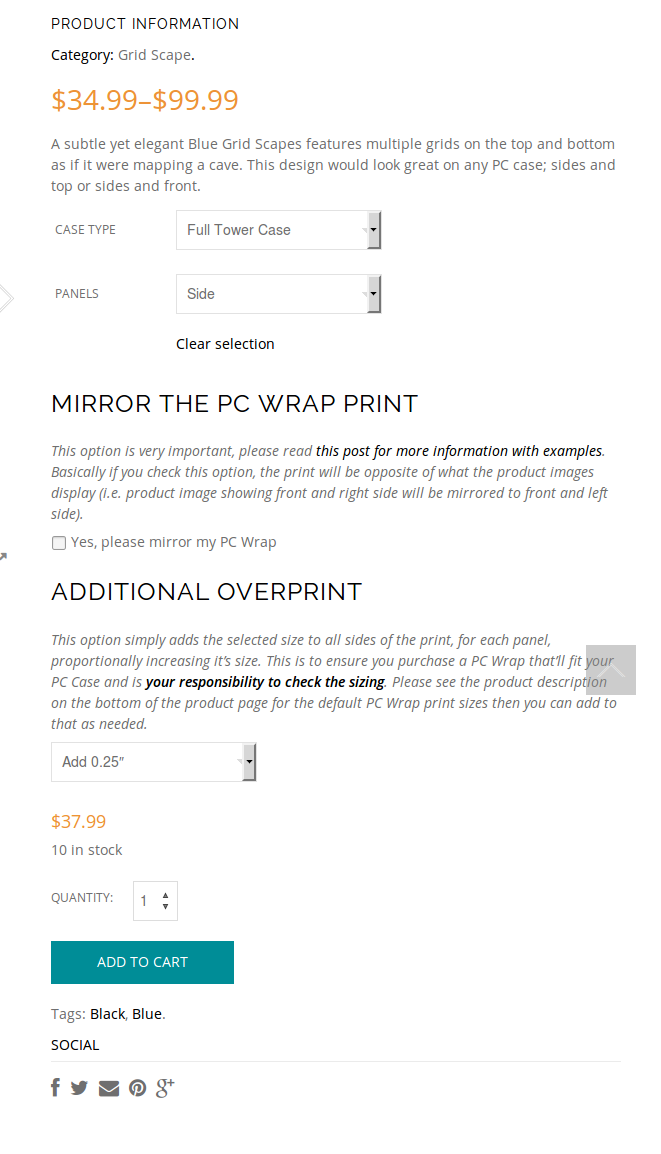
As I see “Add to Cart” button is shown when additional options are selected:
https://s3.amazonaws.com/fvd-data/notes/168674/1427882062-U1BzLN/screen.png
Please check again.
Regards,
Eva Kemp.

Hello,
As I see “Add to Cart” button is shown when additional options are selected:
https://s3.amazonaws.com/fvd-data/notes/168674/1427882062-U1BzLN/screen.png
Please check again.
Regards,
Eva Kemp.
Hello,
As I see there is no code added in child theme files.
Also your query requires additional customization which is beyond of our basic support scope.
Thank you for understanding.
Regards,
Eva Kemp.
Hello,
Please use this code in custom.css file:
.products-grid .product-title {
 margin-top: 20px;
}
Regards,
Eva Kemp.
Hello,
Please provide us with FTP and wp-admin panel credentials in Private Content.
Thank you.
Regards,
Eva Kemp.
Hello,
Your image is too small. The original dimensions should be 1425px × 1900px approximately.
So please reupload your images in high resolution.
Thank you.
Regards,
Eva Kemp.
Hello,
Please add this code in custom.css file:
.home .header-type-2.slider-overlap .header .menu > li > a {
    color: #000 !important;
}
How to create custom.css you can watch in this tutorial (it’s for Legenda theme but the process is the same).
Cart icon can be changed only with some image editor as it’s loading from the file wp-content/themes/woopress/images/sprite/icons.png.
Regards,
Eva Kemp.
Hello,
Here you can find how to remove and add custom tabs:
http://docs.woothemes.com/document/editing-product-data-tabs/
The code should be added in functions.php file.
Regards,
Eva Kemp.
Hello,
Please clear browser cache and check your site now.
Regards,
Eva Kemp.
Hello,
We’re glad you managed to fix the issue.
If there are any questions feel free to contact us.
Regards,
Eva Kemp.
Hello,
That background is added in the page content. Go to Pages > edit the page “Hakkımızda” and edit the first row in Visual Composer editor in background section.
To change slug “portfolio” edit the file wp-content/themes/woopress/framework/portfolio.php (line 41), find the code 'rewrite' => array('slug' => 'portfolio') and change “portfolio” text.
Regards,
Eva Kemp.
Hello,
I’ve added Revolution Slider element in the first row and “home” anchor redirects to the slider.
Please check.
Regards,
Eva Kemp.
Hello,
I’ve added this code in custom.css file:
@media only screen and (max-width: 992px) {.footer-top .textwidget {
  height: 180px;
}}
Please check the footer now.
Regards,
Eva Kemp.
Hello,
Cross-sells are shown on the Cart page and up-sells are shown on a single product page with the title “You may also like”.
Regards,
Eva Kemp.
Hello,
Sorry for a delay.
I’ve added this code in custom.css file:
.st-container .st-pusher {
   overflow: hidden !important;
}
Please check the site and clear browser cache before.
Thank you.
Regards,
Eva Kemp.
Hello,
I’ve added this code in custom.css file:
.header-vertical-enable .page-wrapper .header-type-vertical {
   background-color: #000 !important;
}
Please check the site now.
Regards,
Eva Kemp.
Hello,
Do you have back up of your files and database?
Please contact your host and ask them to restore your database and files from the back up.
Thank you.
Regards,
Eva Kemp.
Hello,
Please check now and clear browser cache before.
Is it fine?
Regards,
Eva Kemp.
Hello,
Sorry, you need add the code in custom.css file.
How to create custom.css you can watch in this tutorial (it’s for Legenda theme but the process is the same).
Regards,
Eva Kemp.
Hello,
Did you check if the issue persists with default WordPress theme? Please check it. If the issue persists there too then you have to contact the plugin author.
Thank you.
Regards,
Eva Kemp.
Hello,
You can make changes for single product page in Theme Options > Single Product Page. If you want to changes something in the content you need edit php file wp-content/themes/royal/woocommerce/content-single-product.php and the files in the directory wp-content/themes/royal/woocommerce/single-product.
Thank you.
Regards,
Eva Kemp.
Hello,
You’re welcome.
Regards,
Eva Kemp.
Hello,
Please read Woocommerce documentation how related products work:
http://docs.woothemes.com/document/related-products-up-sells-and-cross-sells/
As you can see:
Related products can not be specified in the admin, but can be influenced by grouping similar products in the same category or by using the same tags.
Regards,
Eva Kemp.
Hello,
We’re glad you fixed the problem.
If there are any questions feel free to contact us.
Regards,
Eva Kemp.
Hello,
If you want to have similar sizes for all images you should upload them with original dimensions 1425px × 1900px approximately.
Please upload images of high resolution.
Regards,
Eva Kemp.
Hello,
Please try to use this code instead of the previous one:
h2.component_title.product_title, h4.composited_product_title.product_title {
  font-size: 20px !important;
}
Thank you.
Regards,
Eva Kemp.
Hello,
Yes, please provide us with wp-admin panel and FTP credentials and specify what icons aren’t shown.
Thank you.
Regards,
Eva Kemp.
Hello @astromantra,
It is WP limit, not the theme. Here are some explanations:
http://www.wpbeginner.com/wp-tutorials/how-to-fix-the-custom-menu-items-limit-in-wordpress/
https://core.trac.wordpress.org/ticket/14134
Read this topic, maybe you’ll find a workaround
http://wordpress.org/support/topic/wordpress-menu-item-limit
Regards,
Eva Kemp.
Hello,
You’re welcome.
Regards,
Eva Kemp.
Hello,
That code must be placed in functions.php file in the wp-content/themes/woopress directory or your child theme folder.
You can download the latest versions of plugins from this link:
https://www.8theme.com/download-plugins/
Regards,
Eva Kemp.
Hello,
Please ask your host to increase memory_limit value and check orders after that.
Regards,
Eva Kemp.