Hello @ctrimde,
You need update the theme via FTP and don’t forget to create a back up of your files and database before update.
Watch our tutorial how to update the theme:
https://www.youtube.com/watch?v=KdWESIIPU1k
Regards,
Eva Kemp.

Hello @ctrimde,
You need update the theme via FTP and don’t forget to create a back up of your files and database before update.
Watch our tutorial how to update the theme:
https://www.youtube.com/watch?v=KdWESIIPU1k
Regards,
Eva Kemp.
Hello,
You need create child theme as described here http://codex.wordpress.org/Child_Themes and copy the files you modified into child theme folder.
Regards,
Eva Kemp.
Hello,
You’re welcome.
Regards,
Eva Kemp.
Hello,
We’re glad you’ve found the solution.
If there are any questions feel free to contact us.
Regards,
Eva Kemp.
Hello,
Cross-sell products that you set are displayed only on Cart page. To have related products shown you need add up-sells.
Also related products are loaded from one category. As I see the product “Myrrh Anointing Oil” is added to the category “Anointing Oil” and it’s the only product in this category. So you need add more products to the categories to have related products shown.
Regards,
Eva Kemp.
Hello,
As I see the page is loading and sidebar is shown:
https://s3.amazonaws.com/fvd-data/notes/168674/1427822879-3JBCmS/screen.png
Please clear browser cache and check again.
Thank you.
Regards,
Eva Kemp.
Hello,
Sorry, but we’re still getting the same error even with https protocol.
Please ask your host to increase memory_limit value and check page editor after that.
Thank you.
Regards,
Eva Kemp.
Hello,
Please add this code to change color for title in breadcrumbs section:
.bc-type-5 .title, .bc-type-5 a {
   color: black !important;
}
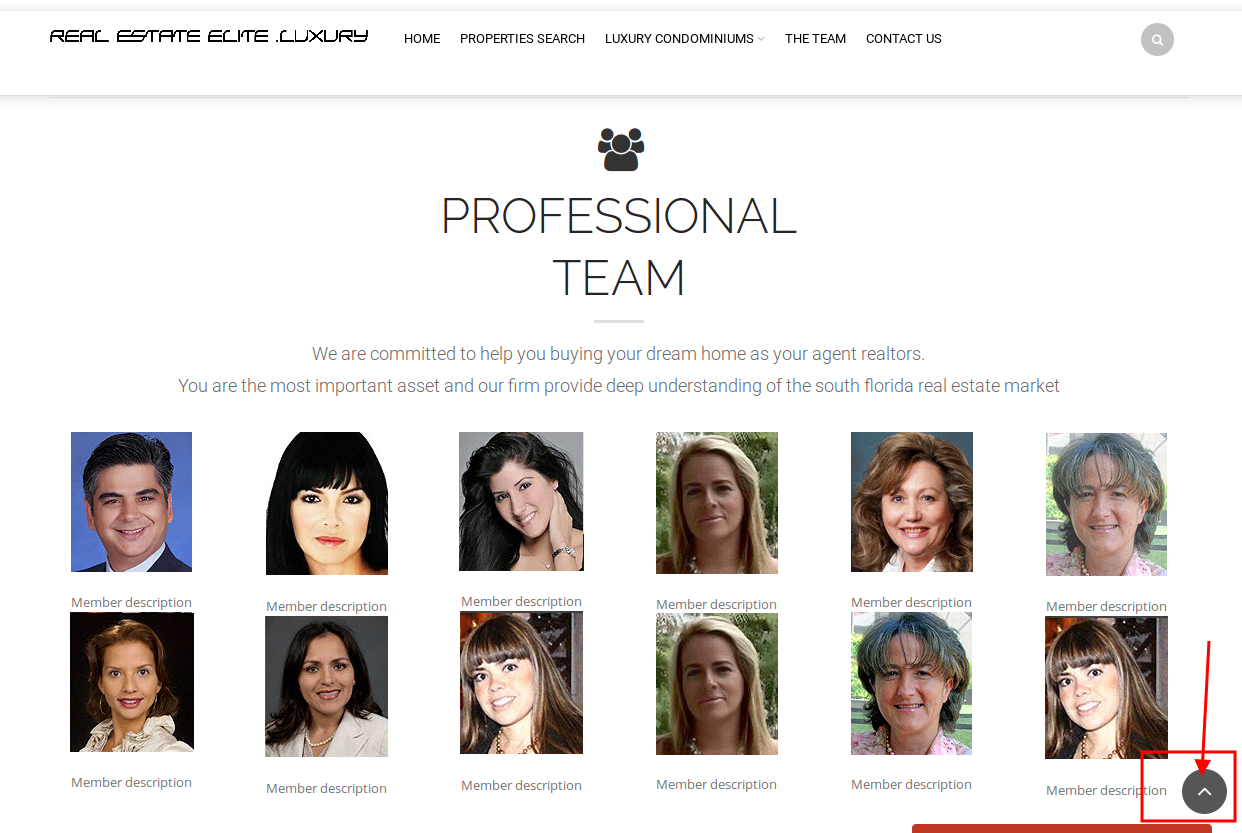
When one page menu item is clicked there is “back to top” button that redirects you to the top of the page:
https://s3.amazonaws.com/fvd-data/notes/168674/1427822127-IO21Q1/screen.png
You don’t need to click on “Home” item.
Regards,
Eva Kemp.
Hello,
Please use this code in custom.css file:
.header-vertical-enable .esg-container-fullscreen-forcer {
   margin-bottom: -40px !important;
}
Regards,
Eva Kemp.
Hello,
We’ve taken this issue into our account and it’ll be fixed in the next theme update.
Please take our apologies for inconveniences.
Regards,
Eva Kemp.
Hello,
Navigate to Portfolio -> Edit project page-> at the right sidebar you can add featured images. When you upload images for featured image of a project you should select “Uploaded to this post” from drop down menu and click “Set featured image”:
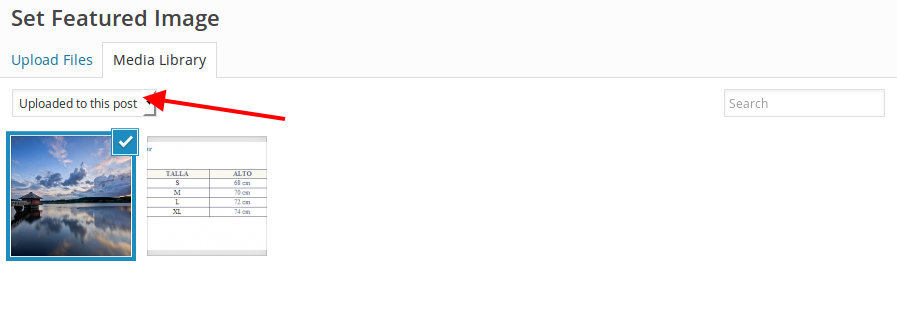
This way you’ll get a slider in the main image section.
To have the same description add this code in text editor for your project page:
Donec non interdum lacus, in dapibus justo. Morbi egestas mauris eu ullamcorper cursus. Quisque dapibus posuere magna ac ultrices. Vestibulum ac velit vel erat pellentesque vulputate eu sed sem. Vivamus nec turpis dapibus, dignissim justo sed, iaculis neque. Sed facilisis ligula erat, sed vulputate tortor egestas tristique. <!--more--> Aliquam non erat sodales, pulvinar purus in, congue mi. Integer dignissim augue at eros imperdiet, eget adipiscing lorem pretium. Suspendisse congue urna eget enim tincidunt rhoncus.
<h5>Project details</h5>
<table class="table">
<tbody>
<tr>
<td><strong>Author:</strong></td>
<td>8theme</td>
</tr>
<tr>
<td><strong>Posted:</strong></td>
<td>23 June 2013</td>
</tr>
<tr>
<td><strong>Size:</strong></td>
<td>1600px x 2400px / 5.2mb</td>
</tr>
<tr>
<td><strong>Copyrights:</strong></td>
<td>Eight Theme</td>
</tr>
</tbody>
</table>
Regards,
Eva Kemp.
Hello,
Please add this code in custom.css file:
.footer .container {
    padding-top: 10px !important;
}
To change color for bold font use this code:
strong {
    color: #787373 !important;
}
Could you please clarify your questions about images?
Regards,
Eva Kemp.
Hello,
I’ve checked your Checkout page and have been successfully redirected to PayPal page after clicking “Proceed to PayPal” button.
Please clarify with more details how we can replicate the issue.
Thank you.
Regards,
Eva Kemp.
Hello @UrbnDesignz,
This option is added by Ultimate VC Addons plugin.
But Legenda theme isn’t compatible with it, so you should use standard background option.
Sorry.
Regards,
Eva Kemp.
Hello,
The credentials are incorrect.
We’ve got this error:
Login authentication failed
Please check them.
Thank you.
Regards,
Eva Kemp.
Hello,
You must make changes for the theme files in a child theme directory.
We recommend you to create child theme http://codex.wordpress.org/Child_Themes and copy the files you modified in there.
Please provide us with FTP and wp-admin panel credentials to check the issue with 404 page.
Thank you.
Regards,
Eva Kemp.
Hello,
Please try to use this code in custom.css file to reduce font size:
.single-product-page .component_title .product_title {
    font-size: 20px !important;
}
How to create custom.css you can watch in this tutorial.
Thank you.
Regards,
Eva Kemp.
Hello,
As I see your portfolio page looks the same as on our demo site.
If you want to show excerpt under the title you need enable it in Theme Options > Portfolio > Show Excerpt > On.
Unfortunately there are no social media icons option for portfolio page. Sorry.
To center the titles use this code in custom.css file:
.portfolio-item h3 {
   text-align: center;
}
Thank you.
Regards,
Eva Kemp.
Hello @64digital,
Thank you for wp-admin credentials but we also need FTP access to fix the issues.
If you don’t want to provide us with FTP login details then you need edit the file wp-content/themes/theleader/framework/woo.php on line 206 and replace $woocommerce->nonce_field with wp_nonce_field.
Also you should update Visual Composer plugin. You can download the latest version at this link: https://www.8theme.com/download-plugins/ .
Regards,
Eva Kemp.
Hello,
What is FTP host?
We’re still getting the error
“Response: 530 Login authentication failed
Error: Critical error
Error: Could not connect to server”
Please check if you’ve written the correct login details.
Thank you.
Regards,
Eva Kemp.
Hello,
When the latest theme version 3.7 is activated there are no those errors.
So you should use the latest version of the theme to avoid such errors and some other bugs.
Thank you.
Regards,
Eva Kemp.
Hello,
You should update the theme to 3.7 version and Woocommerce to 2.3.7 version.
Please do this and check the site after that.
Thank you.
Regards,
Eva Kemp.
Hello,
All your images must be named with latin characters.
I’ve uploaded the image with latin characters in title and it’s shown. Please check the link you provided in the first post and clear browser cache before.
Regards,
Eva Kemp.
Hello,
Your FTP credentials are incorrect.
Please check them.
Thank you.
Regards,
Eva Kemp.
Hello,
You may try to use this plugin:
https://wordpress.org/plugins/search-by-product-tags-for-woocommerce/
Regards,
Eva Kemp.
Hello,
Our developers are working on it and a new version should be released in a week approximately.
Sorry for inconveniences.
Regards,
Eva Kemp.
Hello @64digital,
Please provide us with FTP and wp-admin panel credentials in Private Content.
Thank you.
Regards,
Eva Kemp.
Hello,
Sorry, but your question concerning “the commission for PayPal and default tables WooCommerce” is unclear. Could you please clarify with more details?
Regards,
Eva Kemp.
Hello,
Yes, you’re.
Sorry, my fault. There are a lot of work and I might have missed some information.
Please take my apologies.
Regards,
Eva Kemp.
Hello,
Your original image sizes are too small.
The dimensions should be 1000px × 1000px approximately, so bigger than 600px.
Please try to upload high resolution images.
Thank you.
Regards,
Eva Kemp.