

Hello finleydesign,
no problems! We are always happy to be helpful. Have a nice day!
Regards,
Stan Russell.

Hello dubhlinn,
we are happy that your problem is solved! Have a nice day!
Regards,
Stan Russell.
Hello finleydesign,
no problems! We are always happy to be helpful. Have a nice day!
Regards,
Stan Russell.
Hello,
unfortunately Legenda does not have this icon. If you want to use it – please try to implement it using Font Awesome. Sorry for inconvenience.
Regards,
Stan Russell.
Hello,
please show on screenshot what result do you want to achieve and we will provide you with needed details.
Regards,
Stan Russell.
Hello,
here you can find detailed info about creating footer in Woopress: https://www.8theme.com/demo/docs/woopress/index.html#!/0_footer
Regards,
Stan Russell.
Hello,
is your problem solved?
Regards,
Stan Russell.
Hello,
please ask your host to increase size of your PHP memory limit.
Regards,
Stan Russell.
Hello,
we are happy that you have solved your problem! Have a nice day!
Regards,
Stan Russell.
Hello radenfelix,
we are always happy to be helpful! This problem will be fixed in next Visual Composer’s release.
Regards,
Stan Russell.
Hello,
would you kindly show us on screenshot what is the problem with css?
Regards,
Stan Russell.
Hello,
please read this part of theme documentation: https://www.8theme.com/demo/docs/legenda/index.html#!/footer
You need to create Static block for footer and set it in Visual Composer to have 4 rows as described in documentation.
Regards,
Stan Russell.
Hello jamieburbidge,
it is small Visual Composer bug and can be fixed in two ways:
1) open file wp-content\plugins\js_composer\include\helpers\helpers.php and change line 1155 to function xyz_hex2rgb( $hex ) {
and line 131 in wp-content\plugins\js_composer\include\templates\shortcodes\vc_line_chart.php to:
$rgb = xyz_hex2rgb( $color );
2) temporary switch to default wordpress theme, activate plugin and switch back to Woopress.
Please note that this error will be fixed in next plugin releases.
Regards,
Stan Russell.
Hello,
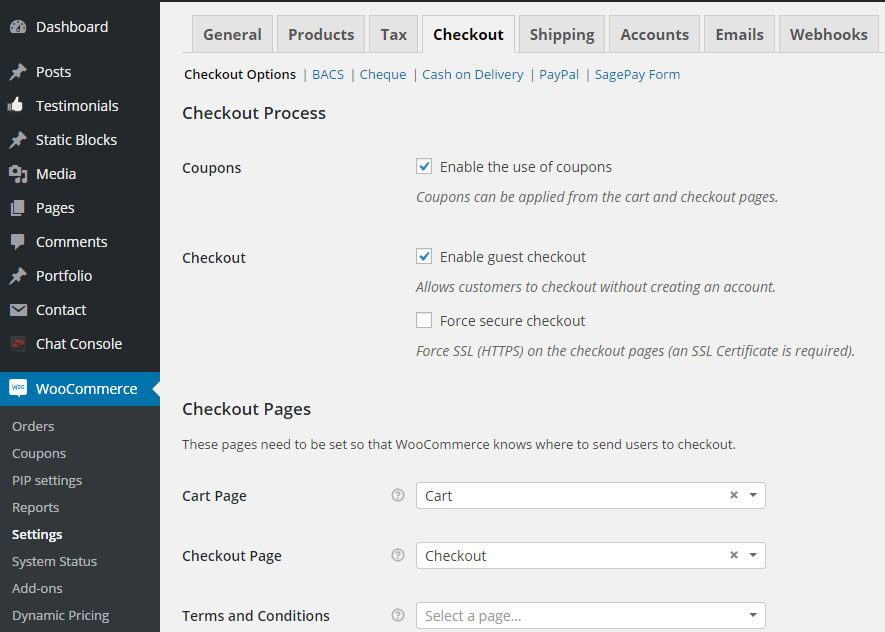
we have set your Cart and Checkout pages in Dashboard > Woocommerce > Settings > Checkout > Checkout pages.
Regards,
Stan Russell.
Hello,
please provide us with admin credentials for your site in private content.
Regards,
Stan Russell.
Hello,
please provide us with FTP credentials for your site in private content.
Regards,
Stan Russell.
Hello radenfelix,
we have successfully activated plugin for you. Please check your site.
Hello atombomb007,
please provide us with admin credentials for your site in private content and we will fix this Visual Composer’s error for you.
Regards,
Stan Russell.
Hello,
Visual Composer 4.6.1 will be available for download in nearest time.
Please accept our apologies for inconvenience.
Regards,
Stan Russell.
Hello,
this is small Visual Composer’s bug which will be fixed in future plugin releases.
Please provide us with admin credentials for your site and we will fix this error for you.
Regards,
Stan Russell.
Hello,
please provide us with admin credentials for your site in private content.
Testimonials problem is not related to these plugins as it is implemented as part of a theme at the moment. We are doing our best to fix this feature.
To display testimonials right now please use Post Grid or Post slider elements of Visual Composer. Just select content type as “testimonials”.
Regards,
Stan Russell.
Hello,
you are welcome!
Regards,
Stan Russell.
Hello,
please add following code to your custom.css file:
.products-tabs .tab-title:after {
  width: 3px;
  height: 15px;
  top: 2px;
  right: -18px;
}
Regards,
Stan Russell.
Hello,
please add following css code to your custom.css:
.woocommerce-checkout .woocommerce-info {
display:none;
}
Regards,
Stan Russell.
Hello rawlsenterprises,
you are welcome!
Regards,
Stan Russell.
Hello,
please add following css code to your custom.css file:
.empty-category-block{
display:none
}
Regards,
Stan Russell.
Hello,
please create test slider with 4 slides, check how it is displayed and let us know results.
Regards,
Stan Russell.
Hello,
you are welcome!
Regards,
Stan Russell.
Hello Gursimran18,
unfortunately our theme does not have such feature by default. You need to edit theme files if you want to implement it.
Regards,
Stan Russell.
Hello,
please disable caching on your site or update cache because your site is using cached old versions of css files. That’s why code added to child theme’s style.css or custom.css is not displayed.
Regards,
Stan Russell.
Hello,
it is strongly recommended to update theme and plugins using FTP. We can update them for you if you will provide us with FTP credentials for your site in private content.
Regards,
Stan Russell.
Hello,
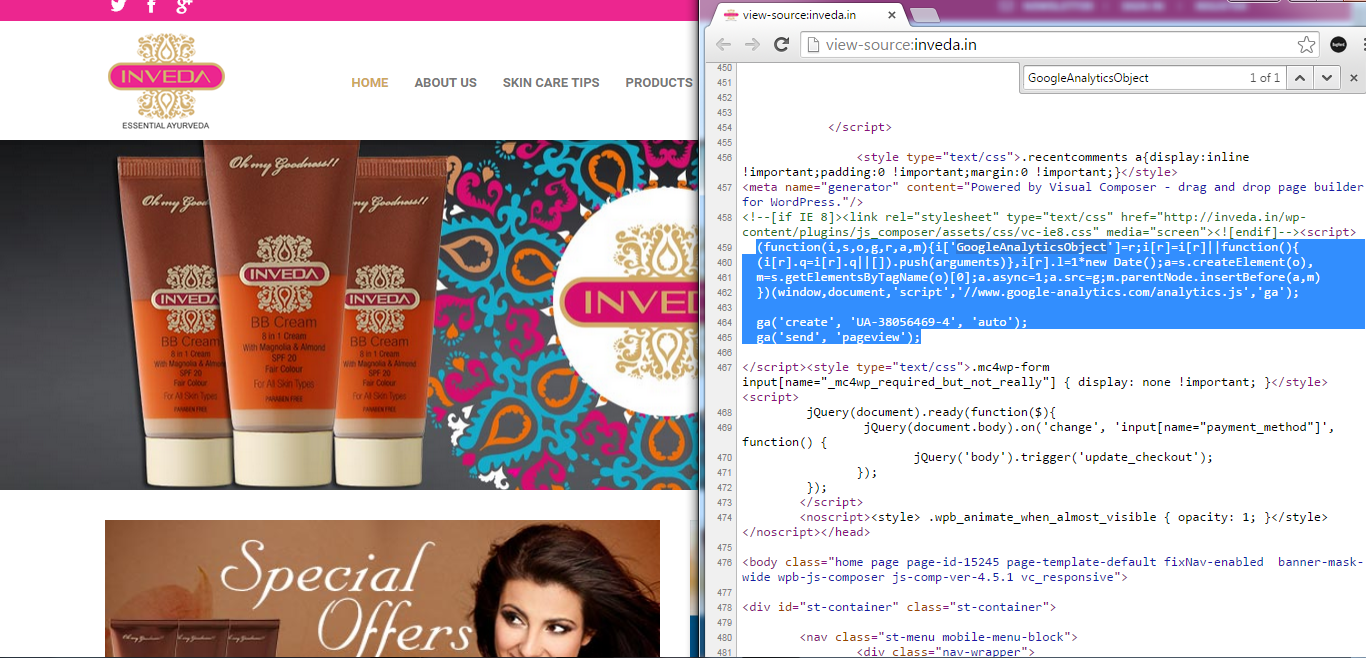
click on right mouse button in Chrome, select ‘View source code’ and search(ctrl+F) for “GoogleAnalyticsObject”. You will be able to see following code:
Regards,
Stan Russell.

Free AI store scan · SalesMax
Paste your store address. SalesMax AI shows which upsell moments are missing. No signup.

Free AI speed test · FlashMax
Paste your site address. FlashMax runs Google Lighthouse for phone and desktop, checks Core Web Vitals and lists what to fix. No signup.
 LawyerWPBakery
(live demo, opens in a new tab)
 Niche MarketMarketplace
(live demo, opens in a new tab)
 PosterPortfolio
(live demo, opens in a new tab)
 Ecotransport StoreElectronics
(live demo, opens in a new tab)
 Painting studioElementor
(live demo, opens in a new tab)
 PerfumeBeauty
(live demo, opens in a new tab)
 Organic milk farmFood & drinks
(live demo, opens in a new tab)
 WeddingBusiness
(live demo, opens in a new tab)
 Sneakers StoreSports & travel
(live demo, opens in a new tab)
 Minimal Fashion StoreFashion
(live demo, opens in a new tab)
 X-Phone StoreElectronics
(live demo, opens in a new tab)
 Minimalist OutfitsFashion
(live demo, opens in a new tab)
 Jewellery Niche MarketMarketplace
(live demo, opens in a new tab)
 Purely HandmadeElementor
(live demo, opens in a new tab)
 Car Parts StoreCars & bikes
(live demo, opens in a new tab)
 Industrial Power Tools StoreElementor
(live demo, opens in a new tab)