Forum Replies Created

Viewing 30 posts - 1,651 through 1,680 (of 2,795 total)
  • Avatar: stan
    Stan Russell
    Participant

    Hello,

    please temporary switch to default WordPress theme and check will you be able to save changes in it?

    Regards,
    Stan Russell.

    Avatar: stan
    Stan Russell
    Participant

    Hello,

    license keys are not needed to use plugins bundled with our theme. You can download latest versions of these plugins here: https://www.8theme.com/download-plugins/
    If you want to receive premium support from plugin author – you need to buy it.

    Regards,
    Stan Russell.

    Avatar: stan
    Stan Russell
    Participant

    Hello,

    would you kindly list all problems that you have with our demo at the moment?

    Regards,
    Stan Russell.

    Avatar: stan
    Stan Russell
    Participant

    Hello,

    unfortunately we do not provide such services but you may ask your hosting provider to enable gzip compression for you or search for third-party plugins for this.

    Regards,
    Stan Russell.

    Avatar: stan
    Stan Russell
    Participant

    Hello,

    we have opened your test product image and it is displayed correctly without any blur:

    Is it displayed in other way for you?

    Regards,
    Stan Russell.

    Avatar: stan
    Stan Russell
    Participant

    Hello jnunoalves,

    we are happy that your problem is solved! Have a nice day!

    Regards,
    Stan Russell.

    Avatar: stan
    Stan Russell
    Participant

    Hello,

    please provide us with admin credentials for your site in private content.

    Regads,
    Stan Russell.

    Avatar: stan
    Stan Russell
    Participant

    Hello,

    You’re welcome.

    Regards,
    Stan Russell.

    Avatar: stan
    Stan Russell
    Participant

    Hello PramaWeb,

    you are welcome!

    Regards,
    Stan Russell.

    Avatar: stan
    Stan Russell
    Participant

    Hello mariemassephoto,

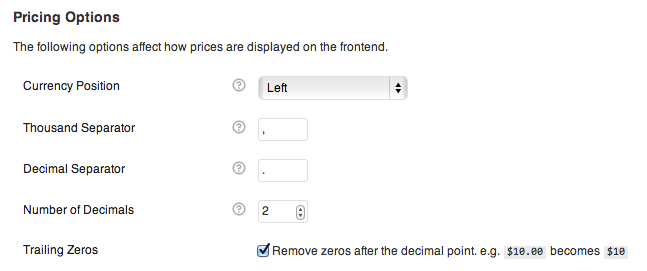
    options for formatting the currency can be found by going to: WooCommerce > Settings > Catalog > Pricing Options

    Number of Decimals option – you can chose the number of digits to appear after the decimal separator.
    Trailing Zeros option – removes zeros after the decimal point. e.g. $10.00 becomes $10

    Regards,
    Stan Russell.

    Avatar: stan
    Stan Russell
    Participant

    Hello,

    please provide us with admin credentials for your site in private content.

    Regards,
    Stan Russell.

    Avatar: stan
    Stan Russell
    Participant

    Hello,

    we are sorry but your request is a bit unclear for us. Please describe it with more details.

    Regards,
    Stan Russell.

    Avatar: stan
    Stan Russell
    Participant

    Hello @arivukamal,

    You’re welcome.

    Regards,
    Stan Russell.

    Avatar: stan
    Stan Russell
    Participant

    Hello,

    please provide us with link to your site and show on screenshot where do you want to have title between two lines.

    Regards,
    Stan Russell.

    Avatar: stan
    Stan Russell
    Participant

    Hello dpac56,

    please specify – what Operating System and browsers are you using to test your site?
    We have tested your site in Chrome, Firefox and Opera in different screen sizes and everything worked correct.

    Regards,
    Stan Russell.

    Avatar: stan
    Stan Russell
    Participant

    Hello,

    we have successfully logged in your Dashboard, temporary switched to default WordPress theme but it would not load:

    This means that problem is not related to our theme as even default WordPress theme is not working.
    Please contact your host for assistance.

    Regards,
    Stan Russell.

    Avatar: stan
    Stan Russell
    Participant

    Hello,

    we have checked your site – product page tabs are displayed and working correct:

    Do you still have problems with product tabs?

    Regards,
    Stan Russell.

    Avatar: stan
    Stan Russell
    Participant

    Hello,

    please provide us with admin and FTP credentials for your site in private content.

    Regards,
    Stan Russell.

    Avatar: stan
    Stan Russell
    Participant

    Hello,
    we can not reach your site as it is protected by ‘Coming soon’ page.
    Please provide us with admin credentials for it in private content and show on screenshot what elements do you want to delete.

    Regards,
    Stan Russell.

    Avatar: stan
    Stan Russell
    Participant

    Hello,

    is your problem solved?

    Regards,
    Stan Russell.

    Avatar: stan
    Stan Russell
    Participant

    Hello,

    you are welcome!

    Regards,
    Stan Russell.

    Avatar: stan
    Stan Russell
    Participant

    Hello,

    please update Visual Composer plugin to latest version and check it.

    Regards,
    Stan Russell.

    Avatar: stan
    Stan Russell
    Participant

    Hello,
    unfortunately our theme does not have feature to include certain slider on every page in one click.
    You need to manually add the Slider to nneded pages in one of these ways:
    1) from the widgets panel (drag the “Revolution Slider” widget to the desired sidebar)
    2) from the post editor (insert the shortcode from the sliders table)
    3) add RevolutionSlider element if you build your page using Visual Composer.
    Sorry for inconvenience.

    Regards,
    Stan Russell.

    Avatar: stan
    Stan Russell
    Participant

    Hello,

    1. In your child theme add a folder /images/
    2. Add your image to this folder
    3. In your child theme style.css add your style element,
    for example this code:

    .image1{
     background-image:url(http:yoursite.com/woopress/wp-content/themes/woopress-child/images/assets/shopbanner.jpg);
    }

    Regards,
    Stan Russell.

    Avatar: stan
    Stan Russell
    Participant

    Hello,

    would you kindly describe your request with more details? It is a bit unclear for us. What results do you want to achieve?

    Regards
    Stan Russell.

    Avatar: stan
    Stan Russell
    Participant

    Hello,

    please try to set My account page in Woocommerce > Settings > Accounts > My account page.
    If this does not help – we will provide you with guide how to edit theme files for changing URLs.

    Regards,
    Stan Russell.

    Avatar: stan
    Stan Russell
    Participant

    Hello,

    please navigate to needed post > Edit post > Featured image > Remove featured image.

    if you want to hide featured images for all blog posts, please add following code to your custom.css file:

    .post-single .wp-picture{
    display:none;
    }

    Regards,
    Stan Russell.

    Avatar: stan
    Stan Russell
    Participant

    Hello,

    you are welcome!

    Regards,
    Stan Russell.

    Avatar: stan
    Stan Russell
    Participant

    Hello,

    is your problem solved?

    Regards,
    Stan Russell.

    Avatar: stan
    Stan Russell
    Participant

    Hello,

    you do not need keys to use plugins bundled with our theme.
    Latest versions or plugins can be downloaded here: http://www.8theme.com/download-plugins/

    Regards,
    Stan Russell.

  • 1 2 3 … 55 56 57 … 92 93 94
    1,651–1,680 of 2,795 posts
Viewing 30 posts - 1,651 through 1,680 (of 2,795 total)