Hello @santo21,
Mail function is disabled on a server where your site is located, that’s why emails from your site can’t be sent.
Please ask your host to enable this function.
Thank you.
Regards,
Eva Kemp.

Hello @santo21,
Mail function is disabled on a server where your site is located, that’s why emails from your site can’t be sent.
Please ask your host to enable this function.
Thank you.
Regards,
Eva Kemp.
Hello @Rawi7,
You’re using a lot of 3rd-party plugins. Please disable them and check home page after that. Some plugin may cause this issue.
Thank you.
Regards,
Eva Kemp.
Hello @Pablo,
We’re glad the issue has been resolved.
If there are any questions feel free to ask us.
Thank you.
Regards,
Eva Kemp.
Hello,
Do you need further assistance from us?
If so then please describe your issue and provide us with wp-admin panel credentials.
Thank you.
Regards,
Eva Kemp.
Hello,
We’re glad you managed to fix the issue.
Enjoy your work.
Regards,
Eva Kemp.
Hello,
Do you still need further assistance concerning that issue in Royal theme?
Thank you.
Regards,
Eva Kemp.
Hello,
You’re welcome.
Regards,
Eva Kemp.
Hello @DiegoSSC,
Please provide us with wp-admin panel and FTP credentials in Private Content.
Thank you.
Regards,
Eva Kemp.
Hello,
You’re using old theme version. Please update it to the latest 1.7 version:
http://themeforest.net/item/royal-multipurpose-wordpress-theme/8611976
https://www.8theme.com/demo/docs/royal/#!/installation_upgrade (1.5 Theme Upgrade)
Thank you.
Regards,
Eva Kemp.
Hello,
Please give us a page link where Posts Grid element is added.
Thank you.
Regards,
Eva Kemp.
Hello,
You’re welcome.
Regards,
Eva Kemp.
Hello @JulianBeats,
I’ve checked your site pages and all icons are centered.
Could you please show a screenshot and provide a page link where icons aren’t aligned correctly?
Thank you.
Regards,
Eva Kemp.
Hello,
Sorry for a delay.
We forwarded your query to the developers and the issue will be fixed per the plugin author’s instruction. Soon our new theme update will be released where this fix will be implemented.
Thank you for your understanding and patience.
Regards,
Eva Kemp.
Hello,
The reason is because of the slider you selected for Recent posts widget. Column width is too small for the posts slider. You should disable it.
Thank you.
Regards,
Eva Kemp.
Hello,
I’ve added one icon to the page you provided. Please look at the screenshot:
https://s3.amazonaws.com/fvd-data/notes/168674/1424357683-JdFta1/screen.png
Clear your browser cache and check the site or check it in another browser.
Thank you.
Regards,
Eva Kemp.
Hello,
Please provide us with wp-admin panel credentials in Private Content to check the issue.
Thank you.
Regards,
Eva Kemp.
Hello @Mods,
Our developers are working on the solution of this problem and it’ll be provided in the next theme update.
Please take our apologies for inconveniences.
Regards,
Eva Kemp.
Hello @Pablo,
Our developers checked speed of the site loading and we can confirm it’s really loading slowly, but that is caused by a server where your site is located, it’s responding too long.
Concerning this issue, you have to contact your hosting provider.
Sorry for inconveniences.
Regards,
Eva Kemp.
Hello @plandman72,
To have “Add to Cart” button element working you need type product ID which should be added to the cart:
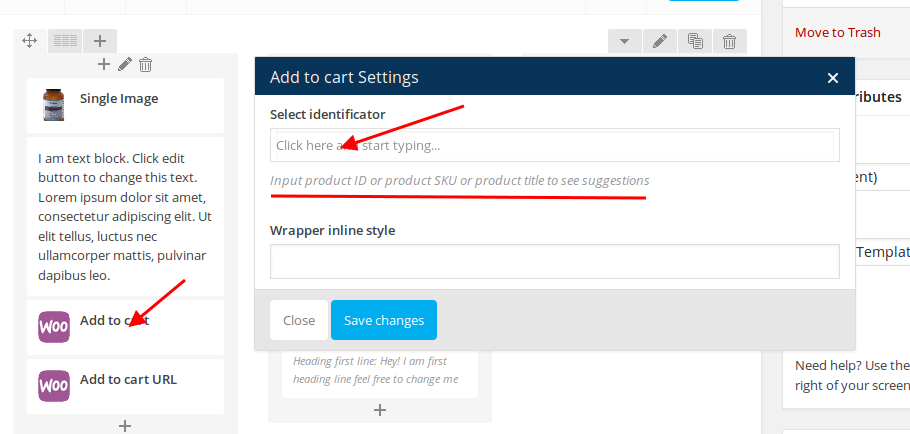
That product should be created in Products section in wp-admin panel.
Also on the Shop page “Add to Cart” button isn’t shown because you didn’t add “Add to Cart” element in Visual Composer editor.
Actually Woocommerce shop page works this way:
– create products in Products section in wp-admin panel;
– Shop page in Pages section must be empty;
– go to Woocommerce > Settings > Products tab > Display and select “Shop” page in “Shop Page” field. This way all product created in Products section will be visible on Shop page, even with “Add to Cart” buttons.
Please try it.
Thank you.
Regards,
Eva Kemp.
Hello @noi.la,
Please specify what issues you’re experiencing and provide us with wp-admin panel and FTP credentials.
Thank you.
Regards,
Eva Kemp.
Hello,
We’re unable to connect to your site via FTP.
Please check the credentials and provide us with the correct ones.
Thank you.
Regards,
Eva Kemp.
Hello,
Please provide us with FTP login details.
Thank you.
Regards,
Eva Kemp.
Hello,
The problem was caused by YITH WooCommerce Zoom Magnifier plugin.
I’ve disabled it.
Please check your site now.
Thank you.
Regards,
Eva Kemp.
Hello,
Thank you for the suggestion.
We’ve taken this into our account and will try to implement it as soon as possible.
Have a nice day.
Regards,
Eva Kemp.
Hello,
Thank you for your feedback!
We appreciate it very much.
If there are any questions don’t hesitate to contact us.
Regards,
Eva Kemp.
Hello,
You have to edit the image from which star icon loads – wp-content/themes/legenda/images/xstar-active.png.pagespeed.ic.j5B98v2F3G.png.
You need use some image editor.
Regards,
Eva Kemp.
Hello,
Please provide us with full permissions to view admin panel items.
Also please give us FTP access.
Thank you.
Regards,
Eva Kemp.
Hello @CJMillar82,
Your hosting provider should make backups on a server.
You need ask them to restore a database from the back up they have.
Also we recommend you to create back up of the files and database yourself every time before update (theme or plugins).
Thank you.
Regards,
Eva Kemp.
Hello,
Unfortunately we can’t connect to the server via FTP using the credentials you provided, getting this error:
Error: Could not connect to server
Also wp-admin login details are incorrect.
Please check all credentials and provide us with the correct ones.
Thank you.
Regards,
Eva Kemp.
Hello,
Please provide us with FTP credentials.
Thank you.
Regards,
Eva Kemp.