Hello @DiegoSSC,
The issue has been fixed.
Please clear browser cache and check your site.
Thank you.
Regards,
Eva Kemp.

Hello @DiegoSSC,
The issue has been fixed.
Please clear browser cache and check your site.
Thank you.
Regards,
Eva Kemp.
Hello,
You’re welcome.
Regards,
Eva Kemp.
Hello @plandman72,
You’re welcome.
Regards,
Eva Kemp.
Hello,
We’ve sent the archive with the templates to your email address.
Please check.
Thank you.
Regards,
Eva Kemp.
Hello,
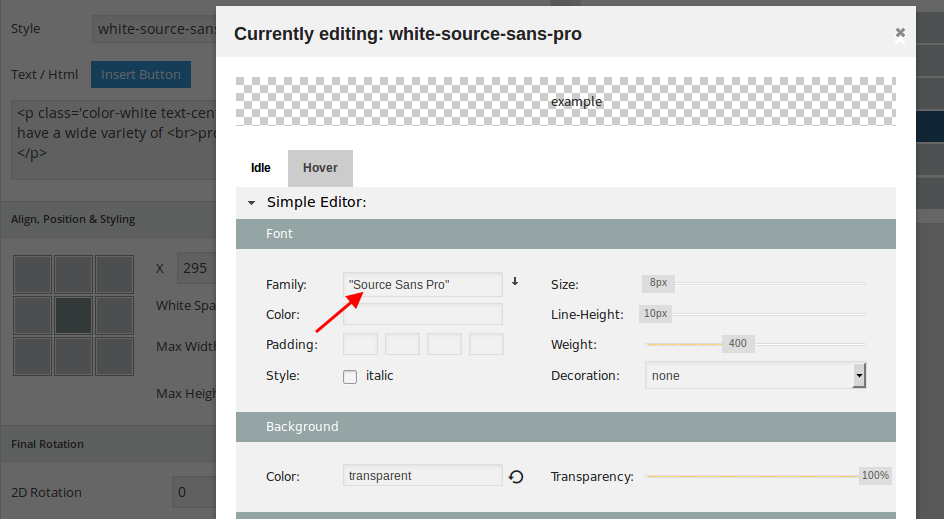
As I see Source Sans Pro font is selected in the slider settings:
https://s3.amazonaws.com/fvd-data/notes/168674/1424466631-QDqrma/screen.png
Please clear your browser cache and check again.
Thank you.
Regards,
Eva Kemp.
Hello,
1. You need update the theme to the latest version.
2. WooCommerce has removed that feature in the recent update and replaced it with the number input type. And now there is no overrides in Royal for this. You may try https://wordpress.org/plugins/woocommerce-quantity-increment/ plugin
3. Yes, you need update the theme.
https://www.8theme.com/demo/docs/royal/#!/installation_upgrade (1.5 Theme Upgrade)
Did you make any changes in the original theme files? If so you need create child theme and copy modified files in the child theme folder. If no, you can overwrite the existing files with the new ones.
4. We modified some Woocommerce files in the directory wp-content/themes/royal/woocommerce and old versions can be written in those files. But you shouldn’t worry. It won’t affect your site work at all.
Thank you.
Regards,
Eva Kemp.
Hello,
You’re welcome.
Regards,
Eva Kemp.
Hello,
I’ve imported Travel One Page template manually.
Please check it in Pages menu in wp-admin panel.
Thank you.
Regards,
Eva Kemp.
Hello,
We’ve sent Royal templates archive to your email address. You can import any template (.xml file) via Tools > Import > WordPress in wp-admin panel.
Please try it.
Thank you.
Regards,
Eva Kemp.
Hello,
As I see you’re using 3rd-party plugins that may cause the issue with Visual Composer.
Please disable them and check VC editor after that.
Thank you.
Regards,
Eva Kemp.
Hello,
Please update Visual Composer plugin as old version may create conflict with a new theme version.
You can download the plugin at this link https://www.8theme.com/download-plugins/
Thank you.
Regards,
Eva Kemp.
Hello @downlo,
Have you updated the theme to the latest version http://themeforest.net/item/xmarket-responsive-wordpress-ecommerce-theme/3558432 ?
https://www.8theme.com/demo/docs/xmarket/index.html#!/upgrade
Thank you.
Regards,
Eva Kemp.
Hello,
Sorry but the credentials are incorrect.
Also please provide us with FTP credentials.
Thank you.
Regards,
Eva Kemp.
Hello @lestatu2,
There is compatibility issue with updated Wishlist plugin and our theme.
We’ll fix it in the nearest update.
Please take our apologies for the troubles.
Thank you for your understanding.
Regards,
Eva Kemp.
Hello,
Is the issue resolved?
Thank you.
Regards,
Eva Kemp.
Hello,
1. Perhaps there are some hosting restrictions on a server where your site is located. Again you have to check error logs concerning this issue.
2. Please specify what exactly you want to customize. It can be done via css styles in custom.css and editing php files.
3. Did you checked Theme Options > General > Site Layout?
Thank you.
Regards,
Eva Kemp.
Hello,
You’re welcome.
Regards,
Eva Kemp.
Hello,
You can create a new page and use Products element in Visual Composer to display products from some category.
Thank you.
Regards,
Eva Kemp.
Hello,
Is the issue resolved now?
Thank you.
Regards,
Eva Kemp.
Hello,
We’ve sent slider archive to your email address.
Please check it.
Thank you.
Regards,
Eva Kemp.
Hello,
Please check the site now and clear browser cache before.
Thank you.
Regards,
Eva Kemp.
Hello @Rawi7,
We’re glad you found the solution.
Have a nice weekend.
Regards,
Eva Kemp.
Hello,
I’ve checked single product page and it’s scrolling fine.
Please try to check with different Internet provider.
Thank you.
Regards,
Eva Kemp.
Hello,
You’re welcome.
Regards,
Eva Kemp.
Hello,
Please provide us with wp-admin panel and FTP credentials in Private Content.
Thank you.
Regards,
Eva Kemp.
Hello,
Unfortunately there is no possibility to search by SKU. You can try to to use some plugin if you want to have such search type enabled.
Sorry.
Regards,
Eva Kemp.
Hello,
The problem is caused by different font size.
Please add this code in custom.css:
.main-nav .menu > li .nav-sublist-dropdown .container > ul > li a {
  font-size: 17px;
}
Thank you.
Regards,
Eva Kemp.
Hello,
We’re glad the issue has been resolved.
Have a nice weekend.
Regards,
Eva Kemp.
Hello,
There is an issue with Wishlist plugin and our theme.
We’ll fix this issue in the nearest theme update.
Please take our apologies for inconveniences.
Regards,
Eva Kemp.
Hello,
I’ve added this code in custom.css file:
.copyright-2 .container .row-copyrights, .copyright-3 .container .row-copyrights, .copyright .container .row-copyrights {
  padding-bottom: 0px !important;
}
.copyright-2 .container .row-copyrights .wpb_content_element, .copyright .container .wpb_content_element.row-copyrights {
margin-bottom: 0px !important;
}Please check your site now.
Thank you.
Regards,
Eva Kemp.