
Hello,
Please provide us with FTP and wp-admin panel credentials in Private Content.
Thank you.
Regards,
Eva Kemp.

Hello,
Please provide us with FTP and wp-admin panel credentials in Private Content.
Thank you.
Regards,
Eva Kemp.
Hello,
1. On this page https://www.8theme.com/demo/idstore/dark/?page_id=3666 when you view pictures in lightbox, all featured images are shown from this page.
2. Navigate to Portfolio -> Edit project page-> at the right sidebar you can add featured images. When you upload images for featured image of a project you should select “Uploaded to this post” from drop down menu and click “Set featured image”:
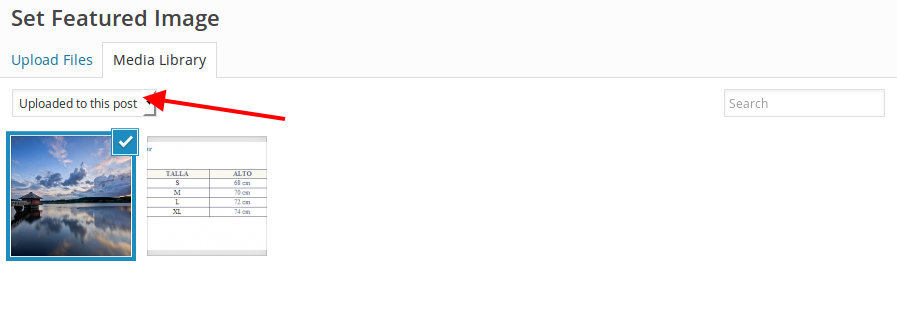
3. Recently created projects are shown in that section.
4. Use this code in custom.css file:
.portfolio-image img {
    width: 100% !important;
}
Thank you.
Regards,
Eva Kemp.
Hello,
Thank you for providing us with information.
We’ll forward it to our developers.
Regards,
Eva Kemp.
Hello,
Unfortunately we don’t have the exact date of a new release as the theme is being tested by our developers currently.
You can check our site for new updates.
Sorry for inconveniences.
Regards,
Eva Kemp.
Hello,
Please use this code in custom.css:
.menu .menu-full-width .nav-sublist-dropdown ul > li {
    margin-right: 30px !important;
}
Regards,
Eva Kemp.
Hello,
You’re welcome.
Regards,
Eva Kemp.
Hello,
That’s the normal review box for logged in customer.
What is it that doesn’t satisfy you?
Regards,
Eva Kemp.
Hello @FastcoUSA,
I’ve updated the theme.
Please check your site and clear browser cache before.
Thank you.
Regards,
Eva Kemp.
Hello,
Go to Woocommerce > Settings > Accounts tab and untick “Automatically generate username from customer email”, then check registration.
Thank you.
Regards,
Eva Kemp.
Hello,
To correct all categories you need go to Products > Categories > open a category and re-save it. Errors will disappear.
Thank you.
Regards,
Eva Kemp.
Hello,
We’d like to help you but unfortunately we can’t see the issue:
http://storage1.static.itmages.com/i/15/0319/h_1426784060_1263575_15ab7a6248.png
Please show a screenshot of the Shop page that you see.
Thank you.
Regards,
Eva Kemp.
Hello,
Please try to use this code instead of the one that you’ve written:
.side-area-icon i:before {
content: "\f002" !important;
font-family: FontAwesome !important;
font-size: 24px;
padding-top: 2px;
color: #fff;
}
Thank you.
Regards,
Eva Kemp.
Hello,
To add space above “Add to Cart” button you need use this code:
.product-information .product-name-price {
    height: 150px;
}
Thank you.
Regards,
Eva Kemp.
Hello,
Do you want to show more than 5 stars or make the stars bigger in size?
Regards,
Eva Kemp.
Hello @FastcoUSA,
Please provide us with wp-admin panel credentials in Private Content as well.
Thank you.
Regards,
Eva Kemp.
Hello,
Thank you, but we also need FTP host, FTP username, FTP password.
Regards,
Eva Kemp.
Hello,
Please create a back up of your files and database and provide us with FTP and wp-admin panel credentials in Private Content.
Thank you.
Regards,
Eva Kemp.
Hello,
We’re sorry, but the issue is still being investigated.
Once there is some news we’ll inform you.
Thank you for your patience.
Regards,
Eva Kemp.
Hello,
1. Please add this code in custom.css file:
.footer-product {
   display: none;
}
2. Use this code in custom.css:
.product-navigation .next-product .hide-info {
    left: none !important;
    right: 1px !important;
}
How to create custom.css you can watch in this tutorial (it’s for Legenda theme but the process is the same).
Thank you.
Regards,
Eva Kemp.
Hello,
You need import Essential Grid data as described in our documentation https://www.8theme.com/demo/docs/royal/index.html#!/essential_grid and create a page as I described in the last post.
Thank you.
Regards,
Eva Kemp.
Hello,
I’ve changed permalinks settings to default and then back to Post name and now projects links are opened successfully.
Please clear browser cache and check.
Thank you.
Regards,
Eva Kemp.
Hello,
Sorry, but FTP credentials are incorrect.
Please check them.
Thank you.
Regards,
Eva Kemp.
Hello,
We’ve checked the files and that error message is called by Woocommerce plugin. You need contact their support and they should provide you with the code for changing that message.
Sorry for inconveniences.
Regards,
Eva Kemp.
Hello,
Please clear browser cache and check the products again.
Thank you.
Regards,
Eva Kemp.
Hello,
Please try to add this code in custom.css file:
.widget_layered_nav {
    width: 280px;
}
How to create custom.css you can watch in this tutorial (it’s for Legenda theme but the process is the same).
Thank you.
Regards,
Eva Kemp.
Hello,
Please give us permissions to be able to view site files via FTP.
Thank you.
Regards,
Eva Kemp.
Hello,
That grid layout was made with help of Essential Grid plugin https://www.8theme.com/demo/docs/royal/#!/essential_grid .
You can use Essentials Grid element from Visual Composer editor and select the grid you create.
More information is described in the plugin documentation:
http://essential.themepunch.com/documentation/
Thank you.
Regards,
Eva Kemp.
Hello,
The problem may be caused by lack of memory. Try to increase memory_limit value on a server where your site is hosted and check the plugin after that.
Thank you.
Regards,
Eva Kemp.
Hello,
I’ve clicked “Do not show this popup again” in the appeared window and it has been hidden. After the second visit to the Home page pop up wasn’t shown.
Please try to check it again in another browser.
Thank you.
Regards,
Eva Kemp.
Hello,
We recommend you to update the theme to the latest version 2.6.3 which is compatible with the latest Woocommerce version.
Also update required plugins https://www.8theme.com/download-plugins/ .
Create a back up of your files and database before update!
Thank you.
Regards,
Eva Kemp.





