
Hello,
You can edit et-registration.php file to change registration page template. The file is located in wp-content/themes/legenda directory via FTP.
Regards,
Eva Kemp.

Hello,
You can edit et-registration.php file to change registration page template. The file is located in wp-content/themes/legenda directory via FTP.
Regards,
Eva Kemp.
Hello,
To hide “Your account” link use this code in style.css file of your child theme:
li.my-account-link {
display: none !important;
}
Concerning the 404 error, seems there is an issue with permalinks. Please refer to this article http://codex.wordpress.org/Permalinks , pay attention to the section “Using “Pretty” permalinks
Requirements:” and check the requirements with your hosting provider.
Thank you.
Regards,
Eva Kemp.
Hello,
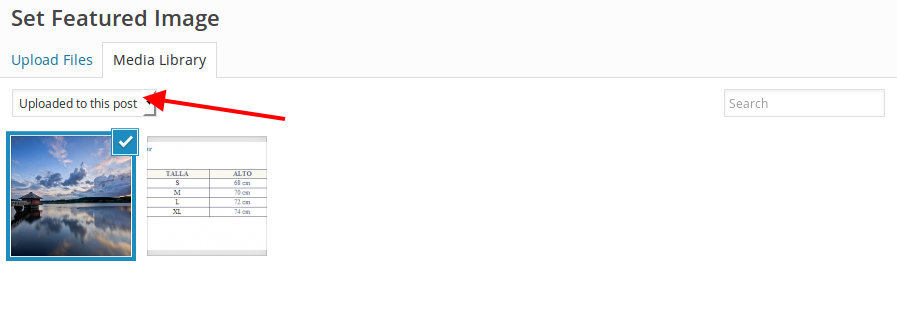
When you upload images for featured image of a project you should select “Uploaded to this post” from drop down menu and click “Set featured image”:
Regards,
Eva Kemp.
Hello @elyfrank,
You didn’t mark products as new in admin panel. Please read this article how to do this: https://support.8theme.com/index.php?/Knowledgebase/Article/View/9/0/how-to-mark-products-as-featured-and-new-ones
Thank you.
Regards,
Eva Kemp.
Hello,
I’ve just update the theme to the latest version 1.5 and activated the plugin successfully.
Please check.
Thank you.
Regards,
Eva Kemp.
Hello,
Please provide us with wp-admin panel and FTP credentials in Private Content to check the issue.
Thank you.
Regards,
Eva Kemp.
Hello,
Unfortunately there is no option in the theme to divide sidebar in 2 columns. Sorry.
Concerning “Your account” page and portfolio categories, please provide us with wp-admin panel credentials in Private Content.
Thank you.
Regards,
Eva Kemp.
Hello,
What browser are you using?
It’s full width on our side via Chrome browser:

Could you please show a screenshot?
Also please try to check with some other browser.
Thank you.
Regards,
Eva Kemp.
Hello,
Yes, you need update the theme manually. Please refer to our documentation: https://www.8theme.com/demo/docs/idstore/index.html#!/upgrade
Thank you.
Regards,
Eva Kemp.
Hello,
To change color for table borders add this code into custom.css file:
.table td {
    border-top: 1px solid #ff0000 !important;
}
Could you please show on a screenshot what exactly you wan to remove on the page http://mantravisual.com/atlantic/?product=brook-jameson ?
To remove a black line use this code:
.page-title {
 border-bottom: none !important;
}
Please provide us with wp-admin panel credentials to check the text columns. Also this page http://mantravisual.com/atlantic/?page_id=372 doesn’t have any text to be able to compare.
Concerning the menu use this code:
.menu > ul > li > a {
    color: pink;
}
.menu > ul > li > a:hover {
color: pink !important;
border-bottom-color: pink !important;
}
The code to remove the line in footer is:
.grid_pagination_bottom_block {
    border-bottom: none !important;
}
Regards,
Eva Kemp.
Hello,
As I see you’re using old theme version. Please update it to 3.5.
https://www.8theme.com/demo/docs/idstore/index.html#!/upgrade
Thank you.
Regards,
Eva Kemp.
Hello,
Sorry, but the credentials to wp-admin panel are incorrect.
Please check them.
Thank you.
Regards,
Eva Kemp.
Hello @mswartz,
Please provide us with the login details to wp-admin panel and FTP in Private Content.
Thank you.
Regards,
Eva Kemp.
Hello,
Please add this code in custom.css file:
.portfolio-filters li {
    margin: 0px 0px 20px !important;
}
How to create custom.css you can watch here:
https://www.youtube.com/watch?v=Qok2zRedRMY
Thank you.
Regards,
Eva Kemp.
Hello,
As I see you have 2 theme versions in Appearance > Themes. You shouldn’t create multiple folders for different theme versions, but overwrite old files with the new ones.
Please reupdate the theme. Also clarify whether you made any changes to the theme files.
Thank you.
Regards,
Eva Kemp.
Hello,
Thank you for the link, but as I see that page is full width.
Could you please clarify what you are trying to achieve?
Regards,
Eva Kemp.
Hello,
We’ve added the following code into custom.css file:
@media (max-width:1200px){
 .et_section.parallax-section{
 position:relative !important;
 }
}
Now parallax effect if full width on mobile device.
Please check.
Regards,
Eva Kemp.
Hello,
1. Sorry, but your request is a bit unclear. Do you want to remove the subcategories from the last menu item and add them to the second one?
2. Concerning the portfolio categories, you need select “Categories” in Screen Options as shown on screenshot, in Appearance > Menus. After that you’ll see the categories block on the left side.

Regards,
Eva Kemp.
Hello,
Could you please provide us with the direct link to your portfolio page?
Thank you.
Regards,
Eva Kemp.
Hello,
Sorry for a delay.
We’ve fixed the cart issue for you.
Please check it now.
Thank you.
Regards,
Eva Kemp.
Hello,
You’re welcome.
Regards,
Eva Kemp.
Hello,
You need upload images with high resolution.
Please do this and the issue should be fixed.
Thank you.
Regards,
Eva Kemp.
Hello,
Please clarify whether you still need our assistance.
Thank you.
Regards,
Eva Kemp.
Hello,
I’ve created the row you needed.
Please check your home page now.
Regards,
Eva Kemp.
Hello @iletisim1,
Please provide us with FTP and wp-admin panel credentials in Private Content.
Thank you.
Regards,
Eva Kemp.
Hello,
You can reorder tabs following the instruction described in Woocommerce documentation:
http://docs.woothemes.com/document/editing-product-data-tabs/ or using their plugin http://www.woothemes.com/products/woocommerce-tab-manager/
Regards,
Eva Kemp.
Hello,
If you’re talking about breadcrumbs image you need go to Theme Options > Header > select Breadcrumbs Style “With Background” and upload an image for Breadcrumbs Background.
I’ve disabled WP All Import plugins and the logo and sidebar have appeared.
Also footer colors have been fixed. Seems there is some incompatibility with the plugin and our theme. We’ve taken this into account and try to fix it in the future update.
Please check the site and clear your browser cache before.
Thank you.
Regards,
Eva Kemp.
Hello,
Please update the theme to the latest 1.2 version, which has been recently released.
If the issue still persists after that, then provide us with FTP login details.
Thank you.
Regards,
Eva Kemp.
Hello,
Payment icons are one image that is located in wp-content/themes/royal/images/assets directory and the file is payments.png. You can replace it adding Text widget with your image link into Footer Copyright widget area in Appearance > Widgets. If you want to hide it and add nothing into this area you can add an empty Text widget and save it.
Thank you for kind words! We appreciate it very much!
We’d be thankful if you leave your feedback at http://themeforest.net/item/royal-multipurpose-wordpress-theme/8611976 .
Regards,
Eva Kemp.
Hello,
We did nothing, but that’s great all is working now.
If you need some assistance let us know.
Regards,
Eva Kemp.









