
Hello,
You’re welcome.
Regards,
Eva Kemp.

Hello,
You’re welcome.
Regards,
Eva Kemp.
Hello,
I’ve added this code in custom.css file:
.product_image .views-gallery .slide img {
    width: 75px;
}
Please check products gallery now.
Thank you.
Regards,
Eva Kemp.
Hello,
The problem with related products is caused by the reason you have several categories for one product and related products are taken from all these categories. You can test it yourself: select only one category for a product and related products will be shown only from that one category.
Thank you.
Regards,
Eva Kemp.
Hello,
Yes, you’re correct.
Regards,
Eva Kemp.
Hello @Ann Sanicola,
You’re welcome.
Regards,
Eva Kemp.
Hello,
Please update Visual Composer plugin to the latest version.
We’ve sent the archive to your email address which you used for registration on the forum.
Thank you.
Regards,
Eva Kemp.
Hello,
Sorry, but FTP credentials are incorrect.
Please check them.
Thank you.
Regards,
Eva Kemp.
Hello,
Please check your email.
The plugin archive has been sent.
Thank you.
Regards,
Eva Kemp.
Hello,
Please check your email address which you used for registration on the forum.
We’ve sent a new plugin version for you.
Thank you.
Regards,
Eva Kemp.
Hello,
The problem is related to Woocommerce configuration as the issue persists with default WordPress theme too.
You need contact Woocommerce support team and ask them to check it.
Thank you.
Regards,
Eva Kemp.
Hello,
Unfortunately Visual Composer editor doesn’t have such options to make full width columns.
Sorry.
Regards,
Eva Kemp.
Hello,
I’ve added the following code in CSS block in Visual Composer editor:
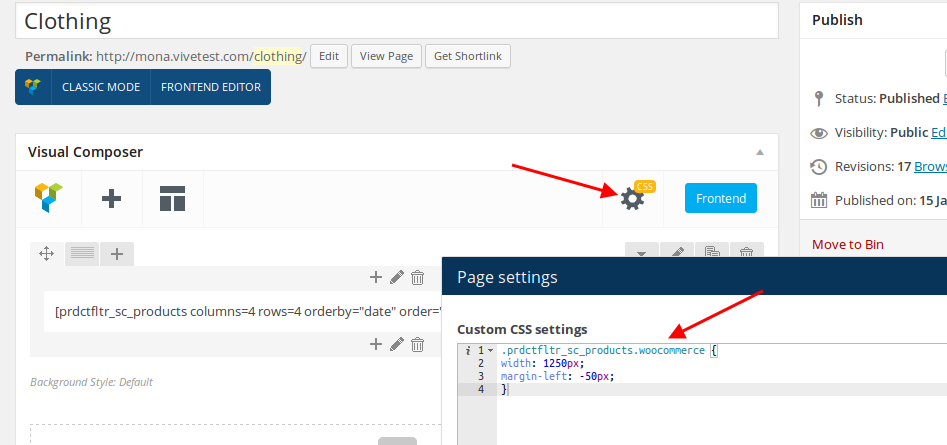
Please check Clothing page now.
Thank you.
Regards,
Eva Kemp.
Hello,
You’re welcome.
Regards,
Eva Kemp.
Hello,
Please take our apologies for misunderstanding.
To change “SIZING GUIDE” text you need edit the file wp-content/themes/royal/framework/woo.php (line 835).
Thank you.
Regards,
Eva Kemp.
Hello,
We’re glad you were managed to find the solution.
Have a nice weekend.
Thank you.
Regards,
Eva Kemp.
Hello,
The problem is caused by Woocommerce Poor Guys Swiss Knife plugin. I’ve deactivated it and footer is shown fine now.
Please check.
Thank you.
Regards,
Eva Kemp.
Hello,
Your site link is giving “Server not found” error.
Please check if you spelled domain name correctly or there are some problems at your host.
Thank you.
Regards,
Eva Kemp.
Hello,
You can overwrite old plugin folder with a new one. Extract the archive and upload it to wp-content/plugins directory via FTP. Accept a notification to overwrite it.
Thank you.
Regards,
Eva Kemp.
Hello,
Also add this code:
@media (max-width:480px) {.banner.align-center {
margin-left: 7px;
}}
Thank you.
Regards,
Eva Kemp.
Hello,
To enable Visual Composer editor go to wp-admin panel > Settings menu > Visual Composer and select content types where VC should be used.
You can use any hosting provider, but please note that php version shouldn’t be less than 5.3 version and allow_url_fopen function should be enabled.
Thank you.
Regards,
Eva Kemp.
Hello,
As I see that meta text is removed.
Have you resolved it?
Thank you.
Regards,
Eva Kemp.
Hello,
You’re using low php version – 5.2. Please ask your host to upgrade it to at least 5.3 php version.
Thank you.
Regards,
Eva Kemp.
Hello,
This issue has been forwarded to our developers and as soon as there is a result we’ll let you know.
Thank you for your patience.
Regards,
Eva Kemp.
Hello,
Please try to add this code:
@media (max-width:480px) { .banner.align-center {
width: 280px;
}}
Thank you.
Regards,
Eva Kemp.
Hello,
You’re welcome.
Regards,
Eva Kemp.
Hello @creeb,
I don’t see the code $locale with prefix with your language name in wp-config.php file.
Please refer to our documentation: https://www.8theme.com/demo/docs/legenda/index.html#!/how_to_translate
Thank you.
Regards,
Eva Kemp.
Hello,
Please refer to our documentation how to translate the theme:
https://www.8theme.com/demo/docs/legenda/index.html#!/how_to_translate
Also you need translate Woocommerce files as described in their documentation:
http://docs.woothemes.com/document/woocommerce-localization/ > Translating with PoEdit.
Thank you.
Regards,
Eva Kemp.
Hello,
What is the link of your web site?
Thank you.
Regards,
Eva Kemp.
Hello,
We’ve sent pages archive to your email address which you used for registration on the forum.
Please check your mail.
Thank you.
Regards,
Eva Kemp.
Hello @creeb,
Your site is redirecting to other link.
Please provide us with the correct url and specify in what folder your files are located.
Thank you.
Regards,
Eva Kemp.









