


Hello Charles Obasi,
unfortunately your request is a bit unclear for us. Please specify your question with more details.
Regards,
Stan Russell.
Hello DoubleHapp,
please provide us with admin credentials for your site in ‘Private content’ section. We will investigate the problem and try to fix it as soon as possible.
Regarding plugins bundled with our theme – latest releases of these can be found at our Downloads section.
Regards,
Stan Russell.
Hello Charles Obasi,
unfortunately your request is a bit unclear for us. Please specify your question with more details.
Regards,
Stan Russell.
Hello beckers,
please provide us with admin credentials for your site in Private content. We will check this problem.
Regards,
Stan Russell.
Hello mleihs,
we have checked your site on mobile viewport and do no see the problem.
Here is screenshot how it is displayed on our side:

Does this problem still appear for you? What device and browser are you using at the moment?
Regards,
Stan Russell.
Hello Hoellwarth,
we are happy that you have found what was source of the problems.
Have a nice day!
Regards,
Stan Russell.
Hello directsupport,
please disable all third-party plugins and provide us with admin credentials for your site in Private Content.
Regards,
Stan Russell.
Hello raptureadmin,
please add following css code to your Theme Options > Custom CSS > Global Custom CSS:
.vc_btn3-color-juicy-pink{
background-color:#6DAB3C
}
Regards,
Stan Russell.
Hello mhammoud,
in this case you do not even need to edit theme files! Just add following css code to your custom.css file:
.blog-post .posted-by{
display:none
}
Regards,
Stan Russell.
Hello C2market,
as we can see – new favicon is displayed at the moment. Is it the favicon you want:
 ?
Regards,
Stan Russell.
Hello C2market,
please add following css code to your custom.css file:
@media screen and (max-width: 480px) {
.top-bar{height:30px}
}
Regards,
Stan Russell.
Hello ivava,
we have checked your site and Wishlist icon is displayed this way:
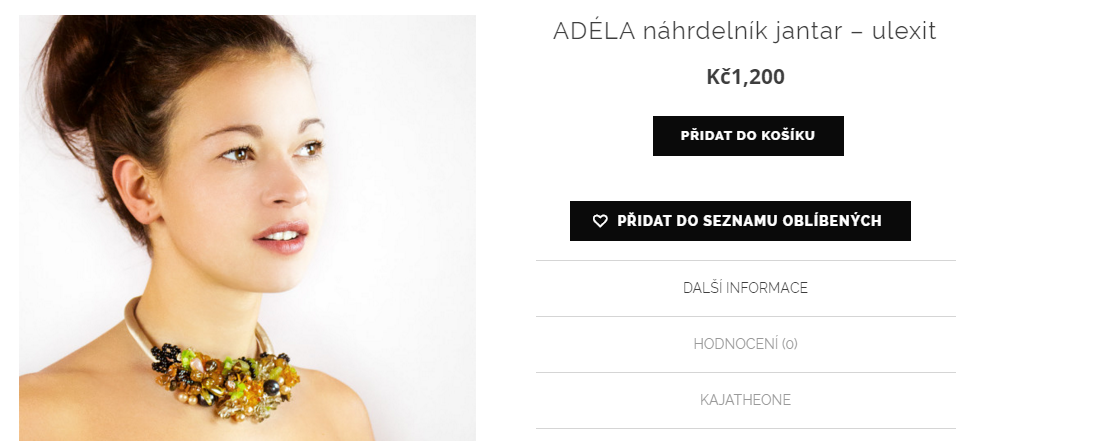
Please show on screenshot what results do you want to achieve.
Regards,
Stan Russell.
Hello otk,
please provide us with admin credentials for your site in Private content. We will investigate the problem.
Regards,
Stan Russell.
Hello Cristian,
you can change social icons code in the file wp-content/themes/legenda/framework/shortcodes.php, find the section “! Share This Product” in line 1476.
Regards,
Stan Russell.
Hello Katie2005,
You can change social icons code in the file wp-content/themes/legenda/framework/shortcodes.php, find the section “! Share This Product” in line 1476.
Regards,
Stan Russell.
Hello knguyen2015,
1) please add following css code to your custom.css file:
h2.title{
  font-size:20px;
 }
h3 {
  font-size:18px;
}
Here is video tutorial how to create custom.css file:
https://youtu.be/Qok2zRedRMY
You may set any values you want.
2) Please provide us with admin credentials for your site in Private content. We need them to investigate the problem.
Regards,
Stan Russell.
Hello zouking,
you are welcome! Have a nice day!
Regards,
Stan Russell.
Hello nic_and_mel,
we will wait for your reply.
Regards,
Stan Russell.
Hello smartrobbie,
we have disabled Ajax ‘Add to cart’ in Theme options > E-Commerce > Single product page. Please check your site now.
Regards,
Stan Russell.
Hello anilshakyawar,
1) please show on screenshot what elements do you want to hide.
2) You may try following the suggestions from these articles:
http://www.sparringmind.com/speed-up-wordpress/
https://www.inmotionhosting.com/support/website/wordpress/heartbeat-ajax-php-usage#heartbeat-in-action
http://premium.wpmudev.org/blog/10-best-image-optimization-plugins-to-speed-up-your-wordpress-site/
http://www.elegantthemes.com/blog/tips-tricks/optimize-images-for-your-wordpress-website
Regards,
Stan Russell.
Hello,
1) we have added following css code to your Theme options > Global css:
.languages-area{
  display:none
}
2) Demo footer content can not be edited. You need to create your own footer according to our video tutorial:
https://youtu.be/KWAQRXZXsaw
3) we have added following css code:
.login-link:hover .login-popup{
left:-225px
}
Regards,
Stan Russell.
Hello gurhan,
you are welcome!
Regards,
Stan Russell.
Hello talonhead,
as we can see – header background image is displayed on your site. Is there any problem with it?
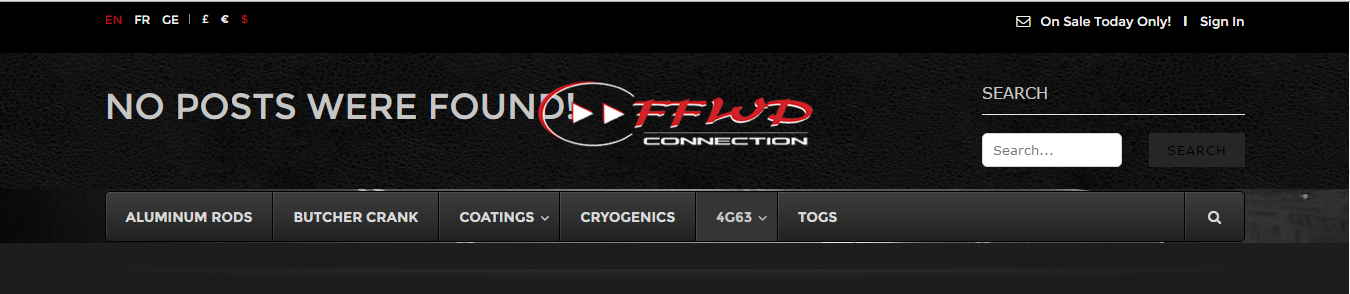
Regards,
Stan Russell.
Hello davidstokes,
please provide us with admin credentials for your site in Private content.
Regards,
Stan Russell.
Hello yakult,
please specify – do you want to change background color for that pages?
Regards,
Stan Russell.
Hello itaund,
you are welcome!
Regards,
Stan Russell.
Hello Lily,
please add following css code to your custom.css file:
.product-category h5 {
  text-align:center;
}
Regards,
Stan Russell.
Hello Kireaki,
thank you for being helpful!
Hello heybill,
please navigate to Visual Composer > Role manager > Post types and select ‘staticblocks’
Regards,
Stan Russell.
Hello bdcmc,
you are welcome!
Regards,
Stan Russell.
Hello Jayverweij,
you are welcome!
Regards,
Stan Russell.
hello itaund,
we are happy to hear that! Have a nice day!
Regards,
Stan Russell.

Free AI store scan · SalesMax
Paste your store address. SalesMax AI shows which upsell moments are missing. No signup.

Free AI speed test · FlashMax
Paste your site address. FlashMax runs Google Lighthouse for phone and desktop, checks Core Web Vitals and lists what to fix. No signup.
 Jewellery Niche MarketMarketplace
(live demo, opens in a new tab)
 Organic StoreFood & drinks
(live demo, opens in a new tab)
 Business 02Elementor
(live demo, opens in a new tab)
 Books StoreBooks & art
(live demo, opens in a new tab)
 Eco Scooter StoreSports & travel
(live demo, opens in a new tab)
 Car Parts StoreCars & bikes
(live demo, opens in a new tab)
 EcoenergyElementor
(live demo, opens in a new tab)
 Agricultural StoreWPBakery
(live demo, opens in a new tab)
 SEO AgencyElementor
(live demo, opens in a new tab)
 Luxury Jewelry StoreJewellery
(live demo, opens in a new tab)
 Chocolate BoutiqueElementor
(live demo, opens in a new tab)
 Animals StorePets
(live demo, opens in a new tab)
 Beaty & CosmeticsBeauty
(live demo, opens in a new tab)
 ArchitectureBusiness
(live demo, opens in a new tab)
 Classic Fashion Store (Dark)Fashion
(live demo, opens in a new tab)
 Pet ShopPets
(live demo, opens in a new tab)