

Forum Replies Created

Viewing 30 posts - 13,231 through 13,260 (of 16,168 total)
  • Avatar: Jack Richardson
    Jack Richardson
    Support staff
    August 26, 2015 at 11:03

    Hello,

    Please update the theme to the latest version.
    Before update delete “woocommerce” folder in the directory wp-content/themes/legenda/ and it’ll be reuploaded from a new theme package.
    Also update all required plugins https://www.8theme.com/download-plugins/ .

    Don’t forget to create back up of your files and database before starting update process!

    Best regards,
    Jack Richardson.

    Avatar: Jack Richardson
    Jack Richardson
    Support staff
    August 26, 2015 at 10:59

    Hello,

    Did you change login details to WP Dashboard?
    We can’t log in now. Also provide us with a link to variable product where variations aren’t shown.

    Best regards,
    Jack Richardson.

    Avatar: Jack Richardson
    Jack Richardson
    Support staff
    August 26, 2015 at 10:53

    Hello,

    Please provide us with FTP and WP Dashboard credentials in Private Content.

    Best regards,
    Jack Richardson.

    Avatar: Jack Richardson
    Jack Richardson
    Support staff
    August 26, 2015 at 10:51

    Hello,

    As I see drop down menu is working:
    http://storage9.static.itmages.com/i/15/0826/h_1440582614_5406603_6967807515.png

    Please clarify your issue with more details.

    Best regards,
    Jack Richardson.

    Avatar: Jack Richardson
    Jack Richardson
    Support staff
    August 26, 2015 at 09:57

    Hello,

    The problem was caused by the plugin “SUMO Reward Points”. I’ve disabled it. Please clear browser cache and check cart popup window now.

    Best regards,
    Jack Richardson.

    Avatar: Jack Richardson
    Jack Richardson
    Support staff
    August 26, 2015 at 09:44

    Hello,

    Sorry, but WP Dashboard credentials are incorrect.
    Please check them.

    Best regards,
    Jack Richardson.

    Avatar: Jack Richardson
    Jack Richardson
    Support staff
    August 26, 2015 at 09:43

    Hello,

    Please check if style.css file in the directory wp-content/themes/legenda has permissions 644. If no, set them for this file.
    Have you deleted the files that mentioned in the theme description http://storage2.static.itmages.com/i/15/0817/h_1439794170_5940258_acd46deb52.png ?
    You must delete them from your theme folder too (in wp-content/themes/legenda/woocommerce directory).

    Best regards,
    Jack Richardson.

    Avatar: Jack Richardson
    Jack Richardson
    Support staff
    August 26, 2015 at 09:41

    Hello @sebdicam,

    I’ve added this code in CSS block for that page:

    .content.span9 {
        background-color:#f4f2f2;
        padding-left: 20px;
        padding-right: 20px;
    }

    and changed sidebar width to 1/4. Please check.

    Please provide us with a page link where you added blockquote shortcode.

    To move “Menu” text to the left use this code in custom.css:

    @media (max-width: 767px){.header .menu-icon {
        left: 0px !important;
    }}

    As you can see on the screenshot http://storage2.static.itmages.com/i/15/0826/h_1440578172_6256660_d63008c3c3.png the block is centered, but as the image isn’t full width it’s shown as aligned to the left. In this case you have to use the code below to make it shown properly:

    .wpb_single_image img {
       width: 100% !important;
    }

    I’ve checked your site in Safari and haven’t seen any issues:
    http://storage6.static.itmages.com/i/15/0826/h_1440578393_3292619_911aeccf5e.png
    The icons are shown. Sorry.

    Best regards,
    Jack Richardson.

    Avatar: Jack Richardson
    Jack Richardson
    Support staff
    August 26, 2015 at 09:27

    Hello @lugas,

    Unfortunately slider can’t be imported because of the error:
    “Fatal error: Call to a member function getStream() on a non-object in /home/lightlys/public_html/wp-content/plugins/revslider/includes/slider.class.php on line 924”.
    The same problem with slider persists with default WordPress theme – Twenty Fifteen too.
    You need contact Revolution Slider authors http://codecanyon.net/item/slider-revolution-responsive-wordpress-plugin/2751380/comments regarding this issue.

    Best regards,
    Jack Richardson.

    Avatar: Jack Richardson
    Jack Richardson
    Support staff
    August 26, 2015 at 09:20

    Hello,

    You’re welcome.

    Best regards,
    Jack Richardson.

    Avatar: Jack Richardson
    Jack Richardson
    Support staff
    August 26, 2015 at 09:19

    Hello,

    To create mega menu you need select “Full Width” in “Design” field for the parent menu item:
    http://storage5.static.itmages.com/i/15/0826/h_1440576445_7774575_1ef9f3814d.png and set how many columns you want to show in the menu.
    If you want to show only images in full width menu you need disable titles in submenu item:
    http://storage8.static.itmages.com/i/15/0826/h_1440576592_3437635_81bf524290.png and select “Image Column” in “Design” field.
    Also you can add icons to menu items, for example: http://storage4.static.itmages.com/i/15/0826/h_1440577052_6845220_01811c915a.png , I took the code from this link: http://fortawesome.github.io/Font-Awesome/icon/bell-o/
    You can find all icons here:
    http://fortawesome.github.io/Font-Awesome/icons/

    Best regards,
    Jack Richardson.

    Avatar: Jack Richardson
    Jack Richardson
    Support staff
    August 26, 2015 at 08:51

    Hello,

    You’re welcome.

    Best regards,
    Jack Richardson.
    Avatar: Jack Richardson
    Jack Richardson
    Support staff
    August 26, 2015 at 08:51

    Hello,

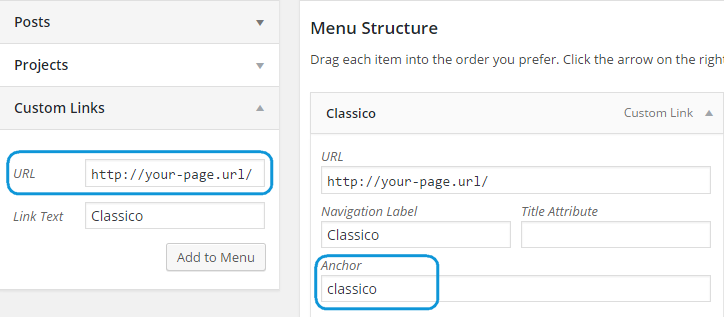
    I’ve added slash for the url in menu settings:
    http://storage6.static.itmages.com/i/15/0826/h_1440575303_7313414_c06344469d.png as shown in our screesnhot:
    https://www.8theme.com/wp-content/uploads/2015/04/one-page.png and selected menu in the page editor in the field “Custom navigation for this page”. Please clear browser cache and check menu now.

    Best regards,
    Jack Richardson.

    Avatar: Jack Richardson
    Jack Richardson
    Support staff
    August 26, 2015 at 08:02

    Hello,

    Left arrow doesn’t work because there is nowhere to slide. If you click right arrow, then the left one will be clickable. Please check it.
    To change these arrows you need edit images wp-content/themes/blanco/images/slide_next.png, wp-content/themes/blanco/images/slide_prev.png and use this css code:

    .product-slider .next {
        background-image: url("path_to_image");
    }
    .product-slider .prev {
        background-image: url("path_to_image");
    }

    Best regards,
    Jack Richardson.

    Avatar: Jack Richardson
    Jack Richardson
    Support staff
    August 26, 2015 at 07:58

    Hello,

    Unfortunately products can’t be searched by SKU number, only by name. Try to disable all 3rd-party plugins and check search form after that. Seems some plugin is causing the issue.

    Best regards,
    Jack Richardson.

    Avatar: Jack Richardson
    Jack Richardson
    Support staff
    August 26, 2015 at 07:39

    Hello,

    Please provide us with WP Dashboard credentials in private content and show a page where you added custom menu.

    Best regards,
    Jack Richardson.

    Avatar: Jack Richardson
    Jack Richardson
    Support staff
    August 26, 2015 at 07:37

    Hello,

    Please try to use this code too:

    .fixNav-enabled .fixed-active .tbs.blog-description {
       display: none;
    }

    Best regards,
    Jack Richardson.

    Avatar: Jack Richardson
    Jack Richardson
    Support staff
    August 26, 2015 at 07:35

    Hello,

    Please provide us with WP Dashboard credentials in private content.

    Best regards,
    Jack Richardson.

    Avatar: Jack Richardson
    Jack Richardson
    Support staff
    August 26, 2015 at 07:14

    Hello,

    Please provide us with WP Dashboard credentials in private content and specify what exactly you have difficulties with.

    Best regards,
    Jack Richardson.

    Avatar: Jack Richardson
    Jack Richardson
    Support staff
    August 26, 2015 at 07:12

    Hello,

    You shouldn’t worry about those notices. They won’t affect your site at all. We edited Woocommerce files in wp-content/themes/classico/woocommerce directory and old version may be written in those files. But, please don’t worry, as the original version is written in wp-content/plugins/woocommerce/templates directory.
    So you can hide this message or you can fix it by editing the files in wp-content/themes/classico/woocommerce directory and change the version to the current Woocommerce version that you’re using.

    Regarding the warning you’re getting on all pages, please provide us with FTP and WP Dashboard credentials in private content.

    Best regards,
    Jack Richardson.

    Avatar: Jack Richardson
    Jack Richardson
    Support staff
    August 26, 2015 at 07:10

    Hello @jbrogaard,

    Please provide us with FTP and WP Dashboard credentials.

    Best regards,
    Jack Richardson.

    Avatar: Jack Richardson
    Jack Richardson
    Support staff
    August 25, 2015 at 18:54

    Hello @digitalfound,

    You’re welcome.

    Best regards,
    Jack Richardson.

    Avatar: Jack Richardson
    Jack Richardson
    Support staff
    August 25, 2015 at 16:31

    Hello,

    Did you update Visual Composer plugin https://www.8theme.com/download-plugins/ ?
    Please provide us with FTP and WP Dashboard credentials in Private Content.

    Best regards,
    Jack Richardson.

    Avatar: Jack Richardson
    Jack Richardson
    Support staff
    August 25, 2015 at 16:29

    Hello,

    May we reupload the theme?

    Best regards,
    Jack Richardson.

    Avatar: Jack Richardson
    Jack Richardson
    Support staff
    August 25, 2015 at 15:42

    Hello @digitalfound,

    I’ve added this code in functions.php file:

    function custom_wc_ajax_variation_threshold( $qty, $product ) {
    	return 80;
    }
    
    add_filter( 'woocommerce_ajax_variation_threshold', 'custom_wc_ajax_variation_threshold', 80, 2 );

    You can read about it here:
    https://woocommerce.wordpress.com/2015/07/13/improving-the-variations-interface-in-2-4/

    Clear browser cache and check products now.

    Best regards,
    Jack Richardson.

    Avatar: Jack Richardson
    Jack Richardson
    Support staff
    August 25, 2015 at 15:05

    Hello @sebdicam,

    I’ve added this code in CSS block of Visual Composer editor to change background color for the page you wanted:
    http://storage3.static.itmages.com/i/15/0825/h_1440509997_3478841_b63782d3d3.png

    To add space for single posts content use this code in custom.css file:

    .post-single {
        padding-right: 10px;
        padding-left: 10px;
    }
    .post-single .post-images {
        width: 870px;
        margin-left: -10px;
    }

    To decrease size of “Menu” text use this css code:

    @media (max-width: 979px) {.header .menu-icon {
       font-size: 17px;
    }}

    Add this code in custom.css to change icons color:

    .custom-info-block.a-left span {
      color: grey !important;
    }
    
    .custom-info-block.a-left span:hover { 
      color: #af5e25 !important;
    }

    Is Safari browser updated to the latest version? Please show a screenshot what you see instead of the icons.

    I’ve removed this code in Static Block “Footer 2”:

    <a href="#"><img src="[template_url]/images/assets/mastercard.png" alt="" /></a>
    
    <a href="#"><img src="[template_url]/images/assets/visa.png" alt="" /></a>

    Please check footer now.

    To add text with border you can use this shortcode [blockquote]Your text[/blockquote] in Text editor.

    The images in your post can be set to full width to fill the container, try to use this code in custom.css:

    .wpb_single_image img {
       width: 100% !important;
    }

    Best regards,
    Jack Richardson.

    Avatar: Jack Richardson
    Jack Richardson
    Support staff
    August 25, 2015 at 14:36

    Hello @digitalfound,

    As I see variations work for variable products
    http://storage7.static.itmages.com/i/15/0825/h_1440509775_2441630_30cb2168c9.png . Please show us pages where you have problems.

    Thank you.
    Best regards,
    Jack Richardson.

    Avatar: Jack Richardson
    Jack Richardson
    Support staff
    August 25, 2015 at 14:33

    Hello @Mackenzy,

    You’re welcome.

    Best regards,
    Jack Richardson.

    Avatar: Jack Richardson
    Jack Richardson
    Support staff
    August 25, 2015 at 14:33

    Hello,

    Please update the theme to the latest version.
    Also update all required plugins https://www.8theme.com/download-plugins/ .

    Don’t forget to create back up of your files and database before starting update process!


    (it’s for Legenda theme but the process is the same).

    Best regards,
    Jack Richardson.

    Avatar: Jack Richardson
    Jack Richardson
    Support staff
    August 25, 2015 at 14:29

    Hello,

    Some plugin is causing this issue.
    Please deactivate all 3rd-party plugins and check your site after that.

    Best regards,
    Jack Richardson.

  • 1 2 3 441 442 443 537 538 539
    Viewing 13,260 results - 13,231 through 13,260 (of 16,168 total)
Viewing 30 posts - 13,231 through 13,260 (of 16,168 total)
We're using our own and third-party cookies to improve your experience and our website. Keep on browsing to accept our cookie policy.






