
Hello,
Sorry, but your question is unclear. When I hover the image zoom effect is enabled.
Do you wish to remove it?
Regards,
Eva Kemp.

Hello,
Sorry, but your question is unclear. When I hover the image zoom effect is enabled.
Do you wish to remove it?
Regards,
Eva Kemp.
Hello,
Sorry, but the credentials to wp-admin panel is incorrect. Please check it.
Demo data has been sent to your email address. Please check it.
Thank you.
Regards,
Eva kemp.
Hello,
1. You can edit the banners via Visual Composer editor on the page Cleopatra.
All the banners and a text with a background image are placed on that page.
2. Footer area can be edited in Appearance > Widgets > Footer 1/ Footer 2 widget areas. Also please refer to our documentation if you want to create your own footer:
https://www.8theme.com/demo/docs/royal/#!/footer
3. Products are added via Products element in Visual Composer. There you can type the IDs of the products which you want to show.
Regards,
Eva Kemp.
Hello @pierreraiche,
Our developers are working on this issue. It will be produced very soon.
Please take our apologies for the troubles you have to experience.
We’re very thankful for your patience.
Regards,
Eva Kemp.
Hello,
Unfortunately there is no such possibility. Sorry.
If you want you can use some plugin instead of our default search form.
Thank you.
Regards,
Eva Kemp.
Hello,
You do have “Customize skin” option. Please log in to wp-admin panel, go to Chat console menu > Options, select Customize skin tab:

Then scroll down and you’ll see Colors section where you’ll be able to select background color.
Thank you.
Regards,
Eva Kemp.
Hello,
Geo.yahoo.com is related to Flickr widget. If you don’t use this widget on your site then check if footer demo blocks are disabled in Theme Options > General.
Thank you.
Regards,
Eva Kemp.
Hello,
You can add a telephone number into Text widget and drag it into the “Place in header top bar” widget area.
Regards,
Eva Kemp.
Hello,
We already know about this issue which has happened after Woocommerce update. Our developers are working on the solution currently. It will be produced this week.
Please take our apologies for the troubles.
Thank you for your patience.
Regards,
Eva Kemp.
Hello,
1. Please read the following article how to add google font into the theme:
http://www.wpbeginner.com/wp-themes/how-add-google-web-fonts-wordpress-themes/
2. Please clarify your question with more details.
3. I’ve added the following code into custom.css file:
.menu .menu-full-width .nav-sublist-dropdown ul > li {
   width: 140px;
}
Please check if the Brands menu is fine now.
Thank you.
Regards,
Eva Kemp.
Hello,
Please add this code in custom.css file:
@media (max-width: 992px) {.fixed-header-area .header-logo img {
width: 150px;
max-width: 150px;
}}
How to create custom.css you can watch here. The tutorial is for Legenda theme, but the process identical.
Thank you.
Regards,
Eva Kemp.
Hello,
You need edit the Home page via wp-admin panel > Pages and find the Text element of VC where “Pixel perfect design” is written, you need edit this row:
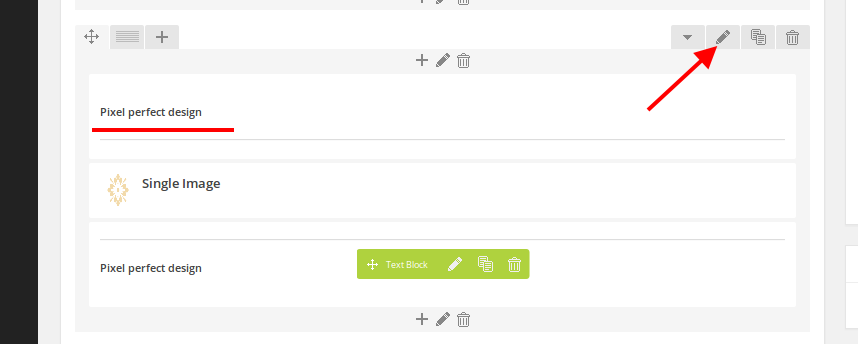
Then go to Background tab and you’ll be able to replace the video file with yours.
Thank you.
Regards,
Eva Kemp.
Hello,
To install default demo data you need follow the instruction described in the documentation: https://www.8theme.com/demo/docs/royal/index.html#!/demo_data_installation
Clicking “Install base demo content” button you’ll install default demo data of the Royal theme.
If this is not what you need please show us a screenshot or a link to have clear understanding what template you want to use.
Thank you.
Regards,
Eva Kemp.
Hello,
Is there the problem with slider only?
Please describe all issues you’re experiencing and provide us with wp-admin panel credentials as well.
Thank you.
Regards,
Eva Kemp.
Hello,
Please provide us with the correct login details to wp-admin panel.
Thank you.
Regards,
Eva Kemp.
Hello,
Please provide us with wp-admin panel credentials as well.
Also please clarify your second question with more details.
Thank you.
Regards,
Eva Kemp.
Hello,
Please watch the video tutorial how to create custom.css file (it’s for Legenda theme, but the process is identical).
Please remove the changes you’ve made to style.css and other files.
Thank you.
Regards,
Eva Kemp.
Hello,
Please show us a screenshot where you see the message of activation.
Is the plugin activated in wp-admin panel > Plugins? If so you don’t need enter any license keys. In other way you have to buy the plugin yourself.
Thank you for understanding.
Regards,
Eva Kemp.
Hello,
Please provide us with wp-admin panel credentials in Private Content and specify to which color you want to change chat background.
You don’t need license key as we include the plugin in the theme package.
If you want to have it you should buy the plugin yourself.
Regards,
Eva Kemp.
Hello,
Please provide us with the link where alert icon is shown to have clear understanding what you’re talking about.
Thank you.
Regards,
Eva Kemp.
Hello,
We’re very sorry, but we need more time. The update will be released this week.
Please take our apologies.
Thank you for your patience.
Regards,
Eva Kemp.
Hello,
Please provide us with wp-admin panel credentials in Private Content.
Regards,
Eva Kemp.
Hello,
Please provide us with the link to your site.
Regards,
Eva Kemp.
Hello,
You’re welcome.
Regards,
Eva Kemp.
Hello @pitsandbieces,
Yes, you need install demo data as described in our documentation:
https://www.8theme.com/demo/docs/legenda/index.html#!/demo_data_installation
Concerning the warning, you shouldn’t worry. It won’t affect your site work. We’ll fix it in our next update.
Sorry for inconveniences.
Regards,
Eva Kemp.
Hello,
The steps you described are correct.
Sorry, but we need wp-admin credentials to check what may cause the issue.
Also you may try to deactivate 3rd-party plugins as they can be the reason of the problem.
Thank you.
Regards,
Eva Kemp.
Hello,
Please show us a screenshot what exactly you want to remove.
Do you want to remove the text or change H1 type to some another?
Thank you.
Regards,
Eva Kemp.
Hello,
You’re welcome.
Regards,
Eva Kemp.
Hello,
Please provide us with wp-admin panel credentials and access to your FTP account in Private Content.
Thank you.
Regards,
Eva Kemp.
Hello,
Please add this code into custom.css file to the issue with logo:
@media (max-width: 992px) { .header-logo img, .header-type-6 .header .header-logo img {
width: 60%;
}}
Regards,
Eva Kemp.









