
Hello,
Please ask your host to change functions to these values as well:
max_execution_time 600
memory_limit 128M
And ask to change php version to 5.3 if possible.
Thank you.
Regards,
Eva Kemp.

Hello,
Please ask your host to change functions to these values as well:
max_execution_time 600
memory_limit 128M
And ask to change php version to 5.3 if possible.
Thank you.
Regards,
Eva Kemp.
Hello,
You need add the code $locale='nl_NL'; in the body of wp-config.php file.
nl_NL.po and nl_NL.mo files must be uploaded in the directory wp-content/themes/royal/languages. Default files can be kept.
Thank you.
Regards,
Eva Kemp.
Hello,
As I see you haven’t created .po file for Woocommerce plugin.
Please read the documentation: http://docs.woothemes.com/document/woocommerce-localization/ (item 6 “Translating – PoEdit”).
Thank you.
Regards,
Eva Kemp.
Hello,
Some css bugs have been fixed and plugins updated.
We recommend you to upgrade the theme to prevent any issues.
Thank you.
Regards,
Eva Kemp.
Hello,
We’re glad you’ve found the solution.
Enjoy your work!
Regards,
Eva Kemp.
Hello,
I’ve added the following code in custom.css:
#tabs li {
    list-style: disc outside none;
}
Please check list style now.
Regards,
Eva Kemp.
Hello,
You can remove the link adding this code in custom.css file:
.portfolio-item .portfolio-image .portfolio-mask .mask-content {
  display: none !important;
}
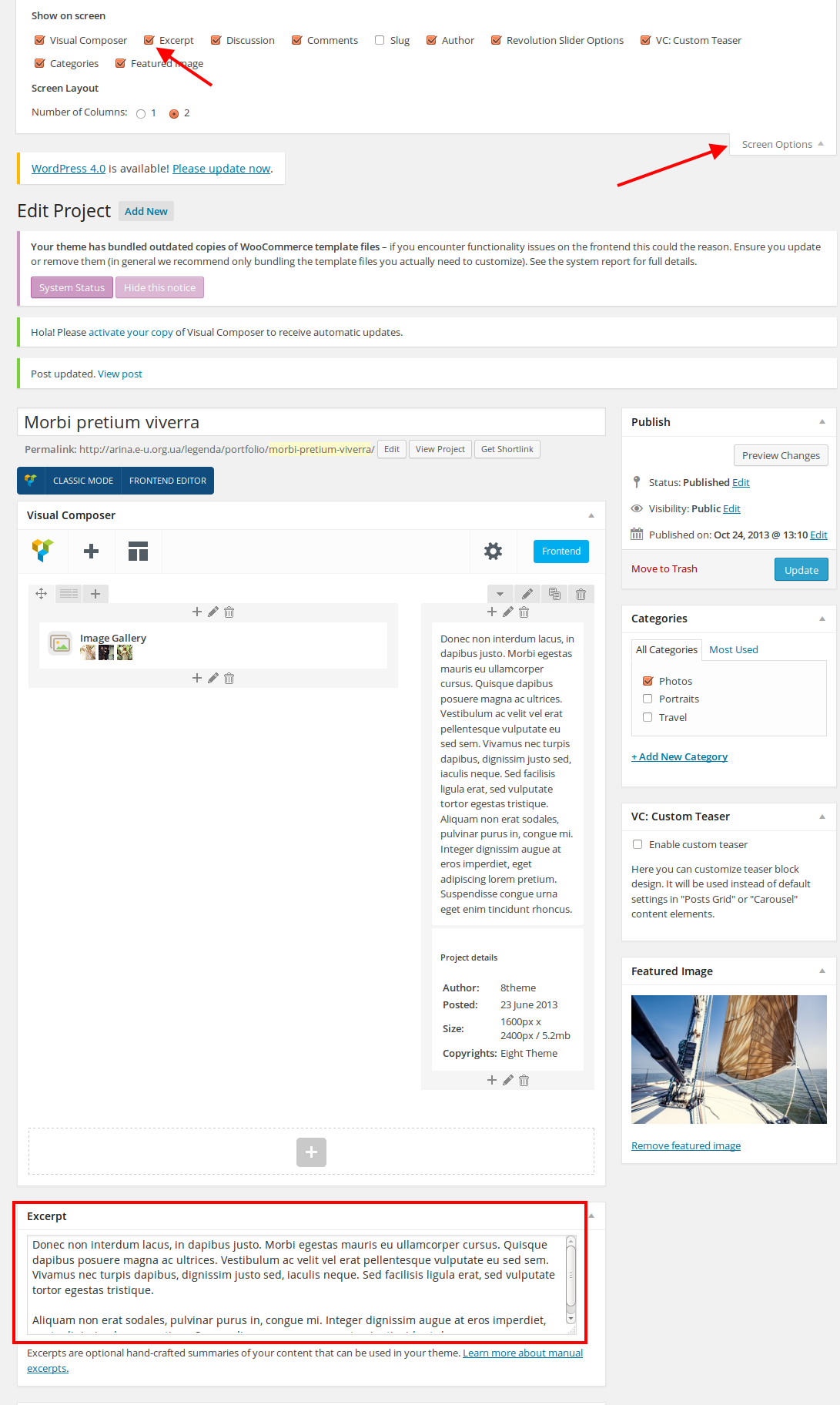
To make full posts visible you can add full text into Excerpt when editing a project and enable excerpt in Theme Options > Portfolio:
Regards,
Eva Kemp.
Hello,
The scroll look is changed in this case. Please make sure you’re using the latest version of the theme – 2.4.1.
Thank you.
Regards,
Eva Kemp.
Hello,
I’ve added the following code into style.css of the child theme:
.media-frame select.attachment-filters {
    margin-top: 1px !important;}
.media-frame .search {
    margin-top: -3px !important; }
Please check Media button now.
Thank you.
Regards,
Eva Kemp.
Hello,
You can add that shortcode to the top panel on the left side using “Place in header top bar” widget area where you can place Text widget with that shortcode.
Thank you.
Regards,
Eva Kemp.
Hello,
I’ve changed settings in Theme Options > Products Page Layout and selected layout without sidebar. Now it’s absent on the Shop page.
To display some products you can use this shortcode [etheme_products title=" " ids="" skus="" type=" " products=" " limit=" " columns=" " categories="" desktop="" notebook="" tablet="" phones=""] as described in our documentation https://www.8theme.com/demo/docs/legenda/index.html#!/legenda_shortcodes
Please specify what text and where you added it so it’s not showing.
Thank you.
Regards,
Eva Kemp.
Hello @starmila,
Thank you for the credentials.
I’ve reupdated the theme and the error has gone.
Please check your site now.
Regards,
Eva Kemp.
Hello,
We’re very sorry, but this issue requires more time for investigation due to busyness of our developers.
We’ll inform you concerning this bug as soon as possible.
Thank you for understanding.
Please take our apologies.
Regards,
Eva Kemp.
Hello,
You can select in Woocommerce > Settings > Products tab > Shop Page Display > Show subcategories and “The Horseshoes” page will display product categories instead of products themselves.
To remove sidebar from the left side you need edit the page “The Horseshoes” in wp-admin panel > Pages and select Sidebar Position as “Without Sidebar” in the Page Layout box.
To change the banner you need go to Theme Options > Shop > Product Page Banner and add your own image.
Thank you.
Regards,
Eva Kemp.
Hello,
If you are checking a page using emulation in Firefox you need reload the page to update the content.
Please check it once more.
Thank you.
Regards,
Eva Kemp.
Hello,
I’ve enabled debugging in wp-config.php file and the error has appeared on the site:
Fatal error: Allowed memory size of 268435456 bytes exhausted (tried to allocate 82 bytes) in /customers/f/9/2/olida-pashmina.nl/httpd.www/wp-content/plugins/sitepress-multilingual-cms/lib/xml2array.php on line 34
It means memory limit value should be increased.
Please contact your hosting provider and ask them to increase it.
Thank you.
Regards,
Eva Kemp.
Hello,
As I see you have selected “The Horseshoes” page for shop page in Woocommerce > Settings > Products tab. Please specify what exactly you want to edit on this page.
Thank you.
Regards,
Eva Kemp.
Hello,
You can make bigger logo in the fixed header using this code in custom.css file:
.fixed-header-area .fixed-header .logo-with-menu {
    width: 200px !important;
}
To create custom.css you need rename default.custom.css to custom.css via FTP in wp-content/themes/idstore directory and enable it in Theme Options > Custom CSS.
Thank you.
Regards,
Eva Kemp.
Hello,
Thank you for the suggestion.
We’ll take this into account and perhaps include it in our future updates.
Thank you.
Regards,
Eva Kemp.
Hello,
You’re welcome.
Regards,
Eva Kemp.
Hello,
Please provide us with wp-admin panel and FTP credentials in Private Content.
Thank you.
Regards,
Eva Kemp.
Hello,
I’ve checked and allow_url_fopen function is disabled for your site.
Please contact your host and ask them to enabled it and increase the value of “upload_max_filesize”.
After that try to install demo data again.
Thank you.
Regards,
Eva Kemp.
Hello,
I’ve disabled “Hidden Sidebar” option in Theme Options > Products Page layout and sidebar has appeared on the category page.
Please check.
Regards,
Eva Kemp.
Hello,
Please update the theme to 1.3 version as some bugs have been fixed there.
Thank you.
Regards,
Eva Kemp.
Hello,
Sorry but we didn’t test that plugin with Royal theme and can’t guarantee their full compatibility.
We’re unable to access wp-admin panel as Google Authenticator code is asked. Please provide us with the access.
Also please specify what icon you’re trying to edit.
Thank you.
Regards,
Eva Kemp.
Hello,
Please update the theme to the latest 1.3 version.
The demo data can be imported as described in our documentation:
https://www.8theme.com/demo/docs/royal/#!/demo_data_installation
Thank you.
Regards,
Eva Kemp.
Hello,
As I see you have disabled “Ajax “Add To Cart”” in Theme Options to avoid the problem.
We’ve taken this bug into our account and the fix should appear in the future update.
Please take our apologies.
Thank you.
Regards,
Eva Kemp.
Hello,
Sorry for a long delay.
We’ve transferred your query to the second level support and due to large amount of work the investigation may take more time. But we’ll try to help you as soon as possible.
Thank you for understanding.
Regards,
Eva Kemp.
Hello @starmila,
You provided us with an empty FTP account.
There are no any files to check.
Please give us access to be able to view site files.
Thank you.
Regards,
Eva Kemp.
Hello,
Please clarify what exactly you are trying to do.
Are you experiencing troubles activating the theme or you’re trying to update Visual Composer plugin?
Please be more specific.
Thank you.
Regards,
Eva Kemp.









