Hello,
Please provide us with a page link where your icons should be displayed.
Css code should be removed from functions.php file.
Thank you.
Regards,
Eva Kemp.

Hello,
Please provide us with a page link where your icons should be displayed.
Css code should be removed from functions.php file.
Thank you.
Regards,
Eva Kemp.
Hello,
Sorry, but your query is a bit unclear.
What exactly is incorrect? Are you talking about parallax effect?
Thank you.
Regards,
Eva Kemp.
Hello,
You provided us with access to the site classicalmarketplace.com.
Please give us access (wp-admin/FTP) to a new site that you wrote in private content.
Thank you.
Regards,
Eva Kemp.
Hello,
I’ve disabled Ajax Filter in Theme Options > Shop and Active Filter is working now.
Please clear browser cache and check.
Regards,
Eva Kemp.
Hello,
1. Your original image sizes should be 1135px × 1550px approximately. Try to reupload the image.
2. Please provide us with wp-admin panel credentials.
3. Please add this code in custom.css file:
.quick-view-popup .product-info .posted_in, .single-product-page .product-info .posted_in, .single-product-page .product-info .sku_wrapper {
    display: none !important;
}
How to create custom.css you can watch in this tutorial.
Thank you.
Regards,
Eva Kemp.
Hello,
Please add this code in custom.css file:
.tp-caption.lncyan.sfr.tp-resizeme.start a:hover {
color: rgb(210,178,203) !important;
}
Regards,
Eva Kemp.
Hello,
1. I don’t see that notification on the home page. Please show a screenshot. Does it appear in another browser?
2. Please refer to this article:
http://www.wpbeginner.com/beginners-guide/how-to-install-google-analytics-in-wordpress/
Thank you.
Regards,
Eva Kemp.
Hello @Pablo,
Do you want to change image sizes on Shop page or single product page?
Please provide us with correct wp-admin panel credentials in Private Content.
Thank you.
Regards,
Eva Kemp.
Hello,
Contact form is loaded from the template contacts.php in wp-content/themes/legenda directory.
To help you we need to check what issue is there, so please provide us with FTP and wp-admin panel credentials.
Thank you.
Regards,
Eva Kemp.
Hello,
I’ve reuploaded “woocommerce” folder in the directory wp-content/themes/legenda.
Please clear browser cache and check Cart page now.
Thank you.
Regards,
Eva Kemp.
Hello,
You’re welcome.
Regards,
Eva Kemp.
Hello @festybee,
Please provide us with wp-admin and FTP credentials.
Thank you.
Regards,
Eva Kemp.
Hello,
1. Please provide us with FTP credentials.
2. Unfortunately there is no such option to add thumbnails to portfolio categories. Sorry.
Regards,
Eva Kemp.
Hello,
Are you unable to install templates versions in Theme Options > Import/Export?
Please provide us with FTP and wp-admin panel credentials in Private Content.
Thank you.
Regards,
Eva Kemp.
Hello,
You can find contact form code in the file wp-content/themes/woopress/framework/shortcodes.php (line 216).
I’ve selected Boxed layout in Theme Options > General. Please check background now.
As I see your footer is shown fine and it’s responsive.
Please clarify with more details what issue you’re experiencing.
Thank you.
Regards,
Eva Kemp.
Hello,
1. Please read this article how to mark featured products:
http://support.8theme.com/index.php?/Knowledgebase/Article/View/9/0/how-to-mark-products-as-featured-and-new-ones
2. Could you please show a screenshot what exactly you want to edit, to add in search form for better understanding?
Thank you.
Regards,
Eva Kemp.
Hello,
You need edit the file wp-content/themes/blanco/woocommerce/myaccount/my-account.php on line 9 via FTP and replace $woocommerce->show_messages(); with wc_print_notices();.
Thank you.
Regards,
Eva Kemp.
Hello,
1. Please add this code in custom.css file:
.product-grid .product-image img {
   height: 250px !important;
}
2. Your original image sizes are too small.
You should upload it with dimensions 1135px × 1550px approximately. Please try it.
3. Please provide us with wp-admin panel and FTP credentials in Private Content.
4. Please ads this code in custom.css file:
@media (max-width: 480px) {.tabs .tab-content {
    width: 300px;
}}
5. Use this code:
a.button.etheme_add_to_cart_button.product_type_variable, a.button.etheme_add_to_cart_button.product_type_simple {
  background-color: #007bcc;
}
a.button.etheme_add_to_cart_button.product_type_simple:hover, a.button.etheme_add_to_cart_button.product_type_variable:hover {
  background-color: #0261a1;
}
Thank you.
Regards,
Eva Kemp.
Hello,
Please add this code in custom.css file:
.header-links > li > a, .pluginSkinDark a, .footer_container .textwidget p, a {
    color: #007bcc !important;
}
How to create custom.css you can watch in this tutorial (it’s for Legenda theme but the process is the same).
Thank you.
Regards,
Eva Kemp.
Hello,
Please provide us with FTP credentials as well.
Did you modify theme files?
Regards,
Eva Kemp.
Hello,
You’re welcome.
Regards,
Eva Kemp.
Hello,
I’ve set full width in the settings of Revolution Slider and added margin value in the row settings where Revolution Slider is placed in Visual Composer editor.
Please clear browser cache and check it.
Regards,
Eva Kemp.
Hello,
Please provide us with correct FTP credentials as well.
Thank you.
Regards,
Eva Kemp.
Hello,
You’re welcome.
Regards,
Eva Kemp.
Hello,
I’ve added this code in style.css of the child theme:
.mc4wp-notice {
  display: inline-block !important;
}
Please clear browser cache and check the form.
Regards,
Eva Kemp.
Hello,
What are login credentials for authorization box that pops up when trying to visit the site?
Thank you.
Regards,
Eva Kemp.
Hello,
1. Unfortunately there is no such option. Sorry. You may consult with Woocommerce support concerning this issue as products page is their configuration.
5. You didn’t add price to variations. I’ve added to one of them http://storage2.static.itmages.com/i/15/0404/s_1428159333_4907600_ab2db98e80.png and the attribute is shown on a single product page. Please clear browser cache and check.
6. As I see you don’t have any images added in a product description.
Please add it and check the site.
Regards,
Eva Kemp.
Hello,
3. I’ve added this code in custom.css section:
.et-mobile-menu li .open-child::after {
   background-image: url("http://www.chuchick.com/wp-content/themes/legenda/images/small-plus.png");
}
Now “plus” icon is shown to open drop down menu.
4. I’ve added this code in custom.css block:
@media (max-width: 768px) {.tabs.accordion {
  width: 100%;
}}
Please check tabs on a mobile device now.
6. I’ve edited the code. Please check the tabs now.
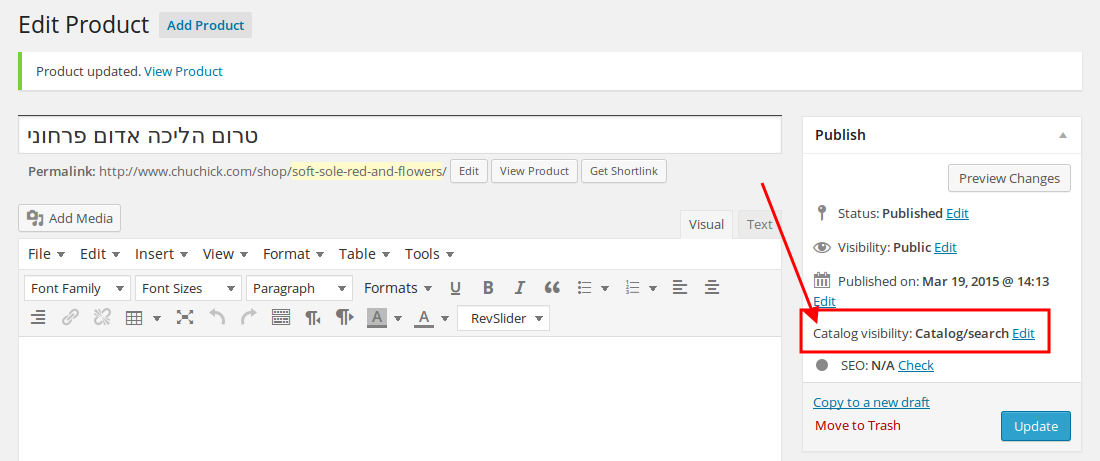
7. You marked the product as hidden. I’ve changed the settings:
https://s3.amazonaws.com/fvd-data/notes/168674/1428156163-8CTCd9/screen.png
Now it’s displayed on the home page. Please clear browser cache and check.
Thank you.
Regards,
Eva Kemp.
Hello @dietnga,
As I see you didn’t translate .po file in the directory wp-content/plugins/woocommerce/i18n/languages.
Please read this article:
http://docs.woothemes.com/document/woocommerce-localization/ (6. Translating with PoEdit)
Thank you.
Regards,
Eva Kemp.
Hello,
You need write the code in functions.php file of the child theme.
As I see you modified images files, so you need write the code where those images should be loaded from.
Or write it in style.css of the child theme as background images for the site elements.
Regards,
Eva Kemp.