Hello,
Please provide us with FTP and wp-admin panel credentials in Private Content.
Thank you.
Regards,
Eva Kemp.

Hello,
Please provide us with FTP and wp-admin panel credentials in Private Content.
Thank you.
Regards,
Eva Kemp.
Hello,
You need comment the code <?php do_action( 'woocommerce_cart_collaterals' ); ?> in the file wp-content/themes/woopress/woocommerce/cart/cart.php on line 174.
Regards,
Eva Kemp.
Hello,
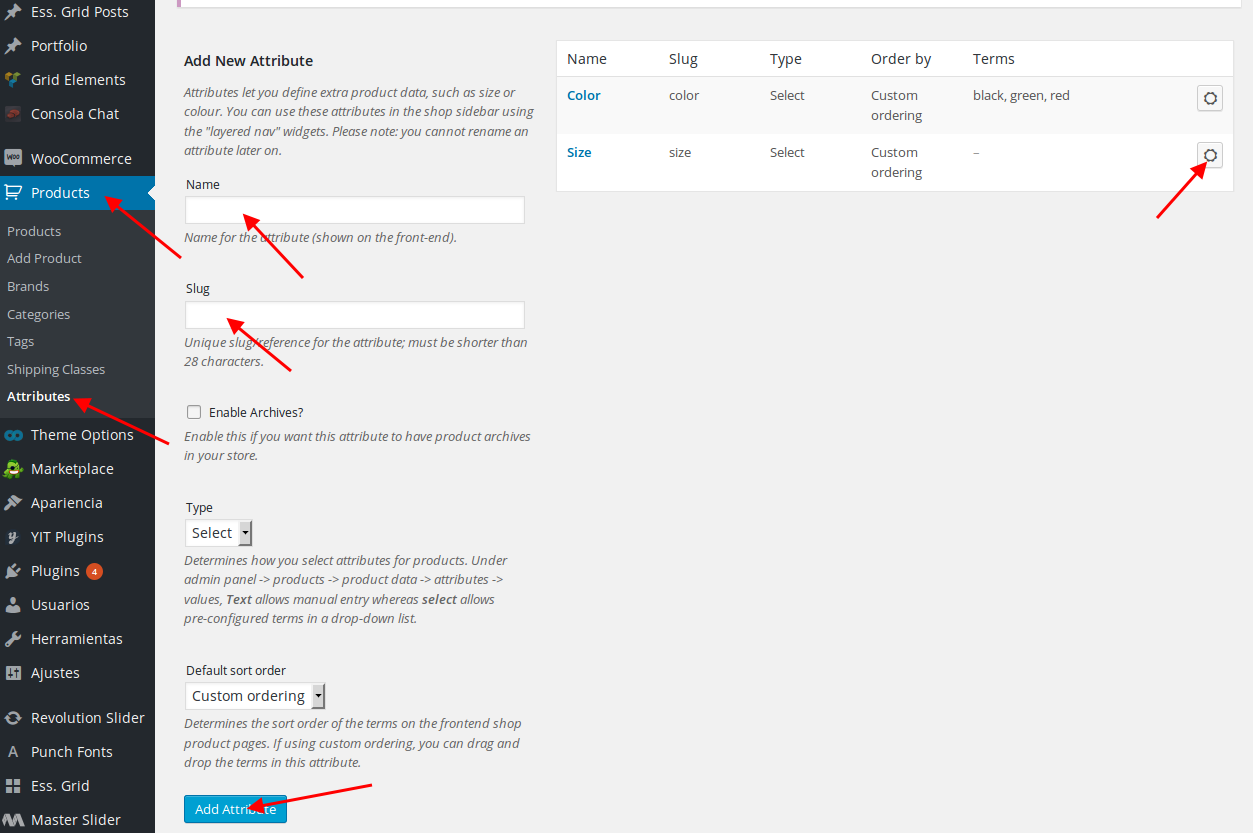
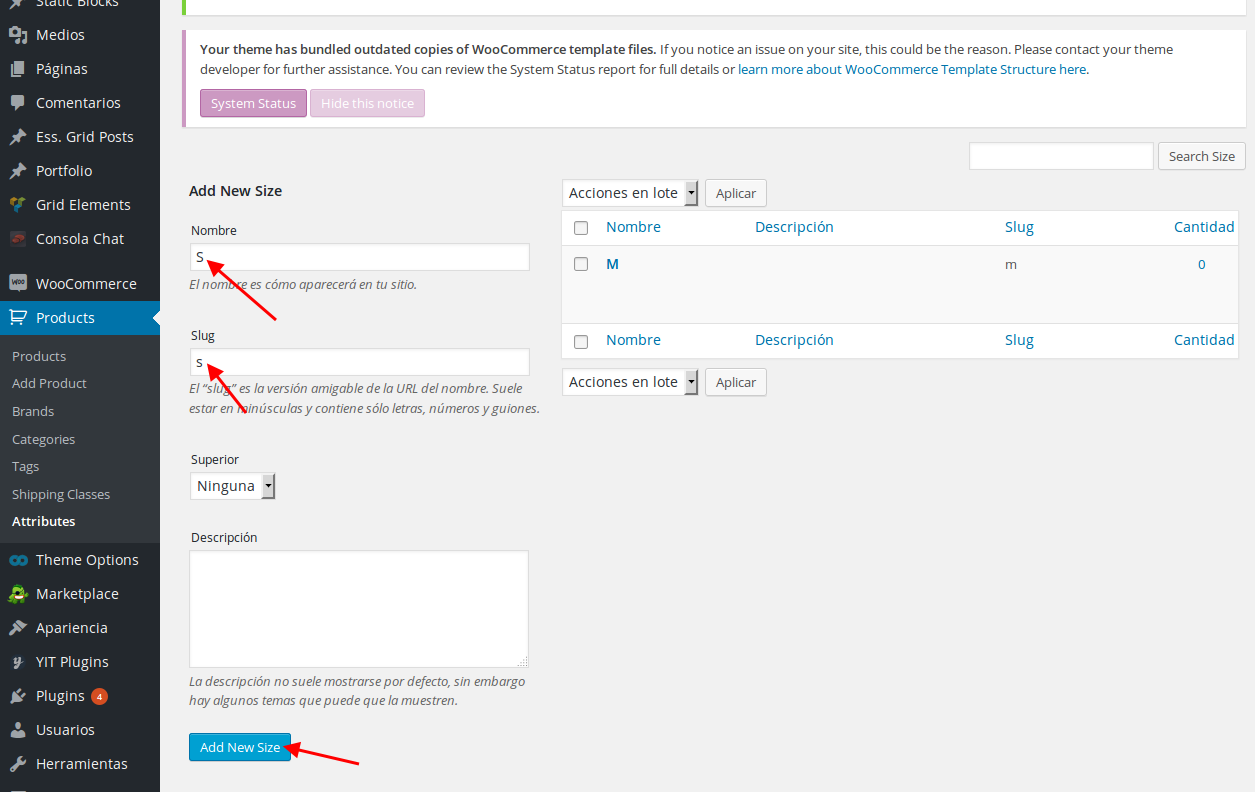
To create Size attribute you need create it in Products > Attributes section at first.
Please do this as I’ve done for Color attribute:
https://s3.amazonaws.com/fvd-data/notes/168674/1429817905-8nHRvm/screen.png
https://s3.amazonaws.com/fvd-data/notes/168674/1429818011-SD4BQc/screen.png
Then you’ll be able to select those variations in products editor.
Regards,
Eva Kemp.
Hello,
No, if you’re using child theme you need add the code in style.css of the child theme folder.
Regards,
Eva Kemp.
Hello,
Please provide us with FTP and wp-admin panel credentials in Private Content.
Thank you.
Regards,
Eva Kemp.
Hello @TeeDev,
I’ve set “Default state” as “Open” in FAQ element settings for contact form.
Now it’s opened by default. Please clear browser cache and check.
Regards,
Eva Kemp.
Hello,
You can create such page with help of Visual Composer editor:
https://wpbakery.atlassian.net/wiki/pages/viewpage.action?pageId=4030510
Regards,
Eva Kemp.
Hello,
You’re welcome.
Regards,
Eva Kemp.
Hello,
I’ve edited shortcodes.php file to change background color for captcha of the contact form.
Please check.
Regards,
Eva Kemp.
Hello,
Zoom effect isn’t working on your example page because original sizes of the image are 510px × 510px, which are too small. You should reupload the image with dimensions more than 800px.
Try to disable 3rd-party plugins and check images titles after that.
Thank you.
Regards,
Eva Kemp.
Hello,
You were suggested to update the theme. Do you want us to do this for you?
Please create a back up of the files and database and provide us with FTP credentials.
Regards,
Eva Kemp.
Hello,
Sorry, but if you change code for contact form it’ll be changed for both pages Contacts and Services.
Regards,
Eva Kemp.
Hello,
Unfortunately there is no such tag.
Regards,
Eva Kemp.
Hello,
Please clarify how we can replicate the issue.
Also please check if it persists with default WordPress theme.
Thank you.
Regards,
Eva Kemp.
Hello,
Try to use <br> tag where you want to add break-spacing.
Regards,
Eva Kemp.
Hello,
Please add this code in custom.css file:
.vc_button-2-wrapper a:hover {
  color: #463A2C!important;
  background-color: #9C7B52 !important;
}
Regards,
Eva Kemp.
Hello,
I’ve added this code in style.css of the child theme and the columns width is changed now:
.products-list .product .product-details{
width: 50% !important;
}
.products-list .product .product-image-wrapper{
width: 45% !important;
}
Please clear browser cache and check.
Regards,
Eva Kemp.
Hello,
Please provide us with wp-admin panel and FTP credentials in Private Content.
Thank you.
Regards,
Eva Kemp.
Hello,
Have you already translated some part of the content?
You need translate the theme as described in our documentation:
https://www.8theme.com/demo/docs/royal/#!/1_how_to_translate
Edit default.po file and then save it as “es_ES.po”, so with the prefix of your language.
Regards,
Eva Kemp.
Hello,
The issue with logo has been fixed.
Please clear browser cache and check.
Thank you.
Regards,
Eva Kemp.
Hello,
You can try to reorder categories in Products > Categories.
Regards,
Eva Kemp.
Hello,
You can try this code instead of the previous one:
http://webplantmedia.com/starter-themes/wordpresscanvas/how-to-remove-all-image-titles-when-hovering-over-pictures-in-site/
Regards,
Eva Kemp.
Hello,
Sorry, but we still can’t log in.
Please reset FTP password.
Thank you.
Regards,
Eva Kemp.
Hello,
Please add this code in custom css block in Visual Composer editor on the Cart page:
.wpb_alert-info {
    border-color: #EC2E67;
    background-color: #EC2E67;
}
http://storage1.static.itmages.com/i/15/0423/s_1429805834_8318527_5c6eb9a54e.png
Thank you.
Regards,
Eva Kemp.
Hello,
Please take our apologies for inconveniences.
Those notices will be fixed in the next theme update.
Thank you.
Regards,
Eva Kemp.
Hello,
I’ve edited the code in custom.css file. Please clear browser cache and check the site.
Regards,
Eva Kemp.
Hello,
We’re glad the issue has been fixed.
If there are any questions feel free to contact us.
Thank you.
Regards,
Eva Kemp.
Hello,
Yes, we read your post.
Please take our apologies but we can’t replicate the problem. Your site is loading fine on our side http://storage1.static.itmages.com/i/15/0423/s_1429801899_2623480_7657722a56.png . We also tested it on iPhone 6 and iPhone 5 devices.
Regards,
Eva Kemp.
Hello,
You’re welcome.
Regards,
Eva Kemp.
Hello,
You’re welcome.
Regards,
Eva Kemp.