
Hello,
The problem has been fixed. Please check your site now.
Regards,
Eva Kemp.

Hello,
The problem has been fixed. Please check your site now.
Regards,
Eva Kemp.
Hello,
Could you please clarify where exactly you want to change the font color? Also please provide us with the site name and admin panel credentials in Private Content.
Make sure you’ve created custom.css file in the theme folder.
Thank you.
Regards,
Eva Kemp.
Hello,
Please check your email. The file has been sent to you. You can edit .po and .mo files for your needs.
Also we recommend to update the theme to the latest version if you haven’t done yet.
Regards,
Eva Kemp.
Hello,
Unfortunately it can’t be done for the pages in menu. But you can add product categories to the menu and it should work. Also you need change settings in Woocommerce > Settings > Products > Shop Page Display > Show subcategories and upload images for the categories.
Regards,
Eva Kemp.
Hello,
Try to add this line to your wp-config.php file:
define(‘WP_MEMORY_LIMIT’, ’64M’);
Or if you have access to your PHP.ini file, change the line in PHP.ini:
memory_limit = 64M ;
If you don’t have access to PHP.ini try adding this to .htaccess file:
php_value memory_limit 64M
If this doesn’t help you should contact your host to increase the memory limit.
Regards,
Eva Kemp.
Hello,
As I see mobile version is disabled in your settings. You can turn it on in Theme Options > Responsive > Enable Responsive Design > On.
Here you can find the information how to get a new theme for upgrade:
http://www.ait-themes.com/doc/how-can-i-downloadupdate-my-theme/
Also please read our documentation about update: https://www.8theme.com/demo/docs/legenda/index.html#!/upgrade > Upgrade.
Regards,
Eva Kemp.
Hello,
I was unable to connect to FTP (login incorrect).
Please rename default.custom.css to custom.css file in the theme folder and insert the following code:
.main-nav .menu > li.menu-full-width .nav-sublist-dropdown .container > ul > li.et-col4 {
    float: right;
    right: -150px;
}
Please reply back if the issue still persists.
Regards,
Eva Kemp.
Hello,
You can enable pop up window in Store settings > Presentation > Display Fancy Purchase Notifications > On.
Also please view the WP E-Commerce documentation, which will help you to set the plugin options due to your needs:
http://docs.getshopped.org/category/wp-e-commerce-user-guide-3-8-version/configure-your-e-commerce-settings/
http://www.tipsandtricks-hq.com/ecommerce/simple-wp-shopping-cart-installation-usage-290
Regards,
Eva Kemp.
Hello,
Unfortunately WordPress does not come with some kind of video player. You can insert only the link to the video.
If you want to embed a player for the file on a page or a post you’ll need some kind of plugin.
Regards,
Eva Kemp.
Hello,
You need rename default.custom.css to custom.css via FTP. This file is located in the theme folder.
Also you don’t need to insert the following code:
/*
Theme Name: LEGENDA – 8theme WordPress theme
Theme URI: https://www.8theme.com/
Author: 8theme
Author URI: http://themeforest.net/user/8theme
Description: ThemeForest Premium Theme
Version: 2.1
License: GNU General Public License version 3.0
License URI: http://www.gnu.org/licenses/gpl-3.0.html
*/
It’s just the theme information and it’s commented.
You can change font color in Theme Options > Color Scheme.
Regards,
Eva Kemp.
Hello,
You need to use the shortcode [etheme_contacts gmap=”0″]
It adds the functionality of a contact form without google map.
Please refer to our documentation: https://www.8theme.com/demo/docs/idstore/index.html#!/idstore_shortcodes
Regards,
Eva Kemp.
Hello,
Please check the page now. The problem was with Permalinks settings.
Please note we provide support only to the issues that are strictly related to our theme, not WP settings.
We advise you to recheck Permalinks settings when you get 404 error before contacting 8theme support.
Thank you for understanding.
Regards,
Eva Kemp.
I’ve just made some modifications in custom.css file.
Please check the mobile version of your site.
Regards,
Eva Kemp.
You are always welcome.
Thank you for kind words.
Regards,
Eva Kemp.
Thank you for the login details.
But we also need FTP credentials.
You can watch this video tutorial how to create custom.css. This video is for Legenda theme but the process is the same.
Regards,
Eva Kemp.
Hello,
Sorry for a long delay.
Are you experiencing the same issue with the default theme? Please check.
If this problem appears only with our theme please provide us with FTP and admin panel credentials in Private Content.
Regards,
Eva Kemp.
Hello,
Could you please create custom.css file in the theme folder? Or just rename currect default.custom.css into custom.css and enable it in Theme Options > Custom CSS > On.
Let us know when it’s done.
Thank you.
Regards,
Eva Kemp.
You need to change Revolution Slider settings: in General settings tab you can change the delay of slides and enable Shuffle Mode and Lazy Load.
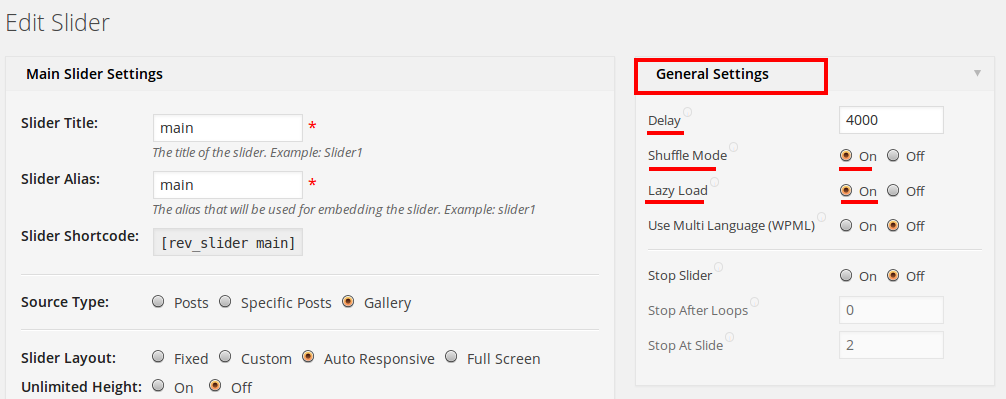
Regards,
Eva Kemp.
Hello,
You can insert a video file only via text widget, just insert the embed code into the text field.
Sorry but this is the only solution to put video in footer.
Regards,
Eva Kemp.
Hello,
Please provide us with FTP and admin panel credentials.
Also please create custom.css file in the theme directory and enable it in Theme Options > Custom CSS > On.
Regards,
Eva Kemp.
Hello,
1. As I see you have only one slide on the home page. Are we talking about this one? (see in private content).
2. To make the post info invisible you can the following code into custom.css:
.portfolio-item .post-info { display: none; }
Regards,
Eva Kemp.
Hello @kooop,
Sorry, but we don’t know the exact date.
Please take our apologies.
Regards,
Eva Kemp.
Hello,
That’s great.
You are welcome.
Regards,
Eva Kemp.
Hello,
You can decrease the slider size at the bottom. Add the following code into custom.css file:
.slider-container { height: 500px; }
To create custom.css you can rename default.custom.css to custom.css.
Make sure you enabled this file in Theme Options > Custom CSS > On.
Please provide us with the admin panel credentials to check the header issue.
Have you made any changes to the original theme files?
Regards,
Eva Kemp.
Hello,
Please read the woocommerce documentation http://docs.woothemes.com/document/woocommerce-shortcodes/.
You should use the following shortcode for your page: [woocommerce_order_tracking]
Please note we provide support only to the issues that are strictly related to our theme, not to woocommerce features.
Regards,
Eva Kemp.
Shipping Address form will open automatically when clients fill in Billing Address form and click “Continue” button.
Let us know if you need more help.
Regards,
Eva Kemp.
Hello,
Have you made any changes in the original theme files? Have you tried to revert back to the default settings?
If the default settings don’t help, please provide us with FTP and admin panel credentials.
You can create a new row of stores adding submenus to the main menu as you’ve done with the current submenus.
Regards,
Eva Kemp.
Hello,
You need edit the file wp-content/themes/legenda/contacts.php, find the lines with ‘Name and Surname’ and remove “surname”.
Regards,
Eva Kemp.
Hello,
Thank you for the feedback.
You are welcome.
Have a nice day!
Regards,
Eva Kemp.
You are welcome.
Regards,
Eva Kemp.








