Forum Replies Created

Viewing 30 posts - 31,021 through 31,050 (of 31,366 total)
  • Avatar: Eva
    Eva Kemp
    Participant
    April 30, 2014 at 22:35

    Please check now if the header color is the one you need.
    If no, you can change it in custom.css. Find the block:

    .header-wrapper.header-type-1 {
        background-color: #1F1F1F;
        }

    and set the value for background color or just write the color name.

    Regards,
    Eva Kemp.
    Avatar: Eva
    Eva Kemp
    Participant
    April 30, 2014 at 22:22

    You are welcome.

    Regards,
    Eva Kemp.

    Avatar: Eva
    Eva Kemp
    Participant
    April 30, 2014 at 21:56

    Please check the site now.
    If something needs to be changed feel free to ask us.

    Regards,
    Eva Kemp.

    Avatar: Eva
    Eva Kemp
    Participant
    April 30, 2014 at 21:37

    Hello,

    Unfortunately it can’t be done for the pages in menu. But you can add product categories to the menu and it should work. Also you need change settings in Woocommerce > Settings > Products > Shop Page Display > Show subcategories and upload images for the categories.
    Also main-categories can’t be removed, but the subcategories of BEDROOM will be opened by default when you click Bedroom item on the menu.

    Regards,
    Eva Kemp.

    Avatar: Eva
    Eva Kemp
    Participant
    April 30, 2014 at 21:31

    Hello,

    The problem was you had enabled Template Debug Mode in WooCommerce > System Status > Tools tab > Template Debug Mode.
    I’ve disabled it. Now the site is working fine.
    Please check it.

    Regards,
    Eva Kemp.

    Avatar: Eva
    Eva Kemp
    Participant
    April 30, 2014 at 21:12

    Try to set the code below into custom.css file:

    .product-information .product-name-price {
           display: inline; }

    To create custom.css you need rename default.custom.css to custom.css in the theme folder, then enable it in admin panel > XMarket – Theme Settings > tick “Enable Custom CSS file”.

    Regards,
    Eva Kemp.

    Avatar: Eva
    Eva Kemp
    Participant
    April 30, 2014 at 20:33

    Hello,

    Please provide us with FTP and wp-admin panel credentials in Private Content to check the issues.

    Regards,
    Eva Kemp.

    Avatar: Eva
    Eva Kemp
    Participant
    April 30, 2014 at 20:26

    You are welcome.

    Regards,
    Eva Kemp.

    Avatar: Eva
    Eva Kemp
    Participant
    April 30, 2014 at 19:18

    Hello,

    Thank you for FTP access.
    Could we also have wp-admin login details?

    Regards,
    Eva Kemp.

    Avatar: Eva
    Eva Kemp
    Participant
    April 30, 2014 at 19:15

    Hello,

    That’s great you’ve fixed the issue yourself.
    Don’t hesitate to contact us if you need more help.

    Regards,
    Eva Kemp.

    Avatar: Eva
    Eva Kemp
    Participant
    April 30, 2014 at 19:13

    Hello,

    You need to write this code in custom.css file:
    .header-type-3 .main-nav .double-border { background-color: red; }
    Change color attribute to yours.
    On this video tutorial you can see how to create custom.css.

    Regards,
    Eva Kemp.

    Avatar: Eva
    Eva Kemp
    Participant
    April 30, 2014 at 19:05

    Hello,

    Yes, this issue is also related to the current theme version. It should be fixed in the next update.
    Please take our apologies for the troubles you are experiencing.
    The new release will appear very soon.

    Regards,
    Eva Kemp.

    Avatar: Eva
    Eva Kemp
    Participant
    April 30, 2014 at 18:53

    Hello,

    Try to use the code <!--more--> in text mode for your posts.
    Put it inside the post where you want “Read more” button to appear.

    Regards,
    Eva Kemp.

    Avatar: Eva
    Eva Kemp
    Participant
    April 30, 2014 at 18:28

    Hello,

    I’ve just checked the site from my end and it’s showing fine:
    mobile

    Have you enabled Responsive design in Theme Options > Responsive?
    Please check it.

    Regards,
    Eva Kemp.

    Avatar: Eva
    Eva Kemp
    Participant
    April 30, 2014 at 17:06

    Hello,

    Have you read our documentation https://www.8theme.com/demo/docs/blanco/index.html#!/portfolio > Portfolio ?
    You need create new projects at Portfolio > Add New.

    Please specify the exact issues you are experiencing creating portfolio page.

    Regards,
    Eva Kemp.

    Avatar: Eva
    Eva Kemp
    Participant
    April 30, 2014 at 16:03

    Hello,

    Please check your site now. We’ve edited custom.css file and white block has disappeared.
    Regarding columns in footer you need use Static blocks for this.
    Please read our documentation https://www.8theme.com/demo/docs/legenda/index.html#!/footer > Footer.

    Regards,
    Eva Kemp.

    Avatar: Eva
    Eva Kemp
    Participant
    April 30, 2014 at 15:52

    Hello @slpalmer,

    The update of Legenda theme will be released in a week or so.
    The bug with VC will be fixed there.

    Please take our apologies for the troubles with the current theme version.

    Regards,
    Eva Kemp.

    Avatar: Eva
    Eva Kemp
    Participant
    April 30, 2014 at 15:08

    Yes, it’s compatible. You can update Woocommerce to 2.1.8 version.

    Regards,
    Eva Kemp.

    Avatar: Eva
    Eva Kemp
    Participant
    April 30, 2014 at 14:30

    Hello,

    There is a problem of incompatibility of 2 shortcodes on the page. If [advps-slideshow optset=”6″] works, then [sabai-directory-slider] doesn’t work.
    You should contact the plugins developer regarding this issue.

    By the way, you have a very nice site.

    Regards,
    Eva Kemp.

    Avatar: Eva
    Eva Kemp
    Participant
    April 30, 2014 at 13:36

    Hello,

    Please try to edit the file theleader/framework/etheme-functions.php , find wp_enqueue_script('masonry', get_template_directory_uri().'/js/jquery.masonry.min.js',array(),false,true); (line 50) and replace with
    wp_enqueue_script('et_masonry', get_template_directory_uri().'/js/jquery.masonry.min.js',array(),false,true);

    If the issue still persists please provide us with FTP credentials.
    Regards,
    Eva Kemp.

    Avatar: Eva
    Eva Kemp
    Participant
    April 30, 2014 at 12:19

    Hello,

    Is this problem also present on default theme?
    We advise you to update WP version to the latest 3.9.
    If this doesn’t help, let us know.

    Regards,
    Eva Kemp.

    Avatar: Eva
    Eva Kemp
    Participant
    April 30, 2014 at 12:06

    Hello,

    In the admin panel you should edit Theme Options > Portfolio and set “Enable Lightbox For Projects” to “Off”.

    Regards,
    Eva Kemp.

    Avatar: Eva
    Eva Kemp
    Participant
    April 30, 2014 at 11:27

    You’re welcome.
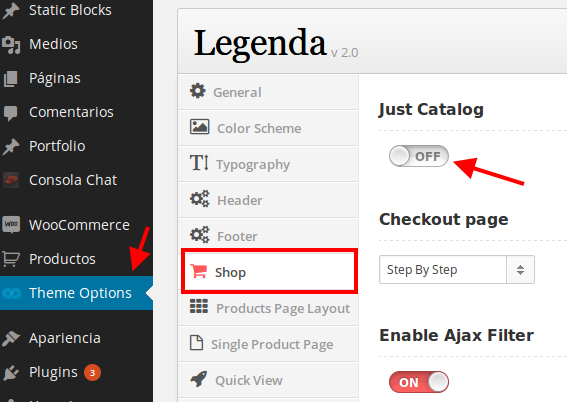
    Please see the screenshot:
    catalog
    That option should be set to off if you want “Add to cart” button to be displayed.

    Regards,
    Eva Kemp.

    Avatar: Eva
    Eva Kemp
    Participant
    April 30, 2014 at 11:06

    Hello,

    The problem was you enabled “Just Catalog” option in Theme Options > Shop.
    I’ve turned it off and attributes and “Add to cart button” have appeared.
    Please check.

    Regards,
    Eva Kemp.

    Avatar: Eva
    Eva Kemp
    Participant
    April 30, 2014 at 11:00

    You are welcome.

    Regards,
    Eva Kemp.

    Avatar: Eva
    Eva Kemp
    Participant
    April 30, 2014 at 10:13

    Hello @cyan,

    Thank you for such kind words.
    You’re always welcome.

    Have a nice day!
    Regards,
    Eva Kemp.

    Avatar: Eva
    Eva Kemp
    Participant
    April 30, 2014 at 10:08

    Hello,

    This problem isn’t related to our theme. The warning you are getting is “WordPress could not establish a secure connection to WordPress.org. Please contact your server administrator.) in /home/egadget2/public_html/wp-admin/includes/plugin-install.php on line 77”.
    You should ask your host to check the connection settings, maybe they are using some proxy settings as well.

    Regards,
    Eva Kemp.

    Avatar: Eva
    Eva Kemp
    Participant
    April 30, 2014 at 09:23

    Hello,

    Sorry but in Appearance > Editor I see only default.custom.css file. Where have you created it? Please watch the tutorial how to create custom.css: http://www.youtube.com/watch?v=Qok2zRedRMY&list=PLMqMSqDgPNmD4uhGI1IBhr1iaEy81TMff&feature=share&index=1
    Or provide us with the correct FTP credentials to do this ourselves.

    Also the problem with the page may be caused by the large image size. You can try to set the dimensions in Woocommerce settings: http://docs.woothemes.com/document/using-the-appropriate-product-image-dimensions/

    Regards,
    Eva Kemp.

    Avatar: Eva
    Eva Kemp
    Participant
    April 30, 2014 at 09:18

    Hello,

    Could you please provide us with the FTP and admin panel credentials?

    Regards,
    Eva Kemp.

    Avatar: Eva
    Eva Kemp
    Participant
    April 30, 2014 at 09:13

    Hello,

    Please provide us with the site name and credentials to FTP and wp-admin panel.

    Regards,
    Eva Kemp.

  • 1 2 3 … 1,034 1,035 1,036 … 1,044 1,045 1,046
    Viewing 31,050 results - 31,021 through 31,050 (of 31,366 total)
Viewing 30 posts - 31,021 through 31,050 (of 31,366 total)
We're using our own and third-party cookies to improve your experience and our website. Keep on browsing to accept our cookie policy.