
Hello,
Do you mean mega menu plugin?
If so you can its documentation at this link: http://manual.menu.megamain.com/
Regards,
Eva Kemp.

Hello,
Do you mean mega menu plugin?
If so you can its documentation at this link: http://manual.menu.megamain.com/
Regards,
Eva Kemp.
Hello,
The shortcodes that can be used in the theme are described in the documentation: https://www.8theme.com/demo/docs/idstore/index.html#!/idstore_shortcodes > IDStore Shortcodes.
If you still have questions please let us know.
Regards,
Eva Kemp.
Hello,
You need insert the following code in custom.css:
.copyright.copyright-3 { background: red; } and replace the color name with yours.
.copyright.copyright-3 means the type of footer you’re using. You can check it in Theme Options > Footer. If you’re using the 1st footer type then you should write “.copyright.copyright-1”.
Regards,
Eva Kemp.
Hello,
You can change links color in admin panel > XMarket – Theme Settings > Color Scheme > Main Color.
You can make the content box wider adding the code in custom.css:
.content.simple-page { width: 920px; }
Have followed the instruction carefully how to translate the theme https://www.8theme.com/demo/docs/xmarket/index.html#!/how_to_translate ?
As I see you have .mo and .po files with the names of es_GB instead of es_ES as written your wp-config.php file. Please check your files again.
Regards,
Eva Kemp.
Regarding this request: http://juegosdigital.com/wp-content/uploads/2014/05/colorfooter-1000×625.png:
Unfortunately it can’t be customized in custom.css file as those icons are images and can be edited using some image editor (e.g. Photoshop).
You can remove sidebar from the page inserting the code into custom.css:
.columns2-left > #sidebar { display: none; }
or add an empty text widget into the Primary Widget Area in Appearance > Widgets.
According to http://juegosdigital.com/wp-content/uploads/2014/05/page-1000×625.png:
The stars can’t be changed as this is also an image which you have to edit for your needs.
Do you want to change the link color to red and not green as it is now?
Please clarify your request regarding “Normal (blue)”.
LayerSlider plugin may conflict with some other plugins you’ve installed. Please try to deactivate the plugins one by one to check which one is causing the issue.
Thank you.
Regards,
Eva Kemp.
Hello,
I was able to install Revolution Slider and Wishlist plugins uploading them into the plugins directory via FTP. That issue might occur because of some problems at your host. One of the issues might be lack of storage space.
If you need more help let us know.
Regards,
Eva Kemp.
Hello,
We’re sorry for a long delay.
I’ve edited custom.css file and now the products are displayed correctly. Please check.
Unfortunately there is no such feature for “Sale” and “New” icons.
Could you please clarify your request regarding the links color? What links do you want to edit?
Regarding the LayerSlider plugin I advise you to reinstall it. Try to remove its folder from the plugins directory via FTP and install it again. If it doesn’t help provide us with the FTP access to check the issue.
Regards,
Eva Kemp.
Hello @CourseLinq,
Unfortunately we’re still waiting for the news from the developers.
We hope it won’t take much more time and the update will be produced in a short period.
Thank you for being so patient.
Regards,
Eva Kemp.
Hello @edDesignStudio,
Could you please provide wp-admin panel credentials too?
Also please specify what plugins you’re trying to install.
Thank you.
Regards,
Eva Kemp.
Hello,
There is a bug with VC in our theme which will be fixed in the next update. We’re very sorry for this.
According to Woocommerce plugin, do you have the same problem with the default theme too?
If so, then you have to contact woocommerce support as we provide help only to the issues strictly related to our theme.
Thank you for understanding.
Regards,
Eva Kemp.
Hello,
Please check if you’ve enabled “Comments” in the Screen Options at the top of the page in the Posts tab.

And tick “Allow Comments” after post editor
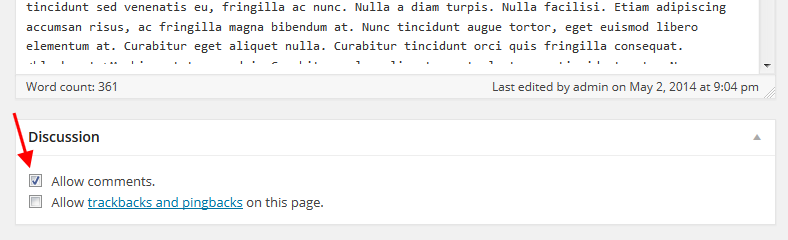
If you still have problems please provide us with admin panel credentials in Private Content.
Regards,
Eva Kemp.
Hello,
There is a bug in the theme and it should be fixed in the next update.
Please take our apologies for the caused inconveniences.
Could you please clarify what problems you are experiencing with the Register page?
Regards,
Eva Kemp.
Hello,
You are welcome.
Regards,
Eva Kemp.
Hello,
Unfortunately as this is a built-in widget it requires additional customization in the theme files. If you have needed skills you may edit files of a child theme. Other way you can create a picture with the telephone number and we’ll insert it in the widget.
Please let us know if you agree.
Also please provide us with the site name and wp-admin panel credentials in Private Content to check the issue with logo on a mobile device.
Regards,
Eva Kemp.
Hello,
Sorry, but I can’t find the text “View More Posts” as well as ‘recent works’ title and ‘projects’ title. Have you removed them already? If no, could you please provide screenshots where I can see the titles?
Regards,
Eva Kemp.
Hello,
Sorry, but this requires adittional customization. Now you can change backgrond color only for the whole block in drop-down menu. You need insert these lines in custom.css:
#main-nav > ul > li ul { background: red; }
#main-nav > ul > li > ul > li a { color: white; }
If you need more help please let us know.
Regards,
Eva Kemp.
Hello,
You can provide the credentials in Private Content. Have you updated woocommerce plugin as well? You may try to update it to the latest version and don’t forget to create a back up of your files and database.
Regards,
Eva Kemp.
Hello,
Please clarify your issue with more details. What’s wrong with the pages?
Please provide us with wp-admin panel credentials and site name in Private Content to check.
Regards,
Eva Kemp.
Hello,
You can refer to the woocommerce documentation regarding shortcodes: http://docs.woothemes.com/document/woocommerce-shortcodes/
If you still need help with shortcodes please provide us with the wp-admin panel and FTP credentials to check.
Regards,
Eva Kemp.
Hello,
As I see you’ve selected the type of header where logo is situated on the right side. Could you please provide us with the link to check the banner issue?
Regards,
Eva Kemp.
Hello,
In this case we can change font color using custom.css file.
Please specify what font you’d like to change and we’ll assist you.
Also please make sure you’ve created custom.css in the theme folder.
Thank you.
Regards,
Eva Kemp.
Ok. Hope it’ll help you to get what you need.
Best regards,
Eva Kemp.
Hello,
Have you followed the instructions carefully as described in our documentation https://www.8theme.com/demo/docs/legenda/index.html#!/installation ?
If you are still unable to install the theme, our specialists will help you. But this service isn’t for free. Please check this link: https://www.8theme.com/our-installation-service/
If you agree you can contact us at support.8theme.com.
Regards,
Eva Kemp.
Hello,
When editing a Blog page you should choose a widget area for sidebar at the right side of the page:
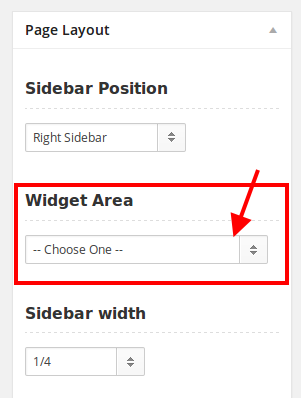
Don’t forget to put necessary widgets into the Widget area in Appearance > Widgets.
Regards,
Eva Kemp.
Hello,
Try to change the permissions for plugins folder to 755 or 777 and check if it helps. If it doesn’t, please provide us with FTP and wp-admin panel credentials.
Regards,
Eva Kemp.
Hello,
Please read this article how to add featured and new products:
http://support.8theme.com/index.php?/Knowledgebase/Article/View/9/0/how-to-mark-products-as-featured-and-new-ones
Regards,
Eva Kemp.
Hello,
Please create a database and theme files backup. Delete the woocommerce folder, then upload it again on the plugin folder via FTP. Try to activate the woocommerce plugin again.
If the problem persists provide us with FTP and wp-admin panel credentials.
Regards,
Eva Kemp.
The reason was you hadn’t enabled custom.css in Theme Settings. I’ve done this and changes made in custom.css file are affecting the site now.
Please check.
Regards,
Eva Kemp.
You are welcome.
When you remove the “chain” image the link will be removed from the image category as well. And you’ll have to click on the title to get on the category page.
But if it’s ok for you, you can insert the code into custom.css:
.block-mask {display: none;}
Regards,
Eva Kemp.
Hello,
You need to insert the following code into custom.css file:
.cart-summ, .cart-popup {
            display: none;
}

.shopping-cart-widget {
    background-image: url("http://full_path_to_your_image");
    background-repeat: no-repeat;
}
You can edit custom.css file in admin panel > Appearance > Editor.
Regards,
Eva Kemp.








