Forum Replies Created

Viewing 30 posts - 30,901 through 30,930 (of 31,366 total)
  • Avatar: Eva
    Eva Kemp
    Participant
    May 6, 2014 at 15:18

    Hello,

    To investigate the issues we need to have FTP login information. So, you need create a ticket at https://support.8theme.com/ and provide with all needed details.

    Also, there is no matter if footer is disabled or not. There were no changes in loading.

    Regards,
    Eva Kemp.

    Avatar: Eva
    Eva Kemp
    Participant
    May 6, 2014 at 15:13

    Hello @slpalmer,

    Yes, there will be a possibility to activate/deactivate VC as it’ll be added as a separate plugin.

    Regards,
    Eva Kemp.

    Avatar: Eva
    Eva Kemp
    Participant
    May 6, 2014 at 15:12

    Hello @philipe3d,

    I recommend you to create a ticket at http://support.8theme.com/ and provide all details and login information. Our specialists will investigate that issue.

    Regards,
    Eva Kemp.

    Avatar: Eva
    Eva Kemp
    Participant
    May 6, 2014 at 15:08

    Hello,

    I’ve checked the site with http and https. The font is the same for both variants. Could you please show us a screenshot with different fonts you’re facing now?

    Regards,
    Eva Kemp.

    Avatar: Eva
    Eva Kemp
    Participant
    May 6, 2014 at 14:50

    Hello,

    If you’ve already translated the theme files, you should also translate woocommerce file in /wp-content/plugins/woocommerce/i18n/languages. The file should be woocommerce-es_ES.po.
    If there are any troubles please provide us with FTP and admin panel credentials in Private Content.

    Regards,
    Eva Kemp.

    Avatar: Eva
    Eva Kemp
    Participant
    May 6, 2014 at 14:47

    Hello,

    You should contact woocommerce support regarding this issue and ask them for help with plugin installation.
    After that we’ll assist you on the issues that are referred to our theme.

    Regards,
    Eva Kemp.

    Avatar: Eva
    Eva Kemp
    Participant
    May 6, 2014 at 14:45

    Hello,

    You can add “Our stores” section as you’ve done for “Our shops” at http://reneeblundon.com/projects/anovelidea/wp-admin/post.php?post=7643&action=edit. Use Visual Composer to add new sections.

    Regards,
    Eva Kemp.

    Avatar: Eva
    Eva Kemp
    Participant
    May 6, 2014 at 14:40

    Hello,

    That’s great the issue has been fixed.
    Have a good meeting!

    Regards,
    Eva Kemp.

    Avatar: Eva
    Eva Kemp
    Participant
    May 6, 2014 at 14:33

    Hello,

    Could you please clarify your question with more details?
    Also please provide us with wp-admin and FTP credentials in Private Content.

    Regards,
    Eva Kemp.

    Avatar: Eva
    Eva Kemp
    Participant
    May 6, 2014 at 14:30

    Hello,

    We’re very sorry but there is a bug with Visual Composer in our theme. It should be fixed in the next update, which will be released very soon.

    Please take our apologies.
    Regards,
    Eva Kemp.

    Avatar: Eva
    Eva Kemp
    Participant
    May 6, 2014 at 14:27

    Hello,

    We’re glad the problem has been solved.
    If you have any questions don’t hesitate to contact us.

    Regards,
    Eva Kemp.

    Avatar: Eva
    Eva Kemp
    Participant
    May 6, 2014 at 14:25

    Hello,

    Sorry but I’m unable to view your site as it’s closed for maintenance. Please provide us with wp-admin panel and FTP credentials. Do you have the latest theme version installed?

    Regards,
    Eva Kemp.

    Avatar: Eva
    Eva Kemp
    Participant
    May 6, 2014 at 14:20

    Hello,

    Unfortunately sidebar can’t be displayed when you select Grid option for Blog Layout in Theme Options. It works only with the default option and timeline.
    I’ve removed “view more posts” editing custom.css.

    Regards,
    Eva Kemp.

    Avatar: Eva
    Eva Kemp
    Participant
    May 6, 2014 at 14:07

    Hello @rebharris,

    Please check the settings for Revolution Slider in “Navigation” tab. You’ll see “Navigation Arrows” field there. Please check if it’s not set to “None”.

    Regards,
    Eva Kemp.

    Avatar: Eva
    Eva Kemp
    Participant
    May 6, 2014 at 14:01

    Hello,

    Please clarify what problems you are experiencing with the site display? Have you followed the instruction in our documentation: https://www.8theme.com/demo/docs/legenda/index.html#!/installation ?
    Also please provide us with FTP and admin panel credentials in Private Content for further assistance.

    Regards,
    Eva Kemp.

    Avatar: Eva
    Eva Kemp
    Participant
    May 6, 2014 at 13:58

    Hello,

    Please provide us with FTP credentials and we’ll update the file.

    Regards,
    Eva Kemp.

    Avatar: Eva
    Eva Kemp
    Participant
    May 6, 2014 at 13:57

    Hello,

    Could you please provide us with the credentials to wp-admin panel?

    Regards,
    Eva Kemp.

    Avatar: Eva
    Eva Kemp
    Participant
    May 6, 2014 at 13:46

    Hello,

    Unfortunately we don’t have features for tags search.
    You can add the woocommerce code in header.php yourself. Just create a child theme.
    If there are some difficulties we can add the code for you, but before create a child theme or provide us with FTP credentials.

    Regards,
    Eva Kemp.

    Avatar: Eva
    Eva Kemp
    Participant
    May 6, 2014 at 13:13

    Hello @efishinsea,

    We’ve sent the files of the previous theme version to your email you used for registration on our site. Please check.

    Regards,
    Eva Kemp.

    Avatar: Eva
    Eva Kemp
    Participant
    May 6, 2014 at 13:04

    Hello,

    Could you please provide us with the site name and FTP/wp-admin panel credentials in Private Content?

    Regards,
    Eva Kemp.

    Avatar: Eva
    Eva Kemp
    Participant
    May 6, 2014 at 12:51

    Hello,

    In Appearance > Themes it’s shown 2.8 version:
    version

    Have you followed the instruction in our documentation: https://www.8theme.com/demo/docs/blanco/index.html#!/upgrade ?

    Regards,
    Eva Kemp.

    Avatar: Eva
    Eva Kemp
    Participant
    May 6, 2014 at 12:47

    Hello,

    The version of your current theme is 2.9.1 and the new one is 2.9.2.
    Please update it to the latest version as described in our documentation: https://www.8theme.com/demo/docs/blanco/index.html#!/upgrade

    Regards,
    Eva Kemp.

    Avatar: Eva
    Eva Kemp
    Participant
    May 6, 2014 at 12:43

    Hello,

    If you want only one price to be displayed on the shop page you have to edit the products and set only one price for all attributes. But as I see it will be impossible as you have different prices for different kinds of products.
    You can ask woocommerce support regarding this.

    Regards,
    Eva Kemp.

    Avatar: Eva
    Eva Kemp
    Participant
    May 6, 2014 at 12:12

    Hello,

    I’ve changed Grid Settings in admin panel > Revolution Slider > Settings (for big slider (big-slider)).
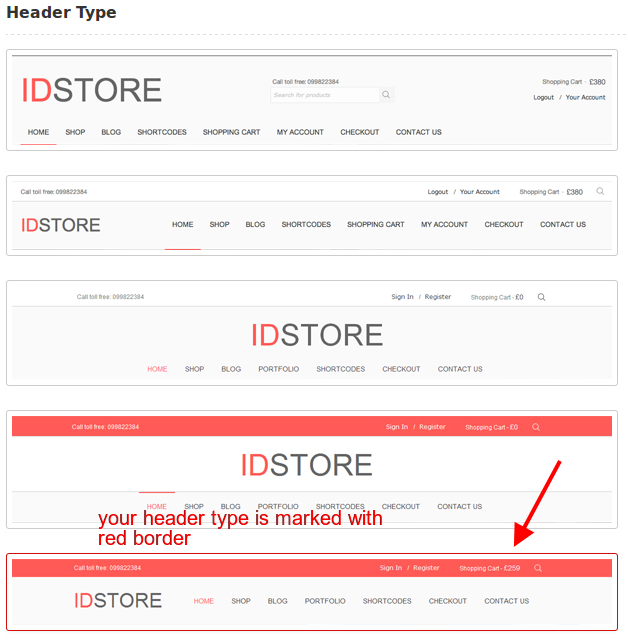
    Unfortunately I can’t the problem with the logo. You’ve chosen the type header #5 where logo is on the left.
    header

    Could you please show us a screenshot where logo is displayed incorrectly?

    Regards,
    Eva Kemp.

    Avatar: Eva
    Eva Kemp
    Participant
    May 6, 2014 at 11:51

    Hello,

    I’ve changed the order of tabs on your pages.
    You hadn’t changed the priority. If you want description to go first you should have written $tabs[‘description’][‘priority’] = 5; // Reviews first
    $tabs[‘reviews’][‘priority’] = 10; // Description second

    Could you please provide us with the screenshot how page is displayed in mobile device from your side?
    Also please provide us with FTP credentials.

    Regards,
    Eva Kemp.

    Avatar: Eva
    Eva Kemp
    Participant
    May 6, 2014 at 11:36

    Hello,

    You can remove the current banner in Theme Settings > Shop > Product Page Banner and you’ll see the url of the image in the text mode. Just remove it and upload new image via “Add Media” button.
    Don’t forget to save the changes.

    Regards,
    Eva Kemp.

    Avatar: Eva
    Eva Kemp
    Participant
    May 6, 2014 at 11:01

    Hello,

    You can change the menu color in custom.css using the code:
    .menu {background-color: red;} and change the value to the one you need.

    Don’t forget to enable custom.css in XMarket – Theme Settings > tick “Enable Custom CSS file”.
    Also you need create custom.css in the theme folder.

    Regards,
    Eva Kemp.

    Avatar: Eva
    Eva Kemp
    Participant
    May 5, 2014 at 21:08

    Hello,

    You are welcome.

    Best regards,
    Eva Kemp.

    Avatar: Eva
    Eva Kemp
    Participant
    May 5, 2014 at 20:34

    Thank you for the details, but we were unable to log in to admin panel. The access is blocked.
    Please give us permission to log in.

    Regards,
    Eva Kemp.

    Avatar: Eva
    Eva Kemp
    Participant
    May 5, 2014 at 20:30

    Hello,

    The latest version of the theme is 2.9.2 and you have 2.8.
    Please update it to the latest version.

    Regards,
    Eva Kemp.

  • 1 2 3 … 1,030 1,031 1,032 … 1,044 1,045 1,046
    Viewing 30,930 results - 30,901 through 30,930 (of 31,366 total)
Viewing 30 posts - 30,901 through 30,930 (of 31,366 total)
We're using our own and third-party cookies to improve your experience and our website. Keep on browsing to accept our cookie policy.