
Hello,
Could you please clarify with more details? What problems are you experiencing? Please give us the link to reproduce the problem and admin panel credentials in Private Content.
Regards,
Eva Kemp.

Hello,
Could you please clarify with more details? What problems are you experiencing? Please give us the link to reproduce the problem and admin panel credentials in Private Content.
Regards,
Eva Kemp.
Hello,
If you want to have Home page and Shop page separated, then choose or create another page for your products and change “Product Archive / Shop Page” in Woocommerce > Settings.
Regards,
Eva Kemp.
Hello,
Please refer to woocommerce documentation: http://docs.woothemes.com/document/editing-product-data-tabs/#section-3
Regards,
Eva Kemp.
Hello,
You need add the following codes into custom.css:
html {overflow: hidden;}
.page-content {margin-bottom: 5px;}
Regards,
Eva Kemp.
Could you please provide us with the admin panel credentials to check the issue?
Regards,
Eva Kemp.
Hello,
You can implement that page from the theme archive you have got. It is located in the folder “Demo_Pages” and the file is named “homepage6.xml”. Please refer to our documentation how to import the page: https://www.8theme.com/demo/docs/legenda/index.html#!/demo_data_installation > How to import Home Page?
Don’t forget: in admin panel > Settings > Reading change the “Front page displays” setting to “A static page”, set the front page to your homepage.
Regards,
Eva Kemp.
Ok, and reply back if it doesn’t help.
We’ll investigate it further.
Regards,
Eva Kemp.
Hello,
Our documentation shows the basic instruction for a 3rd-party plugin. If you have some problems installing it you’d better refer to the plugin documentation (e.g. http://wordpress.org/plugins/mailchimp-for-wp/installation/).
Regards,
Eva Kemp.
Hello Fran,
I’ve updated the file and the error has disappeared.
Please check.
Regards,
Eva Kemp.
Hello,
If you want to use our demo slides you can import them as described in the documentation https://www.8theme.com/demo/docs/legenda/index.html#!/slideshow
If the problem persists please provide us with admin panel credentials in Private Content.
Regards,
Eva Kemp.
You need remove a widget from Main Sidebar area in Appearance > Widgets and insert an empty text widget into there.
If the issue is still present please provide us with admin panel credentials.
Regards,
Eva Kemp.
Hello,
We need access to FTP account as well to check the file review-order.php.
Can you provide us with the credentials?
Regards,
Eva Kemp.
Hello,
I’ve made changes in custom.css file.
Please check the site if everything is fine.
Regards,
Eva Kemp.
Hello,
Could you please provide us with the link where sidebar is shown and admin panel credentials in Private Content?
Regards,
Eva Kemp.
Hello,
As I see you have the latest version of WP and the old one of our theme.
We recommend you to update the theme to the latest version. Also you should update woocommerce plugin.
If it doesn’t help please let us know.
Don’t forget to create a back up before update.
Regards,
Eva Kemp.
Thank you for the details.
I’ve logged in to FTP account and found no files there. There were only 2 folders: “Maildir” and “logs”. Is the account correct?
Regards,
Eva Kemp.
Hello,
Sorry but this is a bug in the theme and it should be fixed in the next update which will be released very soon.
Please take our apologies for the inconveniences.
Regards,
Eva Kemp.
Hello,
Unfortunately there is no such feature to add additional information on the brand page.
If you still have questions please let us know.
Regards,
Eva Kemp.
Hello,
Could you please provide us with FTP and admin panel credentials in Private Content?
Regards,
Eva Kemp.
Hello,
Please provide us with FTP details and admin panel credentials.
Regards,
Eva Kemp.
You’re welcome.
Regards,
Eva Kemp.
I’ve edited custom.css.
Please check your site if it’s showing correctly.
Regards,
Eva Kemp.
Have you enabled custom.css in Theme Options > Custom CSS > On?
If it’s enabled and the issue persists please provide us with admin panel and FTP credentials in Private Content.
Regards,
Eva Kemp.
Hello,
Please take our apologies for all inconveniences.
We’re going to present a new theme version this week.
So soon you’ll be able to download it.
Regards,
Eva Kemp.
Hello,
Please check the menu now.
Is it displayed correctly?
If no please specify what exactly needs to be changed.
Regards,
Eva Kemp.
Try to use these ones:
.fixed-.fixed-header-area .fixed-header .logo-with-menu { display: none !important; } and `.fixed-header-area .fixed-header .menu {
float: none !important;
text-align: center !important;
}`
If it doesn’t help please provide us with admin panel credentials.
Regards,
Eva Kemp.
Hello,
To use mega menu you need create a menu with items and subitems in Appearance > Menu. Then select in Theme Options > General > Menu Type > Mega Menu. And in Theme Options > Header > Mega menu works only with Header Type 1, 3 or 4.
Regards,
Eva Kemp.
Hello,
Could we have FTP access too?
Thank you.
Regards,
Eva Kemp.
Hello Fran,
You need edit wp-content/themes/legenda/woocommerce/checkout/review-order.php file.
Find the code <div id="order_review"> (line 14) and replace it with <?php if ( ! is_ajax() ) : ?><div id="order_review"><?php endif; ?>
Then at the end of the file under the code <?php do_action( 'woocommerce_review_order_after_payment' ); ?> you should add <?php if ( ! is_ajax() ) : ?></div><?php endif; ?> instead of </div>
If you have troubles with it please provide us with FTP details.
Regards,
Eva Kemp.
Hello,
All changes need to be made in custom.css file. Please view this tutorial how to create custom.css.
1. To remove logo from the fixed header area you need add the following code in custom.css: .fixed-.fixed-header-area .fixed-header .logo-with-menu { display: none; }
2. To center the menu add the code:
.fixed-header-area .fixed-header .menu {
    float: none;
    text-align: center;
}
3. To remove the search box add this code:
header .et-mega-search { display: none; }
4. Insert the code below:
.page-heading .row-fluid .span12 .back-to { top: -2px; }
5. Do you wish to remove the subtitle as shown on the screenshot?
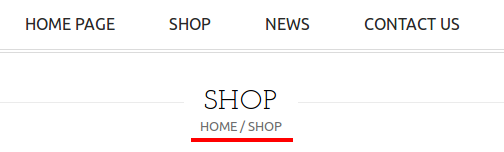
If so you can do this in Theme Options > Header > Breadcrumb Type set to “Without title”
Regards,
Eva Kemp.








