
Forum Replies Created

Viewing 30 posts - 2,281 through 2,310 (of 2,795 total)
  • Avatar: stan
    Stan Russell
    Participant

    Hello setupbranding,
    I have checked your site and Visual Composer editor is working correct:

    Are there any problems left?

    Hello ilnegozio,
    thank for your notification. We appreciate your help.

    Regards,
    Stan Russell.

    Avatar: stan
    Stan Russell
    Participant

    Hello,

    1) 2) we have reduced the gap below the slider and before the footer as possible. Please clear browser cache and check.

    3) You need to install Woocommerce plugin as it is required for correct work of log in feature in our template. Please navigate to Dashboard > Plugins and install it.

    Regards,
    Stan Russell.
    Avatar: stan
    Stan Russell
    Participant

    Hello,

    1) 2) we have reduced the gap below the slider and before the footer as possible. Please clear browser cache and check.

    3) You need to install Woocommerce plugin as it is required for correct work of log in feature in our template. Please navigate to Dashboard > Plugins and install it.

    Regards,
    Stan Russell.

    Avatar: stan
    Stan Russell
    Participant

    Hello,

    our demo site is using ‘Raleway’ font.

    Regards,
    Stan Russell.

    Avatar: stan
    Stan Russell
    Participant

    Hello,

    unfortunately we can log into your admin panel as it is blocked by Mod_Security. Please check.

    Regards,
    Stan Russell.

    Avatar: stan
    Stan Russell
    Participant

    Hello,

    we are sorry but this is not possible for this header variant.
    Please accept our apologies for inconvenievce.

    Regards,
    Stan Russell.

    Avatar: stan
    Stan Russell
    Participant

    Hello,

    if you want to make your popup transparent you need to add following code to yours custom.css:
    .white-popup-block {opacity: 0.9}

    Regards,
    Stan Russell.

    Avatar: stan
    Stan Russell
    Participant

    Hello,

    we are always glad to help our customers. Have a nice day!

    Regards,
    Stan Russell.

    Avatar: stan
    Stan Russell
    Participant

    Hello,

    to edit title for single product page you need to add following code to yours custom.css file:

    .single-product .page-heading .title{
    color:white!important
    }

    for ‘Add to cart’ button from single product page please use :

    .single_add_to_cart_button{
    color:white!important
    }

    Regards,
    Stan Russell.

    Avatar: stan
    Stan Russell
    Participant

    Hello,

    please provide us with admin credentials for your site in private content.

    Regards,
    Stan Russell.

    Avatar: stan
    Stan Russell
    Participant

    Hello,
    this image is created in graphics editor and only after that was used for theme. It was not edited with theme tools.

    Regards,
    Stan Russell.

    Avatar: stan
    Stan Russell
    Participant

    Hello,

    please activate that theme version which you have problem with. Right now we can see parent theme and three child themes. If the problem is with your parent theme – we have added code

    .product-information .product-name-price {
        height: 150px;
    }

    to your parent theme’s default.custom.css file
    To activate it you need rename file to ‘custom.css’

    Regards,
    Stan Russell.

    Avatar: stan
    Stan Russell
    Participant

    Hello,

    1) please check this part of documentation:
    https://www.8theme.com/demo/docs/woopress/index.html#!/9_footer

    2) navigate to Theme options > Header > ‘Breadcrumbs Background’ to set background image for breadcrumbs.

    3) to delete links please add following css code to yours custom.css file:
    .header .links{display:none}
    If you need to add elements to header, you need to add that code in Dashboard > Appearance > Widgets > ‘Place in header top bar’ widget area

    4) please specify your request or show us on screenshot what result do you want to achieve.

    Regards,
    Stan Russell.

    Avatar: stan
    Stan Russell
    Participant

    Hello,

    Essential Grid v 2.0.8 is available for download at https://www.8theme.com/download-plugins/

    Regards,
    Stan Russell.

    Avatar: stan
    Stan Russell
    Participant

    Hello ijedlickova,

    you are welcome!

    Regards,
    Stan Russell.

    Avatar: stan
    Stan Russell
    Participant

    Hello arahmati1,

    you are welcome!

    Regards,
    Stan Russell.

    Avatar: stan
    Stan Russell
    Participant

    Hello,

    you are welcome!

    Regards,
    Stan Russell.

    Avatar: stan
    Stan Russell
    Participant

    Hello,

    we are always glad to help our customers.

    Regards,
    Stan Russell.

    Avatar: stan
    Stan Russell
    Participant

    Hello,

    To close first category, edit wp-content/themes/royal/js/etheme.js file. Find and comment out line 1643:
    $this.find('>li').first().find('.open-this').html(minusIcon).parent().addClass('opened').find('ul.children').show();
    We recommend you to make backup before editing theme files.

    Thank you.
    Regards,
    Stan Russell.

    Avatar: stan
    Stan Russell
    Participant

    Hello cambya,
    we just created new layer for your slider. No serious fixes were applied.

    Regards,
    Stan Russell.

    Avatar: stan
    Stan Russell
    Participant

    Hello,

    please provide us with admin credentials for your site in private content. We will investigate this issue as soon as possible.

    Regards,
    Stan Russell.

    Avatar: stan
    Stan Russell
    Participant

    Hello,

    you are welcome!

    Regards,
    Stan Russell.

    Avatar: stan
    Stan Russell
    Participant

    Hello,
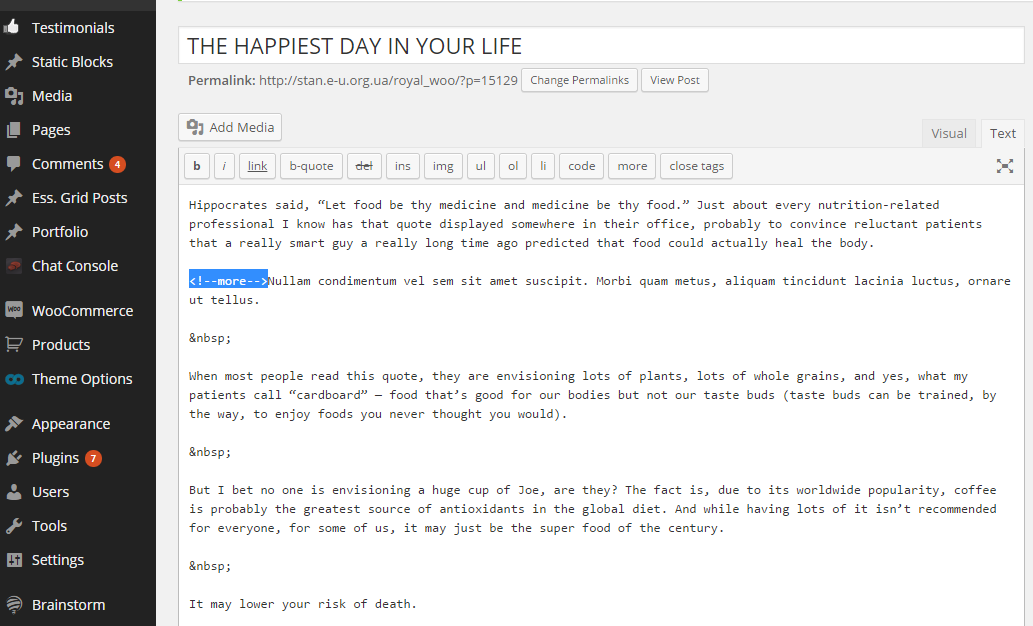
    you need to edit post and use default wordpress ‘read more’ buttons or add shortcode manually at the end of post summary.
    Please take a look on example

    Regards,
    Stan Russell.

    Avatar: stan
    Stan Russell
    Participant

    Hello,

    Please remove review-order.php file in the directory wp-content/themes/royal/woocommerce/checkout.

    Regards,
    Stan Russell.

    Avatar: stan
    Stan Russell
    Participant

    Hello,

    you are welcome!

    Regards,
    Stan Russell.

    Avatar: stan
    Stan Russell
    Participant

    Hello,

    you are welcome!

    Regards,
    Stan Russell.

    Avatar: stan
    Stan Russell
    Participant

    Hello,

    you need to enable Visual Composer for Static blocks. You can do it in Dashboard > Settings > Visual Composer > General Settings > Content types > enable static block.

    Regards,
    Stan Russell.

    Avatar: stan
    Stan Russell
    Participant

    Hello queenb123,

    You’re welcome.

    Regards,
    Stan Russell.

    Avatar: stan
    Stan Russell
    Participant

    Hello,

    first issue is fixed. Please check.

    Layout problem with checkout and Orders page is caused by your third-party plugins like ‘WooCommerce Checkout Field Editor’

    Please update these plugins to latest version if possible and check your site.

    Regards,
    Stan Russell.

    Avatar: stan
    Stan Russell
    Participant

    Hello,

    unfortunately our theme does not have this feature.

    Regards,
    Stan Russell.

  • 1 2 3 … 76 77 78 … 92 93 94
    2,281–2,310 of 2,795 posts
Viewing 30 posts - 2,281 through 2,310 (of 2,795 total)