

Hello ronen-webzit,
we are always happy to make our customers happy and satisfied.
Regards,
Stan Russell.

Hello,
please provide us with admin credentials for your site in private content. We will check this issue.
Regards,
Stan Russell
Hello ronen-webzit,
we are always happy to make our customers happy and satisfied.
Regards,
Stan Russell.
Hello,
would you please describe your request with more details? It is a bit unclear for us now.
Your Youtube icon is aligned correct now.
Regards,
Stan Russell.
Hello,
unfortunately we can not reach you site as it is protected by additional authorization form.
Please provide with access in private content.
Regards,
Stan Russell.
Hello,
please try this code:
.menu > li.current-menu-item > a{text-decoration:underline}
Regards,
Stan Russell.
Hello,
we are happy that your problem is solved!
With best wishes,
Stan Russell.
Hello,
you may use <!--more--> tag to hide unnecessary post content from posts page.
Regards,
Stan Russell.
Hello,
please navigate to Dashboard > Static blocks, select needed and check URL field

Regards,
Stan Russell.
Hello roca01,
is your problem solved?
Regards,
Stan Russell.
Hello,
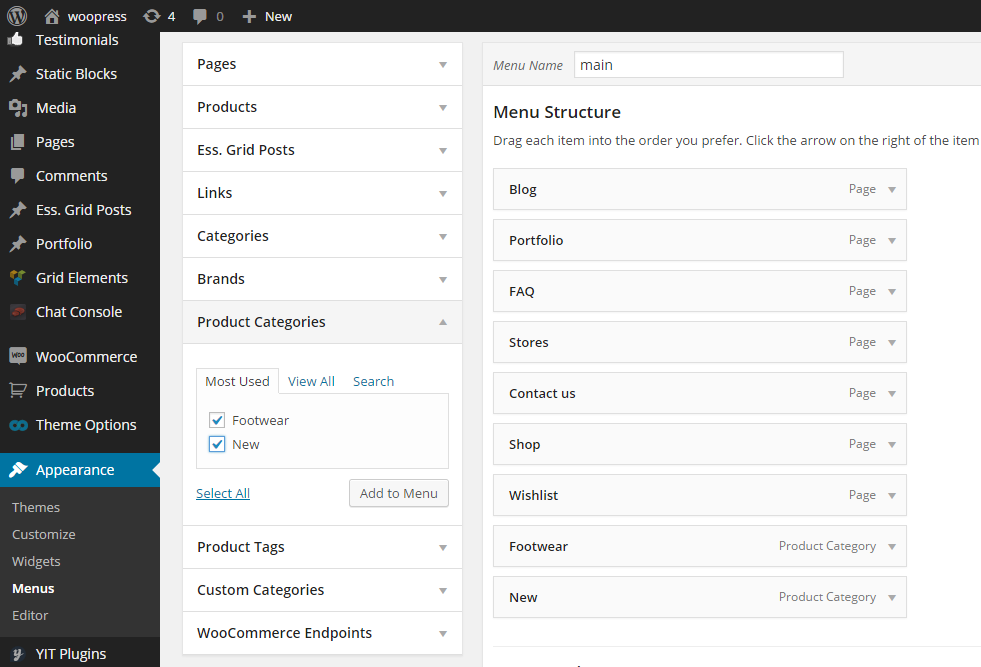
please navigate to Dashboard > Appearance > Menus, click on ‘Product categories’ block on left, select needed product categories and click “Add to menu”. Do not forget to save your menu!
Regards,
Stan Russell.
Hello,
we are happy that your problem is solved!
Regards,
Stan Russell.
Hello,
1) Demo footer is created for demonstration purposes only and is not editable. If you want to use your own footer, you need to create it according to this part of theme documentation:
https://www.8theme.com/demo/docs/royal/index.html#!/9_footer
or using video tutorial: https://www.youtube.com/watch?v=KWAQRXZXsaw
2) Please provide us with admin credentials for your site in private content or specify what background for you site do you want to have.
Regards,
Stan Russell.
Hello,
you need to delete old versions of plugins and upload latest in Dashboard > Plugins
If you will encounter problems with this – please provide us with admin and FTP credentials for your site in private content and we will update required plugins for you.
Regards,
Stan Russell.
Hello,
1) Please add following code to your themes/royal/custom.css file:
.languages-area{display:none}
Do not forget to activate custom css in Theme options > Custom css > enable
2) These links are reserved for WPML plugin and must be configurated in plugin settings.
3) Use shortcode [share] which inserts social icons (facebook, twitter, mail, pinterest, google+);
Regards,
Stan Russell.
Hello,
we are glad that your problem is solved!
Regards,
Stan Russell.
Hello,
we are glad that your problem is solved!
Regards,
Stan Russell.
Hello,
please check our video tutorial ‘How to create menu’: https://www.youtube.com/watch?v=xC8pLwU-6n0
If you will have any questions left – feel free to ask them.
Regards,
Stan Russell.
Hello,
please add following css code to yours custom.css file:
.main-footer p{color:black}
.main-footer a{color:black}
.tabs .tab-content p{color:black}
Regards,
Stan Russell.
Hello,
please provide us with admin credentials for your site on private content.
Regards,
Stan Russell.
Hello,
we have removed empty space between page content and footer and added ‘px’ to your values in
Homepage > Row > Row settings > Background > Background image position and removed bottom padding.
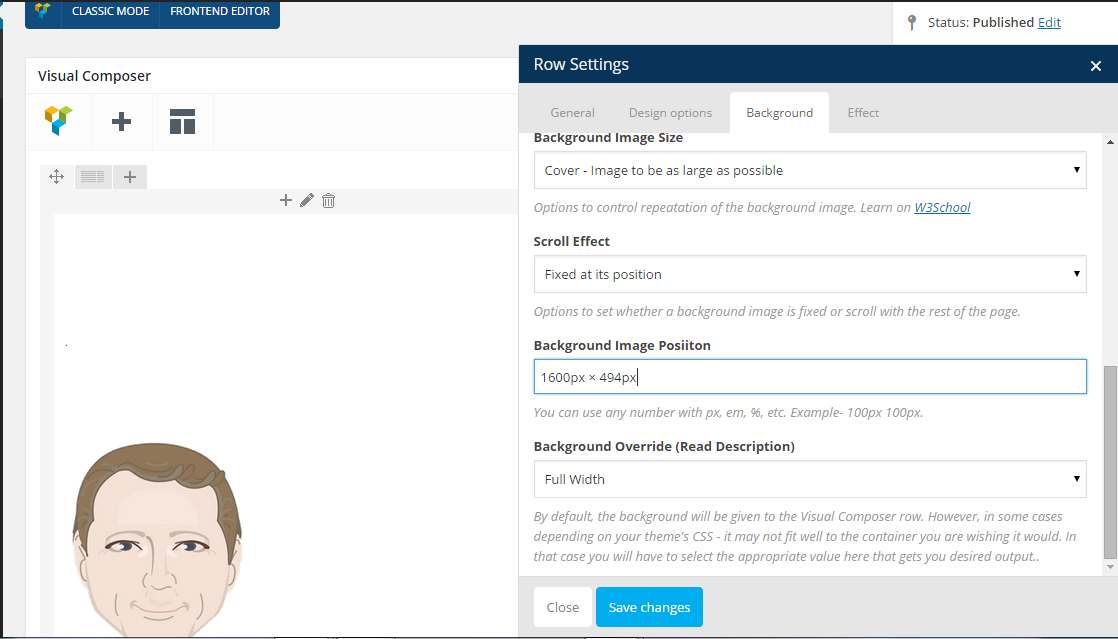
Please check your site.
Regards,
Stan Russell.
Hello,
you need to create footer manually according to this part of theme documentation:
https://www.8theme.com/demo/docs/royal/index.html#!/9_footer
Please check our video tutorial ‘How to set up footer’: https://www.youtube.com/watch?v=KWAQRXZXsaw
Regards,
Stan Russell.
Hello,
have you installed Demo Content as described in this part of documentation: https://www.8theme.com/demo/docs/woopress/index.html#!/demo_data_installation ?
After installing demo content, please navigate to Dashboard > Theme options > Import/Export and select
one of our theme versions. You may set site layout as ‘boxed’ in Theme options > General > Site Layout.
Regards,
Stan Russell.
Hello mistamos,
our theme is using modified woocommerce templates. Thats why file versions for theme and woocommerce templates may be different. It is not bug and does not affect frontend. You may just hide this notification.
Regards,
Stan Russell.
Hello,
we have checked your site and it is working correct now. Are there any problems left?

Regards,
Stan Russell.
Hello,
please provide us with admin credentials for your site in private content.
In addition, have you enabled caching/cookies in your browser?
Regards,
Stan Russell.
Hello,
please provide us with admin credentials for your site in private content.
Regards,
Stan Russell.
Hello,
you are welcome!
Regards,
Stan Russell.
Hello,
you can disable demo footer blocks for all site in Theme options > General > Show footer demo blocks
If you want to hide footer for certain page, click on Edit page > Use custom footer for this page > Without.
Regards,
Stan Russell.
Hello Flexibilis,
You are welcome!
Regards,
Stan Russell.
Hello basera@pukka.ch,
our theme is using modified woocommerce templates. Thats why file versions for theme and woocommerce templates may be different. It is not bug and does not affect frontend. You may just hide this notification.
Regards,
Stan Russell.

Free AI store scan · SalesMax
Paste your store address. SalesMax AI shows which upsell moments are missing. No signup.

Free AI speed test · FlashMax
Paste your site address. FlashMax runs Google Lighthouse for phone and desktop, checks Core Web Vitals and lists what to fix. No signup.
 Hipster StoreFashion
(live demo, opens in a new tab)
 Water DeliveryElementor
(live demo, opens in a new tab)
 Kids Toys StoreToys & games
(live demo, opens in a new tab)
 Grocery MarketFood & drinks
(live demo, opens in a new tab)
 Bike StoreSports & travel
(live demo, opens in a new tab)
 UnderwearFashion
(live demo, opens in a new tab)
 GamingBusiness
(live demo, opens in a new tab)
 Hosting StoreWPBakery
(live demo, opens in a new tab)
 Pizza StoreFood & drinks
(live demo, opens in a new tab)
 PosterPortfolio
(live demo, opens in a new tab)
 Pet ShopPets
(live demo, opens in a new tab)
 SpaBusiness
(live demo, opens in a new tab)
 Engineer StoreWPBakery
(live demo, opens in a new tab)
 BusinessBusiness
(live demo, opens in a new tab)
 Organic Cosmetics StoreBeauty
(live demo, opens in a new tab)
 Drinks StoreFood & drinks
(live demo, opens in a new tab)