


Hello IzzabelleM,
have you tried our downloads section ?
You can find all latest releases of bundled plugins there.
If there are problems with it, we can send you plugin zip on email.
Regards,
Stan Russell.
Hello,
we have answered you in another topic. Please visit our Downloads section where you can find needed plugins without license keys.
Regards,
Stan Russell.
Hello IzzabelleM,
have you tried our downloads section ?
You can find all latest releases of bundled plugins there.
If there are problems with it, we can send you plugin zip on email.
Regards,
Stan Russell.
Hello lxmag,
1) all product tabs are using the same font ‘Oswald’ but have different colors. That’s why they are looking different.
Please provide us with admin credentials for your site in private content and we will fix that.
2) navigate to Dashboard > Wishlist > Settings > Position > After “Add to cart”
Regards,
Stan Russell.
Hello Cristian,
do you mean Sizing guide for this product? Please provide us with admin credentials for your site in Private Content and we will check this problem.
Regards,
Stan Russell.
Hello Cristian,
unfortunately our theme does not have this feature. You need to use some plugin for this or modify template files if you have appropriate skills. Sorry
Regards,
Stan Russell.
Helo stevhongl,
as we can see – you have already added following css code to default.custom.css:
.blog-post .post-info{
display:none
}
but to make it work you need to rename file ‘default.custom.css’ to ‘custom.css’ and enable it in Theme options > Custom CSS.
Regards,
Stan Russell.
Hello aamit,
please specify what box are you asking about?
Regards,
Stan Russell.
Hello psychmedia,
you are right. You may use our theme with this WP version but we can not guarantee that all plugins bundled with theme will be compatible too. So we recommend you to avoid updating plugins in nearest week.
Regards,
Stan Russell.
Hello Vladislav,
you are welcome!
Regards,
Stan Russell.
Hello Nicola,
please show us on screenshot what results do you want to achieve.
Regards,
Stan Russell.
Hello Aravix,
please show on screenshot what results do you want to achieve and we will provide you with needed code.
Regards,
Stan Russell.
Hello MarketingCopenhagen,
you are welcome! Please create new topic for other questions.
Regards,
Stan Russell.
Hello Marcos,
we are happy that you have solved your problem! Have a nice day!
Regards,
Stan Russell.
Hello zeny,
as we can see – your site is full-width already.
We have checked it on several devices and found that problem is caused by your third-party plugin ‘Elfsight InstaShow’ which is not compatible with our theme.
Regards,
Stan Russell.
Hello paulsocas,
you are welcome!
Regards,
Stan Russell.
Hello costheo,
we are happy to help! Have a nice day!
Regards,
Stan Russell.
Hello allrosie,
You can add needed css code to Theme Options > Styling > Custom CSS.
Regards,
Stan Russell.
Hello oyjhahaha,
1) add following css code to your custom.css:
.blog-post h6.active {
display:none;
}
.blog-post .meta-post {
display:none;
}
2) you are using outdated version of theme that has not needed option yet. Please update theme as described here: https://8theme.com/demo/docs/royal/index.html#!/installation_upgrade
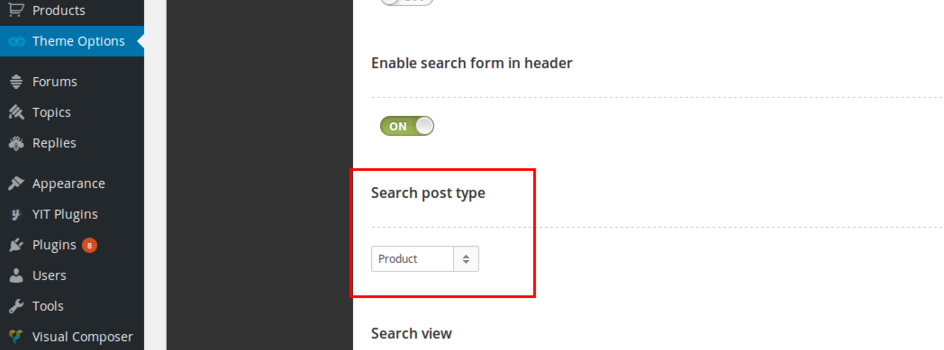
After that navigate to Theme options > Header > Search post type and set to search blog posts.
Regards,
Stan Russell.
Hello allrosie,
file ‘default.custom.css’ is empty and not necessary. You can create your ‘custom.css’ file.
Regards,
Stan Russell.
Hello itaund,
have you updated WPML plugins?
Regards,
Stan Russell.
Hello Dom1788,
please specify where is that “Read More” button placed?
Regards,
Stan Russell.
Hello leo,
you are welcome! Have a nice day!
Regards,
Stan Russell.
Hello young,
please specify – what products are not displayed on your site and where they must be placed?
Regards,
Stan Russell.
Hello raptureadmin,
Revolution Slider and other plugins included in our theme are external and we have the right to build them into our theme as we purchase the Extended License for each of these plugins.
The plugins are functioning perfect without any activation.
These plugins registration is not obligatory! The plugin activation option was added in the plugin only for the customers to get automatic updates and support directly from plugin developers. Only in case you need this features you will need to purchase and register the plugin. This is not only our practice but all the theme authors from ThemeForest.
Regards,
Stan Russell.
Hello,
please add following css code to Theme options > Custom css > Global custom css:
.single_add_to_cart_button{
background-color:white;
border:1px solid grey;
}
.single_add_to_cart_button:hover{
color:grey;
}
Regards,
Stan Russell.
Hello Puretreats,
our theme is using png image for review stars.
To change their color you need to edit file legenda/images/star-active.png,
open it in editor and change color as you want.
Regards,
Stan Russell.
Hello maxwelljf,
You are welcome! We are glad to help you and thanks for good thoughts!
Would be very appreciate if you leave a rating! You can do this in Downloads area. Login to your account on ThemeForest, go to Downloads area, find WooPress theme and you’ll see the stars next to it.
Thank you!
Regards,
Stan Russell.
Hello,
you are right. Please provide us with admin login and admin password.
Private content block can be found above ‘Submit’ button.

Regards,
Stan Russell.
Hello,
please add following css code to your Theme options > Custom css > Global css:
.quantity input[type="number"] {
color:#4c4442
}
Regards,
Stan Russell.
Hello stevhong,
unfortunately our theme does not have such feature. Sorry.
Regards,
Stan Russell.

Free AI store scan · SalesMax
Paste your store address. SalesMax AI shows which upsell moments are missing. No signup.

Free AI speed test · FlashMax
Paste your site address. FlashMax runs Google Lighthouse for phone and desktop, checks Core Web Vitals and lists what to fix. No signup.
 Spice StoreFood & drinks
(live demo, opens in a new tab)
 InteriorFurniture
(live demo, opens in a new tab)
 Marseille 01Fashion
(live demo, opens in a new tab)
 Furniture Store 03Furniture
(live demo, opens in a new tab)
 Transportation and LogisticsCars & bikes
(live demo, opens in a new tab)
 MarketingBusiness
(live demo, opens in a new tab)
 Games DarkToys & games
(live demo, opens in a new tab)
 Minimal Fashion 02 StoreFashion
(live demo, opens in a new tab)
 Business CardBusiness
(live demo, opens in a new tab)
 Kids Toys StoreToys & games
(live demo, opens in a new tab)
 HotelBusiness
(live demo, opens in a new tab)
 Plants StoreElementor
(live demo, opens in a new tab)
 Classic Fashion Store (Dark)Fashion
(live demo, opens in a new tab)
 Flowers StoreWPBakery
(live demo, opens in a new tab)
 Default RTLFashion
(live demo, opens in a new tab)
 Niche Market 03Marketplace
(live demo, opens in a new tab)