

Hello,
We have sent fix to your email. Check, please.
Regards,
Olga Barlow

Hello,
We have sent fix to your email. Check, please.
Regards,
Olga Barlow
Hello,
We have sent fix to your email. Check, please.
Regards,
Olga Barlow
Hello,
Sorry for delay. Copy legenda/woocommerce/content-product.php file into child theme folder, edit and delete following code
<div class="product-excerpt">
  <?php echo do_shortcode(get_the_excerpt()); ?>
 </div>
Regards,
Olga Barlow
Hello, @ronen-webzit,
Your problem with menu is related to rtl direction of the site. Royal theme does not declare RTL languages support. Compatibility requires additional customization, do this if you have appropriate skills or hire developer to get help. Our support covers getting setup with the theme, theme related questions and bugs or issues that occur when using the theme. Anything, that falls outside of the options the theme offers, is additional customization that is not covered by the scope of our support.
Regards,
Olga Barlow
Hello,
As we told you before this is the problem in Visual Composer and WordPress. If you need external plugin support, buy plugin license and then you’ll be able to contact with them. We could offer you only temporary fix. To fix <p> tags I recommend you to write at the start of file page.php following code:
remove_filter( 'the_content', 'wpautop' );
Also want to tell you that validation is an awesome tool, but remember, it’s just a tool!
Regards,
Olga Barlow
Hello, @pxmedia
Sorry for delay. We have checked your account and you should be able to create topic. What error do you get while press create topic button?
You have updated woocommerce and theme, but previous version of theme includes a lot of files that are not necessary in current version.
How you could fix it:
1) delete wp-content/themes/xmarket/woocommerce folder (to remove all the out date files)
2) upload xmarket/woocommerce folder from new theme version instead of deleted one (to add only necessary files in our theme)
Or provide FTP access to your site in Private content and we’ll help you with this.
Regards,
Olga Barlow
Hello,
1), 3) You are using Essential Grid plugin to display products. Please, update plugin to latest version 2.0.8 and check if it fix your issue. Latest version of plugin you can find here
4) You need to click on arrow to open subitem.
Regards,
Olga Barlow
Hello,
Sorry for delay. Check your site now, please.
Regards,
Olga Barlow
Hello,
Check now, please.
Regards,
Olga Barlow
Hello,
Yes, you can use that tip to add zoom and we’ll also add such feature in our next theme update. Edit royal/header.php, replace line 7
<meta name="viewport" content="width=device-width, initial-scale=1, maximum-scale=1"/>
with
<meta name="viewport" content="width=device-width, initial-scale=1, maximum-scale=2.0"/>
Regards,
Olga Barlow
Hello,
It was related to WPML settings 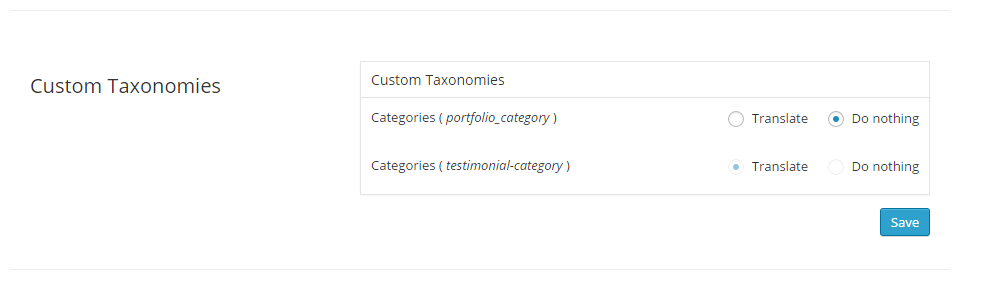 .
.
Translation for Portfolio Categories should be activated. Check now, please.
Regards,
Olga Barlow
Hello,
You need to translate parent theme first, because this is main part. I don’t see files in child theme that require translation. How to translate our theme you can read here https://www.8theme.com/demo/docs/woopress/index.html#!/1_how_to_translate
Translate only strings you need, you don’t need to translate all the strings included in .po file.
If you want to use CodeStyling Localization just ignore that notice.
Regards,
Olga Barlow
Hello,
Very likely this is plugin bug. You need to contact with plugin author to solve the problem, because it does not work even with default theme.
Regards,
Olga Barlow
Hello,
Edit woopress/framework/portfolio.php , line 9, find add_action('init', 'etheme_portfolio_init'); and replace by add_action('init', 'etheme_portfolio_init', 1);
We’ll also include this fix in our next update.
Regards,
Olga Barlow
Hello,
Could you, please, update theme to latest version 3.0?
Current version of your theme is not compatible with WooCommerce 2.3.x. Delete wp-content/themes/blanco/woocommerce folder before theme update.
Regards,
Olga Barlow
Hello,
We have checked your site and see that 2-d select does not work even with default theme and disabled Visual Composer plugin. This is WooCommerce problem, update WooCommerce plugin, this problem was fixed.
Regards,
Olga Barlow
Hello,
We have checked your site and there is no any problem with Mozilla and our theme from our side. Try to check site from other PC, very likely it’s your local machine problem, not our theme!
Regards,
Olga Barlow
Hello,
Ok, let’s solve your issues step by step.
1. Screenshot you provided show not fully loaded page. You should see the following tabs there http://gyazo.com/8d14a456d5696ff4b6be170c80d898bd
WooCommerce admin pages loads 17,24s with default theme http://gyazo.com/7b8438e6fd1749464bf88db82e58fcb9 this is very bad result! Also problems on frontend http://gyazo.com/fc7779f9acd0d7178a3055a70955c908
Anyway when product page is loaded everything works file, I mean checkbox.
2. You did not create variations for that draft product. Where did you add price? For all simple products I can see the prices.
3. May assume it’s related to the previous problem, because I did not face this bug when checked your site.
4. You have created attribute, but did not create term. Did you follow WooCommerce documentation? http://docs.woothemes.com/document/variable-product/
I have created test attribute and added it and don’t see any issue, you can check your KAOS 1 product.
6. Didn’t see this problem http://gyazo.com/bd9136f36a62147983d8a1ed8a771faa
7. Didn’t face any problem http://gyazo.com/5ec40d2914c2847fe07a2c88559dc770
Don’t see problem with checkout settings http://gyazo.com/b34e35117167419d663ba742182c7da2
Also don’t see problem with custom.css http://gyazo.com/6f251235f719237f75403a269995bdc6
Regards,
Olga Barlow
Hello,
First of check if you have these problems with our theme only or with default woocommerce theme http://www.woothemes.com/storefront/ too. Our theme should not affect backend! Then try to disable third-party plugins and check if problem still persists.
Reply back in case all third-party plugins are disabled and problems persists with our theme only. We are able to provide support only for issues related strictly to our theme, we don’t provide support for WP or WooCommerce plugin configurations.
Regards,
Olga Barlow
Hello,
Sorry, my bad. Check again.
Regards,
Olga Barlow
Hello,
If you don’t plan to use this function you can comment out it.
Regards,
Olga Barlow
You are welcome!
Regards,
Olga Barlow
Hello,
We took into account your proposition and maybe we’ll add such type of hover.
Regards,
Olga Barlow
Hello,
1) Don’t know why, but changes we have made in your rtl.css were lost.
You need to add the following code in rtl.css:
To fix carousel
.owl-carousel {
  direction: ltr;
}
To fix quantity
.quantity input[type="number"]{padding:0 6px;font-size:16px;}
You have added unexciting background-image: url(images/qr-bg-rtl.png); (rtl.css, line 305), that’s why you don’t see QR code image. Either create image or remove this code.
Add also
.etheme_widget_qr_code .widget-title {
  text-align: right;
}
2) Fixed. We have added following code in rtl.css
.rtl .st-pusher{
 right: 0;
}

.st-menu-open .hide-filters-block .st-pusher{
 -webkit-transform: translate3d(-350px, 0, 0);
    -moz-transform: translate3d(-350px, 0, 0);
     -ms-transform: translate3d(-350px, 0, 0);
      -o-transform: translate3d(-350px, 0, 0);
         transform: translate3d(-350px, 0, 0);
}

.st-menu.hide-filters-block{
 -webkit-transform: translateX(350px);
    -moz-transform: translateX(350px);
     -ms-transform: translateX(350px);
      -o-transform: translateX(350px);
         transform: translateX(350px);
}
3) Don’t understand your problem. At present I see the same order you want. Would like to recommend just to add the following in rtl.css to align quick view icon
.show-quickly:before {
  margin: 0 0 -2px 10px;
}
4) Add the following code in rtl.css
.top-links li.popup_link:before {
  left: 5px;
}
Regards,
Olga Barlow
Hello,
You are welcome!
Regards
Hello,
Yes, all the template files will be updated. I was working on your site and fixed this problem. So, don’t worry about next theme update.
Regards
Hello,
You are welcome.
Regards
Hello,
Try this one
.product-details .btn.etheme_add_to_cart_button:hover {
  background-color: #719400 !important;
}
But, dear Jimbo, such type of questions is additional customization and is beyond the scope of our support. Our base support includes the fixing of theme bugs and providing detailed information about theme settings and options. Please take this into account and keep in mind when create new topic.
Regards
Hello,
Check now.
Regards
Hello,
At present there are 3 types of hover effect in our theme:
– Swap image (you need to upload product hover image)
– Image Slider (if you have a product gallery)
– Mask with information
If you want to have just opacity you can add it
.content-product .product-content-image:hover {
  opacity: 0.7;
}
Regards









