

Forum Replies Created

Viewing 30 posts - 30,031 through 30,060 (of 30,391 total)
  • Avatar: Olga Barlow
    Olga Barlow
    Participant
    February 3, 2015 at 10:23

    Hello,

    No, unfortunately we can’t check your site with teamviewer. It’s very strange that we don’t see described problem.
    What version of Safari do you use?

    Also we would recommend you to update theme and plugins to latest version. Theme update you can find on ThemeForest. Plugin updates you can download here https://www.8theme.com/download-plugins/

    Regards,
    Olga Barlow
    Avatar: Olga Barlow
    Olga Barlow
    Participant
    February 2, 2015 at 17:18

    Hello,

    Problem was related to old version of plugins. You did not update them. Check your site now.
    Also I would recommend to update also theme to latest version. Watch the video tutorial how to do it.

    Regards,
    Olga Barlow

    Avatar: Olga Barlow
    Olga Barlow
    Participant
    January 31, 2015 at 12:37

    Hello,

    We have sent the fix to your email. Check, please.

    Regards,
    Olga Barlow

    Avatar: Olga Barlow
    Olga Barlow
    Participant
    January 31, 2015 at 10:09

    Hello,

    Please, describe your issue in details. What version of WordPress do you use?

    Regards,
    Olga Barlow

    Avatar: Olga Barlow
    Olga Barlow
    Participant
    January 31, 2015 at 09:31

    Hello,

    Please, create functions.php file in royal-child folder with following code:

    <?php add_action( 'wp_enqueue_scripts', 'theme_enqueue_styles' );
    function theme_enqueue_styles() {
        wp_enqueue_style( 'child-style', get_stylesheet_uri(), array( 'bootstrap', 'parent-style' ) );
    }

    After that delete @import url("../royal/style.css"); from style.css and activate child-theme. Check your footer.

    Regards,
    Olga Barlow

    Avatar: Olga Barlow
    Olga Barlow
    Participant
    January 31, 2015 at 08:49

    Hello,

    You need to edit your portfolio page title to change breadcrumbs.
    When you decide to update theme, you need save that file on your local machine or in any other place first. Then update theme and after update replace updated file by file that was saved.

    Regards,
    Olga Barlow

    Avatar: Olga Barlow
    Olga Barlow
    Participant
    January 29, 2015 at 15:43

    Hello,

    Fixed. Check, please.

    Regards,
    Olga Barlow

    Avatar: Olga Barlow
    Olga Barlow
    Participant
    January 29, 2015 at 09:59

    Hello, @nicolas.w.fisher@gmail.com,

    You need to enter your purchase code (https://www.8theme.com/download-plugins/) to be able to create topics on support forum and get plugin updates.

    If you use PHP 5.3 or higher, but still see the error, please, provide admin panel and FTP accesses in Private Content area.

    Regards,
    Olga Barlow

    Avatar: Olga Barlow
    Olga Barlow
    Participant
    January 28, 2015 at 09:32

    Hello, @mozmocreative,

    Sorry for this situation. Your problem was related to old version of plugins: Visual Composer and Ultimate Addons for VC. Check your site now.

    We have created special access for our clients and now you can upload the latest versions of plugins here https://www.8theme.com/download-plugins/

    Regards,
    Olga Barlow

    Avatar: Olga Barlow
    Olga Barlow
    Participant
    January 27, 2015 at 16:25

    Hello,

    I have checked your site and don’t see any notice. And also don’t see problems with these plugins.
    Anyway, you need to contact with plugin authors to fix problems related to third-party plugins included in our theme.

    Regards,
    Olga Barlow

    Avatar: Olga Barlow
    Olga Barlow
    Participant
    January 27, 2015 at 15:30

    Hello,

    We have fixed the issue with portfolio category and also changed the breadcrumbs from “projects” to “success stories” (keep file royal/framework/portfolio.php in safe).

    Regards,
    Olga Barlow

    Avatar: Olga Barlow
    Olga Barlow
    Participant
    January 27, 2015 at 13:44

    Hello,

    Problem caused by compatibility with third-party plugin – Meta Slider. We replaced your slider by image and seems everything works fine. Check, please.
    And we would recommend you to use Static Block & Visual Composer to create footer, because you may lose some styles for some elements.

    Regards,
    Olga Barlow

    Avatar: Olga Barlow
    Olga Barlow
    Participant
    January 27, 2015 at 11:24

    Hello, @Russ,

    Our theme does not affect plugin if is deactivated! So, if you have problems with third-party plugin even with default theme it means something is wrong with your installation, it’s not our theme bug! Fact that problem appeared after theme update was pure coincidence. What other changes did you do that could cause wishlist problem?
    Unfortunately we are able to provide support for issues related strictly to our theme! If you need to fix plugin issues you should contact with plugin author to solve your problem.

    Regards,
    Olga Barlow

    Avatar: Olga Barlow
    Olga Barlow
    Participant
    January 27, 2015 at 09:08

    Hello, @samanders,

    Sorry for delay. To import Essential Grid you may use woopress_ess_grid.json file (in Documentation folder). Sliders, demo products, few pages will be imported after base demo content installation https://www.8theme.com/demo/docs/woopress/index.html#!/demo_data_installation

    Provide admin panel access and we could check if everything was installed correctly.

    Regards,
    Olga Barlow

    Avatar: Olga Barlow
    Olga Barlow
    Participant
    January 26, 2015 at 15:29

    Hello,

    Your problems related to old version of Visual Composer. I have updated plugin, re-added element Post Grid and everything works fine both on mobile and desktop versions. Check, please.

    Regards,
    Olga Barlow

    Avatar: Olga Barlow
    Olga Barlow
    Participant
    January 21, 2015 at 15:08

    Hello,

    We have checked our theme with latest version of WP All Import plugin and did not face mentioned issues. So, I have also updated this plugin on your site. Check it now, please. Do you still have any issues?

    If you need some additional pages from our demo we could send you xmls of necessary pages, just tell us which one you need.

    About layout changes: you can’t change Header Type, but you can change breadcrumbs type, use different menu for different pages, disable/enable page headings for different pages etc. All available options for each page you can find in Page Layout settings (Pages > edit page > area at the right sidebar)

    Regards,
    Olga Barlow

    Avatar: Olga Barlow
    Olga Barlow
    Participant
    January 20, 2015 at 12:20

    Hello, @James,

    We have answered to your email. Check, please. And sorry for delay.

    Regards,
    Olga Barlow

    Avatar: Olga Barlow
    Olga Barlow
    Participant
    January 20, 2015 at 12:19

    Hello, @csoole,

    Sorry for this inconvenience, we have sent missing file to your email.

    Regards,
    Olga Barlow

    Avatar: Olga Barlow
    Olga Barlow
    Participant
    January 8, 2015 at 15:40

    Hello,

    Confirm, does WooCommerce Google Analytics Integration work fine with default theme?
    If you use this plugin you don’t need Google Analytics Code in theme options.
    Regards,
    Olga Barlow

    Avatar: Olga Barlow
    Olga Barlow
    Participant
    January 6, 2015 at 12:00

    Hello,

    PSD files were sent. Check your e-mail, please.

    Regards,
    Olga Barlow

    Avatar: Olga Barlow
    Olga Barlow
    Participant
    January 5, 2015 at 11:17

    Hello,

    If you faced this message, that related to woocommerce plugin as you can see, it means you need to increase WP Memory Limit http://docs.woothemes.com/document/increasing-the-wordpress-memory-limit/
    Also we want to specify your main site. Is it giddyupgear.horseflydigital.com ? We checked checkout settings (WooCommerce > Settings > Checkout) and don’t see any active payment gateway, your customers won’t be able to make order, till this option is not set. Please, follow woocommerce documentation http://docs.woothemes.com/documentation/plugins/woocommerce/getting-started/sell-products/

    Regards,
    Olga Barlow

    Avatar: Olga Barlow
    Olga Barlow
    Participant
    December 26, 2014 at 15:18

    Hello, @ziloub,

    Please, check your slider with default theme. If this issue is present with default theme too you need to contact with plugin author, because we can’t provide advanced support for third-party plugins included in our theme. Plugin author will be able to help you faster and if this is plugin bug he need to fix this in update, so you won’t face it again when update plugin.

    Regards,
    Olga Barlow

    Avatar: Olga Barlow
    Olga Barlow
    Participant
    December 23, 2014 at 14:21

    Hello,

    I see. Ok, then you may delete that code. We’ll try to fix this bug in our next update, but unfortunately it will be available not earlier than Christmas Holidays will end, after January, 9.

    Regards,
    Olga Barlow

    Avatar: Olga Barlow
    Olga Barlow
    Participant
    December 22, 2014 at 10:40

    Hello,

    Take our apologies for the delay.
    You can find code in royal/framework/theme-functions.php, lines 1241-1245. Delete it if you don’t need this information.

    Regards,
    Olga Barlow

    Avatar: Olga Barlow
    Olga Barlow
    Participant
    December 19, 2014 at 17:15

    Hello,

    If you want to implement mentioned items you need to make changes in template files.
    1), 2) You need to make changes in royal/woocommerce/content-product.php
    3) there are lot of files with H1, you should check and edit them:
    royal\404.php
    royal\archive.php
    royal\attachment.php
    royal\author.php
    royal\bbpress\feedback-no-access.php
    royal\blank.php
    royal\category.php
    royal\et-registration.php
    royal\framework\theme-functions.php
    royal\framework\theme-options.php
    royal\index.php
    royal\page.php
    royal\portfolio.php
    royal\search.php
    royal\single.php
    royal\single-etheme_portfolio.php
    royal\tag.php
    royal\woocommerce\global\breadcrumb.php
    4) It was fixed in version 1.5.2, update theme to latest version.

    All changes we recommend to do in child theme.

    Regards,
    Olga Barlow

    Avatar: Olga Barlow
    Olga Barlow
    Participant
    December 19, 2014 at 14:38

    Hello,

    From our side, when we want to proceed to checkout it goes to https://www.horseflydigital.com/ shows default theme and another site no matter what theme is enabled ( our or default Twenty Fourteen). Is it right? How we could check order problem if we even can’t finish checkout?

    Regards,
    Olga Barlow

    Avatar: Olga Barlow
    Olga Barlow
    Participant
    December 18, 2014 at 11:47

    Hello,

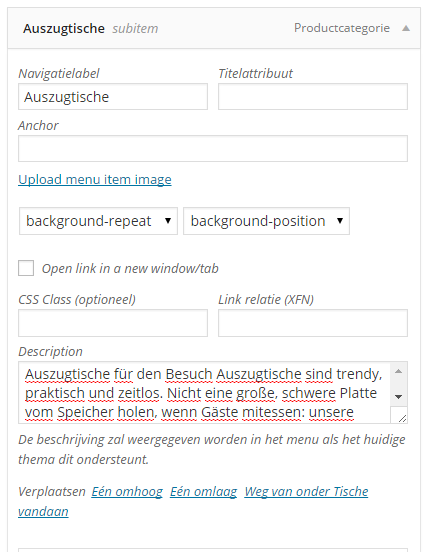
    We have checked your site once more and find that description is displayed because you have added menu item description
    description
    As you can see there is notice: The description will be displayed in the menu if the current theme supports it.
    Our theme supports it. If you don’t need menu item description just delete it. Keep in mind menu item description and category description are different things.

    Regards,
    Olga Barlow

    Avatar: Olga Barlow
    Olga Barlow
    Participant
    December 17, 2014 at 17:20

    Thank you! )))) Have a nice Christmas too.
    Would be very appreciate if you leave a rating for our theme.

    Regards,
    Olga Barlow

    Avatar: Olga Barlow
    Olga Barlow
    Participant
    December 17, 2014 at 17:04

    Hello,
    We checked your site with latest Safari version, that’s why did not see the issue. But once we checked in older version we understood what was the problem. Sorry for inconvenience.

    Check your site now.

    Following code was added to child theme style.css:
    @media(max-width:979px){.tabs .tab-content{float:none;}}

    Regards,
    Olga Barlow

    Avatar: Olga Barlow
    Olga Barlow
    Participant
    December 17, 2014 at 15:18

    Hello, @slidebird,

    Sorry for delay.
    Problem with mobile version was caused by your custom code:

    .container, .navbar-static-top .container, .navbar-fixed-top .container, .navbar-fixed-bottom .container {width: 955px;}
    
    .boxed .page-wrapper {
    width: 1030px;
    margin: 0 auto;
    box-shadow: 0 1px 6px;
    -webkit-box-shadow: 0 1px 6px;
    }
    

    If you change the width of container you need to keep in mind responsiveness and use media queries. For example:
    @media (min-width: 976px){.container, .navbar-static-top .container, .navbar-fixed-top .container, .navbar-fixed-bottom .container {
    width: 955px;
    }}
    We have fixed it on your site. Check, please. Is mobile version fine for you now?
    Also it’s not possible to disable only mobile responsive. You can either disable responsive at all or use it for all devices.

    Regards,
    Olga Barlow

  • 1 2 3 1,001 1,002 1,003 1,012 1,013 1,014
    Viewing 30,060 results - 30,031 through 30,060 (of 30,391 total)
Viewing 30 posts - 30,031 through 30,060 (of 30,391 total)
We're using our own and third-party cookies to improve your experience and our website. Keep on browsing to accept our cookie policy.








