Forum Replies Created

Viewing 30 posts - 30,001 through 30,030 (of 30,337 total)
  • Avatar: Olga Barlow
    Olga Barlow
    Participant
    December 19, 2014 at 17:15

    Hello,

    If you want to implement mentioned items you need to make changes in template files.
    1), 2) You need to make changes in royal/woocommerce/content-product.php
    3) there are lot of files with H1, you should check and edit them:
    royal\404.php
    royal\archive.php
    royal\attachment.php
    royal\author.php
    royal\bbpress\feedback-no-access.php
    royal\blank.php
    royal\category.php
    royal\et-registration.php
    royal\framework\theme-functions.php
    royal\framework\theme-options.php
    royal\index.php
    royal\page.php
    royal\portfolio.php
    royal\search.php
    royal\single.php
    royal\single-etheme_portfolio.php
    royal\tag.php
    royal\woocommerce\global\breadcrumb.php
    4) It was fixed in version 1.5.2, update theme to latest version.

    All changes we recommend to do in child theme.

    Regards,
    Olga Barlow
    Avatar: Olga Barlow
    Olga Barlow
    Participant
    December 19, 2014 at 14:38

    Hello,

    From our side, when we want to proceed to checkout it goes to https://www.horseflydigital.com/ shows default theme and another site no matter what theme is enabled ( our or default Twenty Fourteen). Is it right? How we could check order problem if we even can’t finish checkout?

    Regards,
    Olga Barlow

    Avatar: Olga Barlow
    Olga Barlow
    Participant
    December 18, 2014 at 11:47

    Hello,

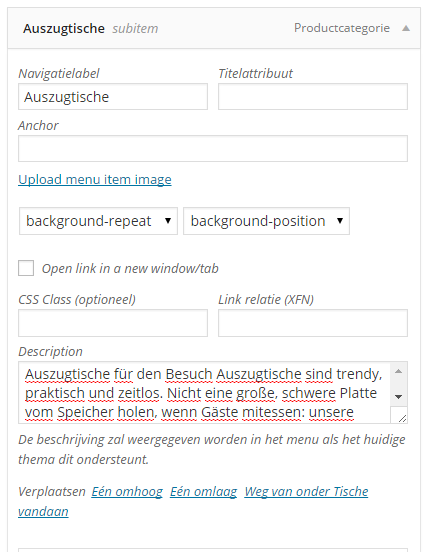
    We have checked your site once more and find that description is displayed because you have added menu item description
    description
    As you can see there is notice: The description will be displayed in the menu if the current theme supports it.
    Our theme supports it. If you don’t need menu item description just delete it. Keep in mind menu item description and category description are different things.

    Regards,
    Olga Barlow

    Avatar: Olga Barlow
    Olga Barlow
    Participant
    December 17, 2014 at 17:20

    Thank you! )))) Have a nice Christmas too.
    Would be very appreciate if you leave a rating for our theme.

    Regards,
    Olga Barlow

    Avatar: Olga Barlow
    Olga Barlow
    Participant
    December 17, 2014 at 17:04

    Hello,
    We checked your site with latest Safari version, that’s why did not see the issue. But once we checked in older version we understood what was the problem. Sorry for inconvenience.

    Check your site now.

    Following code was added to child theme style.css:
    @media(max-width:979px){.tabs .tab-content{float:none;}}

    Regards,
    Olga Barlow

    Avatar: Olga Barlow
    Olga Barlow
    Participant
    December 17, 2014 at 15:18

    Hello, @slidebird,

    Sorry for delay.
    Problem with mobile version was caused by your custom code:

    .container, .navbar-static-top .container, .navbar-fixed-top .container, .navbar-fixed-bottom .container {width: 955px;}
    
    .boxed .page-wrapper {
    width: 1030px;
    margin: 0 auto;
    box-shadow: 0 1px 6px;
    -webkit-box-shadow: 0 1px 6px;
    }
    

    If you change the width of container you need to keep in mind responsiveness and use media queries. For example:
    @media (min-width: 976px){.container, .navbar-static-top .container, .navbar-fixed-top .container, .navbar-fixed-bottom .container {
    width: 955px;
    }}
    We have fixed it on your site. Check, please. Is mobile version fine for you now?
    Also it’s not possible to disable only mobile responsive. You can either disable responsive at all or use it for all devices.

    Regards,
    Olga Barlow

    Avatar: Olga Barlow
    Olga Barlow
    Participant
    December 17, 2014 at 14:37

    Hello, @lorelei,

    We have sent you an updated archive. Check your email.

    Regards,
    Olga Barlow

    Avatar: Olga Barlow
    Olga Barlow
    Participant
    December 17, 2014 at 14:27

    Hello, @mozmocreative,

    We are very sorry that you feel this way! There are lot of requests on our forum that cause some delay in answering.

    We want to help you, but every time when we see your site it looks fine. We checked parallax in Chrome on Mac and Windows, it works like a charm. We are confused what could be the reason of your issue from your side.

    Parallax effect is Ultimate Addons for VC plugin feature, that’s why problems related to compatibility with old versions of browsers should be addressed to plugin author, because we can’t make any changes in plugin files.

    Regards,
    Olga Barlow

    Avatar: Olga Barlow
    Olga Barlow
    Participant
    December 16, 2014 at 10:07

    Hello,

    We have sent you the latest version of plugin. Please, check your email sorin.manica@gmail.com

    Regards,
    Olga Barlow

    Avatar: Olga Barlow
    Olga Barlow
    Participant
    December 15, 2014 at 10:49

    Hello, @VivaDigital,

    You’re right, we’ll add note that you need to save menu to see anchor field. But I don’t understand your problem with navigation. I have added menu item About ( Custom Link! ) and it works fine.
    So, to create one page menu you need:
    1) Create one page, add anchors to rows.
    2) Create menu: use Links to add menu items with anchors (not Pages!). Save menu.
    3) Add anchors to menu items.
    4) Select menu for One page

    Regards,
    Olga Barlow

    Avatar: Olga Barlow
    Olga Barlow
    Participant
    December 12, 2014 at 08:56

    Hello,

    You faced problem with boxed layout, because your code loads child stylesheet twice. Read this post http://wordpress.stackexchange.com/questions/167639/why-does-my-child-theme-css-get-called-twice
    And check your site now.

    We have fixed bug with accordion on your site. Check, please. This fix also will be included in next update.

    Regards,
    Olga Barlow

    Avatar: Olga Barlow
    Olga Barlow
    Participant
    December 11, 2014 at 16:07

    Hello, @mleihs,

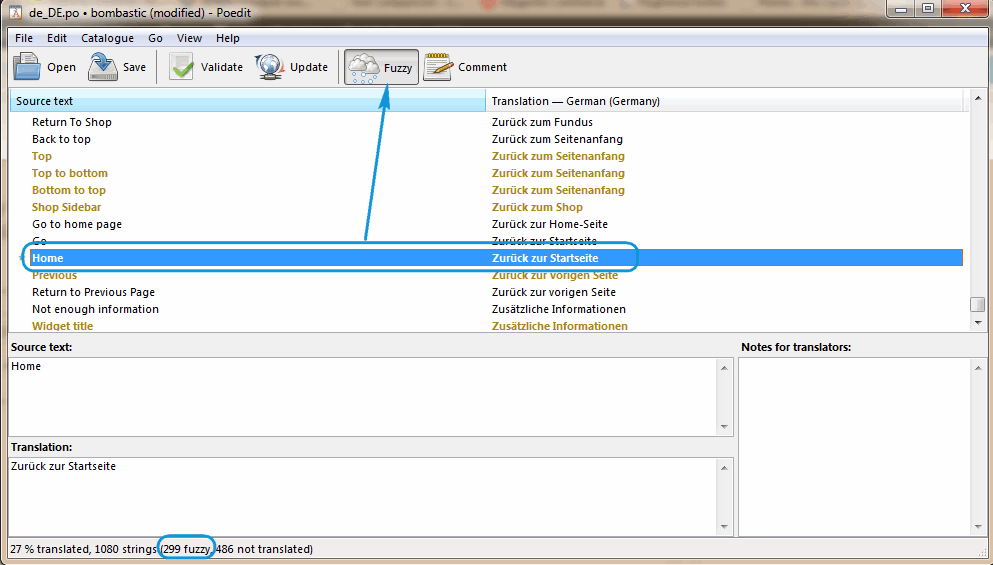
    The same thing was with Portfolio. It was fuzzy. Please, edit your translation file with PoEdit. Select gold string, translate it and press “Fuzzy” button after that. String will change its color to black (it means that translation is correct and should be applied). Do it for all fuzzy lines which you need to translate.

    At present Portfolio and Home are translated, aren’t they? Or send me the link to page where untranslated words still persist.

    Regards,
    Olga Barlow

    Avatar: Olga Barlow
    Olga Barlow
    Participant
    December 11, 2014 at 15:30

    Hello, @Openstream,

    Sorry for delay. You may translate only strings you need (not all 1080) in our .po file. We have included some woocommerce files in our theme (not all!) and all strings from these files were included into our theme translation file. So, you need to translate our theme po file and after that WooCommerce po file if some translations will be missing.

    Regards,
    Olga Barlow

    Avatar: Olga Barlow
    Olga Barlow
    Participant
    December 11, 2014 at 15:04

    Hello, @mleihs,

    Problem with your translation related to unfinished translations. See
    fuzzy
    Home string (and also categories and quantity and other 299 lines with gold color) were marked as unfinished. As a rule fuzzy string is a message which has been automatically translated, thus it may be wrong. That’s why such translation is not displayed. You need to mark it as finished if you want to apply this translation.

    Regards,
    Olga Barlow

    Avatar: Olga Barlow
    Olga Barlow
    Participant
    December 11, 2014 at 11:06

    Hello,

    Problem with registration on checkout step by step if option of auto generate password and username is enabled, will be fixed in update.
    The control of the checkout required fields is realized at the end of the process in all types of checkout and that cannot be changed.

    Regards,
    Olga Barlow

    Avatar: Olga Barlow
    Olga Barlow
    Participant
    December 11, 2014 at 10:21

    Hello,

    Did you make any changes in template files? Can we update your theme?
    Please, provide FTP access, we’ll update theme and check your issues.

    Regards,
    Olga Barlow

    Avatar: Olga Barlow
    Olga Barlow
    Participant
    December 11, 2014 at 09:53

    Hello,

    We are sorry, but if you want to use cart widget in sidebar you need to disable Ajax Filter (Theme Options > Shop > Enable Ajax Filter > Off). WooCommerce Cart widget requires page refreshing and does not work with Ajax.

    Regards,
    Olga Barlow

    Avatar: Olga Barlow
    Olga Barlow
    Participant
    December 10, 2014 at 16:13

    Hello,

    Could you tell us what version of Safari do you use? We have checked in 7.0, 8.0 and now video is playing fine. We have updated Revolution Slider to latest version.

    Regards,
    Olga Barlow

    Avatar: Olga Barlow
    Olga Barlow
    Participant
    December 10, 2014 at 09:50

    Hello,

    We have fixed. Clean plugin cache to implement changes.

    Regards,
    Olga Barlow

    Avatar: Olga Barlow
    Olga Barlow
    Participant
    December 10, 2014 at 09:25

    Hello,

    We have released updated version 1.5.2. You can find it on ThemeForest. Please, update theme.

    Regards,
    Olga Barlow

    Avatar: Olga Barlow
    Olga Barlow
    Participant
    December 9, 2014 at 17:11

    Hello,

    You are welcome! Would be very appreciate if you leave rating for our theme on ThemeForest.

    Regards,
    Olga Barlow

    Avatar: Olga Barlow
    Olga Barlow
    Participant
    December 9, 2014 at 17:10

    Hello,

    Please, wait next theme update. This issue will be fixed.

    Regards,
    Olga Barlow

    Avatar: Olga Barlow
    Olga Barlow
    Participant
    December 9, 2014 at 17:04

    Hello,

    We are sorry, but this is plugin issue. It’s not related with our theme. If you need plugin author support you need to buy plugin and submit a ticket.
    All we can help you with is to send you latest plugin version.

    Regards,
    Olga Barlow

    Avatar: Olga Barlow
    Olga Barlow
    Participant
    December 9, 2014 at 15:25

    Hello,

    Return to previous page uses back() method and loads the previous URL in the history list. But if you enable Ajax filter for shop page it means that page is not reloaded. So, either disable Ajax Filter (Theme Options > Shop > Enable Ajax Filter > Off) or hide Return to previous page link.

    Problem on My Account page was fixed, check.

    Regards,
    Olga Barlow

    Avatar: Olga Barlow
    Olga Barlow
    Participant
    December 9, 2014 at 09:22

    Hello,

    Check now, please.

    Regards,
    Olga Barlow

    Avatar: Olga Barlow
    Olga Barlow
    Participant
    December 8, 2014 at 17:30

    Hello, @UrbnDesignz,

    Problem is caused by Master Slider. We have disabled it for product slider. Please, don’t replace product slider in product single page with Masterslider, use our default.

    Regards,
    Olga Barlow

    Avatar: Olga Barlow
    Olga Barlow
    Participant
    December 8, 2014 at 17:20

    Hello, @houseofstrauss,

    Sorry for delay. We have sent you last version of plugin. Check your email.

    Regards,
    Olga Barlow

    Avatar: Olga Barlow
    Olga Barlow
    Participant
    December 6, 2014 at 08:35

    Hello,

    Due to your server settings we don’t have permissions either create new file or edit existing. We need to be able to edit files to find what causes your issue.

    Besides, please, install default WP theme and check if images are ok when it is activated.

    Regards,
    Olga Barlow

    Avatar: Olga Barlow
    Olga Barlow
    Participant
    December 5, 2014 at 17:02

    Hello,

    Check your tabs now, please.

    Regards,
    Olga Barlow

    Avatar: Olga Barlow
    Olga Barlow
    Participant
    December 5, 2014 at 16:47

    Hello,

    Problem caused by your WP Fastest Cache plugin. Seems it’s not compatible with VC. Disable it.

    Regards,
    Olga Barlow

  • 1 2 3 … 1,000 1,001 1,002 … 1,010 1,011 1,012
    Viewing 30,030 results - 30,001 through 30,030 (of 30,337 total)
Viewing 30 posts - 30,001 through 30,030 (of 30,337 total)
We're using our own and third-party cookies to improve your experience and our website. Keep on browsing to accept our cookie policy.