Forum Replies Created

Viewing 30 posts - 30,061 through 30,090 (of 30,337 total)
  • Avatar: Olga Barlow
    Olga Barlow
    Participant
    November 19, 2014 at 14:25

    Hello,

    All changes were made in custom.css file. We have renamed the old one, because you have copied whole style.css file) and created new file. You need to place only changed or new styles in custom.css, you don’t need to copy all styles from style.css.

    Regards,
    Olga Barlow
    Avatar: Olga Barlow
    Olga Barlow
    Participant
    November 13, 2014 at 11:16

    Hello!

    Thanks for the purchase. We have removed PSD files from the package as it two heavy and our customers wait for too long to download it.
    We have sent you an archive with PSD files to your email. Check, please.

    Regards,
    Olga Barlow

    Avatar: Olga Barlow
    Olga Barlow
    Participant
    November 8, 2014 at 09:51

    Hello,

    According to theme design, styles for some elements are rewritten in style.css and you need to change them manually.
    Please, add the following code in custom.css:

    @media (min-width: 980px){
    .sidebar-position-without .row-count-4 .product-category, .products-grid .product-category {
    width: 25% !important;
    }}
    
    .categories-mask h4 {
    font-size: 22px;
    color: #d7223e !important;
    }

    Watch our video tutorial how to create and enable custom.css

    Regards,
    Olga Barlow

    Avatar: Olga Barlow
    Olga Barlow
    Participant
    November 8, 2014 at 08:46

    Hello,

    We took into account your suggestion. Maybe we’ll add such option in one of our next updates, but at present you can implement it only by additional customization if you have appropriate skills.
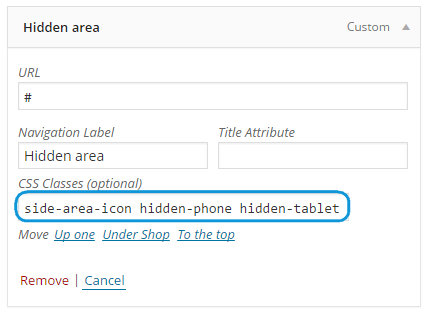
    You can also try to use following workaround: add custom link to your menu with side-area-icon hidden-phone hidden-tablet classes.
    See
    After that hide icon in top .top-bar .side-area-icon {display: none;} if you don’t need it.

    Regards,
    Olga Barlow

    Avatar: Olga Barlow
    Olga Barlow
    Participant
    November 7, 2014 at 08:48

    Hello,

    We have added missing hook. Check now, please.

    Regards,
    Olga Barlow

    Avatar: Olga Barlow
    Olga Barlow
    Participant
    November 6, 2014 at 15:07

    Hello,
    1 screenshot – could you, please, explain in details what is wrong with adding to cart?
    2, 5 – problem caused by your custom css styles. We have fixed.
    3 – fixed
    4 – we did not face this issue on your site

    Regards,
    Olga Barlow

    Avatar: Olga Barlow
    Olga Barlow
    Participant
    November 6, 2014 at 14:38

    Hello,

    We have checked on few devices, didn’t face described issue
    Mobile_site
    Did you try to check on other device? With other internet provider?

    Regards,
    Olga Barlow

    Avatar: Olga Barlow
    Olga Barlow
    Participant
    November 6, 2014 at 13:54

    Hello, @Crealys,
    We received answer from BrainstormForce support. You can see in below:

    Hey,
    We tested, at the moment – Fixed background property is creating bugs in Chrome.

    See reports here –
    http://stackoverflow.com/questions/22292357/fixed-background-image-bug-chrome-mac
    http://www.cybertechquestions.com/css-fixed-background-attachment-blinks-in-google-chrome_118396.html
    https://wordpress.org/support/topic/problem-with-fixed-backgrounds-in-chrome

    if you google “Chrome bug with fixed background” you will find many people reporting the same.

    The workaround for this is quick. Simply change fixed background to “Move with the content” (scroll) Further – you can apply parallax to it and make it even more beautiful.

    We hope this solution helps you.

    Regards,
    Olga Barlow

    Avatar: Olga Barlow
    Olga Barlow
    Participant
    November 6, 2014 at 09:24

    Hello,

    We would like to help you, but we can’t find out what could cause your problem. See how it looks for us

    Regards,
    Olga Barlow

    Avatar: Olga Barlow
    Olga Barlow
    Participant
    November 3, 2014 at 17:35

    Hello,

    We have created test product http://workit.com.ng/?product=test and don’t see described issue.
    Can you also provide your ticket ID, we’ll check its status.

    Regards,
    Olga Barlow

    Avatar: Olga Barlow
    Olga Barlow
    Participant
    November 3, 2014 at 16:35

    Hello,

    Please, provide also correct FTP access. There is no such issue with parent theme, you need to check child theme custom styles.

    Regards,
    Olga Barlow

    Avatar: Olga Barlow
    Olga Barlow
    Participant
    October 31, 2014 at 15:26

    Hello,

    We have checked your site and don’t see described issues (payments.png for example)
    Home page loads within 1.5s http://gyazo.com/fa2b061cba4805535355fd0f703fac28

    Regards,
    Olga Barlow

    Avatar: Olga Barlow
    Olga Barlow
    Participant
    October 31, 2014 at 09:46

    Hello,

    Go to XMarket settings > Single Product Page > Ajax ‘Add To Cart’ > off. This option should be disabled if you want to use this plugin.

    Regards,
    Olga Barlow

    Avatar: Olga Barlow
    Olga Barlow
    Participant
    October 31, 2014 at 09:22

    Hello,

    Sorry for delay. We have added missing strings to po files (wp-content/themes/sakk/languages/). You can translate it using PoEdit https://www.8theme.com/demo/docs/royal/index.html#!/0_how_to_translate
    Also we would like to tell you: your site looks great! Good job!

    Regards,
    Olga Barlow

    Avatar: Olga Barlow
    Olga Barlow
    Participant
    October 29, 2014 at 11:40

    Hello,

    It’s very strange. Maybe it’s your browser cache? Clean it. What version of Safari do you use?
    Check our demo https://www.8theme.com/demo/royal/?page_id=16198&et_styles=0-1-1-7-0-1
    Does parallax effect look ok on our demo for you? We would like to help you, but we need to see the issue.

    Regards,
    Olga Barlow

    Avatar: Olga Barlow
    Olga Barlow
    Participant
    October 29, 2014 at 10:38

    Hello,

    Sorry for delay. We have fixed the issue, check please.

    Regards,
    Olga Barlow

    Avatar: Olga Barlow
    Olga Barlow
    Participant
    October 29, 2014 at 09:57

    Hello,

    Could you, please, ask plugin author what WooCommerce hooks were used and we’ll add them in our theme?
    After that provide FTP access, so we’ll be able to fix this issue.

    Our theme (and any other custom theme) isn’t compatible with all third-party extensions by default even if it’s WooCommerce compatible. You often (not always) need to customize theme or extension to make it work properly together. It’s impossible for theme author to make the theme compatible with all existing extensions. Only default theme is compatible with all third-party extensions. Thank you for your understanding.

    Regards,
    Olga Barlow

    Avatar: Olga Barlow
    Olga Barlow
    Participant
    October 28, 2014 at 08:31

    Hello,

    We’ll fix this bug in our next update. Please, wait, it should be available soon!

    Regards,
    Olga Barlow

    Avatar: Olga Barlow
    Olga Barlow
    Participant
    October 27, 2014 at 17:08

    Hello,

    We have checked and don’t see problems with scrolling on mobile any more.

    Regards,
    Olga Barlow

    Avatar: Olga Barlow
    Olga Barlow
    Participant
    October 27, 2014 at 09:30

    Hello,

    We have checked your site in Safari (Mac OS), Chrome and Mozilla and don’t see any issues with parallax effect.
    See Parallax effect
    If you test in Safari (Windows) you may face issues with parallax, but Safari for Windows is outdated browser!

    Regards,
    Olga Barlow

    Avatar: Olga Barlow
    Olga Barlow
    Participant
    October 26, 2014 at 08:52

    Hello,

    Could you, please, provide admin panel access in Private Content?

    Regards,
    Olga Barlow

    Avatar: Olga Barlow
    Olga Barlow
    Participant
    October 25, 2014 at 10:34

    Hello,

    We have sent them to you. Check your email.

    Regards,
    Olga Barlow

    Avatar: Olga Barlow
    Olga Barlow
    Participant
    October 25, 2014 at 09:14

    Hello,

    Problem was caused by additional plugin Ultimate Visual Composer Addons. We have sent you last version of plugin. Please, update it and check if it fix your issue.

    Regards,
    Olga Barlow

    Avatar: Olga Barlow
    Olga Barlow
    Participant
    October 24, 2014 at 20:14

    Hello,

    Check your email, please.

    Regards,
    Olga Barlow

    Avatar: Olga Barlow
    Olga Barlow
    Participant
    October 14, 2014 at 07:33

    Hello, @bertplantagie,

    We have fixed this bug on your site and also it will be included in next theme update. Check, please.

    Regards,
    Olga Barlow

    Avatar: Olga Barlow
    Olga Barlow
    Participant
    October 13, 2014 at 10:13

    Hello, @freerunner,

    Sorry for delay. Please, check your email, I have sent files.

    Regards,
    Olga Barlow

    Avatar: Olga Barlow
    Olga Barlow
    Participant
    October 9, 2014 at 20:31

    Hello,

    Could you renew admin panel access, so we’ll be able to check if our fix works for you. Because we can’t reproduce this problem on our installs.

    Regards,
    Olga Barlow

    Avatar: Olga Barlow
    Olga Barlow
    Participant
    October 9, 2014 at 18:56

    Hello, @freerunner

    No, unfortunately you can’t. I thought this would help you http://stackoverflow.com/questions/19380615/getting-error-failed-to-load-resource-the-server-responded-with-a-status-of-413
    But if you increased limit and it did not help then only one thing I can advise is to send you few files to import settings step by step and send last version of Essential Grid plugin.

    Regards,
    Olga Barlow

    Avatar: Olga Barlow
    Olga Barlow
    Participant
    October 9, 2014 at 15:33

    Dear customers,

    Take our apologies for this inconvenience. Such variants as Marriage, Street Photo were not included in theme import, due to using essential grid visual composer element, which should be imported separately.
    I’ll explain you how to create such pages and you’ll be able to create them in no time. Or if you don’t want to do this just provide your admin panel access and we’ll create it for you.
    How to create Marriage (or Street Photo) variants:
    1. Go to Theme Options > Header > select 14 (or 13) type of header
    2. Import Essential Grid as described in our documentation https://www.8theme.com/demo/docs/royal/index.html#!/essential_grid
    3. Go to Pages > Add new. Use visual Composer and add Essential Grid element. Select Royal Marriage (or Grid 1). All Page Layout settings (Sidebar, footer, heading) should be disabled. Save page and set it as Front page in Settings > Reading.

    Regards,
    Olga Barlow

    Avatar: Olga Barlow
    Olga Barlow
    Participant
    October 8, 2014 at 16:41

    Hello,

    You need to add following code in custom.css to override the styles:

    .woocommerce-message, .alert-success, .success {background-color: new_color !important;}
     .woocommerce-error, .alert-error, .error {background-color: new_color !important;}
     .woocommerce-info, .alert-info, .info {background-color: new_color !important;}
     .alert-block, .warning {background-color: new_color !important;}

    Regards,
    Olga Barlow

  • 1 2 3 … 1,002 1,003 1,004 … 1,010 1,011 1,012
    Viewing 30,090 results - 30,061 through 30,090 (of 30,337 total)
Viewing 30 posts - 30,061 through 30,090 (of 30,337 total)
We're using our own and third-party cookies to improve your experience and our website. Keep on browsing to accept our cookie policy.