

Hello,
Ok, then did you remove the changes which you have made in large-resolution.css?
Regards,
Jack Richardson

Hello,
Ok, then did you remove the changes which you have made in large-resolution.css?
Regards,
Jack Richardson
Hello,
Please provide us with wp-admin credentials in Private Content.
Regards,
Jack Richardson
Hello,
You can read about how to create home page in our documentation: https://www.8theme.com/demo/docs/blanco/#!/demo_data_installation.
Regards,
Jack Richardson
Hello,
You’re welcome!
Regards,
Jack Richardson
Hello,
Please add this code into your custom.css:
@import (min-width: 1200px) {
.product-grid .product-name-price {
height: 40px;
}
}
Here is the video tutorial how to create custom.css: https://www.youtube.com/watch?v=Qok2zRedRMY&list=PLMqMSqDgPNmD4uhGI1IBhr1iaEy81TMff&feature=share&index=1.
Regards,
Jack Richardson
Hello,
You’re welcome!
Regards,
Jack Richardson
Hello,
Please provide us with FTP credentials and we’ll update your file.
Regards,
Jack Richardson
Hello,
You’re welcome!
Regards,
Jack Richardson
Hello,
To avoid such effect when hovering an image you should upload image with the bigger sizes and enable zoom effect in Theme Options -> Single Product Page -> Zoom effect.
There is no such zoom feature as window at the right in this theme. All available zoom variants you can find in Theme Options -> Single Product Page –< Zoom effect. Regards, Jack Richardson
Hello,
We’ve made some changes and seems it’s works fine now. Please check it.
Regards,
Jack Richardson
Hello,
We’ve made some changes. Please check it now!
Regards,
Jack Richardson
Hello,
Please add the following code into your custom.css of parent theme:
/* 1) Disable previous page link */
.back-to {
display: none;
}

/* 2) Disable breadcrumbs */
.breadcrumbs {
display: none;
}

/* 2) Disable product page title */
.product_title.entry-title {
display: none;
}

/* 2) Disable page title */
.page-title {
display: none;
}

/* 3) Keep headers upper & lower */
.menu > ul > li > a {
text-transform: none;
}

/* 4) Make headers color #006600 */
.header-bg, .fixed-header-area, .header-type-variant2 #main-nav,
.fixed-header-area #main-nav, .header-type-variant6 #main-nav,
.header-type-variant5 #main-nav, .header-area,
.header-type-variant2 .logo, .header-type-variant6 .logo,
.header-type-variant5 .logo, .header-type-variant2 .header,
.header-type-variant6 .header, .header-type-variant5 .header {
background: #006600;
}
5) Do you want to change color of all links or only in header?
/* 6) Make top navigation area wider, using the area normally used for logo */
.header-type-variant2 .logo, .header-type-variant6 .logo, .header-type-variant5 .logo,
.fixed-header-area .logo {
display: none;
}

/* 7) Control font and background colors of footer widget areas */

	/* Widget title font */
.footer_title {
color: #ccc !important;
text-transform: uppercase;
font-weight: 300;
font-size: 14px !important;
}
	/* Widget entire text font */
.footer_menu li {
display: list-item;
color: #fff !important;
list-style: square outside;
line-height: 21px;
}
	/* Background */
.container_footer_bg, .footer_container {
background-color: #888 !important;
}

/* 8) Control font and background colors of page footer */
.footer-black-bg {
background: #AE3434 !important;
}
9) These articles can be helpful for you regarding the question: http://wordpress.org/support/topic/sidebar-per-page, http://www.wpbeginner.com/wp-themes/display-different-sidebar-for-each-post-and-page-for-wordpress/, http://codex.wordpress.org/Sidebars.
10) You can choose post layout while editing the post.
/* 11) Hide meta content shown in bar below post featured images */
.post-information {
display: none;
}
12) Login/logout link is shown by default. Could you please clarify your question?
Regards,
Jack Richardson
Hello,
We’re glad to hear it.
If you have any questions don’t hesitate to contact us.
Regards,
Jack Richardson
Hello,
If you deactivate the sidebar in your Theme Options you have to switch it back.
Then go to Appearance -> Widgets and specify there “Price Filter” for Shop Sidebar widget area. And to disable unnecessary widget areas just place in there empty text widget.
Regards,
Jack Richardson
Hello,
You have to edit theme-functions.php in legenda/framework directory. Find the following lines (931-935):
<?php if($logoimg): ?>
            <a href="<?php echo home_url(); ?>"><img src="<?php echo $logoimg ?>" alt="<?php bloginfo( 'description' ); ?>" /></a>
        <?php else: ?>
            <a href="<?php echo home_url(); ?>"><img src="<?php echo PARENT_URL.'/images/logo.png'; ?>" alt="<?php bloginfo('name'); ?>"></a>
        <?php endif ;
And replace <?php echo home_url(); ?> with link to the desired page.
Also keep safe this file to don’t lose the changes after theme upgrading.
Regards,
Jack Richardson
Hello,
You can send it in Private Content, which is below the message form.
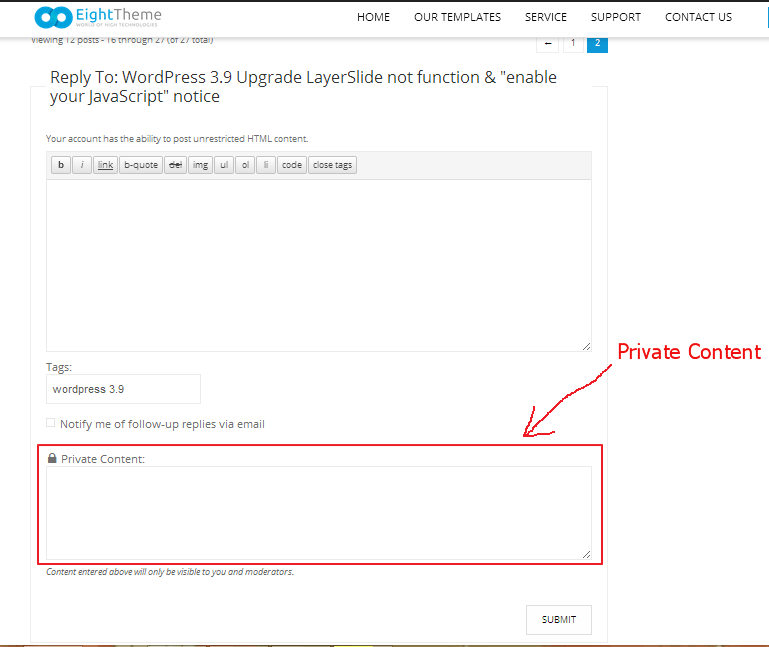
Regards,
Jack Richardson
Hello,
We’re unable to enter in Administration panel. Please check provided wp-admin credentials.
Regards,
Jack Richardson
Hello,
Please check provided credentials. We’re unable to get access to FTP account.
Regards,
Jack Richardson
Hello,
We’re glad to hear it.
If you have any questions feel free to contact us.
Regards,
Jack Richardson
Hello,
Please provide us with FTP and wp-admin credentials and we’ll help with the issue.
Regards,
Jack Richardson
Hello,
Please provide us with link to the site and wp-admin credentials as well.
Regards,
Jack Richardson
Hello,
Please provide us with link to the page where you getting an issue.
Regards,
Jack Richardson
Hello,
There is an issue in Visual Composer plugin, which interrupt work of our script.
We advise you to contact Visual Composer support regarding this question.
Regards,
Jack Richardson
Hello,
Did you try to clear your browser cache? We checked it in Chrome, Mozilla and IE and it works fine.
Regards,
Jack Richardson
Hello,
We’re unable to enter Administration panel. Please check the provided credentials.
Also we’re waiting for FTP access.
Regards,
Jack Richardson
Hello,
Please provide us with FTP and wp-admin credentials and we’ll help you.
Regards,
Jack Richardson
Hello,
Please add this code into your custom.css:
@media (max-width: 767px) {
.wpb_revslider_element.wpb_content_element {
margin-bottom: 0 !important;
}
}
Here is the video tutorial how to create custom.css: https://www.youtube.com/watch?v=Qok2zRedRMY&list=PLMqMSqDgPNmD4uhGI1IBhr1iaEy81TMff&feature=share&index=1.
Regards,
Jack Richardson
Hello,
1. Please read carefully section about how to translate in our documentation: https://www.8theme.com/demo/docs/legenda/#!/how_to_translate.
2. You have to specify necessary Longitude and Latitude for google map in Theme Options -> Contact Form -> Longitude and Latitude for google map. (For example 52.3167, 5.5500).
Regards,
Jack Richardson
Hello,
Please provide us with FTP credentials. We’ll fix the issue.
Regards,
Jack Richardson









