

Hello,
Please provide us with FTP and wp-admin credentials we’ll take a look!
Regards,
Jack Richardson

Hello,
Please provide us with FTP and wp-admin credentials we’ll take a look!
Regards,
Jack Richardson
Hello,
Are you talking about “Add to cart” buttons?
Regards,
Jack Richardson
Hello,
We’ll contact them concerning your issue. When we’ll get reply we’ll inform you here.
Regards,
Jack Richardson
Hello,
If you want to change arrows to default you have to add this code into custom.css:
/* Slider arrows */
.tp-leftarrow.default{ z-index:100;cursor:pointer; position:relative; background:url(images/large_left.png) no-

repeat 0 0; width:40px !important; height:40px !important;}
.tp-rightarrow.default{ z-index:100;cursor:pointer; position:relative; background:url(images/large_right.png) no-

repeat 0 0; width:40px !important; height:40px !important;}
.tp-leftarrow:hover,
.tp-rightarrow:hover{background-position:bottom left; }

.tp-rightarrow.default:before,
.tp-leftarrow.default:before{
 content:"";
}
In the case if you want to create your own arrows you have to modify arrows style as you need.
Regards,
Jack Richardson
Hello,
You’re welcome!
Regards,
Jack Richardson
Hello,
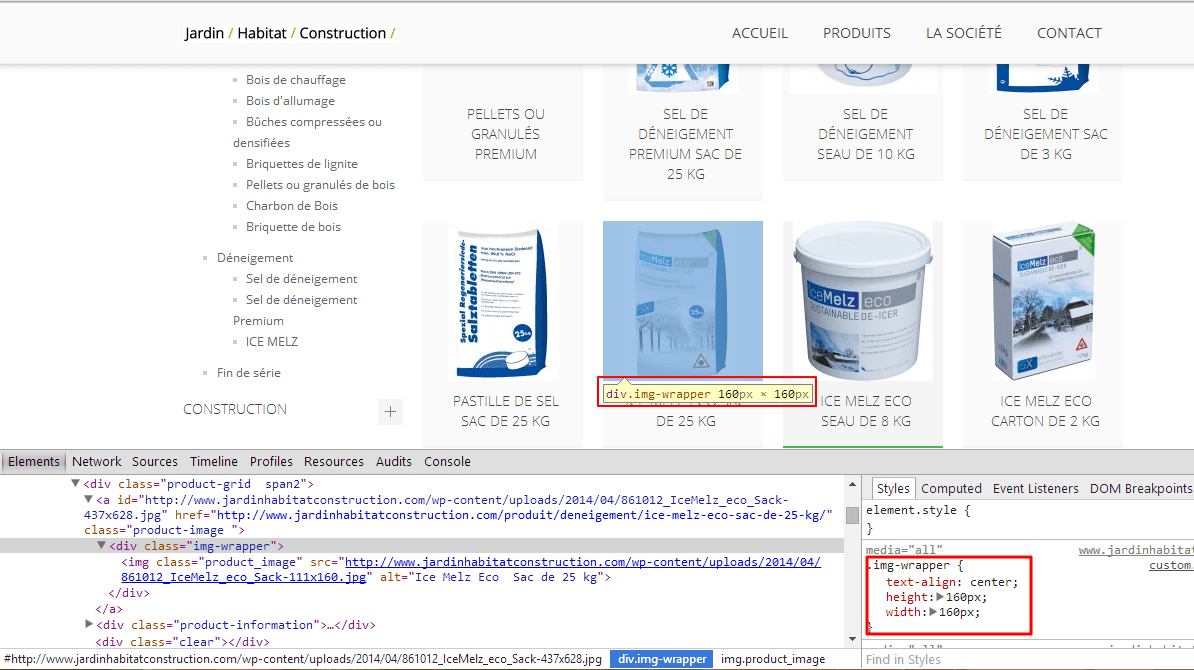
As we can see it’s already has dimensions 160px x 160px.
Could you please clarify what are trying to do?
Regards,
Jack Richardson
Hello,
You can try to contact them in comments on themeforest.net or buy plugin yourself.
If you give us permission to provide your credentials we can try to contact them concerning your issue. But it will take much more time, then if you do it yourself.
Regards,
Jack Richardson
Hello,
You’re welcome!
Regards,
Jack Richardson
Hello,
You are welcome.
We are always happy to help!
Regards,
Jack Richardson
Hello,
It is very difficult to help you without FTP access. We’ve tried to activate Legenda theme and got the white screen.
Now could you please change theme to default and enable WP_DEBUG in wp-config.php.
Regards,
Jack Richardson
Hello,
We always recommend to do style changes in custom.css. It will prevent losing of changes after theme upgrading. That’s why now you should copy all your changes in style.css and paste them into custom.css. If you have made some changes in php files, then you should to create a child theme and copy php files with changes there. About child theme you can read here: http://codex.wordpress.org/Child_Themes.
Also read carefully our documentation before theme upgrading: https://www.8theme.com/demo/docs/blanco/#!/upgrade.
Regards,
Jack Richardson
Hello,
We’ve added following code <?php do_action( 'woocommerce_archive_description' ); ?> into /woocommerce/archive-product.php.
Also we’ve added this code to display category title:
<?php if ( apply_filters( 'woocommerce_show_page_title', true ) ) : ?>
<h1 class="title"><span><?php woocommerce_page_title(); ?></span></h1>
<?php endif; ?>
Regards,
Jack Richardson
Hello,
Yes, it’s possible. Just add the following code into your custom.css:
.post-images ul.slides li {display:none;}
Here is the video tutorial how to create custom.css: https://www.youtube.com/watch?v=Qok2zRedRMY&list=PLMqMSqDgPNmD4uhGI1IBhr1iaEy81TMff&feature=share&index=1.
Regards,
Jack Richardson
Hello,
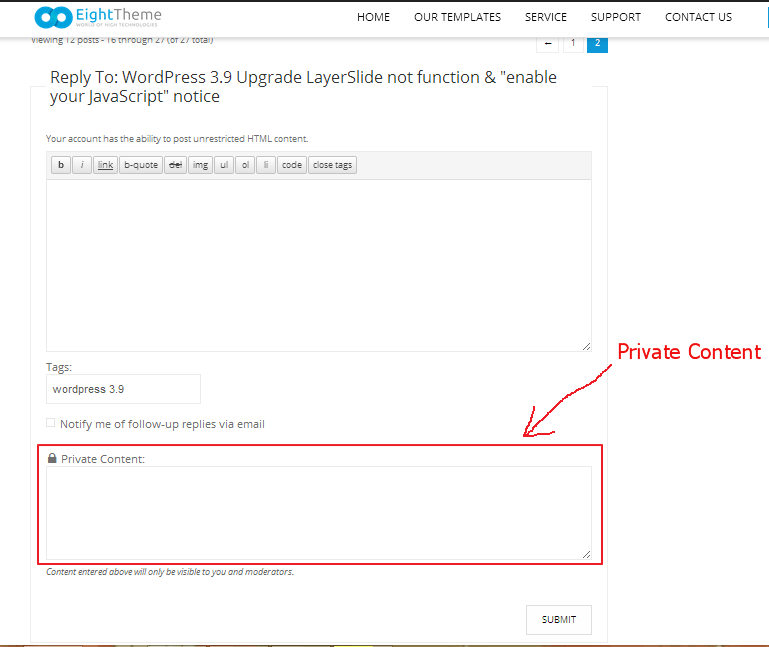
You can send us admin access in Private Content.
Regards,
Jack Richardson
Hello,
We’ve added code for category description display. Check it now, please!
Regards,
Jack Richardson
Hello,
We advise you to increase WordPress PHP memory limit to 96MB: http://docs.woothemes.com/document/increasing-the-wordpress-memory-limit/.
Regards,
Jack Richardson
Hello,
It was theme bug and will be fixed in the next theme release, so don’t worry it wasn’t you!
Regards,
Jack Richardson
Hello,
We can see social icons on mobile device, so could you please clarify what exactly you want to make visible on mobile device?
Regards,
Jack Richardson
Hello,
We’re glad that you figured out.
If you have any questions feel free to contact us.
Regards,
Jack Richardson
Hello,
We’ve made some changes. Please check it now!
Regards,
Jack Richardson
Hello,
We’re glad that you figured out.
If you have any questions feel free to contact us.
Regards,
Jack Richardson
Hello,
You’re welcome!
If you have any questions don’t hesitate to contact us.
Regards,
Jack Richardson
Hello,
The Visual Composer works fine with new WP version. Try to upgrade your WP to the latest version. Also don’t forget then to update your theme to the latest version 2.2. Please read carefully this sections about upgrading and Visual Composer in our documentation before theme upgrading: https://www.8theme.com/demo/docs/legenda/#!/upgrade and https://www.8theme.com/demo/docs/legenda/#!/visual_composer.
Regards,
Jack Richardson
Hello,
We hope new update will be released on next week.
Regards,
Jack Richardson
Hello,
You’re welcome!
Regards,
Jack Richardson
Hello,
Could you please provide us with link to your site?
Regards,
Jack Richardson
Hello,
As we can see the problem persists with default theme too.
We advise you to contact Revolution Slider support regarding the issue.
Regards,
Jack Richardson
Hello,
You just had inserted wrong slider “rer” instead “ddd” on your home page. Check it now!
Regards,
Jack Richardson
Hello,
Please provide us with FTP and wp-admin credentials in Private Content.
Regards,
Jack Richardson
Hello,
In this case you just have to set the “Large resolution from” value in Theme Options.
Also we advise you to do all further style changes in custom.css. It will prevent of losing your changes after theme upgrading.
Regards,
Jack Richardson









