You’re welcome.
Regards,
Eva Kemp.

You’re welcome.
Regards,
Eva Kemp.
Hello,
Please add this code into custom.css file of your subdomain:
.header5 .logo img, .header6 .logo img, .header1 .logo img, .header7 .logo img {
    max-width: 450px; }
.header5 .logo, .header6 .logo, .header1 .logo, .header7 .logo {
    float: right;
}
Regards,
Eva Kemp.
Hello @Bettina,
Could you please clarify what issues you have with images?
Thank you.
Regards,
Eva Kemp.
Hello @ingenuitor,
We’ve sent the latest version of Visual Composer plugin to your email address. Please check it.
Regards,
Eva Kemp.
Hello,
Please add this code into custom.css:
.with_frm_style label.frm_primary_label {
    color: black;
}
.with_frm_style .frm_checkbox label {
    color: black;
}
Regards,
Eva Kemp.
You’re welcome.
Regards,
Eva Kemp.
Hello,
What version of the theme are you using?
We recommend you to upgrade it to the latest 2.2 version: https://www.8theme.com/demo/docs/legenda/index.html#!/upgrade
Some bugs with Visual Composer are fixed there and now it’s a separate plugin you need to install with the theme.
Regards,
Eva Kemp.
You’re welcome.
You can find id in the address bar

Regards,
Eva Kemp.
Hello,
You wrote wrong shortcode for pop up – [block id= “popup”], but you had to write the id of the static block – [block id= “1072”]. I’ve changed it. Also we recommend you to update the theme to the latest version ( https://www.8theme.com/demo/docs/legenda/index.html#!/upgrade ) as some bugs with Visual Composer are fixed there.
Regards,
Eva Kemp.
Hello,
I’ve reverted back the original menu.
Please check it.
Regards,
Eva Kemp.
You’re welcome.
Regards,
Eva Kemp.
Hello,
Please provide us with wp-admin credentials to check static block for pop up you’ve created.
Thank you.
Regards,
Eva Kemp.
Hello,
We recommend you to contact Revolution Slider support regarding your question. They should advise you how to achieve this.
Regards,
Eva Kemp.
Hello,
We’re unable to connect to FTP. The credentials are incorrect. Please check them.
To remove the second price please add this code into custom.css file:
small.woocommerce-price-suffix {
display: none;
}
Here you can watch the tutorial how to create custom.css. The video tutorial is for Legenda theme, but the process is identical.
Regards,
Eva Kemp.
Hello,
Sorry but this requires additional customization and is a paid service.
If you agree to pay you should create a ticket at http://support.8theme.com/ and our specialists will assist you.
Regards,
Eva Kemp.
Hello,
Could you please write the text displayed on the screenshot in English?
Please clarify with more details what issues you are experiencing.
Thank you.
Regards,
Eva Kemp.
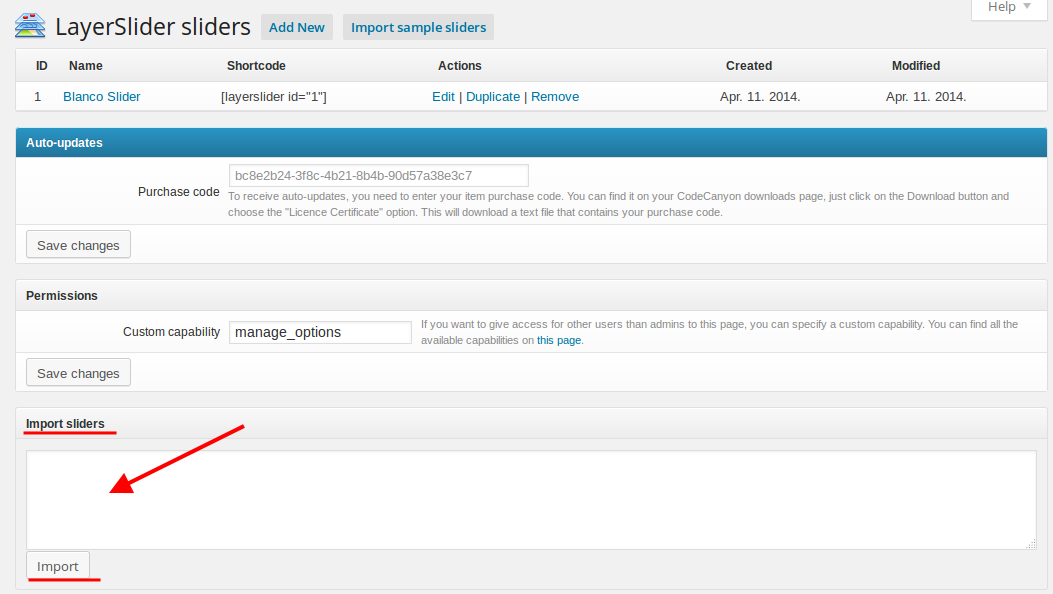
Are you using LayerSlider or Revolution Slider on your site?
If you want to import LayerSlider from our demo, you need find the txt file in the theme archive > Documentation folder and copy the content of the blanco-layer-slider-sample.txt file to the section showed on the screenshot in admin panel > LayerSlider WP
Regards,
Eva Kemp.
Hello,
You’ve already asked this question in this topic.
Please reply to the question you were asked: “Are you talking about slideshow for parallax effect or Revolution Slider?”
This topic will be closed as a duplicate one.
Thank you for understanding.
Regards,
Eva Kemp.
Hello,
You can import LayerSlider from the archive folder you downloaded with the theme.
Please read our documentation: https://www.8theme.com/demo/docs/blanco/index.html#!/slideshow
Regards,
Eva Kemp.
You’re welcome.
Regards,
Eva Kemp.
Hello,
As I see you’re using old theme version.
Please update it to the latest 2.2 version as there were some bugs with VC in the old version.
Read our documentation carefully before upgrading: https://www.8theme.com/demo/docs/legenda/index.html#!/upgrade
Don’t forget to create backup of your files and database as well.
Regards,
Eva Kemp.
The reason was you selected tabs type “Accordion” in Theme Options > Single Product Page > Tabs type. I’ve changed it to default and tabs are showing fine now.
Please check.
Regards,
Eva Kemp.
You’re welcome.
Regards,
Eva Kemp.
Hello,
I’ve just checked the site and all links are clickable from our side. Are you talking about slideshow for parallax effect or Revolution Slider?
Thank you.
Regards,
Eva Kemp.
You have old version of Woocommerce plugin. As those tabs are related to woocommerce configuration please update the plugin. If the issue remains after update please reply back.
Regards,
Eva Kemp.
Hello,
As I can see the content for OUR PRICING LIST, OUR PORTFOLIO and HOW MUCH WE CAN OFFER YOU blocks is already displayed. Have you fixed the issue?
You can upload your screenshots to some image storage (for example, http://imgur.com/) and provide us with the links.
The link inaturalise.com/wp-admin doesn’t work. Do you use other link for wp-admin panel?
Regards,
Eva Kemp.
Hello,
Please check the site now. We’ve placed the logo image into the copyright footer area in Appearance > Widgets using Static blocks and made some changes in custom.css file.
Please check if you translated all words in /web/wp-content/plugins/woocommerce/i18n/languages/woocommerce-fr_FR.po. Also as I see there is no .po, .mo files in /web/wp-content/themes/legenda/languages directory. Please follow our instruction regarding translation: https://www.8theme.com/demo/docs/legenda/index.html#!/how_to_translate
Thank you.
Regards,
Eva Kemp.
Hello,
We’ve sent the latest version of Visual Composer plugin to your email address. Please update it. If the problem still persists after update please let us know.
Regards,
Eva Kemp.
Hello,
To fix the issue with the images display you can update the theme to the latest version (please read our documentation before upgrading: https://www.8theme.com/demo/docs/legenda/index.html#!/upgrade ) or select specific number of projects to be displayed on Portfolio page in Theme Options > Portfolio.
In this way pagination will be enabled and the images should load fine on the 1st page.
Regards,
Eva Kemp.
Hello,
We’re looking forward to the email from WPML support team and we’ll be glad to cooperate with them.
Regards,
Eva Kemp.