
Hello,
Sorry, but we are unable to log in to wp-admin panel as the credentials are incorrect.
Please check them.
Thank you.
Regards,
Eva Kemp.

Hello,
Sorry, but we are unable to log in to wp-admin panel as the credentials are incorrect.
Please check them.
Thank you.
Regards,
Eva Kemp.
Hello,
Thank you for your feedback! We really appreciate it.
There is a bug in the theme with the Checkout page. You need select other template in Theme Options > Shop > Checkout page > Default.
We’ve taken it into our account and this issue should be fixed in future updates.
Please take our apologies.
Regards,
Eva Kemp.
Hello @stuartsinclair,
You’re welcome.
Regards,
Eva Kemp.
You’re welcome.
We’re glad you were able to update the plugins.
If you have any questions, don’t hesitate to contact us.
Regards,
Eva Kemp.
Hello,
We are unable to connect to FTP getting the error:
“Error: Could not connect to server”
Please check if the credentials are correct.
Regards,
Eva Kemp.
Hello,
Please provide us with the login credentials to FTP and wp-admin panel in Private Content.
Regards,
Eva Kemp.
Hello,
You’re welcome.
Please create a ticket at http://support.8theme.com/ and our specialists will provide you with the detailed information regarding additional customization and the price for it.
Regards,
Eva Kemp.
Hello,
To update the plugin you need download the theme archive at http://themeforest.net/item/legenda-responsive-multipurpose-wordpress-theme/5888906 where we’ve recently included the updated versions of plugins VC and Revolution Slider. After you unzip the archive you’ll find the plugins in legenda/framework/plugins directory. Upload the new version via FTP and remove the old one.
Regards,
Eva Kemp.
Hello @stuartsinclair,
We recommend you to update the theme to the latest 2.9.2 version
https://www.8theme.com/demo/docs/blanco/index.html#!/upgrade
If the issue is still there after update please let us know.
Regards,
Eva Kemp.
Hello,
You need create variable products to set color options:
http://docs.woothemes.com/document/product-variations/
Now you have them as simple products.
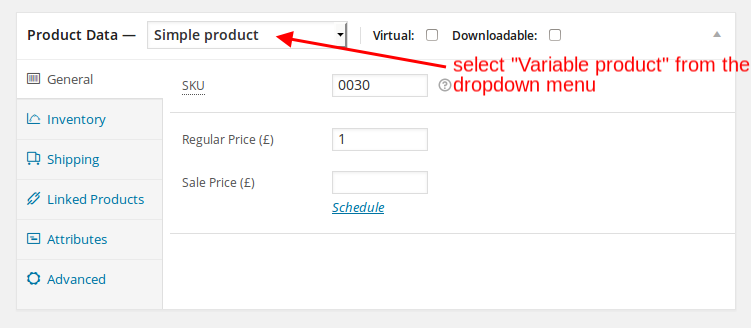
Sorry, but to move the tabs requires additional customization and isn’t for free.
I’ve added the code below to custom.css file to hide the text you mentioned:
.single-product-page .product-info h4, .single-product-page .product-info .sku_wrapper, .single-product-page .product-info .posted_in {
        display: none;
}
Please check it now.
Regards,
Eva Kemp.
Hello,
As I see you have old Woocommerce version. Please update it. If the problem still persists after update let us know.
Regards,
Eva Kemp.
Hello,
As I see all the images in /public_html/wp-content/uploads/2014/06 directory have 666 file permissions. Please change them to 777 as we are unable to do this getting the error:
“550 CHMOD 755 winni.jpg: Operation not permitted”
Or ask your hosting provider to do this.
Regards,
Eva Kemp.
Hello,
Sorry for a long delay.
Unfortunately there is no possibility to show the part of an image on mobile devices as it depends on a mobile screen size. We can make the arrows to be showed only. In this case you need add this code into custom.css file:
 @media (max-width: 480px) {.flex-direction-nav {
    display: block;
}}
Concerning the shipping question you have to consult with Woocommerce support team as this is related to their configuration.
Regards,
Eva Kemp.
You’re welcome.
Regards,
Eva Kemp.
Hello,
I’ve imported the settings of the toys demo, but you have to reupload your logo. Please check it now.
Regards,
Eva Kemp.
1. Please clarify what space you want to fix.
2. The font on the demo is Handlee font.
Regards,
Eva Kemp.
Hello,
We’ve made some changes in custom.css file. Please check the logo now.
Regards,
Eva Kemp.
Hello,
I’ve imported Toys demo page and set it as the Home page.
Please check your site now.
Regards,
Eva Kemp.
Hello,
After you downloaded the theme archive, you need extract it and there you’ll find one more archive “Legenda_v2.2.zip”, extract it as well and open this folder. Then open the folder “framework” and “plugins” inside of it. And VC archive “js_composer.zip” is located in there.
Regards,
Eva Kemp.
Hello,
Could you please resend a screenshot as there is no image?
Thank you.
Regards,
Eva Kemp.
Hello,
Could you please show a screenshot of what you want to remove?
Thank you.
Regards,
Eva Kemp.
You should edit the file wp-content/themes/theleader/woocommerce/global/form-login.php to translate those words.
Regards,
Eva Kemp.
Hello,
Please provide us with the link where you’re getting the error and FTP/wp-admin panel credentials in Private Content.
Thank you.
Regards,
Eva Kemp.
You’re welcome.
Those words can be translated in the file wp-content/themes/theleader/woocommerce/checkout/form-checkout.php.
Regards,
Eva Kemp.
Hello @Flexibilis,
Are you changing the view in Chrome browser settings or in VC?
Could you please show a screenshot of the image you see?
Thank you.
Regards,
Eva Kemp.
Hello,
Please read our documentation carefully:
https://www.8theme.com/demo/docs/legenda/index.html#!/slideshow
https://www.8theme.com/demo/docs/legenda/index.html#!/demo_data_installation
If you have any problems please provide us with FTP and wp-admin panel credentials in Private Content.
Regards,
Eva Kemp.
Hello,
Please provide us with the FTP and admin panel credentials in Private Content.
Regards,
Eva Kemp.
You may lose the changes when you update Woocommerce plugin, but it’s not related to the theme.
You can keep the file safe on your local PC and just reupload it when the plugin is updated.
We’ve taken your suggestion into our account and perhaps it’ll be included in the future updates.
Regards,
Eva Kemp.
You’re welcome.
Regards,
Eva Kemp.
Hello,
You can translate those words in the plugins folder. Find the file class-wc-countries.php in /wp-content/plugins/woocommerce/includes directory (from the line 729).
Regards,
Eva Kemp.









