
Hello,
That’s great you’ve fixed the issue yourself.
If you have any questions feel free to ask us.
Have a nice day!
Regards,
Eva Kemp.

Hello,
That’s great you’ve fixed the issue yourself.
If you have any questions feel free to ask us.
Have a nice day!
Regards,
Eva Kemp.
Hello @HighPassion,
We’ve recently produced 2.4 version of Legenda theme. Please download it and update your theme. There you’ll find updated versions of Revolution Slider and VC plugins. They are placed in legenda/framework/plugins directory.
Thank you.
Regards,
Eva Kemp.
Hello @sophie,
Please provide us with the login details for wp-admin panel.
Thank you.
Regards,
Eva Kemp.
Hello,
Thank you for the suggestion.
We’ve taken this into account and perhaps it will be produced in one of our future updates.
Thank you.
Regards,
Eva Kemp.
Hello,
Yes, you can update WordPress and Woocommerce plugin to the latest versions.
They are compatible with our theme.
Regards,
Eva Kemp.
Hello,
We’re glad you’ve found the solution.
We’re closing this topic.
If you need more help you can always open a new one.
Regards,
Eva Kemp.
Hello,
Please try to use this code to remove space under the products slider:
.product-slider.columns3 {
margin-bottom: -40px !important;
}
Thank you.
Regards,
Eva Kemp.
Hello,
As I see you have default po and mo files in the directory wp-content/themes/royal/languages, but you should create your own depending on the language you use.
Please read our documentation: https://www.8theme.com/demo/docs/royal/#!/how_to_translate
Also the problem of the blank page was related to Wishlist plugin. I’ve deactivated it. Please try to update it and check the site again having the plugin activated.
Thank you.
Regards,
Eva Kemp.
Hello,
Could you please show a screenshot where that space is shown?
Thank you.
Regards,
Eva Kemp.
Hello,
Did you update the theme to the latest 3.5 version? Please do this. When you download a new theme archive and extract it you’ll find updated version of Revolution Slider plugin there. It is placed in idstore/code/plugins directory.
Thank you.
Regards,
Eva Kemp.
Hello,
Unfortunately there is no such option for now but we’re working on it currently and this issue will be fixed in our nearest update.
Thank you.
Please take our apologies for inconveniences.
Regards,
Eva Kemp.
Hello,
We’re very sorry.
You’re right. There is a bug with new Woocommerce version and our theme. We’re working on the solution currently. The issue will be fixed as soon as possible.
Please take our apologies for inconveniences and all troubles you had to experience.
Regards,
Eva Kemp.
Hello,
We’re very sorry.
You’re right. There is a bug with new Woocommerce version and our theme. We’re working on the solution currently. The issue will be fixed as soon as possible.
Please take our apologies for inconveniences and all troubles you had to experience.
Regards,
Eva Kemp.
Hello,
You need create back up of all files and database. You may have backup option in your hosting control panel.
Regards,
Eva Kemp.
Hello,
1. You can change the title in wp-content/themes/legenda/woocommerce/single-product/up-sells.php
You will find the code:
etheme_create_flex_slider($args, __('Our offers', ETHEME_DOMAIN), false, true);
and change “Our offers” title to anything you want.
2. To change Related Products title you need edit wp-content/themes/legenda/woocommerce/single-product/related.php, find the code 'title' =>__('Related Products', ETHEME_DOMAIN) and change the current title to your own.
3. You need add this code into custom.css file to change the background color:
.added-text {
background-color: white !important;
}
How to create custom.css you can watch in this video tutorial.
4. Add the following code into custom.css to change items color in mobile menu:
.side-block .close-block { color: white; }
Regards,
Eva Kemp.
Hello,
You can change the title in wp-content/themes/legenda/woocommerce/single-product/up-sells.php
You will find the code:
etheme_create_flex_slider($args, __('Our offers', ETHEME_DOMAIN), false, true);
and change “Our offers” title to anything you want.
Regards,
Eva Kemp.
Hello,
Please provide us with the link to your site and wp-admin panel credentials in Private Content. Do you want to display one price on the Shop page where all products are shown or on a Single product page?
Thank you.
Regards,
Eva Kemp.
Hello,
Sorry, but unfortunately we don’t have such option in the theme settings.
Please take our apologies for inconvenience.
Regards,
Eva Kemp.
Hello,
You can change size of related products in Theme Options > Products Page Layout > Product Images Width/Product Images Height.
Unfortunately we don’t have such possibility to add some information above the related products section. Sorry.
Regards,
Eva Kemp.
Hello,
You’re welcome.
Regards,
Eva Kemp.
Hello,
Have you updated the theme to 2.4 version? Please do this and remove “woocommerce” folder in wp-content/themes/legenda before the update.
Thank you.
Regards,
Eva Kemp.
Hello @fredsarran,
Have you updated the theme to 2.4 version? Please do this and remove “woocommerce” folder in wp-content/themes/legenda before the update.
Thank you.
Regards,
Eva Kemp.
Hello,
Please update the theme to the latest 1.1 version. Some strings in .po files have been fixed there. Before update remove the folder “woocommerce” in wp-content/themes/royal directory.
Thank you.
Regards,
Eva Kemp.
Hello,
As I see you haven’t updated the theme to the latest version. Please update it to 1.1 version. Before update please remove the folder woocommerce in wp-content/themes/royal directory.
Thank you.
Regards,
Eva Kemp.
Hello,
Unfortunately there is no such feature. Sorry.
Regards,
Eva Kemp.
Hello,
The issue is caused by ITRO Popup Plugin. I’ve disabled it and chat is working fine now.
Please check and clear browser cache before.
Regards,
Eva Kemp.
Hello,
Please provide us with FTP and wp-admin panel credentials.
Thank you.
Regards,
Eva Kemp.
Hello,
Please provide us with FTP access and wp-admin panel credentials and the links of the pages where you can’t translate some items. Please specify which ones.
Thank you.
Regards,
Eva Kemp.
Hello,
Seems reactivation of Woocommerce plugin has fixed the issue. I’ve added a product to the cart again and it’s visible in there:
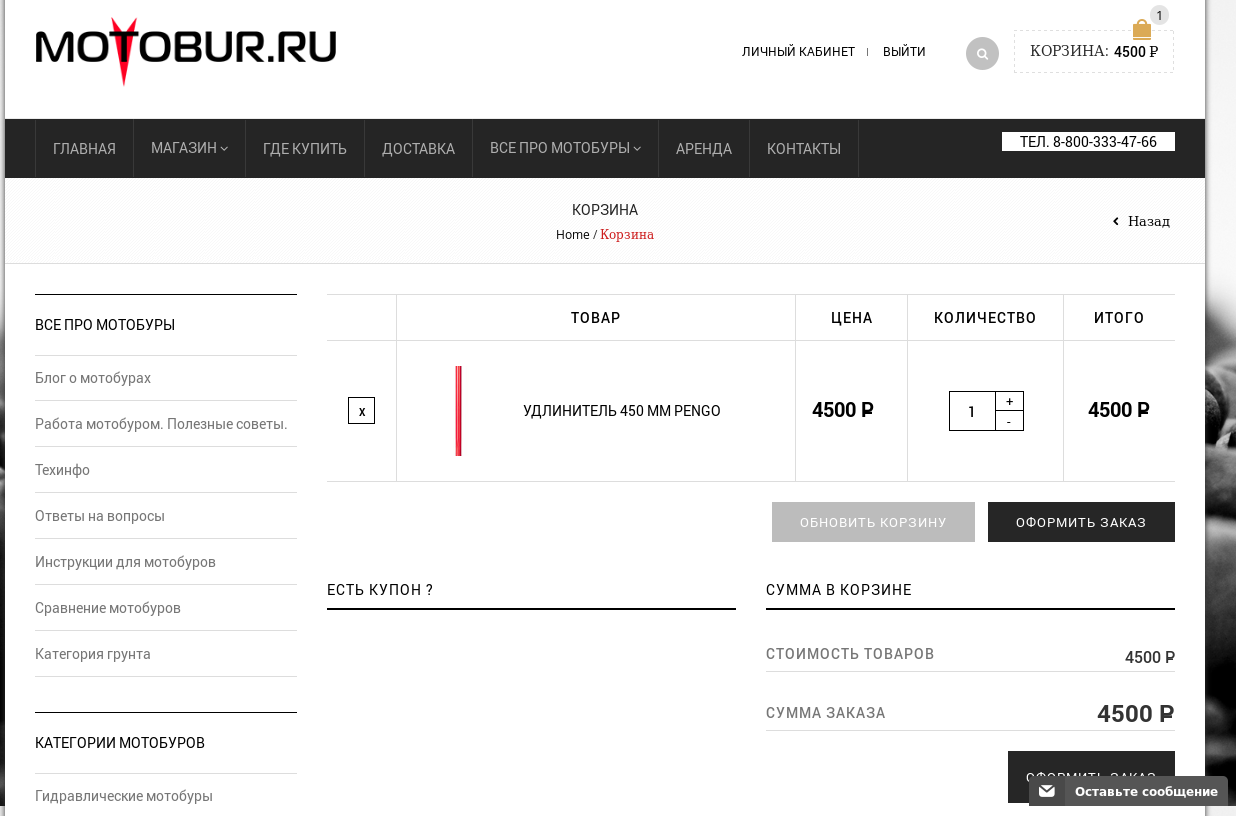
Please check it from your side and clear browser cache before.
Thank you.
Regards,
Eva Kemp.









