
Hello,
We’ll fix this issue in our next update.
Please take our apologies for inconveniences.
Thank you.
Regards,
Eva Kemp.

Hello,
We’ll fix this issue in our next update.
Please take our apologies for inconveniences.
Thank you.
Regards,
Eva Kemp.
Hello,
You don’t need the license as we provide Screets Chat plugin icluded in the theme. If you want to have license key you have to buy the plugin yourself.
Regards,
Eva Kemp.
Hello,
You can change color of the screets chat via wp-admin panel > Chat Console > Options > Customize Skin tab.
Regards,
Eva Kemp.
Hello @pitsandbieces,
I’ve reuploaded the theme files and the site is loading now. Please check it.
Regards,
Eva Kemp.
Hello,
Please provide us with the site link as well.
Also could you please specify where exactly you want to add titles?
Thank you.
Regards,
Eva Kemp.
Hello,
We’ll fix this issue in our next update. You shouldn’t worry about this as these warnings won’t affect your site work.
Sorry for inconveniences.
Thank you.
Regards,
Eva Kemp.
Hello,
1. Sorry, but I don’t see 3 broken images in the footer:

Could you please show a screenshot what images you are talking about?
3./ 4. Please update the theme to the latest version – 2.4. Some bugs were fixed in it.
Thank you.
Regards,
Eva Kemp.
Hello,
Could you please describe your question with more details?
Please show us a screenshot what you want to fix.
Thank you.
Regards,
Eva Kemp.
Hello @Youval,
You didn’t select featured products in Products menu.
Please read this article how to do this:
https://support.8theme.com/index.php?/Knowledgebase/Article/View/9/0/how-to-mark-products-as-featured-and-new-ones
Thank you.
Regards,
Eva Kemp.
Hello,
Unfortunately it can’t be done the same as in Blanco theme.
Drop down option is also present for Cart in Legenda. Try adding a product to the cart and then hover the cart icon.
Thank you.
Regards,
Eva Kemp.
Hello,
The code for shopping cart icon is:
.shopping-cart-widget .cart-summ > a:before {
    content: url('link_to_your_icon') !important;
}
Regards,
Eva Kemp.
Hello,
Sorry, but I don’t see the error you specified on the site.
Have you fixed it?
Regards,
Eva Kemp.
Hello,
Could you please specify exactly what you want to change in the cart display in Legenda theme?
Also please provide us with the link to your site and wp-admin panel credentials in Private Content.
Thank you.
Regards,
Eva Kemp.
Hello,
Are you using frontend editor in Visual Composer?
If so, unfortunately it can’t be used because of some heavy elements, that won’t load in frontend. We recommend you to use backend editor instead.
Please take our apologies for inconveniences.
Thank you.
Regards,
Eva Kemp.
Hello,
Thank you for explanation.
As you’re using external product type, it’s related to Woocommerce configuration.
You have to contact their support in order to find which files need to be modified. There are no such settings in our theme.
Thank you for understanding.
Regards,
Eva Kemp.
Hello,
Please take our apologies for a delay.
We’re still working on this issue. We’ll let you know as soon as possible.
Thank you.
Regards,
Eva Kemp.
Hello,
You can change that text in wp-content/themes/legenda/framework/theme-functions.php (line 4268).
Unfortunately there is no such option to hide popup for the same IP addresses. Sorry.
Regards,
Eva Kemp.
Hello,
Could you please clarify with more details? Where are you trying to register?
Thank you.
Regards,
Eva Kemp.
Hello,
Could you please provide us with the link of the page where contact form is displayed?
Thank you.
Regards,
Eva Kemp.
Hello,
There is an error in Chrome console:
Failed to load resource: the server responded with a status of 404 (Not Found) http://www.chezprunette.com/wp-content/uploads/2014/09/slide5a.jpg
The 5th slide can’t be found. The reason may be you have wrong permissions on the file or folder where the image is located. Please try to change permissions of the folder uploads/2014/09 to 777 via FTP. Or provide us with FTP credentials.
Thank you.
Regards,
Eva Kemp.
Hello,
Could you please clarify with more details what issues you are experiencing?
Also please provide us with wp-admin panel credentials in Private Content.
Thank you.
Regards,
Eva Kemp.
Hello,
To change the font color please add this code in custom.css file:
p, #tabs section h3, #tabs section h2, #tabs section h4 {
   color: black !important;
   font-family: arial;
}
How to insert bullets you find in this articles:
http://www.ehow.com/how_8339529_insert-bullets-wordpress.html
http://smallbusiness.chron.com/insert-bullets-wordpress-46543.html
Regards,
Eva Kemp.
Hello,
We’re glad you managed to find a solution.
If there are any questions feel free to ask us.
Regards,
Eva Kemp.
Hello,
As I see on the site the font weight is 100:

Have you cleared the cache in your browser before checking?
Thank you.
Regards,
Eva Kemp.
Hello,
You can create a custom menu in Appearance > Menus and add it into sidebar using Custom Menu widget in Appearance > Widgets.
Regards,
Eva Kemp.
Hello,
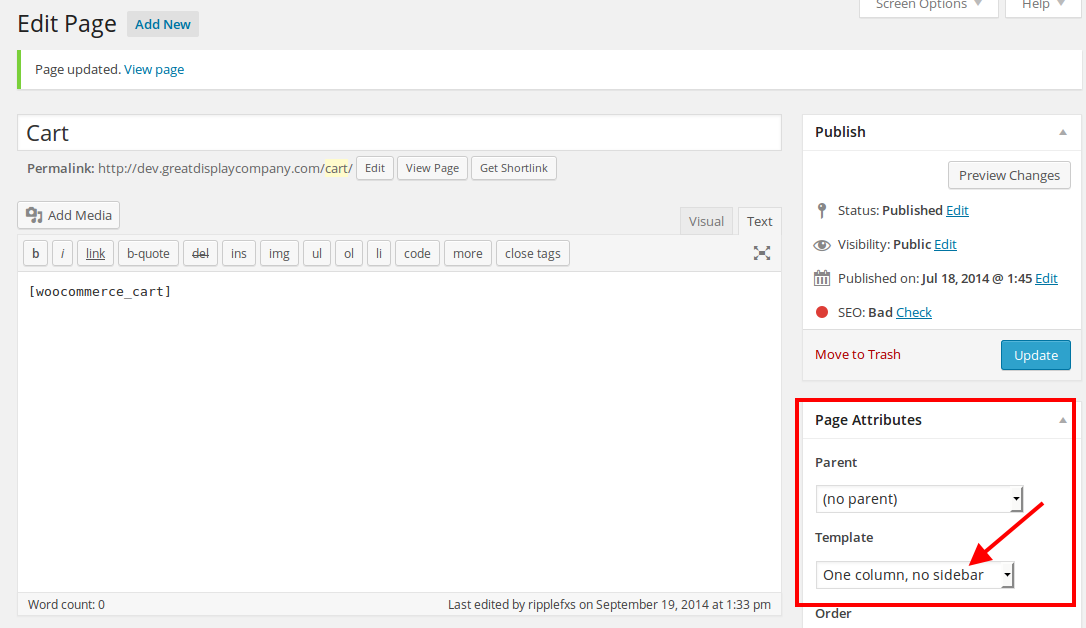
I’ve removed sidebar selected One column template for the Cart page:
Regards,
Eva Kemp.
Hello,
To create excerpt you need do the following:
– Go to wp-admin panel > Posts > select the post to edit
– Please view the screenshot what you need to enable:
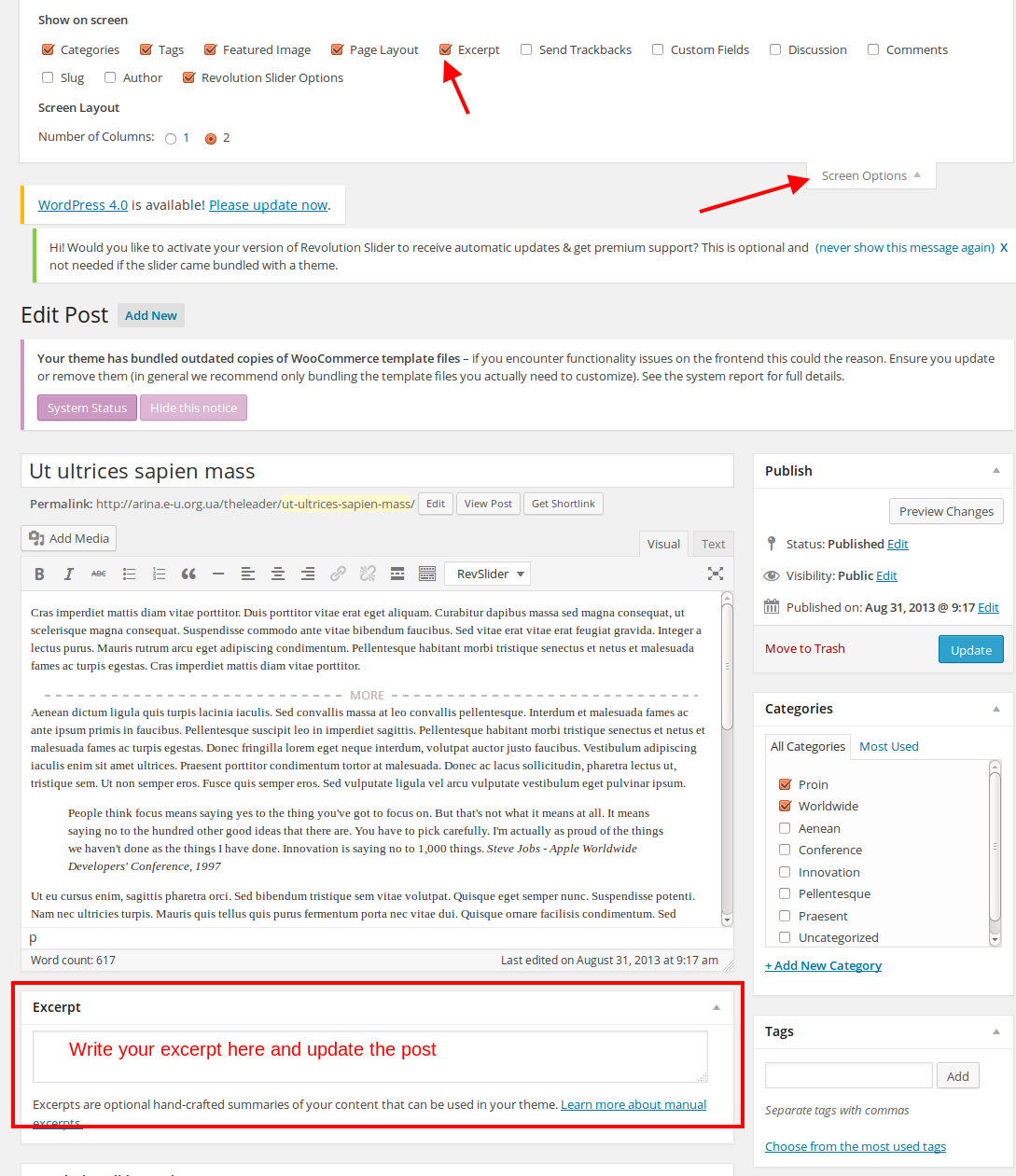
Please try this solution.
Thank you.
Regards,
Eva Kemp.
Hello,
As I see the products are displayed in 3 columns.
Do you still need our help?
Thank you.
Regards,
Eva Kemp.
Hello,
We’ll fix this issue in the next update. You shouldn’t worry as those warnings won’t affect your site work.
Please take our apologies for the inconveniences.
Thank you.
Regards,
Eva Kemp.
Hello,
You had the code in style.css of the child theme
.flex-direction-nav {
display: none !important;
}
That’s why the arrows weren’t shown.
I’ve changed it to
.flex-direction-nav {
display: block !important;
}
and arrows are being showed now.
Regards,
Eva Kemp.










