
Hello,
You’re welcome.
Regards,
Eva Kemp.

Hello,
You’re welcome.
Regards,
Eva Kemp.
Hello,
Are you getting any errors when importing the images?
Our theme shouldn’t affect WP import process, but you may deactivate our theme and all plugins, then import all images and enable everything back.
Thank you.
Regards,
Eva Kemp.
Hello,
You need to add the same widgets as for Product Page Sidebar to Primary Widget Area in Appearance > Widgets.
Thank you.
Regards,
Eva Kemp.
Hello,
Are you using some plugin for social media icons?
Please clarify.
Thank you.
Regards,
Eva Kemp.
Hello,
Could you please provide us with the exact link where you see the issue?
I’ve just checked the site and haven’t found it.
Thank you.
Regards,
Eva Kemp.
Hello,
Please use this code in custom.css file:
header {
 background: #1a2023;
}
.menu > li > a {
  color: #FFF !important;
}
.fixed-header-type-16 {
    border-bottom: 0px solid #EBEBEB;
}
Thank you.
Regards,
Eva Kemp.
Hello,
“Sale” and “New” icons are images located in wp-content/themes/legenda/images/. The files are label-sale.png and label-new.png.
You can replace them with your own pictures or edit the current ones with some image editor.
Regards,
Eva Kemp.
Hello,
You’re welcome.
Regards,
Eva Kemp.
Hello,
You need create footer via Static Blocks as described in our documentation:
https://www.8theme.com/demo/docs/royal/#!/8_footer
Please clarify your second question with more details.
Thank you.
Regards,
Eva Kemp.
Hello,
There are a lot of errors when importing demo data.
We recommend you to reinstall WordPress and alter the database, then install the theme. Also please make sure that file_get_contents() function is enabled in the server configuration. You need contact your hosting provider regarding this question.
Thank you.
Regards,
Eva Kemp.
Hello,
Do you still need our help?
Please let us know.
Regards,
Eva Kemp.
Hello,
I’ve added the following code into style.css of your child theme:
.vc-row-translate {
    overflow: visible !important;
}
Please check the Home page now and clear browser cache before.
Regards,
Eva Kemp.
Hello,
Please provide us with the correct wp-admin panel credentials and FTP access. We’ll install demo content for you.
Thank you.
Regards,
Eva Kemp.
Hello,
Please provide us with wp-admin panel credentials.
Thank you.
Regards,
Eva Kemp.
Hello,
Our footer demo blocks are displayed, you can disable them in Theme Options > General > Show Footer Demo Blocks > Off and create your own footer as described in the documentation I provided you previously.
Thank you.
Regards,
Eva Kemp.
Hello,
Please add this code in custom.css file:
#main-nav > ul > li > ul {
   top: 25px !important;
}
Regards,
Eva Kemp.
Hello,
Thank you for the feedback.
You can import Electronic Store demo via Theme Options > Import/Export, find the template variant in the list and click “Install demo data”.
Thank you.
Regards,
Eva Kemp.
Hello,
I’ve made changes in Settings > Permalinks. Please check Shop page now ( http://www.cadeaux.nc/boutique/restaurantshotelsgites/ )
Regards,
Eva Kemp.
Hello,
Could you please check at your hosting provider if there are any restrictions via FTP (provide them with the error I’ve posted earlier)? It would be better for us to work using FTP.
Thank you.
Regards,
Eva Kemp.
Hello,
To have all subcategories opened you need disable Navigation Accordion in Theme Options > Shop > Enable Navigation Accordion > Off.
Please try this.
Thank you.
Regards,
Eva Kemp.
Hello,
You’re welcome.
Regards,
Eva Kemp.
Hello,
We’re very sorry for such long delay.
Soon we’ll release an update where some bugs are fixed.
Meanwhile you can use Contact form 7 plugin for your needs.
Please take our apologies for the troubles.
We’re appreciate your patience.
Thank you.
Regards,
Eva Kemp.
Hello,
I’ve commented the code <link rel="shortcut icon" href="<?php echo et_get_favicon(); ?>" /> in header.php file (line 9). Now favicon isn’t being shown. Please check it.
Regards,
Eva Kemp.
Hello,
I’ve enabled Excerpt for posts in Screen Options and excerpt is showing now:
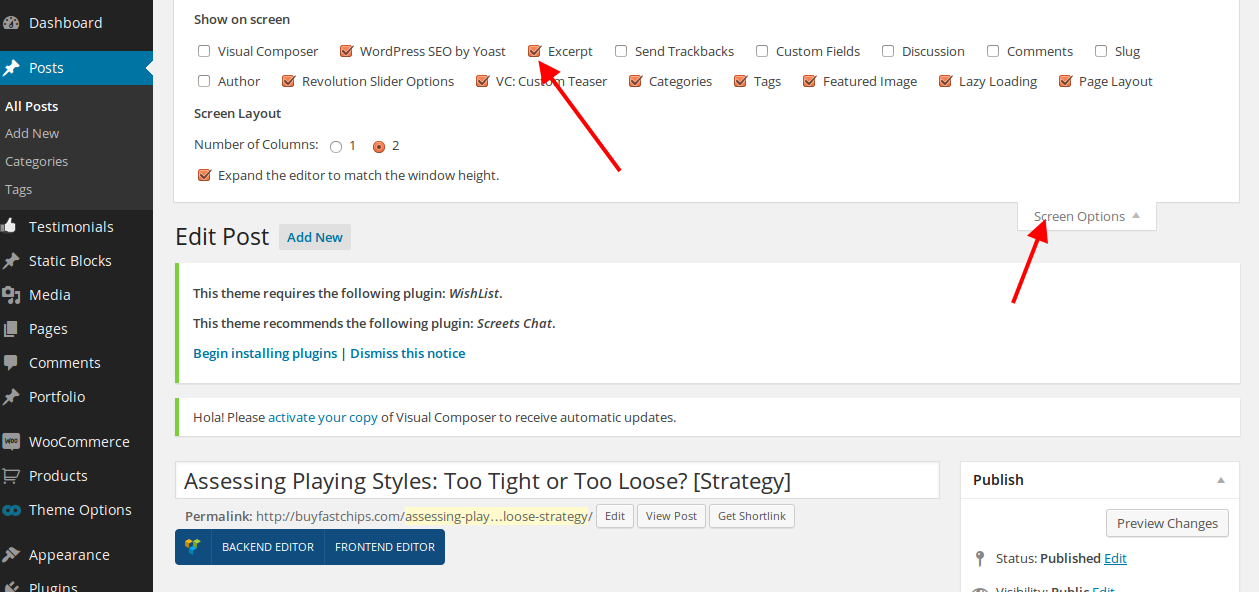
If you use Posts Grid type for posts display and enable sidebar, there will be misconfiguration and posts columns will be shown incorrectly. So you should disable sidebar for the Blog page.
We’re sorry for inconveniences.
Regards,
Eva Kemp.
Hello,
This is logo. You can change it via wp-admin panel in Theme Options > Header.
Regards,
Eva Kemp.
Hello,
Have you changed wp-admin panel login details? We’re unable to log in.
Please provide us with the correct ones.
Thank you.
Regards,
Eva Kemp.
Hello @pitsandbieces,
Could you please describe your issue with more details?
Also please provide us with wp-admin panel credentials.
Thank you.
Regards,
Eva Kemp.
Hello,
You can translate “Your account” in the file wp-content/themes/legenda/framework/theme-functions.php (line 1061) and “Return to Previous Page” in the file wp-content/themes/legenda/framework/theme-functions.php (line 2796).
Regards,
Eva Kemp.
Hello,
I’ve uploaded the archive of Visual Composer to wp-content/plugins directory but can’t find the option to extract it in your control panel.
Please do this and then activate the plugin in wp-admin panel.
Thank you.
Regards,
Eva Kemp.
Hello,
This is Woocommerce section and you should edit their file: wp-content/plugins/woocommerce/includes/class-wc-post-types.php.
Regards,
Eva Kemp.









