
Hello @cadeaux,
Sorry, but it’s a bit unclear for us.
Could you please show a screenshot to have clear understanding about the issue?
Thank you.
Regards,
Eva Kemp.

Hello @cadeaux,
Sorry, but it’s a bit unclear for us.
Could you please show a screenshot to have clear understanding about the issue?
Thank you.
Regards,
Eva Kemp.
Hello,
That error means Taxonomy_Metadata class has already been declared and you can’t declare it twice. I’ve fixed it just renamed the class in the file taxonomy-metadata.php. After that the site has been loaded successfully.
Please check.
Regards,
Eva Kemp.
Hello,
Sorry for a long delay.
Please check the featured image option now.
Thank you.
Regards,
Eva Kemp.
Hello,
Sorry, but still “Forbidden” error after entering the login details.
Regards,
Eva Kemp.
Hello,
I’ve just checked the search form and it’s showing only products in the result.
Could you please provide an example of your search query?
Thank you.
Regards,
Eva Kemp.
Hello,
Sorry, for a long delay.
I’ve just checked the gallery with default Legenda theme and it’s working fine.
The problem is with functions.php file in the child theme.
Please check it carefully.
Thank you.
Regards,
Eva Kemp.
Hello,
As I see there are sale products displayed on the home page.
Could you please clarify your issue with more details?
Thank you.
Regards,
Eva Kemp.
Hello,
To change color for the “x” icon you should edit the picture with some image editor.
This image is located in wp-content/themes/legenda/images/ directory and the file is black_cross.png.
I’ve added the following code into style.css of the child theme:
p.myaccount_user a {
color: red;
}
Please check “My account” page now.
Regards,
Eva Kemp.
Hello,
I’ve disabled “Ajax “Add to Cart”” in Theme Options > Single Product Page.
Please check the site now and clear browser cache before.
Regards,
Eva Kemp.
Hello,
Sorry, but the credentials for FTP are incorrect.
Please check them.
Thank you.
Regards,
Eva Kemp.
Hello,
You’re welcome.
Regards,
Eva Kemp.
Hello,
As I see you’ve been replied in the previous topic.
You site is working now with the latest Blanco theme.
Thank you.
Regards,
Eva Kemp.
Hello,
Could you please provide us with the direct link of the error?
I’ve checked your home page and haven’t found any problems.
Thank you.
Regards,
Eva Kemp.
Hello,
“IDStore” icon in the header is our logo. To change it you should go to Theme Options > Header > Logo image, and upload your own logo. Now it’s absent in the theme settings.
Concerning your site title, as you can see it isn’t shown in any type of the header in Theme Options.
Regards,
Eva Kemp.
Hello,
Sorry, but you should contact Woocommerce support concerning this question.
Thank you.
Regards,
Eva Kemp.
Hello,
Please check this issue with default WordPress theme.
Deactivate the plugins one by one to find out which one is causing the issue.
It could be incompatibility of the theme with one of the plugins.
Thank you.
Regards,
Eva Kemp.
Hello,
As I see you’re using old theme version. Please update it to 3.5.
Thank you.
Regards,
Eva Kemp.
Hello,
I’ve selected the size of the product and “Add to Cart” button has appeared:
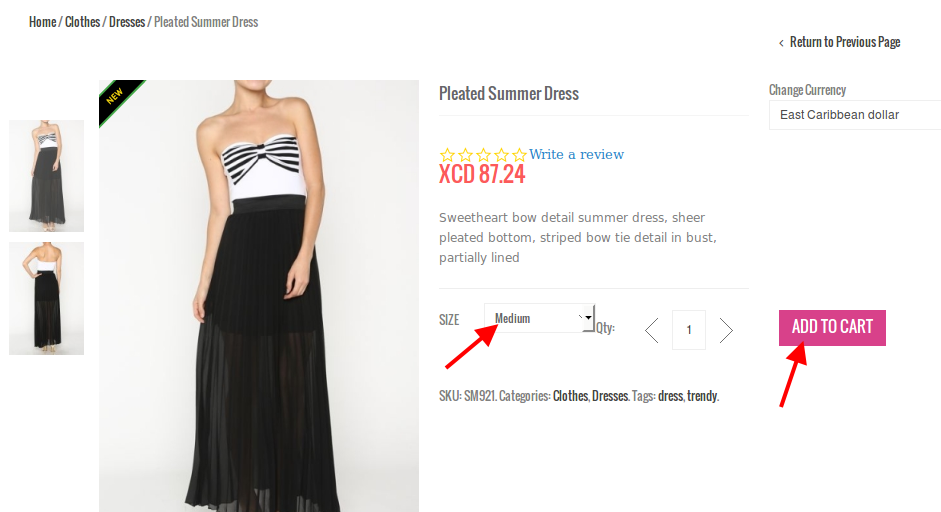
Please check it from your side and clear browser cache.
Thank you.
Regards,
Eva Kemp.
Hello,
We’re glad you’ve found the solution.
Enjoy your work.
Regards,
Eva Kemp.
Hello,
Sorry but our developers are still working on the update. It requires more time to resolve some issues.
We’re very sorry for such long delay.
Thank you for your understanding and patience.
Regards,
Eva Kemp.
Hello,
You’re welcome.
Regards,
Eva Kemp.
Hello,
You’re welcome.
Regards,
Eva Kemp.
Hello,
The reason was you had the following code in style.css file of the child theme:
.tab-content-inner{
display:none;
}
I’ve changed it to
.tab-content-inner{
display:block;
}
And the products have appeared on the Home page.
Please check.
Regards,
Eva Kemp.
Hello,
Please provide us with the link to your tweeter profile to check. What errors are you getting with newsletter? Could you please show a screenshot?
Thank you.
Regards,
Eva Kemp.
Hello,
Please refer to our documentation and check if you created footer blocks correctly: https://www.8theme.com/demo/docs/royal/#!/8_footer
“Punch Fonts” plugin is displayed twice with default WordPress theme as well, so the problem isn’t related to our theme. You may contact plugin author regarding this issue.
To remove the form on the Register page you need edit et-registration.php file n wp-content/themes/royal directory. Create its copy before editing the file.
Regards,
Eva Kemp.
Hello @Fred,
Please provide us with the correct credentials for FTP as we are unable to log in with the current ones.
Thank you.
Regards,
Eva Kemp.
Hello,
I’ve added the following code to style.css in the child theme:
.sidebar-position-without .products-grid.product-count-3 .product {
    width: 250px;
}
Please check home page now.
Regards,
Eva Kemp.
Hello @kevinwhite3000,
Please provide us with FTP credentials as well.
Thank you.
Regards,
Eva Kemp.
Hello,
You had “Just Catalog” option enabled in Theme Options > Shop. I’ve disabled it and “Add to cart” button has appeared.
Please check.
Regards,
Eva Kemp.
Hello,
After Legenda 2.4 we’ve released 2.4.1 version, where some bugs with Woocommerce 2.2.4 have been fixed. So please update your theme to the latest 2.4.1 version.
Also create a back up of your site and database before update.
Thank you.
Regards,
Eva Kemp.









