Forum Replies Created

Viewing 30 posts - 26,971 through 27,000 (of 31,382 total)
  • Avatar: Eva
    Eva Kemp
    Participant
    October 9, 2014 at 15:56

    Hello,

    You didn’t provide login details. Please write them in private content.
    Concerning the fifth question you need add this code in custom.css file:

    a.button.wc-forward {
    display: inline-flex !important;
    }

    To create custom.css you need rename default.custom.css to custom.css via FTP in the directory wp-content/themes/blanco and then enable it in Blanco-Theme Settings > tick “Enable Custom CSS”.

    Thank you.
    Regards,
    Eva Kemp.
    Avatar: Eva
    Eva Kemp
    Participant
    October 9, 2014 at 15:48

    Hello,

    You need recreate the translation file as described in our documentation: https://www.8theme.com/demo/docs/xmarket/index.html#!/how_to_translate
    Edit xmarket.pot file and then save it with your language name e.g es_ES.po into languages folder.

    Thank you.
    Regards,
    Eva Kemp.

    Avatar: Eva
    Eva Kemp
    Participant
    October 9, 2014 at 15:14

    Hello,

    Please provide us with FTP and wp-admin panel credentials in Private Content.

    Thank you.
    Regards,
    Eva Kemp.

    Avatar: Eva
    Eva Kemp
    Participant
    October 9, 2014 at 15:12

    Hello,

    The problem with Sign In link was caused by the reason you selected Home page as My Account page in Woocommerce > Settings > Accounts tab. I’ve changed it to My Account page and now the link is working.

    Concerning the mail issue, we’re still working on it. We’ll let you know the result as soon as possible.

    Please take our apologies.
    Thank you for understanding.

    Regards,
    Eva Kemp.

    Avatar: Eva
    Eva Kemp
    Participant
    October 9, 2014 at 14:56

    Hello,

    I’ve checked the pagination with default WordPress theme and it’s not working there too. So the problem isn’t related to our theme.
    You can try to update Woocommerce plugin to the latest version and check again (don’t forget to create a back up). If the problem persists contact Woocommerce support regarding this issue.

    Thank you.
    Regards,
    Eva Kemp.

    Avatar: Eva
    Eva Kemp
    Participant
    October 9, 2014 at 14:32

    Hello,

    1. You can disable “terms and conditions” removing the page in Woocommerce > Settings > Checkout tab > Checkout Pages and remove the page you selected for “Terms and Conditions”.

    2. That text can be translated in .po file in wp-content/themes/blanco/languages directory.

    3. Woocomercer shortcode icon isn’t shown with default WordPress theme too, so the issue is related to Woocommerce plugin, not our theme.

    4. That warning won’t affect your site work. You can hide it from the dashboard.

    5. Please provide us with the direct link where you see that problem.

    Thank you.

    Regards,
    Eva Kemp.

    Avatar: Eva
    Eva Kemp
    Participant
    October 9, 2014 at 13:32

    Hello,

    Sorry for a delay.
    We’re unable to connect to FTP getting the error:
    Response: 550 PWD: No such file or directory
    Error: Failed to retrieve directory listing

    Please check it. We’ll update Essential Grid plugin for you.

    Thank you.
    Regards,
    Eva Kemp.

    Avatar: Eva
    Eva Kemp
    Participant
    October 9, 2014 at 13:29

    Hello,

    You’re welcome.

    Regards,
    Eva Kemp.

    Avatar: Eva
    Eva Kemp
    Participant
    October 9, 2014 at 13:28

    Hello,

    You’re welcome.

    Regards,
    Eva Kemp.

    Avatar: Eva
    Eva Kemp
    Participant
    October 9, 2014 at 13:28

    Hello @clodrosome,

    You’ve already created a topic concerning your issue. Please don’t create multiple posts. You’ll be replied in the other topic.

    Thank you.
    Regards,
    Eva Kemp.

    Avatar: Eva
    Eva Kemp
    Participant
    October 9, 2014 at 13:25

    Hello,

    To change price font on a Single Product Page use this code in custom.css file:
    .single-product-page .product-info .price {font-family: "Open Sans",Arial;}

    Replace the font value with your own.

    Thank you.
    Regards,
    Eva Kemp.

    Avatar: Eva
    Eva Kemp
    Participant
    October 9, 2014 at 13:22

    Hello,

    Sorry, but we don’t have Instagram widget. It can be achieved only with their code.
    If you have any questions feel free to ask us.

    Regards,
    Eva Kemp.

    Avatar: Eva
    Eva Kemp
    Participant
    October 9, 2014 at 13:17

    Hello,

    Have you changed login details to wp-admin panel as we can’t log in?
    Please provide us with FTP credentials as well.

    Thank you.
    Regards,
    Eva Kemp.

    Avatar: Eva
    Eva Kemp
    Participant
    October 9, 2014 at 13:13

    Hello,

    Very likely that file_get_contents() function is disabled in the server configuration. It caused problems with default import. Please ask your hosting provider to check it.

    Thank you.
    Regards,
    Eva Kemp.

    Avatar: Eva
    Eva Kemp
    Participant
    October 9, 2014 at 12:48

    Hello,

    If you put some code into style.css file of the child theme it will overwrite custom.css.
    You should use either custom.css in the parent theme or style.css in the child theme.

    Thank you.
    Regards,
    Eva Kemp.

    Avatar: Eva
    Eva Kemp
    Participant
    October 9, 2014 at 12:45

    Hello,

    Please provide us with wp-admin panel credentials in Private Content.

    Thank you.
    Regards,
    Eva Kemp.

    Avatar: Eva
    Eva Kemp
    Participant
    October 9, 2014 at 12:33

    Hello @jwezenberg,

    You can find “Browse Wishlist” text in the file wp-content/themes/royal/framework/woo.php (line 805) and “Quick View” is in the file wp-content/themes/royal/woocommerce/content-product.php (line 128).

    Regards,
    Eva Kemp.

    Avatar: Eva
    Eva Kemp
    Participant
    October 9, 2014 at 12:12

    Hello @fitli65,

    If you want to use multilanguage site you need use wpml plugin http://wpml.org/
    Then you’ll be able to add links to the top bar.

    Thank you.
    Regards,
    Eva Kemp.

    Avatar: Eva
    Eva Kemp
    Participant
    October 9, 2014 at 12:09

    Hello,

    “.htaccess” file is created as a simple file and needs to be named “.htaccess” with dot at the beginning. Your host should explain you how to enable functions via .htaccess. Also if you move to other host you should ask their support if they have “allow_url_fopen” function enabled on a server.

    Thank you.
    Regards,
    Eva Kemp.

    Avatar: Eva
    Eva Kemp
    Participant
    October 9, 2014 at 12:03

    Hello,

    Does new version of VC plugin work slowly with default WordPress theme?
    Please check it.

    Thank you.
    Regards,
    Eva Kemp.

    Avatar: Eva
    Eva Kemp
    Participant
    October 9, 2014 at 12:01

    Hello,

    Please provide us with wp-admin panel credentials in Private Content.

    Thank you.
    Regards,
    Eva Kemp.

    Avatar: Eva
    Eva Kemp
    Participant
    October 9, 2014 at 11:56

    Hello,

    Sorry, but the credentials to FTP are incorrect.
    Please check them.

    Thank you.
    Regards,
    Eva Kemp.

    Avatar: Eva
    Eva Kemp
    Participant
    October 9, 2014 at 11:54

    Hello,

    1. Please provide us with wp-admin panel credentials to check the issue.

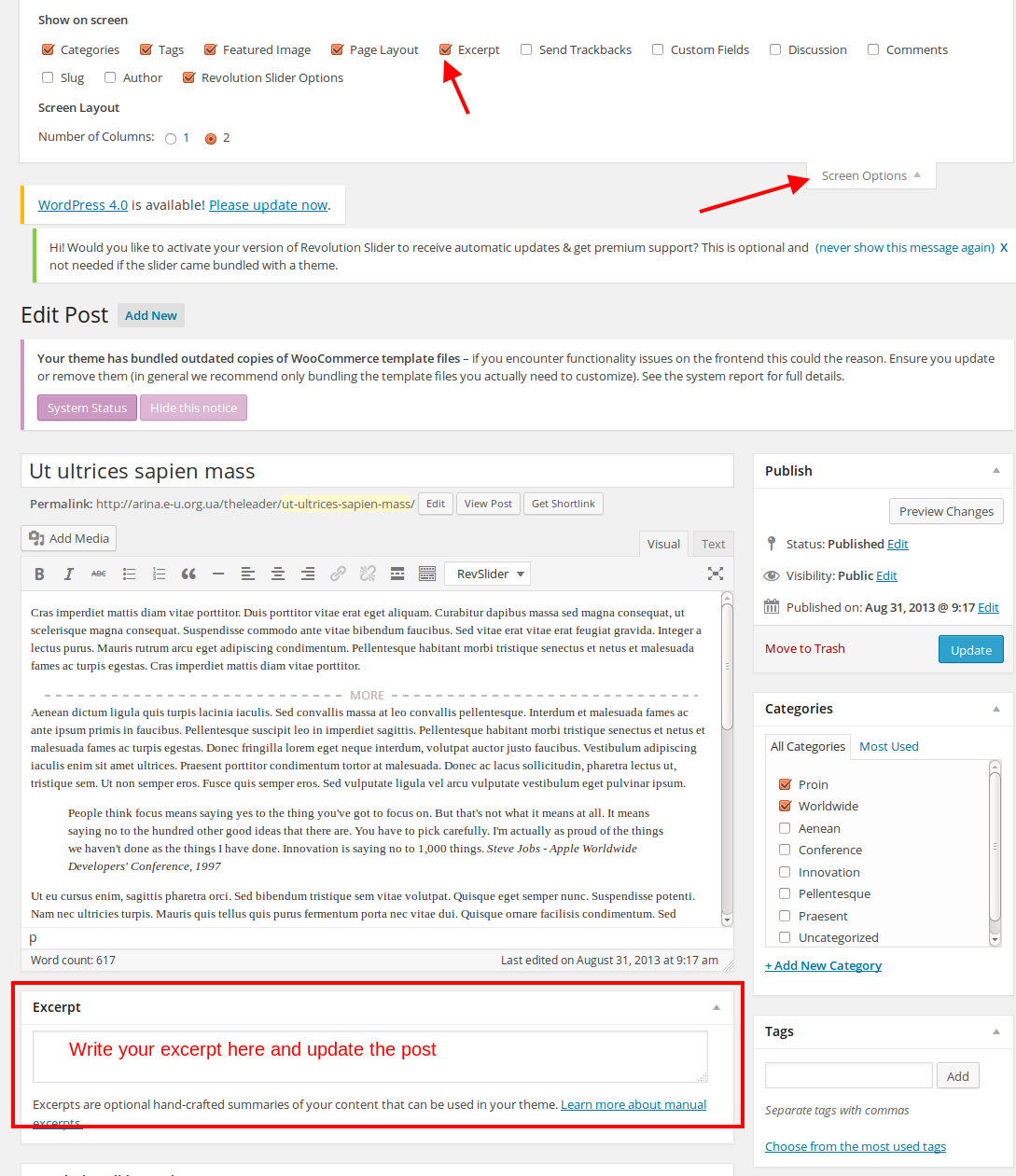
    2. Have you added excerpts for posts this way as shown on the screenshot?

    Also you can use “more” tag in the post.

    3. Is the link working when you click it being on another page?

    4./6. We need to check it in the admin panel.

    5. Please provide us with the link to your Contact page.

    Thank you.
    Regards,
    Eva Kemp.

    Avatar: Eva
    Eva Kemp
    Participant
    October 9, 2014 at 11:46

    Hello,

    I’ve changed font size for price in custom.css file.
    Please check it now.

    Thank you.
    Regards,
    Eva Kemp.

    Avatar: Eva
    Eva Kemp
    Participant
    October 8, 2014 at 23:42

    Hello,

    Could you please clarify with more details? Please show us a screenshot for better understanding.

    Thank you.
    Regards,
    Eva Kemp.

    Avatar: Eva
    Eva Kemp
    Participant
    October 8, 2014 at 23:39

    Hello,

    That is just a warning of some outdated woocommerce files. Please don’t worry. It won’t affect your site work. You can hide that message.

    Thank you.
    Regards,
    Eva Kemp.

    Avatar: Eva
    Eva Kemp
    Participant
    October 8, 2014 at 23:38

    Hello,

    Try to install the plugin manually via FTP. Upload the plugin folder to wp-content/plugins and then activate it in wp-admin panel. The plugin folder can be found in the directory legenda/framework/plugins/js_composer.zip.

    Thank you.
    Regards,
    Eva Kemp.

    Avatar: Eva
    Eva Kemp
    Participant
    October 8, 2014 at 23:32

    Hello,

    Please provide us with wp-admin panel credentials in private content and we’ll help you to create Contact page.

    Thank you.
    Regards,
    Eva Kemp.

    Avatar: Eva
    Eva Kemp
    Participant
    October 8, 2014 at 23:29

    Hello,

    You can edit footer as described in our documentation: https://www.8theme.com/demo/docs/idstore/index.html#!/widgets (The First Footer Widget area section and so on).

    Thank you.
    Regards,
    Eva Kemp.

    Avatar: Eva
    Eva Kemp
    Participant
    October 8, 2014 at 17:15

    Hello,

    You’re welcome.
    Yes, that is the code.
    If there are any questions don’t hesitate to contact us.

    Thank you.
    Regards,
    Eva Kemp.

  • 1 2 3 899 900 901 1,045 1,046 1,047
    Viewing 27,000 results - 26,971 through 27,000 (of 31,382 total)
Viewing 30 posts - 26,971 through 27,000 (of 31,382 total)
We're using our own and third-party cookies to improve your experience and our website. Keep on browsing to accept our cookie policy.






