
Hello,
Sorry, but to get rid of the warnings you have to update all categories.
Please take our apologies for inconveniences.
Thank you.
Regards,
Eva Kemp.

Hello,
Sorry, but to get rid of the warnings you have to update all categories.
Please take our apologies for inconveniences.
Thank you.
Regards,
Eva Kemp.
Hello,
Sorry for misunderstanding.
Please try to set image sizes in Woocommerce > Settings as described in our documentation:
https://www.8theme.com/demo/docs/royal/#!/woocommerce
Then regenerate thumbnails with this plugin http://wordpress.org/plugins/regenerate-thumbnails/
Thank you.
Regards,
Eva Kemp.
Hello,
Also the function allow_url_fopen must be enabled.
Ask your host to activate it.
Error with open_basedir is referred to your hosting server settings. Please check this article:
http://www.templatemonster.com/help/open_basedir-restriction-in-effect-filex-is-not-within-the-allowed-paths-y.html
Thank you.
Regards,
Eva Kemp.
Hello,
You need use Twitter feed widget in Appearance > Widgets as described in our documentation:
https://www.8theme.com/demo/docs/royal/#!/8_widgets_custom_widget_areas
Thank you.
Regards,
Eva Kemp.
Hello,
Have you changed login details to wp-admin panel? We can’t log in with the previous credentials.
Please provide us with the correct ones.
Thank you.
Regards,
Eva Kemp.
Hello @Simon Benjamin,
Please provide us with wp-admin panel and FTP credentials in Private Content.
Thank you.
Regards,
Eva Kemp.
Hello,
You’re welcome.
Regards,
Eva Kemp.
Hello,
As I see your original image http://www.mariemasse.com/wp-content/uploads/2014/10/Product-Image-11.png is too small.
It should have the dimensions approximately 1 425px × 1 900px.
Thank you.
Regards,
Eva Kemp.
Hello,
I’ve disabled all 3rd-party plugins on your site.
Please check the header now and clear browser cache before.
Thank you.
Regards,
Eva Kemp.
Hello,
Please add this code in custom.css file:
.menu > li > a:hover {
color: #f05423 !important;
}
Thank you.
Regards,
Eva Kemp.
Hello,
To correct all categories you need go to Products > Categories > open category and re-save it. Errors will disappear. The problem is related to changes made in category header editor.
Thank you.
Regards,
Eva Kemp.
Hello,
Sorry, in the header type that you’re using, search form is displayed on the left and not in the top bar. If you want to show at the top this required additional customization and if you have needed skills you may edit php files.
I don’t see any problems with your new cart icon. Could you please show a screenshot?
To remove breadcrumbs add this code in custom.css file:
.woocommerce-breadcrumb, #breadcrumb {
    display: none;
}
To remove “Return to previous page”:
.breadcrumbs .back-to {
   display: none;
}
To remove all tabs on a single product page:
.tabs {
   display: none;
}
You can change sorting settings in Woocommerce > Settings > Products tab > Default Product Sorting.
Thank you.
Regards,
Eva Kemp.
Hello,
You can try to edit the media query located in the responsive style sheet file wp-content/themes/royal/css/responsive.css at line 1005 and change @media only screen value.
Thank you.
Regards,
Eva Kemp.
Hello,
This bug will be fixed in the next theme update.
Please take our apologies for inconveniences.
Thank you.
Regards,
Eva Kemp.
Hello,
You can upload an image for hover effect in products editor. Go to Products > select a product to edit and in “Additional Product Options [8theme]” find the field “Upload image for hover effect” and upload your brand logo.
Thank you.
Regards,
Eva Kemp.
Hello,
We’re you found the solution.
Have a nice day!
Regards,
Eva Kemp.
Hello,
You’re welcome.
Regards,
Eva Kemp.
Hello,
You can create full back up of your site and database.
http://codex.wordpress.org/WordPress_Backups
Also you can export theme settings in Theme Options > Import/Export.
Thank you.
Regards,
Eva Kemp.
Hello,
Search icon is shown on mobile version of the site:
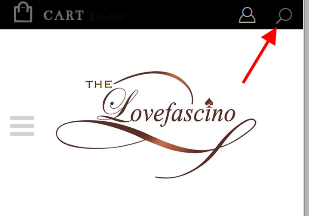
If you click on it you’ll see pop up window with search form.
Thank you.
Regards,
Eva Kemp.
Hello,
Sorry, but we don’t know what you’re doing incorrectly.
You can follow the instructions in our video tutorial how to update the theme:
https://www.youtube.com/watch?v=KdWESIIPU1k
Also we can update the theme for you.
Please provide us with FTP and wp-admin panel credentials in Private Content.
Thank you.
Regards,
Eva Kemp.
Hello,
The credentials for FTP are incorrect.
Please check them.
Thank you.
Regards,
Eva Kemp.
Hello,
You need go to Settings -> Reading -> “Blog pages show at most” and then set the number how many products you want to display.
Thank you.
Regards,
Eva Kemp.
Hello,
You’re welcome.
Regards,
Eva Kemp.
Hello,
Please take our apologies but image dimensions can’t be changed on a single product page in theme options as they can be distorted. It can be edited only in the theme files royal/woocommerce/single-product/product-image.php and royal/woocommerce/single-product/product-thumbnails.php. Also changes in custom.css need to be made.
Thank you.
Regards,
Eva Kemp.
Hello,
I’ve edited the code you added in custom.css file:
@media (max-width: 767px){
.hidden-phone {
display: none !important;
}}
Please check top bar now.
Thank you.
Regards,
Eva Kemp.
Hello,
We’re unable to access your site as well as wp-admin panel getting the error:
“The connection has timed out”
Are there any problems at your host?
Thank you.
Regards,
Eva Kemp.
Hello,
What is the link to your wp-admin panel?
We can’t access it.
Thank you.
Regards,
Eva Kemp.
Hello,
To show more products on Products page you need set the products number per row in Blanco – Theme Settings > Products Page box > Products per row.
Concerning the products on Home page, as I see you’re using shortcode [product_slider cat=”outlet”] but there is no such shortcode in our theme.
Please refer to our documentation what shortcodes to use for products display:
https://www.8theme.com/demo/docs/blanco/index.html#!/blanco_shortcodes
Thank you.
Regards,
Eva Kemp.
Hello,
You’re using old Essential Grid plugin version.
Please update it. You can find the plugins at the link https://www.8theme.com/download-plugins/
Thank you.
Regards,
Eva Kemp.
Hello,
Have you received the previous post?
What you want to achieve requires a lot of additional customization.
You can create a separate custom template for Clothing page and select it in the page editor.
You can refer to these articles:http://millionclues.com/wordpress-tips/make-full-width-page-in-wordpress/
http://premium.wpmudev.org/blog/create-a-full-width-page-for-wordpress-in-5-simple-steps/
http://wpgenesis.blogspot.com/2013/09/force-full-width-and-add-custom-content.html
Thank you.
Regards,
Eva Kemp.










