
Hello,
Yes, you’re right. Also you can write the path to your own images for banners.
Our banner images on demo have dimensions 460px × 170px and original sizes for single product image are 1 500px × 1 500px.
Thank you.
Regards,
Eva Kemp.

Hello,
Yes, you’re right. Also you can write the path to your own images for banners.
Our banner images on demo have dimensions 460px × 170px and original sizes for single product image are 1 500px × 1 500px.
Thank you.
Regards,
Eva Kemp.
Hello,
We’ll release an update for the theme to make it compatible with the latest Woocommerce version.
Meanwhile you can use old Woocommerce plugin version.
Please take our apologies for inconveniences.
Regards,
Eva Kemp.
Hello,
I’ve disabled Woocommerce lightbox in Woocommerce > Settings > Products tab > Display > unchecked “Enable Lightbox for product images” and our lightbox has started working. To open image with lightbox you need click the icon at the right bottom:
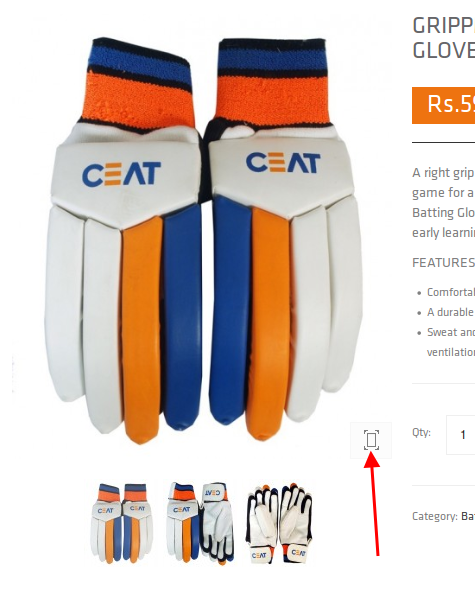
Please clear your browser cache and check it.
Thank you.
Regards,
Eva Kemp.
Hello @josh9787,
As I see this option is present:


Thank you.
Regards,
Eva Kemp.
Hello,
Please provide us with the correct wp-admin panel credentials in Private Content as we can’t access the previous link for wp-admin panel, it’s giving “Internal Server Error”.
Thank you.
Regards,
Eva Kemp.
Hello,
We’re glad that issue has been resolved.
Have a nice day.
Regards,
Eva Kemp.
Hello,
We’re sorry for inconveniences, but soon we’ll release a new theme update where it will be compatible with the latest Woocommerce plugin version.
Meanwhile you can revert back to old Woocommerce version until the theme is updated.
Thank you for your understanding.
Regards,
Eva Kemp.
Hello,
You’re welcome.
Regards,
Eva Kemp.
Hello @jayaram,
Please provide us with wp-admin panel credentials in Private Content.
Thank you.
Regards,
Eva Kemp.
Hello @josh9787,
I’ve uploaded old Woocommerce plugin for your site.
Please check it now.
Soon we’ll release a new theme update to make it compatible with the latest Woocommerce version.
Please take our apologies for inconveniences.
Thank you.
Regards,
Eva Kemp.
Hello,
What are the links to your wp-admin panel and cPanel?
Thank you.
Regards,
Eva Kemp.
Hello,
Please don’t worry concerning this message. It won’t affect your site work.
It’s shown because you’ve updated Woocommerce plugin and we have old version written in the modified files in xmarket/woocommerce directory.
Regards,
Eva Kemp.
Hello @Erik,
Please provide us with FTP login details as well.
Thank you.
Regards,
Eva Kemp.
Hello,
Please add this code in custom.css file:
.header-type-10 .menu-wrapper .languages-area {
    display: none;
}
Thank you.
Regards,
Eva Kemp.
Hello,
Sorry, but we didn’t test any Instagram plugins with the theme.
You can check different plugins to find the compatible one.
Regards,
Eva Kemp.
Hello,
Please provide us with wp-admin panel credentials in Private Content.
Thank you.
Regards,
Eva Kemp.
Hello @josh9787,
Please provide us with wp-admin panel and FTP credentials in Private Content. I’ll revert back old Woocommerce version.
Thank you.
Regards,
Eva Kemp.
Hello,
Your favicon image is large. You should create a smaller one:
http://codex.wordpress.org/Creating_a_Favicon
Please try to recreate it.
Thank you.
Regards,
Eva Kemp.
Hello,
Sorry, but you should contact Woocommerce support team concerning your query.
Thank you.
Regards,
Eva Kemp.
Hello,
Sorry for misunderstanding.
I’ve checked this issue with default WordPress theme and stock quantity isn’t shown there too.
So, something wrong is with Woocommerce plugin. Try to update it or contact their support.
Don’t forget to create a back up before update.
Thank you.
Regards,
Eva Kemp.
Hello,
Sorry, but we can’t understand what is causing this problem. Are you using similar plugins and the plugins versions are the same? We don’t have access to check plugins in wp-admin panel. Please give us permissions. Also please provide us with login credentials for the second site, we’ll try to compare and check what issue can be.
Thank you.
Regards,
Eva Kemp.
Hello,
I’ve commented the code jQuery('.categories-group.has-subnav:first').addClass('opened').find('ul').show(); (line 307) in the file wp-content/themes/idstore/js/script.js.
Please check categories now.
Thank you.
Regards,
Eva Kemp.
Hello,
Ok. Let us know if further assistance is needed.
Thank you.
Regards,
Eva Kemp.
Hello,
Please add this code in custom.css file:
span.reviewer {
padding-left: 10px;
}
a.postimg {
padding-right: 10px;
}
Thank you.
Regards,
Eva Kemp.
Hello @Pablo,
We’ll release a new theme update soon where some bugs will be fixed.
Please take our apologies for inconveniences.
Regards,
Eva Kemp.
Hello @inclousiv,
Please try to disable other 3rd-party plugins and check your site loading again.
Thank you.
Regards,
Eva Kemp.
Hello,
Please add this code in custom.css file:
.navbar {
    padding: 10px 0px !important;
}
Thank you.
Regards,
Eva Kemp.
Hello @queenb123,
@Jimbo has provided you with the correct information. You can follow it.
You can credit card images in Footer Links area in Appearance > Widgets. Just add the link of the image to Text widget. The image is located in wp-content/themes/woopress/images/assets/payments.png.
Thank you.
Regards,
Eva Kemp.
Hello,
Go to Theme Options > Header > Breadcrumbs background.
Thank you.
Regards,
Eva Kemp.
Hello,
You didn’t set $locale in wp-config file.
Please read our documentation attentively:
https://www.8theme.com/demo/docs/royal/#!/1_how_to_translate
Thank you.
Regards,
Eva Kemp.









