Hello,
Please read our documentation how to create Portfolio page:
https://www.8theme.com/demo/docs/legenda/index.html#!/portfolio
Regards,
Eva Kemp.

Hello,
Please read our documentation how to create Portfolio page:
https://www.8theme.com/demo/docs/legenda/index.html#!/portfolio
Regards,
Eva Kemp.
Hello,
I’ve added this code in custom.css file:
.product-thumbnails-slider .slides li img {
    height: 120px;
    width: 150px;
}
Please check single product page now.
If you want to have similar sizes for all images you should upload them with original dimensions 1425px × 1900px approximately.
Regards,
Eva Kemp.
Hello,
Please provide us with wp-admin panel credentials in private content.
Regards,
Eva Kemp.
Hello,
Please provide us with a page link where out-of-stock products are shown.
And give us FTP credentials.
Thank you.
Regards,
Eva Kemp.
Hello,
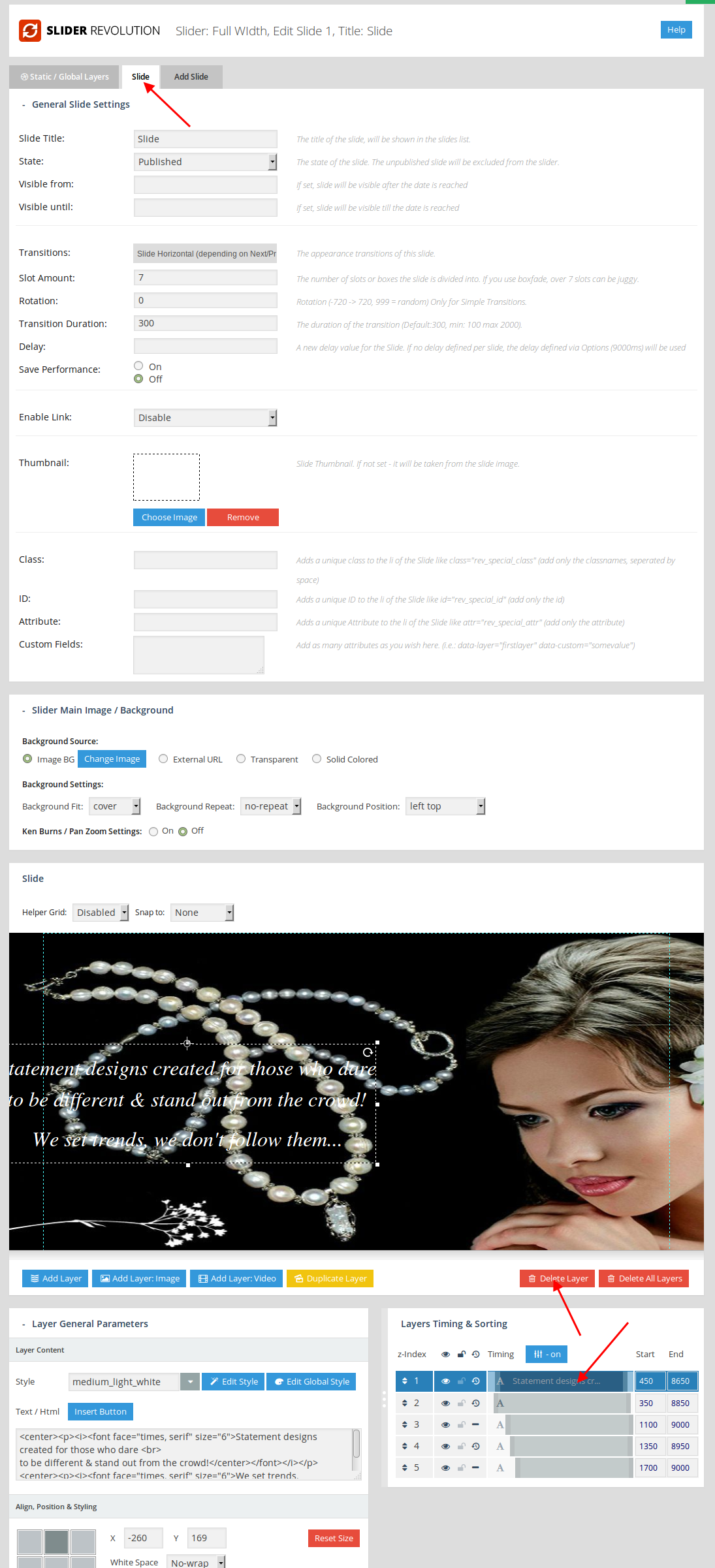
Now you have 2 layers on Static/Global Layer tab and Slide tab and your slider is shown this way:
https://s3.amazonaws.com/fvd-data/notes/168674/1427714722-yn48Vi/screen.png
Go to Slider settings and remove one layer:
https://s3.amazonaws.com/fvd-data/notes/168674/1427714858-4IHE8Z/screen.png
but keep static layer.
Regards,
Eva Kemp.
Hello,
Go to Settings -> Reading -> “Blog pages show at most” and then set the number of products you want to show.
Regards,
Eva Kemp.
Hello,
Please provide us with a link of a page where you want to add more fields.
Thank you.
Regards,
Eva Kemp.
Hello,
Please add this code in custom.css file:
@media (max-width:480px) {.homepage-title h2, .homepage-title strong {font-size: 16px !important;}}
Regards,
Eva Kemp.
Hello,
You can speed up the site following the suggestions from these articles:
http://codex.wordpress.org/WordPress_Optimization
http://techtage.com/speeding-up-wordpress-sites/
http://www.sparringmind.com/speed-up-wordpress/
Thank you.
Regards,
Eva Kemp.
Hello,
If you’re trying to create a single product page you need go to Products in wp-admin panel > Add product and not creating it as a page.
As I see “Add to Cart” button is shown for the product “ELITE SPIRIT” that you created in Products section.
Please check it.
Regards,
Eva Kemp.
Hello,
Please add this code in custom.css file:
.vc_custom_1427633848998 {
    padding-top: 30px !important;
}
Thank you.
Regards,
Eva Kemp.
Hello,
You’re welcome.
Regards,
Eva Kemp.
Hello,
Please provide us with the link to your site and wp-admin panel credentials in Private Content.
Thank you.
Regards,
Eva Kemp.
Hello,
Please provide us with a link where the tabs are shown.
Thank you.
Regards,
Eva Kemp.
Hello @kjhawayek,
I’ve added this code in custom.css file:
.snp-content-inner li {
 list-style: disc !important;
}
Now the bullets are shown. Please clear browser cache and check.
Please specify what you want to modify in the titles and other text.
You can add this code in custom.css file to change popup window width:
.snp-wrap .fancybox-inner {
 width: 750px !important;
}
Regards,
Eva Kemp.
Hello @swindog,
Please add this code in custom.css file:
#tabs li {
    list-style: outside disc none !important;
}
How to create custom.css you can watch in this tutorial (it’s for Legenda theme but the process is the same).
Regards,
Eva Kemp.
Hello,
Please provide us with wp-admin panel credentials in private content.
Regards,
Eva Kemp.
Hello,
Are still experiencing the issue?
As I see the front page is shown. Please check the site in another browser.
Regards,
Eva Kemp.
Hello,
You may try to use this plugin https://wordpress.org/plugins/disable-google-fonts/ or edit the file wp-content/themes/royal/framework/theme-functions.php and comment the lines 25, 26.
How to add custom fonts you can read here:
http://premium.wpmudev.org/blog/custom-fonts-css/
Regards,
Eva Kemp.
Hello,
1. You need create attributes in Products > Attributes and create variable products as described in Woocommerce documentation http://docs.woothemes.com/document/variable-product/ .
2. Add [share] shortcode in Text widget and drag it into “Place in header top bar” area in Appearance > Widgets.
I’ve created static block “Newsletter” and added block id in Theme Options > Promo Popup > Popup content.
Please check now.
Regards,
Eva Kemp.
Hello,
I’ve created “Royal Mariage-073754” grid with the same settings as it’s set on our demo.
Please check.
Regards,
Eva Kemp.
Hello,
Sorry, but it’s difficult to find the reason of the problem without seeing your site.
Could you please upload it to some web hosting to be able to check the theme and the plugins?
Thank you.
Regards,
Eva Kemp.
Hello @UrbnDesignz,
Please provide us with direct links where parallax effect isn’t working as well as woocommerce attributes.
Thank you.
Regards,
Eva Kemp.
Hello,
I’ve edited Slider settings in “Loop and Progress” box and set “Loop Single Slide” to Off.
Also I’ve created a static layer to make it stop on the first slider. Edit a slide > Static/Global Layer tab. You can remove the second layer from “Slide” tab as now 2 layers are shown: one is static and the other one isn’t.
Please check.
Regards,
Eva Kemp.
Hello,
Go to the directory wp-content/themes/legenda/woocommerce/checkout and open the file review-order.php, you’ll find the text “Cart Subtotal” on line 50.
Please check it.
Regards,
Eva Kemp.
Hello,
Please update Visual Composer plugin https://www.8theme.com/download-plugins/ .
Also remove “woocommerce” folder in the directory wp-content/themes/legenda/ and reupload it from the theme package of a new version.
After that check “More Info” button and clear browser cache.
Thank you.
Regards,
Eva Kemp.
Hello,
Are you using the latest theme version?
Please update the theme to 2.6.3 version.
Also before update remove “woocommerce” folder in the directory wp-content/themes/legenda/ and reupload it from the theme package of a new version.
Even if you’re using the latest version, please remove “woocommerce” folder and reupload it.
Also update Visual Composer and Revolution Slider plugins https://www.8theme.com/download-plugins/ .
Regards,
Eva Kemp.
Hello,
Some plugin is causing the issue.
You need disable them one by one to find it out.
Thank you.
Regards,
Eva Kemp.
Hello,
The second issue with related products have been fixed.
Please clear browser cache and check.
Please clarify where you see the problem with PayPal. How can we replicate it? Does the issue persist with default WordPress theme?
Regards,
Eva Kemp.
Hello,
Nothing was changed in php or css files, so there is nothing to transfer into a child theme.
Thank you.
Regards,
Eva Kemp.