Hello,
Please provide us with FTP credentials.
Thank you.
Regards,
Eva Kemp.

Hello,
Please provide us with FTP credentials.
Thank you.
Regards,
Eva Kemp.
Hello,
You can hide price on single product page using this css code in custom.css file:
.product-information .price {
   display: none;
}
How to create custom.css you can watch in this tutorial (it’s for Legenda theme but the process is the same).
Thank you.
Regards,
Eva Kemp.
Hello,
I’ve added margin-top value in the row settings where Revolution Slider is added in Visual Composer editor.
Please check it.
Regards,
Eva Kemp.
Hello,
The link you provided for wp-admin panel redirects to WordPress installation.
Are you making any changes?
Regards,
Eva Kemp.
Hello,
I’ve added horizontal line in Visual Composer editor.
Please check now.
Regards,
Eva Kemp.
Hello,
Please take our apologies for a delay.
We’re working on the theme update, where bugs will be fixed.
A new theme version should released in a short time. Please wait a little.
Thank you.
Regards,
Eva Kemp.
Hello,
That’s great.
If there are any questions feel free to contact us.
Regards,
Eva Kemp.
Hello,
I’ve checked product page and it’s not full width:
http://storage4.static.itmages.com/i/15/0429/s_1430317558_6384860_55babbf53c.png
As you can see on the screenshot the container isn’t full width.
I’ve selected all content types for Visual Composer editor in Settings > Visual Composer > General Settings > Content Types.
Please try to edit posts now.
Regards,
Eva Kemp.
Hello,
Unfortunately there is no feature to create a separate menu for fixed header.
As Brian said you need edit header.php and specify what menu to load in the fixed header. A new menu should be created in Appearance > Menu.
Regards,
Eva Kemp.
Hello,
Sorry for a delay.
Please try to use this code in custom.css file:
form .form-row label, #ship-to-different-address .checkbox, .payment_methods li label, .payment_methods p {
 font-family: helvetica !important;
}
Thank you.
Regards,
Eva Kemp.
Hello,
I’ve reuploaded zoom.js file. Please clear browser cache and check the page now.
Thank you.
Regards,
Eva Kemp.
Hello,
You need contact your host and ask them to increase memory_limit value.
Also you can upload screenshot to some image storage, for example http://imgur.com/ , and give us a link to an image.
But first please ask your host to increase memory value.
Thank you.
Regards,
Eva Kemp.
Hello,
The issue has been fixed. I’ve linked them to media files:
http://storage1.static.itmages.com/i/15/0429/h_1430316120_6416139_a5ce482d2d.png
Please clear browser cache and check.
Regards,
Eva Kemp.
Hello,
Please add this code in custom.css file:
@media (max-width: 480px) { .tp-fullwidth-forcer, .fullwidthbanner-container .fullwidthabanner  {
   height: 250px !important;
} }

@media (max-width: 978px) { .tp-bgimg.defaultimg, .tp-fullwidth-forcer { height: 400px !important;} }
Regards,
Eva Kemp.
Hello,
Sorry for misunderstanding.
The gallery can be created via Media library:
http://storage2.static.itmages.com/i/15/0429/s_1430314686_9759460_89141cec22.png
http://storage3.static.itmages.com/i/15/0429/h_1430314645_7801794_4196854290.png
I’ve created it for you. Please check.
Thank you.
Regards,
Eva Kemp.
Hello,
That option doesn’t work with default WordPress theme too. Please check it. You need ask the author of Revolution Slider plugin concerning this issue or you can find some answers on their forum http://codecanyon.net/item/slider-revolution-responsive-wordpress-plugin/2751380/comments .
Thank you.
Regards,
Eva Kemp.
Hello,
You’re welcome.
Regards,
Eva Kemp.
Hello,
This is Woocommerce configuration and you can find solution here:
http://ideas.woothemes.com/forums/133476-woocommerce/suggestions/2650776-be-able-to-sort-variations-of-variable-products-in
Thank you.
Regards,
Eva Kemp.
Hello,
Please give us access to wp-admin panel and a page url where products columns are shown.
Thank you.
Regards,
Eva Kemp.
Hello,
Please provide us with wp-admin panel credentials and a page url where those products are placed.
Thank you.
Regards,
Eva Kemp.
Hello,
Please provide us with correct wp-admin panel credentials.
Thank you.
Regards,
Eva Kemp.
Hello,
This is caused by one of your plugins.
Please disable them one by one to find it out.
Thank you.
Regards,
Eva Kemp.
Hello,
Please don’t duplicate your requests. I’ve replied to you in the other topic.
Thank you.
Regards,
Eva Kemp.
Hello,
Just to clarify: Do you want to add images and “Add to Cart” buttons for them?
In this case you can create products and add them with Woocommerce shortcodes http://docs.woothemes.com/document/woocommerce-shortcodes/ (just add “etheme_” in front of the shortcodes, for example [etheme_product_category category=" "] https://www.8theme.com/demo/docs/blanco/index.html#!/blanco_shortcodes ).
Regards,
Eva Kemp.
Hello,
We’re glad you’ve found the solution.
Have a nice day.
Regards,
Eva Kemp.
Hello,
Please add this code in custom.css file:
.responsive-sidebar-bottom, .page-heading-slider .wpb_revslider_element {
 margin-bottom: 0px !important;
}
Thank you.
Regards,
Eva Kemp.
Hello,
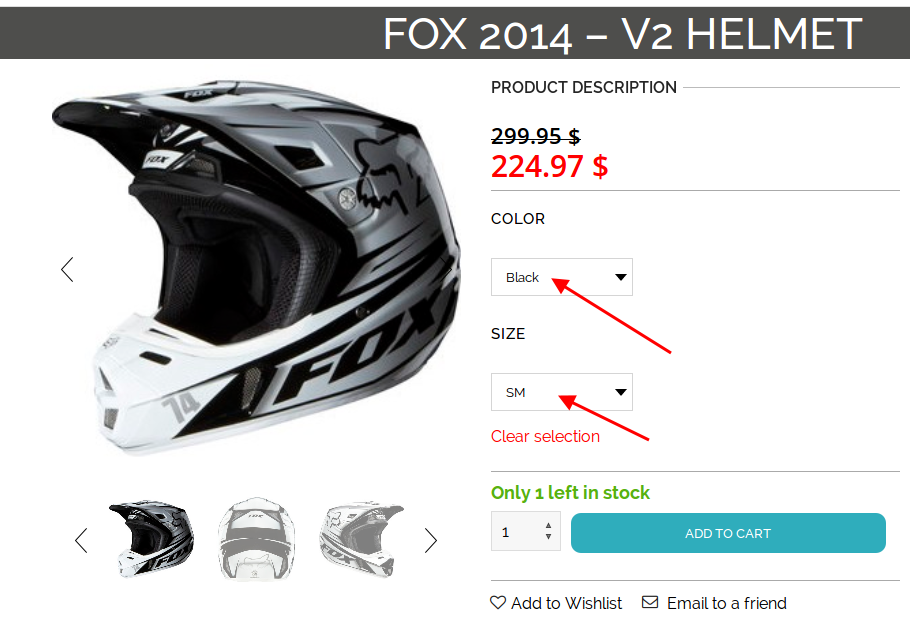
I’ve checked the page and main image loads when variations are selected:
https://s3.amazonaws.com/fvd-data/notes/168674/1430307489-HhAqPH/screen.png
Please clear browser cache and check again.
Thank you.
Regards,
Eva Kemp.
Hello,
Sorry, but still unavailable.
Please check login details to wp-admin panel.
Thank you.
Regards,
Eva Kemp.
Hello,
Please follow the instruction in our documentation:
https://www.8theme.com/demo/docs/woopress/#!/1_how_to_translate
Thank you.
Regards,
Eva Kemp.
Hello,
Please provide us with a link where you see that modal box.
Thank you.
Regards,
Eva Kemp.