
Hello,
I’ve renamed your current theme folder to “legenda_old” in wp-content/themes directory and uploaded the original theme folder. Now the issues have gone.
Please clear browser cache and check it.
Regards,
Eva Kemp.

Hello,
I’ve renamed your current theme folder to “legenda_old” in wp-content/themes directory and uploaded the original theme folder. Now the issues have gone.
Please clear browser cache and check it.
Regards,
Eva Kemp.
Hello,
I’ve added this code in custom.css:
@media (max-width: 480px) {.owl-carousel .owl-item {width: 280px !important;}}
Please clear browser cache and check the page now.
Regards,
Eva Kemp.
Hello,
Please provide us with wp-admin panel credentials in Private Content.
Regards,
Eva Kemp.
Hello,
Please update Visual Composer plugin https://www.8theme.com/download-plugins/ to the latest version and check products slider after that.
Thank you.
Regards,
Eva Kemp.
Hello,
Please provide us with FTP and wp-admin panel credentials in Private Content.
Regards,
Eva Kemp.
Hello,
I’ve selected your blog page in Settings > Reading > Posts page and set “Small” for blog layout in Theme Options > Blog Layout. Please check your blog page now.
To show excerpts of the posts use “more” tag https://www.8theme.com/blog/using-read-more-button-on-wordpress-blog/ .
Regards,
Eva Kemp.
Hello,
Please add this code as well:
.page-heading a, .page-heading .woocommerce-breadcrumb, .page-heading .delimeter {
    color: white;
}
Regards,
Eva Kemp.
Hello,
Try to use this code in custom.css file:
.blog-post .post-info {
    display: none;
}
Regards,
Eva Kemp.
Hello,
Please provide us with wp-admin panel credentials in Private Content.
Regards,
Eva Kemp.
Hello,
Log files are stored on a server. You should ask your hosting provider support to check it.
Regards,
Eva Kemp.
Hello,
I’ve added this code in Custom CSS:
.product-information .short-description li {
  list-style: inside none number;
}
Please check the list in short description now.
I’ve added </br> tag in short description of the product “Gold Milk for Inflammation and Pain Relief (30 Caps)” after the first sentence “Turmeric has been used as a spice in Indian recipes and as Ayurvedic medicine for many thousands of years.” and it’s working properly. Please check it.
Regards,
Eva Kemp.
Hello,
Please provide us with FTP credentials.
Regards,
Eva Kemp.
Hello,
Our theme supports “more” tag by default and not excerpt that is available in post editor.
To show excerpts you need edit theme file – wp-content/themes/royal/content.php.
Unfortunately this is beyond our basic support scope and if you have necessary skills you can edit the file yourself. This article may be helpful:
https://codex.wordpress.org/Excerpt
Regards,
Eva Kemp.
Hello,
We’re sorry for a long delay.
Our theme supports “more” tag by default and not excerpt that is available in post editor.
To show excerpts you need edit theme file – wp-content/themes/royal/content.php.
Unfortunately this is beyond our basic support scope and if you have necessary skills you can edit the file yourself. This article may be helpful:
https://codex.wordpress.org/Excerpt
Regards,
Eva Kemp.
Hello,
Thank you for your feedback and your report about the bug.
We’ve known about this problem and are working on modernization and improvement of the fixed header. We’ll resolve it in the next theme update.
Please take our apologies for inconveniences.
Regards,
Eva Kemp.
Hello,
1. There were odd spaces in the fields for “Access Token”, “Customer Secret” and “Customer Key”, I’ve removed them and now Twitter feed is shown.
2. To close first tab by default you need edit the file wp-content/themes/woopress/woocommerce/single-product/tabs/tabs.php and remove the code <?php if($i == 1) echo 'style="display:block;"'; ?> in line 45.
Regards,
Eva Kemp.
Hello,
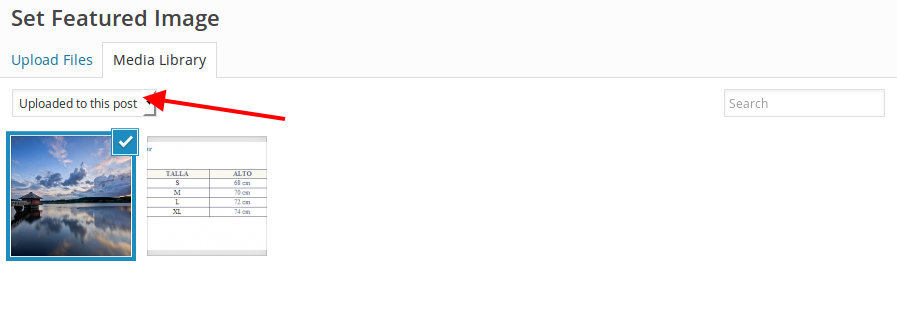
Navigate to Portfolio -> Edit project page-> at the right sidebar you can add featured images. When you upload images for featured image of a project you should select “Uploaded to this post” from drop down menu and click “Set featured image”:
Regards,
Eva Kemp.
Hello,
You need enable registration in Settings > General > Membership and mark “Anyone can register”.
Regards,
Eva Kemp.
Hello,
I’ve checked the page and images are changed when different color is selected.
Please specify how we can replicate the issue and provide us with wp-admin panel/FTP credentials in Private Content.
Regards,
Eva Kemp.
Hello,
Are you talking about gallery images http://storage6.static.itmages.com/i/15/0820/h_1440054498_8672944_744dbc0b5c.png ?
If so you need add this code in 8Theme Options > Typography > Custom CSS > Global Custom CSS:
#product-pager .owl-item img {
    opacity: 1;
}
Regards,
Eva Kemp.
Hello,
We’re glad you’ve managed to resolve the problem.
If there are any questions let us know.
Regards,
Eva Kemp.
Hello,
Please add this code in 8Theme Options > Typography > Custom CSS > Global Custom CSS:
.menu-wrapper {
    border-bottom-color: #888 !important;
}
.menu-wrapper {
  border-bottom: 1px solid transparent !important;
}
.header-type-17 .top-bar .container > div {
    border-bottom: none;
}
Regards,
Eva Kemp.
Hello,
Please provide us with FTP and wp-admin panel credentials in private content.
Regards,
Eva Kemp.
Hello @Shanley7933,
I’ve renamed your current Woopress theme folder to “woopress_old” in wp-content/themes directory and uploaded the original theme folder. Now Shop page is working properly.
Please check it.
Regards,
Eva Kemp.
Hello,
Please provide us with FTP and wp-admin panel credentials in Private Content.
Regards,
Eva Kemp.
Hello,
As I see menu is shown in the header. Do you mean fixed header when you scrolling the page?
Regards,
Eva Kemp.
Hello,
We’ve sent theme archive to your email address.
Please check it.
Regards,
Eva Kemp.
Hello,
You need create attributes and variations as described in Woocommerce documentation:
http://docs.woothemes.com/document/variable-product/
https://www.youtube.com/watch?v=iUcAf89LfCc
Regards,
Eva Kemp.
Hello @sebdicam,
To have black background for page content use this code in custom.css:
.page-wrapper, .footer.footer-bottom-3 {
    background-color: black !important;
}
Regards,
Eva Kemp.
Hello,
Add this code in Global Custom CSS:
.vc_custom_1439907091072 {
   background-color: #242424 !important;
}
.content-page .vc_separator h4, .product-title, .price, .product-categories > li > a, body {
  color: white !important;
}
.etheme_add_to_cart_button {
color: white;
border: 2px solid black;
}Regards,
Eva Kemp.








