
Hello,
You’re always welcome.
Have a good day!
Regards,
Eva Kemp.

Hello,
You’re always welcome.
Have a good day!
Regards,
Eva Kemp.
Hello,
You are welcome.
If you have any questions feel free to ask us.
Regards,
Eva Kemp.
Hello,
You can upload a new image via FTP.
As I told you before the path to the image is wp-content/themes/legenda/images/black_cross.png.
Make sure your image file is named the same “black_cross.png”, the original image can be renamed.
Regards,
Eva Kemp.
Hello,
You can read how to create Blog page in our documentation:
https://www.8theme.com/demo/docs/legenda/index.html#!/demo_data_installation > Blog.
And don’t forget to add your page into menu in Appearance > Menu.
Regards,
Eva Kemp.
Hello,
We’ve made the changes in custom.css file.
Please clear the cache and check the categories.
Regards,
Eva Kemp.
Hello,
Do you mean you want to remove “Categoría: Visitas Guiadas.” on http://parquex.com/?product=domingo-familiar ? If so you can add the following code into custom.css file:
.single-product-page .product-info .posted_in {display: none;}
To remove portfolio filters use this code in custom.css:
.portfolio-filters {display: none;}
1. According to the tabs accordions I see one is displayed when viewing a product.
2. You can change image dimensions in Theme Options > Product Page Layout > Product Images Width and Product Images Height.
3. Could you please show us a link and a title you want to remove?
4. Please provide us with FTP and wp-admin panel credentials to check that error.
5. Write the following code in custom.css file to change the menu color:
.main-nav { background-color: color_name; }
6. To change footer color you need add the code in custom.css:
.footer-top.footer-top-3 {background: color_name !important;}
Regards,
Eva Kemp.
Hello,
You had removed “My Account” page which is used to redirect users to when Sign in button clicked.
I’ve restored this page and the link is working fine now. Please check.
Regards,
Eva Kemp.
Hello @luke9270,
1. Please clarify your 1st question. Where exactly should the badge be displayed?
2. I don’t see any problems with the tick:
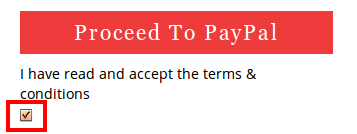
Have you checked it with some other browser? Please try this.
3. The star rating is related to woocommerce settings. As I see you’re using old version of their plugin. Try to update it to the version 2.1.8.
Regards,
Eva Kemp.
Hello,
Please provide us with FTP and admin panel credentials and we’ll update the file.
Regards,
Eva Kemp.
Hello,
That’s great.
If you have any questions don’t hesitate to contact us.
Regards,
Eva Kemp.
You are welcome.
Regards,
Eva Kemp.
Hello,
Try to add the following code into custom.css file:
@media (max-width: 480px) {.top-bar .my-account-link {margin-bottom: 10px;}}
Here you can watch how to create custom.css.
If the problem persists please provide us with wp-admin panel credentials.
Regards,
Eva Kemp.
Hello,
Thank you for contacting us. If there are any questions don’t hesitate to ask us.
Regards,
Eva Kemp.
Hello,
Could you please provide us with the site name and a screenshot of how it looks on iphone?
Thank you.
Regards,
Eva Kemp.
Hello,
You can edit fonts and other styles when editing slides. Go to Revolution Slider > Edit Slides and on the Settings page you’ll find the block called “Layer General Parameters”, click “Edit Global Style” button.
Also you can read the documentation of Revolution Slider plugin:
http://themepunch.com/codecanyon/revolution_wp/documentation/#!/documenter_cover
Regards,
Eva Kemp.
Hello,
Are you talking about the languages area at the top left corner? If so, you don’t need to disable it. Just go to Appearance > Widgets > add Text widget with the links of your social media icons to the “Place in header top bar” widget area.
Regards,
Eva Kemp.
Hello,
Ok. We’re glad the issue has been fixed.
If you need more help don’t hesitate to contact us.
Regards,
Eva Kemp.
You’re welcome.
If you have any questions feel free to ask us.
Regards,
Eva Kemp.
Hello,
Sorry but the login details to wp-admin panel are incorrect.
Could you please provide us with the correct ones?
Thank you.
Regards,
Eva Kemp.
Hello,
I’ve just checked the checkout page on your site and “Login” and “Lost Password” locations were set correctly. Please check the site via other browser or clear the cache of the current one you’re using.
Regards,
Eva Kemp.
Hello,
The private content box is under the text editor where you’re writing to us.
Yes, we need FTP server, login and password as well as to wp-admin panel.
Thank you.
Regards,
Eva Kemp.
Hello,
This is a bug in our theme and will be fixed in next version.
We’re very sorry.
That’s great you’ve fixed it yourself.
If you still need more help let us know.
Regards,
Eva Kemp.
Hello,
The problem is with one of your plugins: wp-content/plugins/envato-wordpress-toolkit-master.tmp.
Try to disable it.
Sorry, but we provide support only to the issues related to our theme.
Regards,
Eva Kemp.
Hello,
Please try to add the following code into custom.css file:
.wpb_content_element {margin-top: 20px;}
You can watch here how to create custom.css (the theme in video is different but the process is the same).
Regards,
Eva Kemp.
Hello,
Please provide us with FTP and admin panel credentials in Private Content.
Regards,
Eva Kemp.
Hello,
You can read this article how to create a favicon: http://codex.wordpress.org/Creating_a_Favicon
Regards,
Eva Kemp.
Hello,
Sorry, but the arrows are images and located in wp-content/plugins/LayerSlider/skins/blanco/slide_next.png and slide_prev.png. The same is for images/slide_prev.png and images/slide_next.png of “Latest Products” slider.
If you want you can edit the images with some image editor to change the color.
Regards,
Eva Kemp.
Unfortunately it can’t be done this way.
We’re sorry.
Regards,
Eva Kemp.
Hello,
You should create a ticket at http://support.8theme.com/ and provide all login details and the description of your problem.
Our specialists will look into it.
Regards,
Eva Kemp.
Hello,
As I see you have Legenda version 1.4.1 and the latest one is 2.1.
Please update the theme to the latest version.
You can watch the tutorial how to update it at this link.
Regards,
Eva Kemp.






