

Hello,
you can copy all customized files to child theme and update parent theme. Please do not forget to make backup of theme folder!
Regards,
Stan Russell.

Hello,
you are welcome!
Regards,
Stan Russell.
Hello,
you can copy all customized files to child theme and update parent theme. Please do not forget to make backup of theme folder!
Regards,
Stan Russell.
Hello,
we have tested your site and found that this issue is caused by your third party plugins. Please disable them one by one to find which is causing error.
Regards,
Stan Russell.
Hello,
please provide us with admin credentials for your site in private content.
Regards,
Stan Russell.
Hello,
As we can see – you are using outdated version of theme that does not support Woocommerce 2.3.5
To fix this you need to update at least to version Version 1.7 from February 13, 2015.
You can update theme according to this part of theme documentation: https://www.8theme.com/demo/docs/royal/index.html#!/installation_upgrade
Regards,
Stan Russell.
Hello,
we are happy that your problem is resolved.
Regards,
Stan Russell.
Hello,
you can edit product tabs according to this article: docs.woothemes.com/document/editing-product-data-tabs/
Custom tab can be set in Theme options > Single product page > Custom Tab Title/Content
Regards,
Stan Russell.
Hello,
please navigate to Dashboard > Appearance > Widgets and add Text widget with needed content to ‘Place in header top bar’ widget area.
Regards,
Stan Russell.
You are welcome!
Regards,
Stan Russell.
Hello,
please open page in Visual Composer Backend Editor, then click on first ‘Edit this row’ > Background > and set your Background Image.
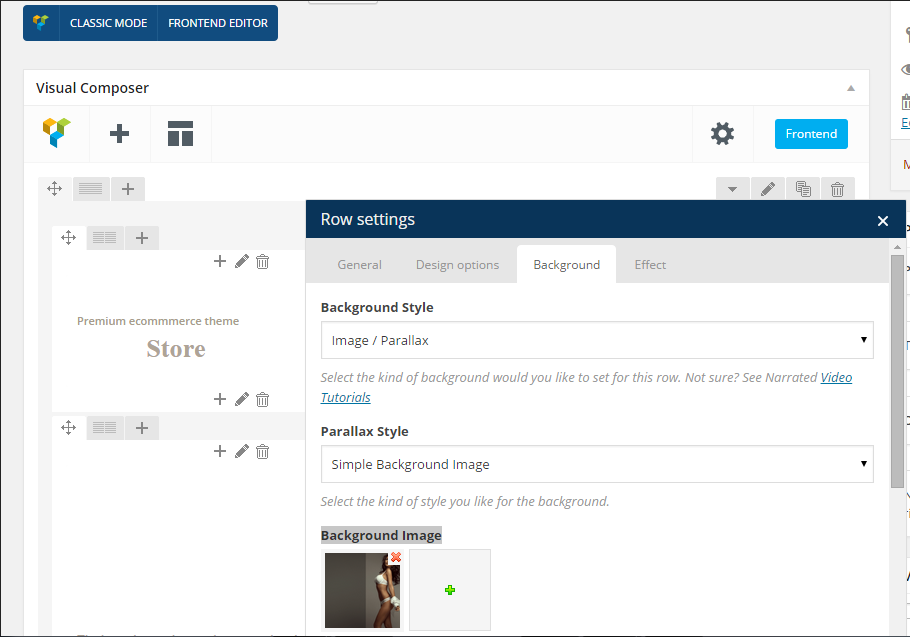
Regards,
Stan Russell.
Hello,
you can remove needed plugin in Dashboard > Plugins > select needed plugin and click ‘Delete’
Regards,
Stan Russell.
Hello,
revolution slider is not used for breadcrumbs. You can set them in Theme options > Header > Breadcrumbs background.
Regards,
Stan Russell.
Hello,
you can edit this file using FTP or File manager for your CPanel..
Regards,
Stan Russell.
Hello,
you need to edit file legenda/woocommerce/single-product/add-to-cart/variable.php (line 26)
Find line
<option value=""><?php echo __( 'Choose an option', ETHEME_DOMAIN ) ?>…</option>
and change it to
<option value=""><?php echo __( 'Choose a Size', ETHEME_DOMAIN ) ?>…</option>
To avoid losing this customization after theme update we recommend you to make it in child theme: codex.wordpress.org/Child_Themes
Regards,
Stan Russell.
Hello,
please provide us with link to your Dashboard in private content.
Regards,
Stan Russell.
Hello,
please show on screenshot what object do you want to edit.
Regards,
Stan Russell.
Hello,
You are welcome!
Regards,
Stan Russell.
Hello beamkiller,
you are welcome!
Regards,
Stan Russell.
Hello f1websites,
you are welcome!
Regards,
Stan Russell.
Hello,
please provide us with admin credentials for your site. Without them we will not be able to investigate these issues.
Regards,
Stan Russell.
Hello Gabriella,
1) you need to rename file ‘default.custom.css’ into ‘custom.css’ in order to enable it.
2) unfortunately links you have provided are local and work only for your PC. Please upload needed images to any image hosting, for example http://tinypic.com/ and provide us with links.
Regards,
Stan Russell.
Hello,
is your problem solved?
Regards,
Stan Russell.
Hello,
you need to edit wp-config.php located in the root folder of WordPress and use the $locale with prefix with your language name which should be similar to the translation file name. For example: $locale=’pl_PL’.
After that please check Dashboard > Settings > General > Site Language and select needed language.
Regards,
Stan Russell.
Hello oyjhahaha,
unfortunately we do not see attached image. Please check.
Regards,
Stan Russell.
Hello,
you are welcome!
Regards,
Stan Russell.
Hello,
1) please try to add following code to yours custom.css file:
.slide-item .product .product-excerpt {
    display: block !important;
}
This code will input text form product’s ‘short description’ field.
2) Please show us on screenshot where do you want to add ‘Read more’ button?
Regards,
Stan Russell.
Hello,
you need to keep file hierarchy in child theme too. So if you want to edit ‘woo.php’ file – place it in your (child theme folder)\framework\woo.php
You need to put only edited files into child theme as they will be used instead original ones.
Regards,
Stan Russell.
You are welcome!
Regards,
Stan Russell.
Hello,
please try to add this code to custom.css:
.single-product .page-heading{float:right}
Regards,
Stan Russell.
Hello,
if you are asking about this plugin: http://www.woothemes.com/products/composite-products/ , our theme partially modifies single product page layout so we can not guarantee all plugins features will be working correct with our theme. It is possible that additional customization will be needed.
Please list your known problems with plugin here.
Regards,
Stan Russell.

Free AI store scan · SalesMax
Paste your store address. SalesMax AI shows which upsell moments are missing. No signup.

Free AI speed test · FlashMax
Paste your site address. FlashMax runs Google Lighthouse for phone and desktop, checks Core Web Vitals and lists what to fix. No signup.
 Bakery StoreFood & drinks
(live demo, opens in a new tab)
 Eco Scooter StoreSports & travel
(live demo, opens in a new tab)
 InteriorFurniture
(live demo, opens in a new tab)
 Organic Store 02Food & drinks
(live demo, opens in a new tab)
 Engineer StoreWPBakery
(live demo, opens in a new tab)
 CleaningWPBakery
(live demo, opens in a new tab)
 Minimal ElectronicsPortfolio
(live demo, opens in a new tab)
 Glasses StoreFashion
(live demo, opens in a new tab)
 Home Decor 02 StoreFurniture
(live demo, opens in a new tab)
 Business 02Elementor
(live demo, opens in a new tab)
 Games StoreToys & games
(live demo, opens in a new tab)
 Tea StoreFood & drinks
(live demo, opens in a new tab)
 Makeup StoreBeauty
(live demo, opens in a new tab)
 Furniture Store 02Furniture
(live demo, opens in a new tab)
 Minimal StoreFashion
(live demo, opens in a new tab)
 Mobile StoreElectronics
(live demo, opens in a new tab)